
1.3 Quick Start中 Step 8: Use Kafka Streams to process data官网剖析(博主推荐)
不多说,直接上干货!
一切来源于官网
http://kafka.apache.org/documentation/

Step 8: Use Kafka Streams to process data
Step : 使用Kafka Stream来处理数据
Kafka Streams is a client library of Kafka for real-time stream processing and analyzing data stored in Kafka brokers. This quickstart example will demonstrate how to run a streaming application coded in this library. Here is the gist of the WordCountDemo example code (converted to use Java 8 lambda expressions for easy reading).
Kafka Stream是kafka的客户端库,用于实时流处理和分析存储在kafka broker的数据,
这个快速入门示例将演示如何运行一个流应用程序。
一个WordCountDemo的例子(为了方便阅读,使用的是java8 lambda表达式)
// Serializers/deserializers (serde) for String and Long types

final Serde<String> stringSerde = Serdes.String();

final Serde<Long> longSerde = Serdes.Long();

// Construct a `KStream` from the input topic ""streams-file-input", where message values

// represent lines of text (for the sake of this example, we ignore whatever may be stored

// in the message keys).

KStream<String, String> textLines = builder.stream(stringSerde, stringSerde, "streams-file-input");

KTable<String, Long> wordCounts = textLines

    // Split each text line, by whitespace, into words.

    .flatMapValues(value -> Arrays.asList(value.toLowerCase().split("\\W+")))

    // Group the text words as message keys

    .groupBy((key, value) -> value)

    // Count the occurrences of each word (message key).

    .count("Counts")

// Store the running counts as a changelog stream to the output topic.

wordCounts.to(stringSerde, longSerde, "streams-wordcount-output");
It implements the WordCount algorithm, which computes a word occurrence histogram from the input text. However, unlike other WordCount examples you might have seen before that operate on bounded data, the WordCount demo application behaves slightly differently because it is designed to operate on an infinite, unbounded stream of data. Similar to the bounded variant, it is a stateful algorithm that tracks and updates the counts of words. However, since it must assume potentially unbounded input data, it will periodically output its current state and results while continuing to process more data because it cannot know when it has processed "all" the input data.
它实现了wordcount算法,从输入的文本计算出一个词出现的次数。
然而,不像其他的WordCount的例子,你可能会看到,在有限的数据之前,执行的演示应用程序的行为略有不同,
因为它的目的是在一个无限的操作,数据流。
类似的有界变量,它是一种动态算法,跟踪和更新的单词计数。
然而,由于它必须假设潜在的无界输入数据,它会定期输出其当前状态和结果,同时继续处理更多的数据,
因为它不知道什么时候它处理过的“所有”的输入数据。
As the first step, we will prepare input data to a Kafka topic, which will subsequently be processed by a Kafka Streams application.
现在准备输入数据到kafka的topic中,随后kafka Stream应用处理这个topic的数据。
> echo -e "all streams lead to kafka\nhello kafka streams\njoin kafka summit" > file-input.txt
Or on Windows:(不推荐)
> echo all streams lead to kafka> file-input.txt

> echo hello kafka streams>> file-input.txt

> echo|set /p=join kafka summit>> file-input.txt
Next, we send this input data to the input topic named streams-file-input using the console producer, which reads the data from STDIN line-by-line, and publishes each line as a separate Kafka message with null key and value encoded a string to the topic (in practice, stream data will likely be flowing continuously into Kafka where the application will be up and running):
接下来,使用控制台的producer 将输入的数据发送到指定的topic(streams-file-input)中,(在实践中,stream数据可能会持续流入,其中kafka的应用将启动并运行)
> bin/kafka-topics.sh --create \

            --zookeeper localhost:2181 \

            --replication-factor 1 \

            --partitions 1 \

            --topic streams-file-input
> bin/kafka-console-producer.sh --broker-list localhost:9092 --topic streams-file-input < file-input.txt
We can now run the WordCount demo application to process the input data:
现在,我们运行 WordCount 处理输入的数据:
> bin/kafka-run-class.sh org.apache.kafka.streams.examples.wordcount.WordCountDemo
The demo application will read from the input topic streams-file-input, perform the computations of the WordCount algorithm on each of the read messages, and continuously write its current results to the output topic streams-wordcount-output. Hence there won't be any STDOUT output except log entries as the results are written back into in Kafka. The demo will run for a few seconds and then, unlike typical stream processing applications, terminate automatically.
不会有任何的STDOUT输出,除了日志,结果不断地写回另一个topic(streams-wordcount-output),demo运行几秒,然后,不像典型的流处理应用程序,自动终止。
We can now inspect the output of the WordCount demo application by reading from its output topic:
现在我们检查WordCountDemo应用,从输出的topic读取。
> bin/kafka-console-consumer.sh --bootstrap-server localhost:9092 \

            --topic streams-wordcount-output \

            --from-beginning \

            --formatter kafka.tools.DefaultMessageFormatter \

            --property print.key=true \

            --property print.value=true \

            --property key.deserializer=org.apache.kafka.common.serialization.StringDeserializer \

            --property value.deserializer=org.apache.kafka.common.serialization.LongDeserializer
with the following output data being printed to the console:
输出数据打印到控台(你可以使用Ctrl-C停止):
all 1
lead 1
to 1
hello 1
streams 2
join 1
kafka 3
summit 1^C
Here, the first column is the Kafka message key in java.lang.String format, and the second column is the message value in java.lang.Long format. Note that the output is actually a continuous stream of updates, where each data record (i.e. each line in the original output above) is an updated count of a single word, aka record key such as "kafka". For multiple records with the same key, each later record is an update of the previous one.
第一列是message的key,
第二列是message的value,
要注意,输出的实际是一个连续的更新流,其中每条数据(即:原始输出的每行)是一个单词的最新的count,又叫记录键“kafka”。
对于同一个key有多个记录,每个记录之后是前一个的更新。
The two diagrams below illustrate what is essentially happening behind the scenes. The first column shows the evolution of the current state of the KTable<String, Long>that is counting word occurrences for count. The second column shows the change records that result from state updates to the KTable and that are being sent to the output Kafka topic streams-wordcount-output.
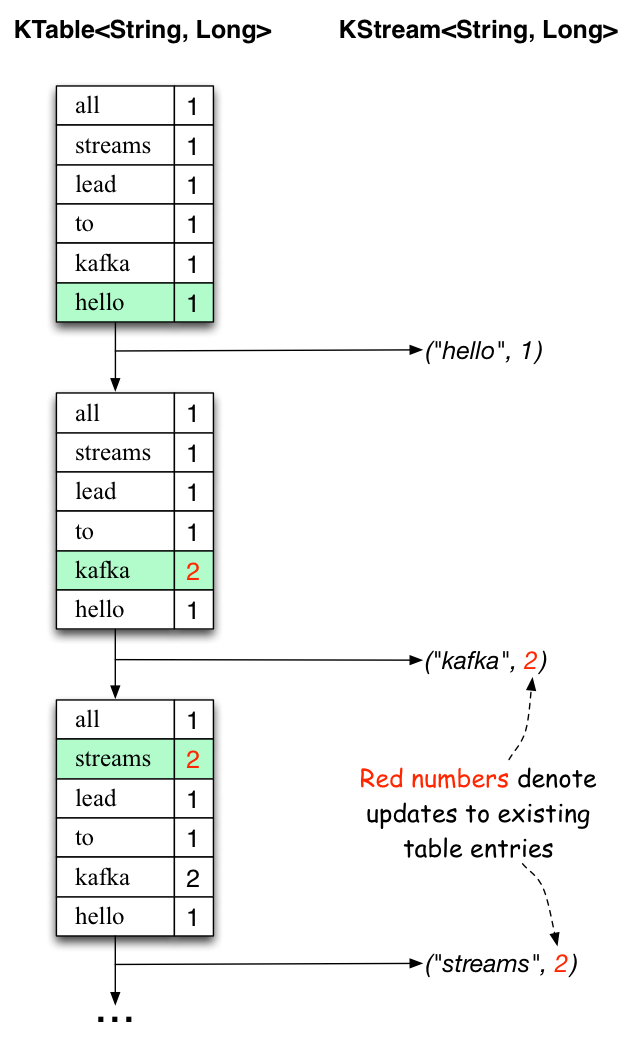
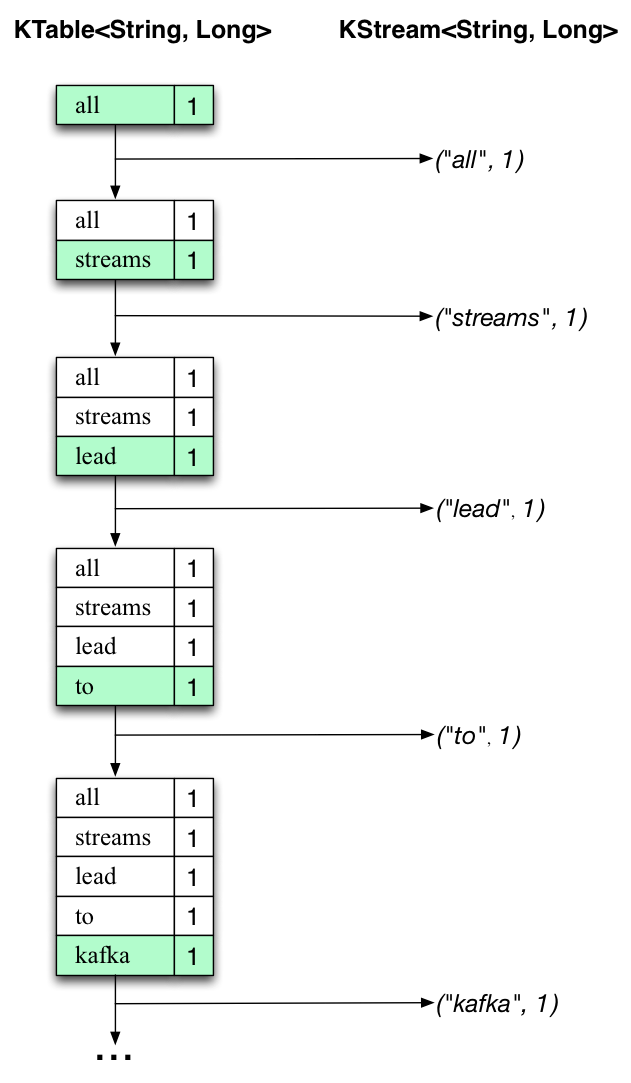
First the text line “all streams lead to kafka” is being processed. The KTable is being built up as each new word results in a new table entry (highlighted with a green background), and a corresponding change record is sent to the downstream KStream.
When the second text line “hello kafka streams” is processed, we observe, for the first time, that existing entries in the KTable are being updated (here: for the words “kafka” and for “streams”). And again, change records are being sent to the output topic.
And so on (we skip the illustration of how the third line is being processed). This explains why the output topic has the contents we showed above, because it contains the full record of changes.
Looking beyond the scope of this concrete example, what Kafka Streams is doing here is to leverage the duality between a table and a changelog stream (here: table = the KTable, changelog stream = the downstream KStream): you can publish every change of the table to a stream, and if you consume the entire changelog stream from beginning to end, you can reconstruct the contents of the table.
Now you can write more input messages to the streams-file-input topic and observe additional messages added to streams-wordcount-output topic, reflecting updated word counts (e.g., using the console producer and the console consumer, as described above).
You can stop the console consumer via Ctrl-C.
1.3 Quick Start中 Step 8: Use Kafka Streams to process data官网剖析(博主推荐)的更多相关文章
- 1.3 Quick Start中 Step 7: Use Kafka Connect to import/export data官网剖析(博主推荐)
不多说,直接上干货! 一切来源于官网 http://kafka.apache.org/documentation/ Step 7: Use Kafka Connect to import/export ...
- 1.1 Introduction中 Kafka as a Storage System官网剖析(博主推荐)
不多说,直接上干货! 一切来源于官网 http://kafka.apache.org/documentation/ Kafka as a Storage System kafka作为一个存储系统 An ...
- 1.1 Introduction中 Kafka as a Messaging System官网剖析(博主推荐)
不多说,直接上干货! 一切来源于官网 http://kafka.apache.org/documentation/ Kafka as a Messaging System kafka作为一个消息系统 ...
- 1.3 Quick Start中 Step 6: Setting up a multi-broker cluster官网剖析(博主推荐)
不多说,直接上干货! 一切来源于官网 http://kafka.apache.org/documentation/ Step 6: Setting up a multi-broker cluster ...
- 1.3 Quick Start中 Step 4: Send some messages官网剖析(博主推荐)
不多说,直接上干货! 一切来源于官网 http://kafka.apache.org/documentation/ Step 4: Send some messages Step : 发送消息 Kaf ...
- 1.3 Quick Start中 Step 2: Start the server官网剖析(博主推荐)
不多说,直接上干货! 一切来源于官网 http://kafka.apache.org/documentation/ Step 2: Start the server Step : 启动服务 Kafka ...
- 1.3 Quick Start中 Step 5: Start a consumer官网剖析(博主推荐)
不多说,直接上干货! 一切来源于官网 http://kafka.apache.org/documentation/ Step 5: Start a consumer Step : 消费消息 Kafka ...
- 1.3 Quick Start中 Step 3: Create a topic官网剖析(博主推荐)
不多说,直接上干货! 一切来源于官网 http://kafka.apache.org/documentation/ Step 3: Create a topic Step 3: 创建一个主题(topi ...
- 在Asp.Net中使用Redis【本文摘自智车芯官网】
Redis安装 在安装之前需要获取Redis安装包.在这里我们就不详细介绍安装包的获取了.这里Redis-x64-3.2.100.zip安装包为例通过dos命令取安装.通过dos命令找到安装目录. 在 ...
随机推荐
- python的开发工具UliPad安装篇
之前文章里写过一个搭建windows下搭建Selenium+Eclipse+Python环境,如今认为这个Eclipse太大了,太笨重了,重新启动又慢,像Python脚本轻级语言,不是必需用那么大的工 ...
- OpenCV图像处理篇之腐蚀与膨胀
转载请注明出处:http://xiahouzuoxin.github.io/notes 腐蚀与膨胀 腐蚀和膨胀是图像的形态学处理中最主要的操作,之后遇见的开操作和闭操作都是腐蚀和膨胀操作的结合运算. ...
- 目标跟踪--CamShift
转载请注明出处! !! http://blog.csdn.net/zhonghuan1992 目标跟踪--CamShift CamShift全称是ContinuouslyAdaptive Mean S ...
- nginx 11个过程
nginx在处理每一个用户请求时,都是按照若干个不同的阶段依次处理的,与配置文件上的顺序没有关系,详细内容可以阅读<深入理解nginx:模块开发与架构解析>这本书,这里只做简单介绍: 1. ...
- jquery ajax中支持哪些返回类型以及js中判断一个类型常用的方法?
1 jquery ajax中支持哪些返回类型在JQuery中,AJAX有三种实现方式:$.ajax() , $.post , $.get(). 预期服务器返回的数据类型.如果不指定,jQuery 将自 ...
- Design Pattern - Service Locator Pattern--转载
原文地址:http://www.tutorialspoint.com/design_pattern/service_locator_pattern.htm The service locator de ...
- appid、appkey、appsecret、accesstoken,消息模板
app_id, app_key, app_secret , 对于平台来说, 需要给你的 你的开发者账号分配对应的权限:1. app_id 是用来标记你的开发者账号的, 是你的用户id, 这个id 在数 ...
- 分享《Python 游戏编程快速上手(第3版)》高清中文版PDF+高清英文版PDF+源代码
通过编写一个个小巧.有趣的游戏来学习Python,通过实例来解释编程的原理的方式.14个游戏程序和示例,介绍了Python基础知识.数据类型.函数.流程控制.程序调试.流程图设计.字符串操作.列表和字 ...
- 学习《人人都是产品经理2.0:写给泛产品经理》高清中文PDF+苏杰(作者)
<人人都是产品经理2.0--写给泛产品经理>将从人开始,以人结束,中间说事,以一个产品从无到有的过程为框架--想清楚.做出来.推出去,外加一章综合案例.其中,最重要的想清楚.做出来.推出去 ...
- chmod---变更文件或目录的权限
chmod命令用来变更文件或目录的权限.在UNIX系统家族里,文件或目录权限的控制分别以读取.写入.执行3种一般权限来区分,另有3种特殊权限可供运用.用户可以使用chmod指令去变更文件与目录的权限, ...