
supervisor process management
supervisor是unix like系统的进程管理工具
安装:
pip install supervisor
配置文件:
echo_supervisord_conf # 打印一个配置文件样例

echo_supervisord_conf > /etc/supervisord.conf  # 在/etc目录生成配置文件
编辑配置文件supervisord.conf,取消include部分注释,修改files配置项指向的路径
[include]

files = /etc/supervisor/*.conf  # /an/absolute/filename.conf /an/absolute/*.conf foo.conf config??.conf  # 使用这个部分可以将不同的配置文件拆分
创建单独的程序配置文件:
mkdir /etc/supervisor  # 建立另一个文件夹,用于放置配置文件

cd /etc/supervisor

touch test.conf
在test.conf写入下面的配置信息,可以在一个文件配置多个程序,也可以将多个程序分在不同文件:
[program:test]
; 程序文件的目录

directory=/home/think/
; 运行程序的命令

command=python test.py

user=think  # 用户名
;下面部分先不用管

autostart=true

autorestart=true

redirect_stderr=true

stopsignal=TERM

stopasgroup=true
[program:celery_producer_consumer_res]
directory=/home/buxizhizhoum/1-Work/2-Codes/celery/producer_consumer
command=python producer_consumer.py -app %(process_num)s
numprocs=1
numprocs_start=10
process_name=%(program_name)s_%(process_num)s
autorestart=true
startsecs=3
startretries=3
stdout_logfile=/tmp/%(program_name)s_%(process_num)s.log
stdout_logfile_maxbytes=20MB
stdout_logfile_backups=1
在上面配置文件的directory项指定的目录,新建test.py文件,写入要运行的程序,此处写入的示例程序为:
#!/usr/bin/python

# -*- coding: utf-8 -*-

import datetime

import time

import sys

while True:

    print >>sys.stdout, datetime.datetime.now()  # 只使用print不会在后续使用supervisorctl tail命令时显示程序输出

    sys.stdout.flush()

    time.sleep(1)
启动:
supervisord
or
supervisord -c /filename/of/your/config/file.conf
这时如果配置正确,配置文件中配置的进程应该已经启动
查看:
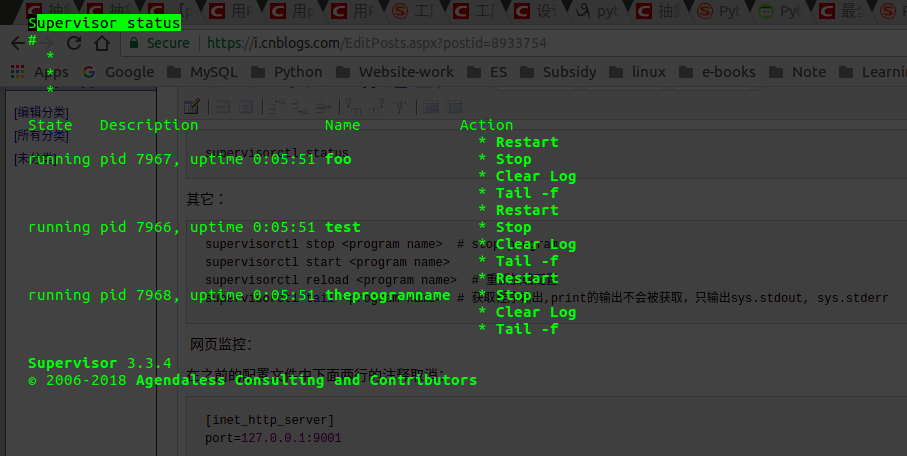
supervisorctl status
log在/tmp/supervisord.log
其它:
supervisorctl stop <program name>  # stop program

supervisorctl start <program name>

supervisorctl reload <program name>  # 重新加载配置

supervisorctl tail <program name>  # 获取程序输出,print的输出不会被获取,只输出sys.stdout, sys.stderr
管理一组程序:
[group:celery_task_summary]

;programs=progname1,progname2  ; each refers to 'x' in [program:x] definitions

programs=celery_tasks  ; each refers to 'x' in [program:x] definitions

;priority=
supervisorctl update

supervisorctl restart celery_task_summary:   # 重启程序组

supervisorctl restart celery_task_summary:celery_tasks  # 重启程序组里面的一个, 添加程序组后 supervisorctl restart celery_tasks 已经不能使用
网页监控:
在之前的配置文件中下面两行的注释取消:
[inet_http_server]

port=127.0.0.1:
使用浏览器访问 http://127.0.0.1:9001
supervisor process management的更多相关文章
- Java Business Process Management(业务流程管理) 初识环境搭建
一.简介 (一)什么是jbpm JBPM,全称是Java Business Process Management(业务流程管理),它是覆盖了业务流程管理.工作流.服务协作等领域的一个开源的.灵活的.易 ...
- Performance Tuning Using Linux Process Management Commands
[root@bigdata-server-02 /]# ps --help all Usage: ps [options] Basic options: -A, -e all processes -a ...
- Linux Process Management && Process Scheduling Principle
目录 . 引言 . 进程优先级 . 进程的生命周 . 进程表示 . 进程管理相关的系统调用 . 进程调度 . 完全公平调度类 . 实时调度类 . 调度器增强 . 小结 1. 引言 在多处理器系统中,可 ...
- <<Linux kernel development>> Process Management
The Process On modern operating systems,processes provide two virtualizations:a virtualized processo ...
- linux process management
CREAT PROCESS fork() | clone(參数,决定父子函数的共享内容) | do_fork() | copy_process() | dup_task_struct() 创建子进程的 ...
- csharp:workflow and bpm(Business Process Management)
http://ccflow.codeplex.com/ http://winwf.codeplex.com/ http://nginn.codeplex.com/ https://github.com ...
- Process management of windows
igfxem.exe进程是正常的进程.是intel家的核显驱动类的进程.核显即"核芯显卡",是指GPU部分它是与CPU建立在同一内核芯片上,两者完全融合的芯片."核芯显卡 ...
- Project Management Process
Project Management ProcessDescription .............................................................. ...
- supervisor:How is this different from daemontools ?
"daemontools has too much focus on security as opposed to being a process manager for my taste. ...
随机推荐
- [UE4]The global shader cache file missing 运行错误解决办法
UE4项目在VS中对项目代码编译时报如错,找了好久在UE4论坛上查到了别人的解决方案,贴出来仅供大家参考. 看到一位开发者解释出错的原因如下: There are a number of build ...
- Hash 迭代程序构造器要求字符串参数--错误解决
报错提示: ERROR: Hash 迭代程序构造器要求字符串参数,位置: 行 56 列 23.ERROR: DATA STEP 组件对象失败.在“EXECUTION”阶段中止.NOTE: 由于出错,S ...
- CentOS之Shell基础
Linux默认的shell版本是bash. 我们所敲的命令都是有记录的:被保存在.bash_history文件中.只有当用户正常突出shell时,命令才会保存至.bash_history中. !!:连 ...
- windows下git的使用
1.安装git 下载地址:https://git-scm.com/download/win
- vue 的组件开发,以及swiper,axios的使用
父组件<template> <div> <home-header :city="city"></home-header> //给子组 ...
- es6基础(7)--函数扩展
{ //有默认值的后面如果有参数必须要有默认值 function test(x,y="world"){ console.log(x,y) } test('hello');//hel ...
- Guava实现 过滤文本,排序,转换内容,分组计数转换map 等等
重要点 :看注释 从access.log中统计数据 对healthcheck.html的请求不计入统计 输出请求总量,以及GET和POST分别的总量 输出请求最频繁的10个接口及其次数,按次数降序 输 ...
- WPF简单数据绑定
XAML: <!--#region 数据绑定控件--> <DataGrid x:Name="dataGrid" Grid.Column="2" ...
- tree-data
[{ label: '一级 1', children: [{ label: '二级 1-1', children: [{ label: '三级 1-1-1' }] }] }, { label: '一级 ...
- tensorflowwindows安装
1.在python官网下载3.5 64位版本的python,并进行安装 https://www.python.org/ 2.进行安装,配置环境变量 3.命令行执行pip3 install numpy ...