
Linux 下安装nginx的总结 (之前写的有问题))
1. 下载niginx的 tar包
下载路径
http://nginx.org/en/download.html
也可以直接使用命令下载
wget http://nginx.org/download/nginx-1.15.1.tar.gz
2. 下载目录下解压缩
tar -zxvf nginx-1.15.1.tar.gz
3. cd 到目录里面进行处理
./configure
4. 安装时会报错 主要有:
./configure: error: the HTTP rewrite module requires the PCRE library.

You can either disable the module by using --without-http_rewrite_module

option, or install the PCRE library into the system, or build the PCRE library

statically from the source with nginx by using --with-pcre=<path> option.

需要pcre

./configure: error: the HTTP gzip module requires the zlib library.

You can either disable the module by using --without-http_gzip_module

option, or install the zlib library into the system, or build the zlib library

statically from the source with nginx by using --with-zlib=<path> option.

需要zlib
一般linux里面安装了 prce和 zlib 但是没有安装devel 包 需要进行安装
yum install -y prce-devel

yum install -y zlib-devel
5. 再次执行 ./confiure命令成功
反馈安装信息
Configuration summary

  + using system PCRE library

  + OpenSSL library is not used

  + using system zlib library

  nginx path prefix: "/usr/local/nginx"

  nginx binary file: "/usr/local/nginx/sbin/nginx"

  nginx modules path: "/usr/local/nginx/modules"

  nginx configuration prefix: "/usr/local/nginx/conf"

  nginx configuration file: "/usr/local/nginx/conf/nginx.conf"

  nginx pid file: "/usr/local/nginx/logs/nginx.pid"

  nginx error log file: "/usr/local/nginx/logs/error.log"

  nginx http access log file: "/usr/local/nginx/logs/access.log"

  nginx http client request body temporary files: "client_body_temp"

  nginx http proxy temporary files: "proxy_temp"

  nginx http fastcgi temporary files: "fastcgi_temp"

  nginx http uwsgi temporary files: "uwsgi_temp"

  nginx http scgi temporary files: "scgi_temp"
6. 执行 make 和 make install 进行安装
make and make install
9. 创建软连接
ln /usr/local/nginx/sbin/nginx /usr/local/bin/nginx
10. 直接启动
nginx
遇到报错如图示时
nginx: [emerg] bind() to 0.0.0.0: failed (: Address already in use)

nginx: [emerg] bind() to 0.0.0.0: failed (: Address already in use)

nginx: [emerg] bind() to 0.0.0.0: failed (: Address already in use)

nginx: [emerg] bind() to 0.0.0.0: failed (: Address already in use)

nginx: [emerg] bind() to 0.0.0.0: failed (: Address already in use)

nginx: [emerg] still could not bind()
11. 修改配置文件
查看配置文件位置

nginx -t
结果为
nginx: the configuration file /usr/local/nginx/conf/nginx.conf syntax is ok
nginx: configuration file /usr/local/nginx/conf/nginx.conf test is successful
修改配置文件
vim /usr/local/nginx/conf/nginx.conf
将端口绑定修改一下
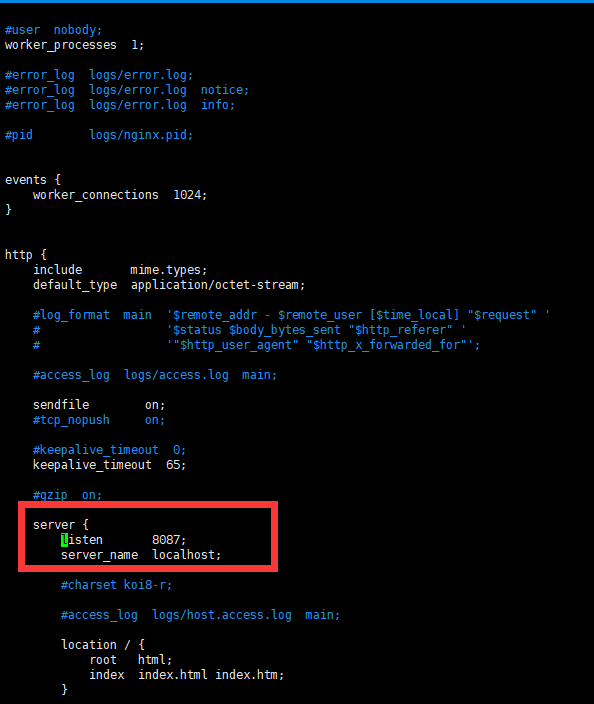
再次启动即可
Linux 下安装nginx的总结 (之前写的有问题))的更多相关文章
- 【云服务器部署】---Linux下安装nginx
[云服务器部署]---Linux下安装nginx 之前两篇,分别讲了:Linux下安装MySQL 和 springboot项目部署云服务器 nginx安装也是挺简单的.具体步骤如下: 第一步,下载 ...
- linux下安装nginx及初步认识
linux下安装配置nginx nginx:是一个高性能的反向代理服务器正向代理代理的是客户端,反向代理代理的是服务端. 这里以nginx-1.12.2版本为例子 1.首先去官网下载nginx-1.1 ...
- linux 下 安装nginx及压力测试
linux 编译安装nginx,配置自启动脚本 下载nginx: wget http://nginx.org/download/nginx-1.8.0.tar.gz下载openssl : wget h ...
- linux 下安装 nginx
安装nginx版本为1.7.5 一.下载nginx 官方地址:http://www.nginx.org/ 下载地址:http://nginx.org/download/ Nginx官网提供了三个类型的 ...
- Linux下安装Nginx并配置一个图片服务器
首先安装nginx安装环境 nginx是C语言开发,建议在linux上运行,本教程使用Centos6.5作为安装环境. gcc 安装nginx需要先将官网下载的源码进行编译,编译依赖gcc环境,如果没 ...
- linux下安装nginx和配置
1.系统:centos6.8 2.安装准备: 安装nginx前,我们首先要确保系统安装了g++.gcc.openssl-devel.pcre-devel和zlib-devel软件,可通过如图所示命令进 ...
- linux下安装nginx+php+mysql环境 详细教程
话不多说上代码 linux环境:centos 7.0 64位 nginx:nginx-1.8.0.tar.gz php: php-7.1.1.tar.gz mysql: mysql-5.6.21.ta ...
- Linux下安装Nginx并实现socket代理
nginx可以使用各平台的默认包来安装,本文是介绍使用源码编译安装,包括具体的编译参数信息. 正式开始前,编译环境gcc g++ 开发库之类的需要提前装好,这里默认你已经装好. ububtu平台编译环 ...
- Linux下安装Nginx服务器
安装Nginx之前,首先要安装好编译环境gcc和g++,然后以CentOS为例安装Nginx,安装Nginx需要PRCE库.zlib库和ssl的支持,除了ssl外其他的我们都是去官网下载: Nginx ...
随机推荐
- oracle 批量更新merge语句
merge into (SELECT * FROM QUERY_DB1.test_MPOS ) T1 using (SELECT FLAG FLAG1,IN_MNO FROM QUERY_DB1.t ...
- c++ 智能指针、函数指针和指针函数
智能指针: 1.内存泄漏memory leak :是指程序在申请内存后,无法释放已申请的内存空间,一次内存泄漏似乎不会有大的影响,但内存泄漏堆积后的后果就是内存溢出. 2.内存溢出 out of me ...
- OpenCV——SIFT特征检测与匹配
SIFT特征和SURF特征比较 比较项目 SIFT SURF 尺度空间极值检测 使用高斯滤波器,根据不同尺度的高斯差(DOG)图像寻找局部极值 使用方形滤波器,利用海森矩阵的行列式值检测极值,并利用积 ...
- HDU1754
https://vjudge.net/contest/66989#problem/B 很多学校流行一种比较的习惯.老师们很喜欢询问,从某某到某某当中,分数最高的是多少. 这让很多学生很反感. 不管你喜 ...
- day60
Bootstrap 一.简介 Bootstrap是美国Twitter公司的设计师Mark Otto和Jacob Thornton合作基于HTML.CSS.JavaScript 开发的简洁.直观.强悍的 ...
- day39
今日内容: 1.对于表,库,记录的基本操作 2.数据库引擎的了解 3.表的详细 4.数据类型的掌握 1.回顾昨日对于表,库,记录的基本操作 库 增: create database mydb2; 删: ...
- php字符串替换的几个函数
strtr() str_replace() substr_replace() preg_replace() strtr()的用法: <?php $str = "test"; ...
- mac下载、破解、安装webstorm编辑器
1.进入webstorm官网 http://www.jetbrains.com/webstorm/,点击DOWNLOAD,开始下载webstorm安装包. untitled.png 2.开始安装 双击 ...
- 9.Libraries and visibility 库和可见性
import和liabrary指令可以帮助你创建模块化,可复用的代码.库不仅仅提供API,也是一个私有化单元:库中已下划线(_)开头的类都是对外不可访问的.每个Dart的应用也是一个包,尽管它没有使用 ...
- Ubuntu16.04上用源代码安装ICE
ubuntu16.04上用源代码安装ICE