
Bootstrap表单验证插件bootstrapValidator使用方法整理
插件介绍
先上一个图:

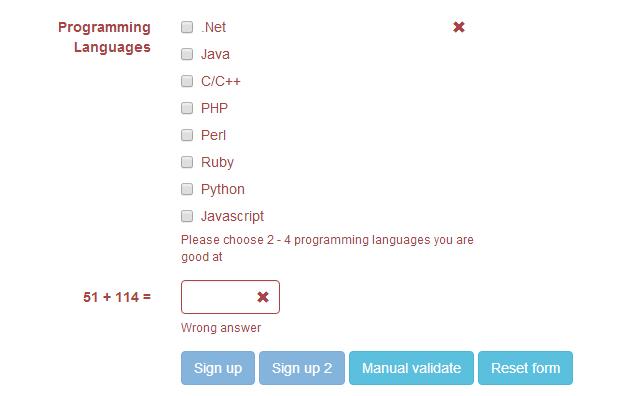
下载地址:https://github.com/nghuuphuoc/bootstrapvalidator
使用方法:http://www.cnblogs.com/huangcong/p/5335376.html
使用提示
中文化:
下载插件后,将\js\bootstrapValidator\language\zh_CN.js 引入文件,即实现中文化
提交前验证表单:
更丰富一点的表单验证例子:http://www.jq22.com/yanshi522,直接上代码:
<!DOCTYPE html>
<html>
<head>
<title>BootstrapValidator demo</title> <link rel="stylesheet" href="vendor/bootstrap/css/bootstrap.css"/>
<link rel="stylesheet" href="dist/css/bootstrapValidator.css"/> <!-- Include the FontAwesome CSS if you want to use feedback icons provided by FontAwesome -->
<!--<link rel="stylesheet" href="http://netdna.bootstrapcdn.com/font-awesome/4.0.3/css/font-awesome.css" />--> <script type="text/javascript" src="vendor/jquery/jquery-1.10.2.min.js"></script>
<script type="text/javascript" src="vendor/bootstrap/js/bootstrap.min.js"></script>
<script type="text/javascript" src="dist/js/bootstrapValidator.js"></script>
</head>
<body>
<div class="container">
<div class="row">
<!-- form: -->
<section>
<div class="col-lg-8 col-lg-offset-2">
<div class="page-header">
<h2>Sign up</h2>
</div> <form id="defaultForm" method="post" class="form-horizontal" action="target.php">
<div class="form-group">
<label class="col-lg-3 control-label">Full name</label>
<div class="col-lg-4">
<input type="text" class="form-control" name="firstName" placeholder="First name" />
</div>
<div class="col-lg-4">
<input type="text" class="form-control" name="lastName" placeholder="Last name" />
</div>
</div> <div class="form-group">
<label class="col-lg-3 control-label">Username</label>
<div class="col-lg-5">
<input type="text" class="form-control" name="username" />
</div>
</div> <div class="form-group">
<label class="col-lg-3 control-label">Email address</label>
<div class="col-lg-5">
<input type="text" class="form-control" name="email" />
</div>
</div> <div class="form-group">
<label class="col-lg-3 control-label">Password</label>
<div class="col-lg-5">
<input type="password" class="form-control" name="password" />
</div>
</div> <div class="form-group">
<label class="col-lg-3 control-label">Retype password</label>
<div class="col-lg-5">
<input type="password" class="form-control" name="confirmPassword" />
</div>
</div> <div class="form-group">
<label class="col-lg-3 control-label">Gender</label>
<div class="col-lg-5">
<div class="radio">
<label>
<input type="radio" name="gender" value="male" /> Male
</label>
</div>
<div class="radio">
<label>
<input type="radio" name="gender" value="female" /> Female
</label>
</div>
<div class="radio">
<label>
<input type="radio" name="gender" value="other" /> Other
</label>
</div>
</div>
</div> <div class="form-group">
<label class="col-lg-3 control-label">Birthday</label>
<div class="col-lg-5">
<input type="text" class="form-control" name="birthday" /> (YYYY/MM/DD)
</div>
</div> <div class="form-group">
<label class="col-lg-3 control-label">Languages</label>
<div class="col-lg-5">
<div class="checkbox">
<label>
<input type="checkbox" name="languages[]" value="english" /> English
</label>
</div>
<div class="checkbox">
<label>
<input type="checkbox" name="languages[]" value="french" /> French
</label>
</div>
<div class="checkbox">
<label>
<input type="checkbox" name="languages[]" value="german" /> German
</label>
</div>
<div class="checkbox">
<label>
<input type="checkbox" name="languages[]" value="russian" /> Russian
</label>
</div>
<div class="checkbox">
<label>
<input type="checkbox" name="languages[]" value="other" /> Other
</label>
</div>
</div>
</div> <div class="form-group">
<label class="col-lg-3 control-label">Programming Languages</label>
<div class="col-lg-5">
<div class="checkbox">
<label>
<input type="checkbox" name="programs[]" value="net" /> .Net
</label>
</div>
<div class="checkbox">
<label>
<input type="checkbox" name="programs[]" value="java" /> Java
</label>
</div>
<div class="checkbox">
<label>
<input type="checkbox" name="programs[]" value="c" /> C/C++
</label>
</div>
<div class="checkbox">
<label>
<input type="checkbox" name="programs[]" value="php" /> PHP
</label>
</div>
<div class="checkbox">
<label>
<input type="checkbox" name="programs[]" value="perl" /> Perl
</label>
</div>
<div class="checkbox">
<label>
<input type="checkbox" name="programs[]" value="ruby" /> Ruby
</label>
</div>
<div class="checkbox">
<label>
<input type="checkbox" name="programs[]" value="python" /> Python
</label>
</div>
<div class="checkbox">
<label>
<input type="checkbox" name="programs[]" value="javascript" /> Javascript
</label>
</div>
</div>
</div> <div class="form-group">
<label class="col-lg-3 control-label" id="captchaOperation"></label>
<div class="col-lg-2">
<input type="text" class="form-control" name="captcha" />
</div>
</div> <div class="form-group">
<div class="col-lg-9 col-lg-offset-3">
<button type="submit" class="btn btn-primary" name="signup" value="Sign up">Sign up</button>
<button type="submit" class="btn btn-primary" name="signup2" value="Sign up 2">Sign up 2</button>
<button type="button" class="btn btn-info" id="validateBtn">Manual validate</button>
<button type="button" class="btn btn-info" id="resetBtn">Reset form</button>
</div>
</div>
</form>
</div>
</section>
<!-- :form -->
</div>
</div> <script type="text/javascript">
$(document).ready(function() {
// Generate a simple captcha
function randomNumber(min, max) {
return Math.floor(Math.random() * (max - min + 1) + min);
};
$('#captchaOperation').html([randomNumber(1, 100), '+', randomNumber(1, 200), '='].join(' ')); $('#defaultForm').bootstrapValidator({
// live: 'disabled',
message: 'This value is not valid',
feedbackIcons: {
valid: 'glyphicon glyphicon-ok',
invalid: 'glyphicon glyphicon-remove',
validating: 'glyphicon glyphicon-refresh'
},
fields: {
firstName: {
validators: {
notEmpty: {
message: 'The first name is required and cannot be empty'
}
}
},
lastName: {
validators: {
notEmpty: {
message: 'The last name is required and cannot be empty'
}
}
},
username: {
message: 'The username is not valid',
validators: {
notEmpty: {
message: 'The username is required and cannot be empty'
},
stringLength: {
min: 6,
max: 30,
message: 'The username must be more than 6 and less than 30 characters long'
},
regexp: {
regexp: /^[a-zA-Z0-9_\.]+$/,
message: 'The username can only consist of alphabetical, number, dot and underscore'
},
remote: {
url: 'remote.php',
message: 'The username is not available'
},
different: {
field: 'password',
message: 'The username and password cannot be the same as each other'
}
}
},
email: {
validators: {
emailAddress: {
message: 'The input is not a valid email address'
}
}
},
password: {
validators: {
notEmpty: {
message: 'The password is required and cannot be empty'
},
identical: {
field: 'confirmPassword',
message: 'The password and its confirm are not the same'
},
different: {
field: 'username',
message: 'The password cannot be the same as username'
}
}
},
confirmPassword: {
validators: {
notEmpty: {
message: 'The confirm password is required and cannot be empty'
},
identical: {
field: 'password',
message: 'The password and its confirm are not the same'
},
different: {
field: 'username',
message: 'The password cannot be the same as username'
}
}
},
birthday: {
validators: {
date: {
format: 'YYYY/MM/DD',
message: 'The birthday is not valid'
}
}
},
gender: {
validators: {
notEmpty: {
message: 'The gender is required'
}
}
},
'languages[]': {
validators: {
notEmpty: {
message: 'Please specify at least one language you can speak'
}
}
},
'programs[]': {
validators: {
choice: {
min: 2,
max: 4,
message: 'Please choose 2 - 4 programming languages you are good at'
}
}
},
captcha: {
validators: {
callback: {
message: 'Wrong answer',
callback: function(value, validator) {
var items = $('#captchaOperation').html().split(' '), sum = parseInt(items[0]) + parseInt(items[2]);
return value == sum;
}
}
}
}
}
}); // Validate the form manually
$('#validateBtn').click(function() {
$('#defaultForm').bootstrapValidator('validate');
}); $('#resetBtn').click(function() {
$('#defaultForm').data('bootstrapValidator').resetForm(true);
});
});
</script>
</body>
</html>
看331行,点击提交时,用
$('#defaultForm').bootstrapValidator('validate');
触发表单验证
下面是碰到的一个坑:
bootstrapValidator默认逻辑是当表单验证失败时,把按钮给变灰色。
但是项目中,button并不在form内部,是通过事件绑定来ajax提交的。那么问题来了:
项目需要当form验证失败时,不执行所绑定的后续事件。百度半天找不到相关资料,最后还是要靠google:
$("#yourform").submit(function(ev){ev.preventDefault();});

$("#submit").on("click", function(){

   var bootstrapValidator = $("#yourform").data('bootstrapValidator');

   bootstrapValidator.validate();

   if(bootstrapValidator.isValid())

     $("#yourform").submit();

   else return;

});
酱紫就可以判断表单验证是否通过了。
Bootstrap表单验证插件bootstrapValidator使用方法整理的更多相关文章
- bootstrapValidator.js,最好用的bootstrap表单验证插件 简单实用方法
实用方法 1.引入 在有jquery和bootstrap的页面里引入bootstrapValidator.js和bootstrapValidator.css文件 2. 按照bootstrap的表单组件 ...
- bootstrapValidator.js,最好用的bootstrap表单验证插件
前言:做Web开发的我们,表单验证是再常见不过的需求了.友好的错误提示能增加用户体验.博主搜索bootstrap表单验证,搜到的结果大部分都是文中的主题:bootstrapvalidator.今天就来 ...
- bootStrap表单验证插件的使用
bootStrapValidator插件的使用 1.插件的下载和引用 首先要引入bootstrapValidator插件.链接的地址:https://www.bootcdn.cn/jquery.boo ...
- bootstrapValidator表单验证插件
bootstrapValidator——一个很好用的表单验证插件,再也不用手写验证规则啦! bootstrapValidator官方文档:http://bootstrapvalidator.votin ...
- BootStrapValidator表单验证插件的学习和使用
BootStrapValidator表单验证插件的学习和使用 引入标签 <script type="text/javascript" src="https://cd ...
- jQuery Validate 表单验证插件----自定义一个验证方法
一.下载依赖包 网盘下载:https://yunpan.cn/cryvgGGAQ3DSW 访问密码 f224 二.引入依赖包 <script src="../../scripts/j ...
- 表单验证插件jquery.validate的使用方法演示
jQueryValidate表单验证效果 jquery.validate验证错误信息的样式控制 <!--validate验证插件的基础样式--> input.error{border: 1 ...
- jquery validate表单验证插件的基本使用方法及功能拓展
1 表单验证的准备工作 在开启长篇大论之前,首先将表单验证的效果展示给大家. 1.点击表单项,显示帮助提示 2.鼠标离开表单项时,开始校验元素 3.鼠标离开后的正确.错误提示及鼠标移入时的帮助提 ...
- 表单验证插件--formvalidation
表单验证是一个非常基础的功能,当你的表单项少的时候,可以自己写验证,但是当你的表单有很多的时候,就需要一些验证的插件.今天介绍一款很好用的表单验证插件,formvalidation.其前身叫做boot ...
随机推荐
- 【java基础系列】一、常用命令行
常用的DOS命令: dir:列出当前目录下的文件以及文件夹 md:创建目录 rd:删除目录 cd:进入指定目录 cd..:退回到上一级目录 cd\:退回到根目录 del:删除文件 exit:退出dos ...
- python网络编程-OSI七层模型详解
OSI 七层模型通过七个层次化的结构模型使不同的系统不同的网络之间实现可靠的通讯,因此其最主要的功能就是帮助不同类型的主机实现数据传输 . 完成中继功能的节点通常称为中继系统.在OSI七层模型中,处于 ...
- ViewPager实现引导页
1. 要使用ViewPager,必须要创建 PagerAdapter. 这里创建一个 ViewPagerAdapter来继承PagerAdapter public class ViewPagerAda ...
- windows和linux执行class
windows java -classpath .;lib/* com.Test linux java -classpath .:ib/* com.Test "."代表当前路径,这 ...
- 全局变量都是window对象的属性
var x = "haha"; var test = function(){ alert(this.x); } 上述,则会弹出 haha的值. 因为在JavaScript的变量作 ...
- ContextFlyout 在10586或10240的使用
虽然ContextFlyout只能在红石以上版本使用,但可以采用附加属性的方法手动写一个 public static class ContextFlyoutSetter { public static ...
- css-css权威指南学习笔记7
第11章 表布局 1.border-spacing,单元格边框间距,可以有两个或一个值,两个值前者表示水平间距,后者垂直间距. 2.border-collapse值为collapse时不可设置padd ...
- oracleXE(oracle学习版)在windows的安装配置
oracleXE其实安装基本就是一路下一步. 在安装前记得先把tomcat打开,不然oracleXE会占用8080端口且安装过程无法更改端口. 如果需要远程连接此oracle XE的话,要关闭这台电脑 ...
- windows常用快捷键
windows常用快捷键 Fn+F1:Windows的支持和帮助 =Windows 徽标+F1 Fn+F2:重命名对象 Fn+F3:查找所有文件 Fn+F4:选择“转到不同的文件夹”框并沿框中的项向下 ...
- Ubuntu学习总结-09 安装 Pycharm
一 下载 PyCharm 从以下网址下载Linux版本的Pycharm,这里使用的版本是pycharm-professional-2016.2.3.tar.gz . http://www.jetbra ...