
Android中通过ImageSwitcher实现相册滑动查看照片功能(附代码下载)
场景
效果
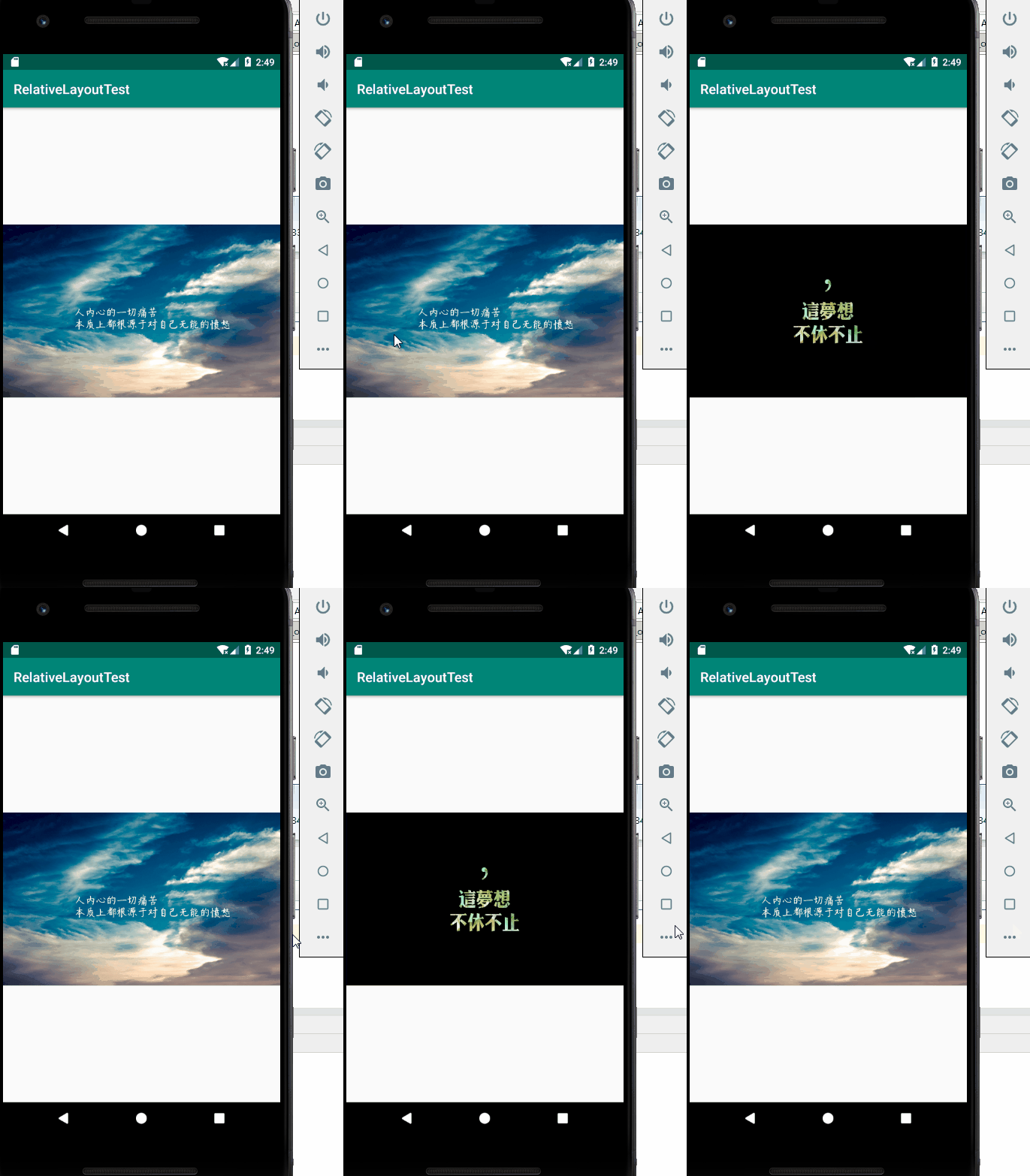
注:
博客:
https://blog.csdn.net/badao_liumang_qizhi
关注公众号
霸道的程序猿
获取编程相关电子书、教程推送与免费下载。
实现
将需要滚动查看的照片复制到res/drawable下
这里只准备了两张bg01.jpg和bg02.jpg
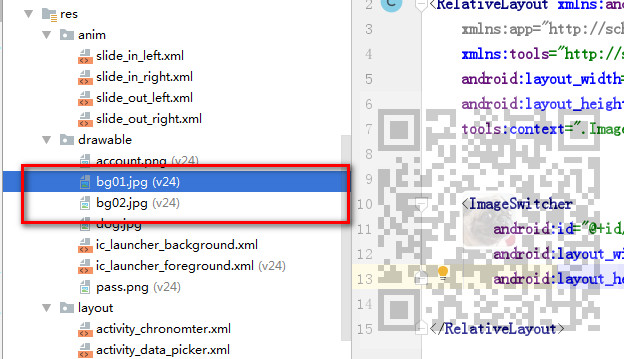
在滚动时需要用到左进右出和左出右进的动画,所以在res下新建anim目录,在目录下新建四种动画的xml文件
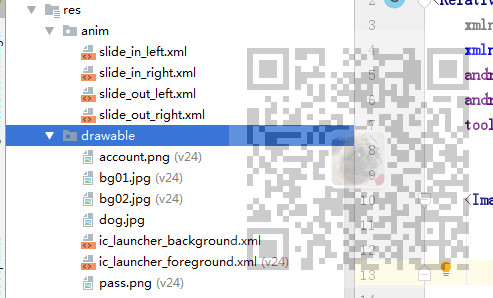
具体代码参照示例代码。
然后打开布局文件activity_image_switcher.xml
将布局修改为相对布局RelativeLayout,并添加一个ImageSwitcher,设置其ID属性。
<?xml version="1.0" encoding="utf-8"?>

<RelativeLayout xmlns:android="http://schemas.android.com/apk/res/android"

    xmlns:app="http://schemas.android.com/apk/res-auto"

    xmlns:tools="http://schemas.android.com/tools"

    android:layout_width="match_parent"

    android:layout_height="match_parent"

    tools:context=".ImageSwitcherActivity">

    <ImageSwitcher

        android:id="@+id/imageSwitcher"

        android:layout_width="match_parent"

        android:layout_height="match_parent"/>

</RelativeLayout>
然后来到ImageSwitcherActivity
首先声明一些私有变量,用来存储照片资源数组、数组索引、鼠标放下和离开的X坐标等。
   //图片资源数组

    private int[] arrayPicture = new int[]{

            R.drawable.bg01,R.drawable.bg02

    };

    private ImageSwitcher imageSwitcher;

    private  int index;

    private  float touchDowmX;

    private  float touchUpX;
然后通过id获取ImageSwitcher并设置其视图工厂
        //获取imageSwitch

        imageSwitcher =(ImageSwitcher) findViewById(R.id.imageSwitcher);

        //设置视图工厂

        imageSwitcher.setFactory(new ViewSwitcher.ViewFactory() {

            @Override

            public View makeView() {

                ImageView imageView = new ImageView(ImageSwitcherActivity.this);

                imageView.setImageResource(arrayPicture[index]);

                return imageView;

            }

        });
然后设置ImageSwitcher的触碰的监听器
通过
event.getAction() == MotionEvent.ACTION_DOWN
判断如果是鼠标按下,则记录鼠标按下时的坐标。
否则通过
event.getAction() ==MotionEvent.ACTION_UP
判断如果是鼠标抬起,则记录抬起时的X坐标。
此时再通过
touchUpX-touchDowmX >
即抬起时的X坐标减去落下时的X坐标大于100则认为是从左往右滑动。
此时图片的索引通过三目表达式进行判断。
index = index==?arrayPicture.length-:index-;
如果当前索引为0,即为第一张照片时,则从左往右滑动后,应该是最后一张照片,即照片索引为图片数组的长度减一。
然后通过
imageSwitcher.setInAnimation(AnimationUtils.loadAnimation(ImageSwitcherActivity.this, R.anim.slide_in_left));
设置左边滑进的动画
再通过
imageSwitcher.setOutAnimation(AnimationUtils.loadAnimation(ImageSwitcherActivity.this, R.anim.slide_out_right));
设置右边滑出的动画
最后通过
imageSwitcher.setImageResource(arrayPicture[index]);
设置图片索引。
同理如果通过
touchDowmX - touchUpX >
则认为是从右往左滑。
同样通过三目表达式
index = index==arrayPicture.length -?:index+;
如果是最后一张照片,即索引为数组的长度 -1 ,则再往左滑 该是第一张照片,即索引为0 否则就索引+1。
然后通过
imageSwitcher.setInAnimation(AnimationUtils.loadAnimation(ImageSwitcherActivity.this, R.anim.slide_in_right));
设置右边滑进的动画
再通过
imageSwitcher.setOutAnimation(AnimationUtils.loadAnimation(ImageSwitcherActivity.this, R.anim.slide_out_left));
设置左边滑出的动画
最后通过
imageSwitcher.setImageResource(arrayPicture[index]);
设置图片
完整示例代码
package com.badao.relativelayouttest;

import androidx.appcompat.app.AppCompatActivity;

import android.os.Bundle;

import android.view.MotionEvent;

import android.view.View;

import android.view.animation.AnimationUtils;

import android.widget.ImageSwitcher;

import android.widget.ImageView;

import android.widget.ViewSwitcher;

public class ImageSwitcherActivity extends AppCompatActivity {

    //图片资源数组

    private int[] arrayPicture = new int[]{

            R.drawable.bg01,R.drawable.bg02

    };

    private ImageSwitcher imageSwitcher;

    private  int index;

    private  float touchDowmX;

    private  float touchUpX;

    @Override

    protected void onCreate(Bundle savedInstanceState) {

        super.onCreate(savedInstanceState);

        setContentView(R.layout.activity_image_switcher);

        //获取imageSwitch

        imageSwitcher =(ImageSwitcher) findViewById(R.id.imageSwitcher);

        //设置视图工厂

        imageSwitcher.setFactory(new ViewSwitcher.ViewFactory() {

            @Override

            public View makeView() {

                ImageView imageView = new ImageView(ImageSwitcherActivity.this);

                imageView.setImageResource(arrayPicture[index]);

                return imageView;

            }

        });

        //设置imageSwitcher 触碰监听器

        imageSwitcher.setOnTouchListener(new View.OnTouchListener() {

            @Override

            public boolean onTouch(View v, MotionEvent event) {

                //如果是鼠标按下

                if(event.getAction() == MotionEvent.ACTION_DOWN)

                {

                    //记录按下时的X坐标

                    touchDowmX = event.getX();

                    return  true;

                }else if(event.getAction() ==MotionEvent.ACTION_UP) //如果是鼠标抬起

                {

                    //记录抬起时的X坐标

                    touchUpX = event.getX();

                    //如果是从左向右滑动

                    if(touchUpX-touchDowmX >)

                    {

                        //如果是第一张图片则从左向右滑后下标是数组的长度-1,即最后一张,如果不是则索引-1

                        index = index==?arrayPicture.length-:index-;

                        //设置左边滑进的动画

                        imageSwitcher.setInAnimation(AnimationUtils.loadAnimation(ImageSwitcherActivity.this, R.anim.slide_in_left));

                        //设置右边滑出的动画

                        imageSwitcher.setOutAnimation(AnimationUtils.loadAnimation(ImageSwitcherActivity.this, R.anim.slide_out_right));

                        //设置图片索引

                        imageSwitcher.setImageResource(arrayPicture[index]);

                    }

                    //否则认为是从右往左滑

                    else if(touchDowmX - touchUpX >)

                    {

                        //如果是最后一张照片,即索引为数组的长度 -1 ,则再往左滑 该是第一张照片,即索引为0  否则就索引+1

                        index = index==arrayPicture.length -?:index+;

                        //设置右边滑进的动画

                        imageSwitcher.setInAnimation(AnimationUtils.loadAnimation(ImageSwitcherActivity.this, R.anim.slide_in_right));

                        //设置左边滑出的动画

                        imageSwitcher.setOutAnimation(AnimationUtils.loadAnimation(ImageSwitcherActivity.this, R.anim.slide_out_left));

                        //设置图片索引

                        imageSwitcher.setImageResource(arrayPicture[index]);

                    }

                }

                return false;

            }

        });

    }

}
示例代码下载
关注公众号:
霸道的程序猿
回复:
Android相册滑动代码
Android中通过ImageSwitcher实现相册滑动查看照片功能(附代码下载)的更多相关文章
- Android中四种补间动画的使用示例(附代码下载)
场景 Android中四种补间动画. 透明度渐变动画 旋转动画 缩放动画 平移动画 注: 博客: https://blog.csdn.net/badao_liumang_qizhi关注公众号 霸道的程 ...
- Android 中 DrawerLayout + ViewPager 怎么解决滑动冲突?
DrawerLayout 是 Android 官方的侧滑菜单控件,而 ViewPager 相信大家都很熟悉了.今天这里就讲一下当在 DrawerLayout 中嵌套 ViewPager 时,要如何解决 ...
- JPA中实现双向多对多的关联关系(附代码下载)
场景 JPA入门简介与搭建HelloWorld(附代码下载): https://blog.csdn.net/BADAO_LIUMANG_QIZHI/article/details/103473937 ...
- 浅谈Android中拍照、从相册选择图片并截图相关知识点
前言 我们在Android开发中经常会需要使用相机或者从相册中选取图片的情况,今天就把这里面相关的知识点总结下,方便以后开发的时候使用. 1.相机拍照并可自定义截图功能 我们先来看如何使用Intent ...
- Android中通过访问本地相册或者相机设置用户头像
目前几乎所有的APP在用户注册时都会有设置头像的需求,大致分为三种情况: (1)通过获取本地相册的图片,经过裁剪后作为头像. (2)通过启动手机相机,现拍图片然后裁剪作为头像. (3)在APP中添加一 ...
- Android中使用GridView和ImageViewSwitcher实现电子相册简单功能
我们在手机上查看相册时,首先看到的是网格状的图片展示界面,然后我们选择想要欣赏的照片点击进入,这样就可以全屏观看该照片,并且可以通过左右滑动来切换照片.如下图的显示效果: 首先我们先罗列一下本次实现所 ...
- Android中获取网页表单中的数据实现思路及代码
在Android中获取网页里表单中的数据具体实现代码如下,感兴趣的各位可以参考过下哈,希望对大家有所帮助 MainActivity如下: 复制代码 代码如下: package cn.testjavas ...
- Android中实现一个简单的逐帧动画(附代码下载)
场景 Android中的逐帧动画,就是由连续的一张张照片组成的动画. 效果 注: 博客: https://blog.csdn.net/badao_liumang_qizhi 关注公众号 霸道的程序猿 ...
- Android 一s个相对完整的自动升级功能实现代码
由于项目的需要最近做了一个关于Android自动升级的功能,下面将贴出Android手机客户端的完整代码.这段代码参考别的代码居多,由于不满足需求,所以自己仅仅改了一些需要变动的内容,其他功能都是按照 ...
随机推荐
- 机器学习环境配置系列六之jupyter notebook远程访问
jupyter运行后只能在本机运行,如果部署在服务器上,大家都希望可以远程录入地址进行访问,这篇文章就是解决这个远程访问的问题.几个基本的命令就可以搞定,然后就可以愉快的玩耍了. 1.安装jupyte ...
- SpringBoot初级知识总结,太难了,未完待续.......
idea如何打包发布springboot 1.1.环境准备window系统,jdk8环境,springboot项目,maven3.5.4环境 1.2.进行打包发布 打开idea编辑器,打开一个写好的d ...
- php--->注册模式
注册模式 什么是注册树模式? 注册树模式当然也叫注册模式,注册器模式.注册树模式通过将对象实例注册到一棵全局的对象树上,需要的时候从对象树上采摘的模式设计方法. 优点:单例模式解决的是如何在整个项目中 ...
- Electron使用electron-packager打包记录
1.使用 JavaScript, HTML 和 CSS 构建跨平台的桌面应用 2.下载https://github.com/electron/electron-quick-start中的示例 3.在示 ...
- 浅谈synchronized
目录 浅谈synchronized 前言 是什么 格式 同步代码块 同步方法 注意 最后 浅谈synchronized 前言 看多线程的相关书籍的时候,会经常阅读到一个使用前景,就是银行的取钱存钱操作 ...
- learn more ,study less(二):整体性学习技术(上)
前言:在学习整体性学习概念时,一个很好的方法是把它比喻成下棋,首先你要了解下棋的 基本规则和基本目标,本书第一部分可以看做是介绍关于整体性学习的一整套规则和目标. 一旦你理解了下棋的基本规则,你就要开 ...
- LeetCode 18: 4 Sum 寻找4数和
链接 4Sum 难度 Medium 描述 Given an array nums of n integers and an integer target, are there elements a , ...
- 娱乐往事,年初捡到1G PAR,平淡的日子泛起波澜
常听说这样的故事 垃圾佬捡到蓝牙键盘,于是配了一台上万的电脑 垃圾佬捡到机箱,于是配了一台带遥控的HTPC 垃圾佬捡到假NAS,于是组了20+T的RAID 而我,不是垃圾佬,更没有捡到过U盘,对突如其 ...
- 暑假第六周总结(对HBASE进行编程实践并且安装Redis)
本周主要是根据教程对HBASE进行了编程实践,对于hadoop的编程来说需要用到很多的.jar 包,在进行编程实践的时候需要参照相关的教程将jar包添加至程序当中去.教程上给的代码还是比较详细的,加上 ...
- Vue 常用三种传值方式
Vue常用的三种传值方式: 父传子 子传父 非父子传值 引用官网一句话:父子组件的关系可以总结为 prop 向下传递,事件向上传递.父组件通过 prop 给子组件下发数据,子组件通过事件给父组件发送消 ...