
ubuntu set up 2 - 双系统时间问题
http://ubuntuhandbook.org/index.php/2016/05/time-differences-ubuntu-1604-windows-10/
For users who dual boot Ubuntu 16.04 and Windows, you may find the clock time is off that causes time differences after you reboot and switch between the two systems. Here’s how to fix it.
Ubuntu maintains the hardware clock (RTC, real time clock) in universal time (UTC) by default while Windows maintains the clock in local time, thus causing time conflicts between Ubuntu and Windows.
To fix it, either set Ubuntu to maintain RTC in local time or make Windows uses UTC.
1. Disable UTC and use Local Time in Ubuntu:
In previous Ubuntu editions, you can edit the config file /etc/default/rcS to disable UTC.
In Ubuntu 16.04, open terminal (Ctrl+Alt+T) and run the command below instead:
timedatectl set-local-rtc 1 --adjust-system-clock
To check out if your system uses Local time, just run:
timedatectl
you’ll the local time zone is in use in the Warning section.
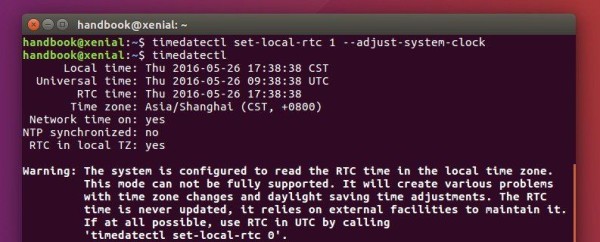
Finally restart and switch to Windows, adjust system clock time if need and done.
2. Make MicroSoft Windows uses UTC:
Another way to fix this issue is doing the following changes in Windows, Windows 10, in the case below:
1.) First if you’ve switched to local time in Ubuntu, run command in Ubuntu terminal to use back UTC:
timedatectl set-local-rtc 0
2.) Restart and select boot into Windows 10, when you’re in, do:
- go to Start Menu, search for and launch
cmdas Administrator. - When the command console opens, paste below command to create a DWORD value to the registry:
Reg add HKLM\SYSTEM\CurrentControlSet\Control\TimeZoneInformation /v RealTimeIsUniversal /t REG_DWORD /d 1
For 64-bit Windows, use a QWORD value instead:
Reg add HKLM\SYSTEM\CurrentControlSet\Control\TimeZoneInformation /v RealTimeIsUniversal /t REG_QWORD /d 1
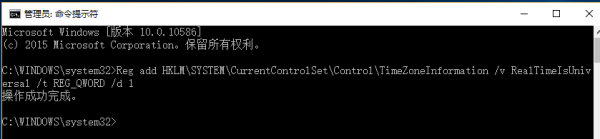
- Disable the “internet update” for the time and reboot.
ubuntu set up 2 - 双系统时间问题的更多相关文章
- Ubuntu 16.04 win7 双系统时间问题
在安装了win7的电脑上又装了一个Ubuntu 16.04,这Ubuntu的启动速度慢就选不说了,切加win7之后发现时间也不对啊. 所以记一个随笔记录一下自己修改双系统的日期. 当然,网上也搜过,说 ...
- Windows + Ubuntu双系统时间不一致
在安装Ubuntu和Windows双系统的情况下,Ubuntu的时间总会和Windows的时间相差8小时,原因在于widows认为BIOS时间是本地时间,Ubuntu认为BIOS时间是UTC时间 su ...
- 如何解决Ubuntu与Windows双系统时间不同步
导读 不知道有没朋友跟我一样是 Ubuntu 和 Windows 双系统?今天有朋友问到我,当他从 Ubuntu 系统重新启动到 Windows 时,会发现 Windows 中的时间变了,他问我有没办 ...
- Win/Lin 双系统时间错误的调整 (转)
Win/Lin 双系统时间错误的调整 http://jingyan.baidu.com/article/154b46317b25ca28ca8f41e8.html | 浏览:1070 | 更新:201 ...
- Arch Linux中禁用UTC解决双系统时间问题
原因 Windows双系统时间不统一在于时间表示有两个标准:localtime 和 UTC(Coordinated Universal Time) .UTC 是与时区无关的全球时间标准.尽管概念上有差 ...
- Windows/Linux双系统时间错乱问题
问题描述 安装双系统后,切换系统的时候(Windows)系统时间会错乱 解决方式 百度经验Win/Lin 双系统时间错误的调整 注意1:最后两步更改硬件UTC时间 注意2:适用Windows系统为Wi ...
- Manjaro 与 Windows 双系统时间相差8小时
Manjaro 与 Windows 双系统时间相差8小时 产生原因: Windows 将本地硬件时间作为设定时区(如 UTC+8)的区时,而 Linux 默认将其作为 UTC 时间. 解决方式: 让 ...
- win10 + Ubuntu 20.04 LTS 双系统 引导界面美化
版权声明:本文为CSDN博主「ZChen1996」的原创文章,遵循CC 4.0 BY-SA版权协议,转载请附上原文出处链接及本声明. 原文链接:https://blog.csdn.net/ZChen1 ...
- Ubuntu 16.04 + Win10双系统 启动Ubuntu进入命令行 无界面
Ubuntu 16.04 + Win10双系统,启动Ubuntu时候报错,并入命令行(无界面). 原因:可能是双系统兼容性问题 解决办法: 重启系统,进入Win10 然后在Win10中重启电脑. 重启 ...
随机推荐
- 搞定 ElasticSearch系列一 下载安装
一.安装jdk 二.安装ElasticSearch 1.ElasticSearch下载地址: 2: 配置ElasticSearch 3:启动ElasticSearch 4: 安装ElasticSear ...
- 关于OFFICE 文件在线编辑dsoframer
下载dsoframer.ocx 系统为32位时:拷贝 dsoframer.ocx 到c:\windows\system32\dsoframer.ocx打开cmd命令行注册 regsvr32.exe ...
- Travase Objects and four method of array
<!DOCTYPE html> <html lang="en"> <head> <meta charset="UTF-8&quo ...
- OptaPlanner 7.32.0.Final版本彩蛋 - SolverManager之异步求解
因为工作和其它原因,很长一段时间没有出新的.关于OptaPlanner的文章了,但工余时间并没有停止对该引擎的学习.与此同时Geoffrey大神带领的KIE项目团队并没有闲下来,尽管在工业可用性.易用 ...
- 如何将文本放置在div的底部显示呢?
转自:将文本定位于div的底部的方法 摘要: 下文讲述将文本放于div的底部的两种方法,如下所示: 实现思路: 思路1:采用绝对定位的方式,将其放置于div的底部 思路2:使用Line-height ...
- Count the Colors ZOJ - 1610 区间颜色覆盖
#include<stdio.h> #include<iostream> #include<string.h> #include<algorithm> ...
- ECMAScript基本对象——Global全局对象
特点: 全局对象,这个Global中封装的方法不需要对象就可以直接调用.直接写 方法名():就可以调用 url编码:浏览器自动转换谷歌浏览器:wd=淘宝IE浏览器:wd=%E6%B7%98%E5%A ...
- SecureCRT 按退格键出现 ^H 的解决办法
问题如图 打开SecureCRT 界面,最上方工具栏 1.选项→会话选项 2.终端→仿真→映射键 3.其他选项→勾选 Backspace 发送 delete(B) 4.点击确定即可 另外在不可编辑状态 ...
- Spring Aop和Spring Ioc(一)
Spring Aop Aop: 面向切面编程的本质:面向切面编程,指扩展功能不修改源代码,将功能代码从业务逻辑代码中分离出来. 1:主要功能:日志记录,性能统计,安全控制,事务处理,异常处理等等. 2 ...
- JAVA8对象属性的计算
Men men = new Men(); men.setName("UU"); men.setAge("56"); Men men1 = new Men(); ...