
安装Nginx到CentOS(YUM)
运行环境
系统版本:CentOS Linux release 7.3.1611
软件版本:nginx-1.12.2
硬件要求:无
安装过程
1、配置YUM源
[root@localhost ~]# rpm -i https://dl.fedoraproject.org/pub/epel/epel-release-latest-7.noarch.rpm

[root@localhost ~]# yum clean all

[root@localhost ~]# yum makecache
2、安装NGINX
RPM版的NGINX软件包分为主软件包和扩展模板包,主软件包只提供基本的WEB+反向代理功能,则其他扩展模块包则实现一些其他的高级功能,默认情况下安装主软件包,则扩展模块包也会安装。
[root@localhost ~]# yum search nginx

nginx-all-modules.noarch : A meta package that installs all available Nginx modules

nginx-filesystem.noarch : The basic directory layout for the Nginx server

nginx-mod-http-geoip.x86_64 : Nginx HTTP geoip module

nginx-mod-http-image-filter.x86_64 : Nginx HTTP image filter module

nginx-mod-http-perl.x86_64 : Nginx HTTP perl module

nginx-mod-http-xslt-filter.x86_64 : Nginx XSLT module

nginx-mod-mail.x86_64 : Nginx mail modules

nginx-mod-stream.x86_64 : Nginx stream modules

nginx.x86_64 : A high performance web server and reverse proxy server(主程序包)

[root@localhost ~]# yum -y install nginx
3、编辑主配置文件,添加一个新Web站点的配置
[root@localhost ~]# vim /etc/nginx/nginx.conf

user nginx;

worker_processes auto;

error_log /var/log/nginx/error.log;

pid /run/nginx.pid;

include /usr/share/nginx/modules/*.conf;

events {

    worker_connections 1024;

}

http {

    log_format  main  '$remote_addr - $remote_user [$time_local] "$request" '

                      '$status $body_bytes_sent "$http_referer" '

                      '"$http_user_agent" "$http_x_forwarded_for"';

    access_log  /var/log/nginx/access.log  main;

    sendfile            on;

    tcp_nopush          on;

    tcp_nodelay         on;

    keepalive_timeout   65;

    types_hash_max_size 2048;

    include             /etc/nginx/mime.types;

    default_type        application/octet-stream;

    include /etc/nginx/conf.d/*.conf;

    #==WEB站点配置==#

    server {

        listen       80 default_server;

        #监听IPV4的地址与端口,地址为空表示监听所有,“default_server”即默认服务器,DNS映射一个域名

        #到该主机,但是当用户访问的这个域名与这些WEB虚拟主机绑定的域名都不匹配的情况下,默认由监

        #听“default_server”的虚拟主机呈现内容。

        listen       [::]:80 default_server;

        #监听IPV6的地址与端口。

        server_name  _;

        #域名绑定,绑定一个域名。

        location / {

        #匹配“/”,即用户访问“server_name/”时则呈现里面定义的内容。

          root	/usr/share/nginx/html;

          #WEB应用根目录。

    	  index index.html;

          #默认呈现的首页文件,当用户访问域名或IP地址是自动索引呈现该文件中的内容。

        }

        error_page 404 /404.html;

       #HTTP请求错误响应码,反馈给用户的页面文件位置。

        location = /40x.html {

        #匹配上面的错误页面。

        }

        error_page 500 502 503 504 /50x.html;

            location = /50x.html {

        }

    }

}
4、创建一个静态页面存放到站点配置所指定的发布目录下
[root@localhost ~]# vim /usr/share/nginx/html/index.html

hello world!
5、开启服务
[root@localhost ~]# systemctl start nginx

[root@localhost ~]# netstat -lnupt |grep :80

tcp    0      0 0.0.0.0:80    0.0.0.0:*       LISTEN      14379/nginx: master
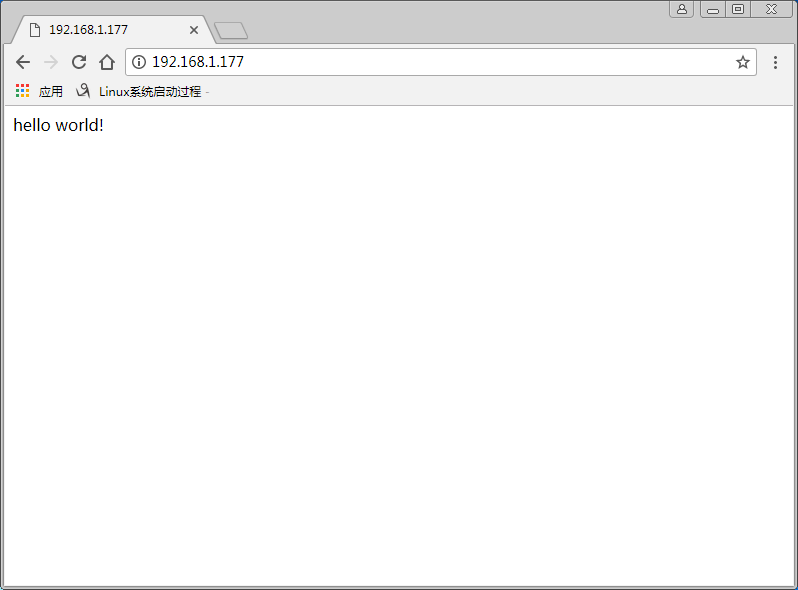
6、使用浏览器访问WEB
在浏览器输入:http://Server_IP
7、查看NGINX版本和安装了那些模块
[root@localhost ~]# nginx -V

nginx version: nginx/1.12.2

built by gcc 4.8.5 20150623 (Red Hat 4.8.5-16) (GCC)

built with OpenSSL 1.0.2k-fips  26 Jan 2017

TLS SNI support enabled

configure arguments: --prefix=/usr/share/nginx --sbin-path=/usr/sbin/nginx --modules-path=/usr/lib64/nginx/modules --conf-path=/etc/nginx/nginx.conf --error-log-path=/var/log/nginx/error.log --http-log-path=/var/log/nginx/access.log --http-client-body-temp-path=/var/lib/nginx/tmp/client_body --http-proxy-temp-path=/var/lib/nginx/tmp/proxy --http-fastcgi-temp-path=/var/lib/nginx/tmp/fastcgi --http-uwsgi-temp-path=/var/lib/nginx/tmp/uwsgi --http-scgi-temp-path=/var/lib/nginx/tmp/scgi --pid-path=/run/nginx.pid --lock-path=/run/lock/subsys/nginx --user=nginx --group=nginx --with-file-aio --with-ipv6 --with-http_auth_request_module --with-http_ssl_module --with-http_v2_module --with-http_realip_module --with-http_addition_module --with-http_xslt_module=dynamic --with-http_image_filter_module=dynamic --with-http_geoip_module=dynamic --with-http_sub_module --with-http_dav_module --with-http_flv_module --with-http_mp4_module --with-http_gunzip_module --with-http_gzip_static_module --with-http_random_index_module --with-http_secure_link_module --with-http_degradation_module --with-http_slice_module --with-http_stub_status_module --with-http_perl_module=dynamic --with-mail=dynamic --with-mail_ssl_module --with-pcre --with-pcre-jit --with-stream=dynamic --with-stream_ssl_module --with-google_perftools_module --with-debug --with-cc-opt='-O2 -g -pipe -Wall -Wp,-D_FORTIFY_SOURCE=2 -fexceptions -fstack-protector-strong --param=ssp-buffer-size=4 -grecord-gcc-switches -specs=/usr/lib/rpm/redhat/redhat-hardened-cc1 -m64 -mtune=generic' --with-ld-opt='-Wl,-z,relro -specs=/usr/lib/rpm/redhat/redhat-hardened-ld -Wl,-E'
安装Nginx到CentOS(YUM)的更多相关文章
- Centos 7下安装nginx,使用yum install nginx,提示没有可用的软件包
Centos 7下安装nginx,使用yum install nginx,提示没有可用的软件包. 18 (flaskApi) [root@67 flaskDemo]# yum -y install n ...
- Docker 实战(二)——centos7镜像安装nginx,将安装nginx的centos容器生成新的镜像,并导出
Docker centos7镜像安装nginx 1.安装docker 使用yum安装docker不再重复:见 Linux常用命令 2.pull centos 1)在docker仓库中搜索centos ...
- 使用nginx代理centos yum 源
我们在安装centos 服务器时,可能会有以下情况: 局域网内有若干台服务器,但是只有一台服务器可以连接外网,其余服务器都不可以连接外网,但通过局域网与外网机器联通. 那么我们再使用 yum 安装软件 ...
- Docker容器安装nginx基本步骤Yum版
首先我们来科普一下nginx: Nginx (engine x) 是一个高性能的HTTP和反向代理web服务器,同时也提供了IMAP/POP3/SMTP服务.Nginx是由伊戈尔·赛索耶夫为俄罗斯访问 ...
- 安装Nginx:通过yum方式
1.配置yum源: 在/etc/yum.repos.d中新建后缀为.repo的文件,此处以nginx.repo为例. 2.更新yum源: yum clean all yum makecache 3 ...
- Ejabberd2:安装和操作指南(centos yum 安装ejabberd)
(1)首先安装EPEL Repository ## RHEL/CentOS 6 32-Bit ## # wget http://download.fedoraproject.org/pub/ ...
- 服务器 CentOS上yum安装Nginx服务
一.更改yum源为网易的源加快速度 vi /etc/yum.repos.d/CentOS-Base.repo 更改内容如下 # CentOS-Base.repo # # This file uses ...
- CentOS 7 yum 安装 Nginx
1.添加Nginx到YUM源 添加CentOS 7 Nginx yum资源库,打开终端,使用以下命令: sudo rpm -Uvh http://nginx.org/packages/centos/7 ...
- CentOS上yum安装Nginx服务
一.更改yum源为网易的源加快速度 vi /etc/yum.repos.d/CentOS-Base.repo更改内容如下 # CentOS-Base.repo # # This file uses a ...
随机推荐
- MySQL 高可用之主从复制
MySQL主从复制简介 Mysql的主从复制方案,都是数据传输的,只不过MySQL无需借助第三方工具,而是自带的同步复制功能,MySQL的主从复制并不是磁盘上文件直接同步,而是将binlog日志发送给 ...
- 详细步骤:手动添加bits/stdc++.h到vs2017
本机环境:win10系统 64位 vs2017 最近码代码时偶然发现了bits/stdc++.h这个头文件(万能头文件),基本上所有的代码只要用了这个头文件就不再写其他头文件了. 看到它就仿佛开启了新 ...
- 请注意安全!你的mongodb已经被黑了!互联网安全生产大过天!
你所不知道的入侵,你的服务器安全吗?你的数据库安全吗? 讲真,也许是我以前一直从事内网应用开发吧,我从来没有想过在互联网上,有那么多扫描器. 10月份的时候,受人委托我做了一个简单的抢单插件,里面有用 ...
- *args 和 **kwargs 的区别
截取百度里的两个答案: 这是Python函数可变参数 args及kwargs *args表示任何多个无名参数,它是一个tuple **kwargs表示关键字参数,它是一个dict 测试代码如下: de ...
- CCF_ 201509-3_模板生成系统
又是一道考验细心和耐心的题,不知道哪里出问题了,一直只有90分 = =! #include<cstdio> #include<iostream> #include<cst ...
- 静态代码块&非静态代码块&构造函数
总结:静态代码块总是最先执行.非静态代码块跟非静态方法一样,跟对象有关.只不过非静态代码块在构造函数之前执行.父类非静态代码块.构造函数执行完毕后(相当于父类对象初始化完成), 才开始执行子类的非静态 ...
- ARTS Week 13
Jan 20, 2020 ~ Jan 26, 2020 Algorithm Problem 141 Linked List Cycle (环形链表) 题目链接 题目描述:给定一个链表,判断链表中是否存 ...
- num12---组合模式
案例描述: 学校下有多个学院,每个学院下有多个专业系. 把学校.院系.专业 全都看成某个组织类型,含有添加add方法,删除remove方法,显示print方法. 如果有新增的院系.专业,新增加对应的 ...
- Git 分支设计规范
概述 这篇文章分享 Git 分支设计规范,目的是提供给研发人员做参考. 规范是死的,人是活的,希望自己定的规范,不要被打脸. 在说 Git 分支规范之前,先说下在系统开发过程中常用的环境. 简称 全称 ...
- 《Head first设计模式》之单例模式
单例模式(书中叫单件模式,个人习惯叫单例)确保一个类只有一个实例,并提供一个全局访问点. 有一些对象我们只需要一个,比方说:线程池.缓存.对话框.处理器偏好设置和注册表的对象等等.事实上,这类对象只能 ...