
V-rep学习笔记:外部函数调用方式
The remote API functions are interacting with V-REP via socket communication in a way that reduces lag and network load to a great extent. The remote API can let one or several external applications interact with V-REP.
A remote API function is called in a similar fashion as a regular API function, however with 2 major differences:
- most remote API functions return a similar value: a return code.
- most remote API functions require two additional argument: the operation mode, and the clientID (identifier returned by the simxStart function)
由于客户端和服务器使用socket套接字进行通信,因此就涉及到网络编程时常见的同步(Sync)/异步(Async),阻塞(Block)/非阻塞(Unblock)等调用方式。The need for an operation mode and a specific return code comes from the fact that the remote API function has to travel via socket communication to the server (V-REP), execute a task, then return to the caller (the client). A naive (or regular) approach would be to have the client send a request, and wait until the server processed the request and replied: in most situations this would take too much time and the lag would penalize the client application. Instead, the remote API lets the user chose the type of operation mode and the way simulation advances by providing four main mechanisms to execute function calls or to control the simulation progress:
- Blocking function calls(a blocking function call is the naive or regular approach)
- Non-blocking function calls
- Data streaming
- Synchronous operation
1. Blocking function calls(阻塞调用)
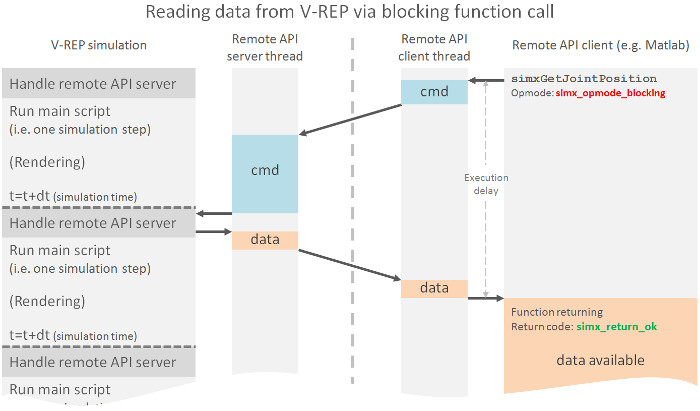
这种方式在调用结果返回之前,当前线程会被挂起。函数只有在得到结果之后才会返回。比如下面代码获取物体句柄,操作模式采用阻塞模式simx_opmode_blocking(A command is sent to the server for execution, and the function waits for the reply from the server)
// Following function (blocking mode) will retrieve an object handle:

if (simxGetObjectHandle(clientID,"myJoint",&jointHandle,simx_opmode_blocking)==simx_return_ok)

{

    // here we have the joint handle in variable jointHandle!

}
下图反映了阻塞调用的流程:
 2. Non-blocking function calls(非阻塞调用)
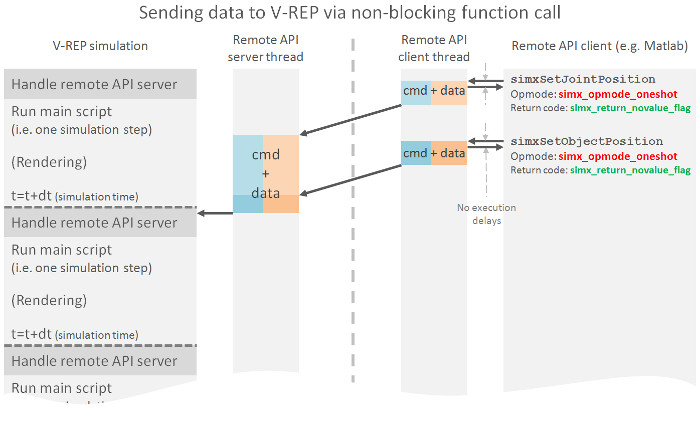
非阻塞指在不能立刻得到结果之前,该函数不会阻塞当前线程,而会立刻返回。非阻塞调用适用于不需要服务端应答的场合(A non-blocking function call is meant for situations when we simply want to send data to V-REP without the need for a reply)。如下面例子,只是调用函数设置关节位置而不需要服务端返回数据,就可以使用非阻塞模式simx_opmode_oneshot。
// Following function (non-blocking mode) will set the position of a joint:

simxSetJointPosition(clientID,jointHandle,jointPosition,simx_opmode_oneshot);
下图反映了非阻塞调用的流程:
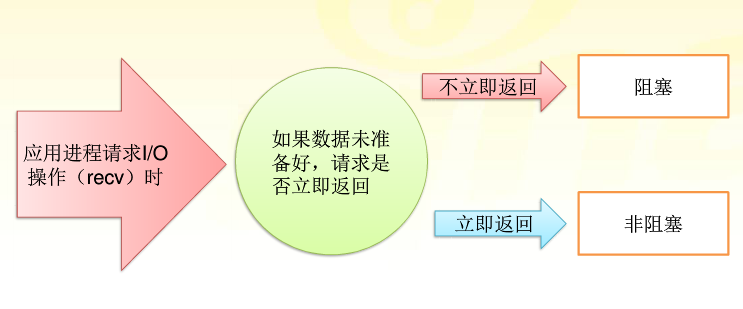
阻塞/非阻塞,是指程序在等待消息时的状态。简单理解为需要做一件事能不能立即得到应答返回。如果不能立即获得返回,需要等待,那就阻塞了;否则就可以理解为非阻塞。详细区别如下图所示:
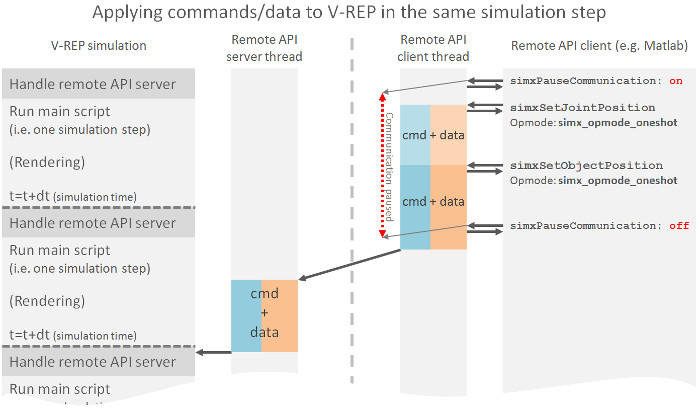
有时为了同时发送多条指令给服务端响应,我们可以先暂停通信。In some situations, it is important to be able to send various data within a same message, in order to have that data also applied at the same time on the server side (e.g. we want the 3 joints of a robot to be applied to its V-REP model in the exact same time, i.e. in the same simulation step). In that case, the user can temporarily halt the communication thread in order to achieve this, as shown in following example:
simxPauseCommunication(clientID,);  //Allows to temporarily halt the communication thread from sending data.

simxSetJointPosition(clientID,joint1Handle,joint1Value,simx_opmode_oneshot);

simxSetJointPosition(clientID,joint2Handle,joint2Value,simx_opmode_oneshot);

simxSetJointPosition(clientID,joint3Handle,joint3Value,simx_opmode_oneshot);

simxPauseCommunication(clientID,);

// Above's 3 joints will be received and set on the V-REP side at the same time
Following diagram illustrates the effect of temporarily halting the communication thread:
3. Data streaming(数据流模式)
这一模式下,客户端可以向服务端发起请求连续的数据流。可以将其看做一种客户与服务端之间的命令/信息订阅模式(也可以类比模拟信号采集卡的连续采样功能:Analog Input在采样过程中每相邻两个采样点的时间相等,采集过程中不停顿,连续不间断的采集数据,直到用户主动停止采集任务)。客户端发起数据流请求及读取的代码如下所示:
// Streaming operation request (subscription) (function returns immediately (non-blocking)):

simxGetJointPosition(clientID,jointHandle,&jointPosition,simx_opmode_streaming);

// The control loop:

while (simxGetConnectionId(clientID)!=-) // while we are connected to the server..

{

    // Fetch the newest joint value from the inbox (func. returns immediately (non-blocking)):

    if (simxGetJointPosition(clientID,jointHandle,&jointPosition,simx_opmode_buffer)==simx_return_ok)

    {

        // here we have the newest joint position in variable jointPosition!

    }

    else

    {

        // once you have enabled data streaming, it will take a few ms until the first value has arrived. So if

        // we landed in this code section, this does not always mean we have an error!!!

    }

}

// Streaming operation is enabled/disabled individually for each command and

// object(s) the command applies to. In above case, only the joint position of

// the joint with handle jointHandle will be streamed.
simx_opmode_streaming: non-blocking mode. Similar to simx_opmode_oneshot, but with the difference that the command will be stored on the server side , continuously executed, and continuously sent back to the client. This mode is often used with "get-functions" (e.g. simxGetJointPosition), where the user requires a specific value constantly.
simx_opmode_buffer: non-blocking mode. No command is sent to the server, but just a reply to a same command, previously executed. This mode is often used in conjunction with the simx_opmode_streaming mode: first, a constant command execution is started with a streaming command, then only command replies fetched.
Following diagram illustrates data streaming:
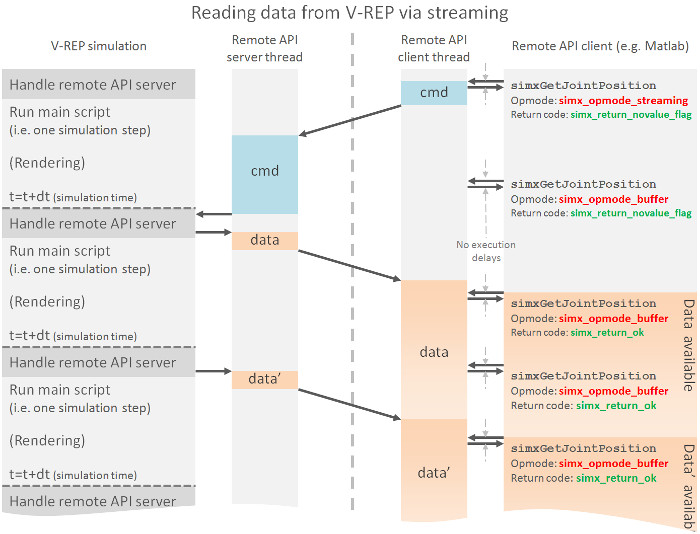
当完成任务后,客户端需要主动发送请求停止数据流(otherwise the server will continue to stream unessesary data and eventually slow down)。使用simx_opmode_discontinue操作模式来停止数据流。simx_opmode_discontinue: non-blocking mode. This mode is used to interrupt streaming commands.
参考:
https://www.zhihu.com/question/19732473
V-rep学习笔记:外部函数调用方式的更多相关文章
- stm32学习笔记——外部中断的使用
stm32学习笔记——外部中断的使用 基本概念 stm32中,每一个GPIO都可以触发一个外部中断,但是,GPIO的中断是以组为一个单位的,同组间的外部中断同一时间只能使用一个.比如说,PA0,PB0 ...
- 树莓派学习笔记—— 源码方式安装opencv
0.前言 本文介绍怎样在树莓派中通过编译源码的方式安装opencv,并通过一个简单的样例说明怎样使用opencv. 很多其它内容请參考--[树莓派学习笔记--索引博文] 1.下载若干依 ...
- Hive 学习笔记(启动方式,内置服务)
一.Hive介绍 Hive是基于Hadoop的一个数据仓库,Hive能够将SQL语句转化为MapReduce任务进行运行. Hive架构图分为以下四部分. 1.用户接口 Hive有三个用户接口: 命令 ...
- Tornado学习笔记(三) 请求方式/状态码
本章我们来学习 Tornado 支持的请求方式 请求方式 Tornado支持任何合法的HTTP请求(GET.POST.PUT.DELETE.HEAD.OPTIONS).你可以非常容易地定义上述任一种方 ...
- Android学习笔记-listview实现方式之BaseAdapter
listview是Android开发中最为常用的组件,这里我们就学习一下用BaseAdapter的方式实现listview, 主布局activity_main.xml是这样的: <LinearL ...
- hibernate学习笔记6--Criteria查询方式、完整小练习(开发步骤)
一.Criteria查询方式没有sql语了,因此更加面向对象一些.Criteria是一种比HQL更面向对象的查询方式:Criteria的创建方式: Criteria c = s.createCrite ...
- Linux学习笔记4——函数调用栈空间的分配与释放
一.函数执行时使用栈空间作为自己的临时栈,3种方式决定编译器清空栈的方式:__stdcall. __fastcall.__cdecl 1.__stdcall表示每个调用者负责清空自己调用的函数的临时栈 ...
- AM335x(TQ335x)学习笔记——使用dtb方式启动内核
老式的u-boot使用ATAGS的方式启动linux内核,本文使用新式的dtb方式启动内核. 我使用的内核是linux-3.17.2版本,下面开始编译内核. (1) 解压内核 [php] view p ...
- Mybatis进阶学习笔记——动态代理方式开发Dao接口、Dao层(推荐第二种)
1.原始方法开发Dao Dao接口 package cn.sm1234.dao; import java.util.List; import cn.sm1234.domain.Customer; pu ...
随机推荐
- PHP获取指定函数定义在哪个文件中及行号
当调试开源的代码时,希望查看某个函数的定义,那么就需要定位其位置.特别是有的项目中,函数会有多个地方都有定义,那么如果我想知道当前调用的这个函数是在哪里定义的,可以用下面这个方法. function ...
- IIS 7.0 SSL 部署指南
一. 生成证书请求 1.进入IIS控制台 进入IIS控制台,并选择服务器的服务器证书设置选项. 2.添加证书请求 进入服务器证书配置页面,并选择“创建证书申请” 3.选择加密服务提供 ...
- 【deep learning学习笔记】注释yusugomori的DA代码 --- dA.h
DA就是“Denoising Autoencoders”的缩写.继续给yusugomori做注释,边注释边学习.看了一些DA的材料,基本上都在前面“转载”了.学习中间总有个疑问:DA和RBM到底啥区别 ...
- FIR滤波原理及verilog设计
FIR(Finite Impulse Response)Filter:有限冲激响应滤波器,又称为非递归线性滤波器. FIR滤波器的冲击响应是一个值为滤波器抽头系数的采样序列,其脉冲响应由有限个采样值构 ...
- Windbg命令学习15(bp bm bu bl bc ba断点)
以下以skinhgy为例,windbg附加运行 1. bp 命令是在某个地址下断点, 可以 bp 0x7783FEB 也可以 bp MyApp!SomeFunction . 对于后者,WinDBG 会 ...
- Sudoku Solver leetcode java
题目: Write a program to solve a Sudoku puzzle by filling the empty cells. Empty cells are indicated b ...
- Dll 导出函数那些破事
经常使用VC6的Dependency查看DLL导出函数的名字,会发现有DLL导出函数的名字有时大不相同,导致不同的原因大多是和编译DLL时候指定DLL导出函数的界定符有关系. VC++支持两种语言:即 ...
- JAVA中如何将一个json形式的字符串转为json对象或对象列表
import java.util.*; import java.text.SimpleDateFormat; import org.json.JSONObject; import org.json.J ...
- Kudu-java数据库简单操作
参考官网:http://kudu.apache.org/docs/kudu_impala_integration.html 参考:https://my.oschina.net/weiqingbin/b ...
- (转)Xen Server删除Local Storage
1. First, you have to determine the Storage-Repository-UUID: xe sr-list -> write down / take note ...