
iOS:自定义导航栏,随着tableView滚动显示和隐藏
自定义导航栏,随着tableView滚动显示和隐藏
一、介绍
自定义导航栏是APP中很常用的一个功能,通过自定义可以灵活的实现动画隐藏和显示效果。虽然处理系统的导航栏也可以实现,但是这个是有弊端的,因为系统导航栏是全局的,在任何一个地方去修改导航栏内部的结构,其他地方都会改变,需要再次去特殊处理,否则很容易出现不可预知的bug。此时,自定义是最好的选择。
二、思想
(1)在控制器将要显示时,隐藏系统的导航栏,显示自定义的导航栏
(2)在控制器将要消失时,显示系统的导航栏,隐藏自定义的导航栏
(3)重写scrollView的代理方法,监测ContentOffst.y偏移,动态控制自定义的导航栏的可见性
三、定义
@interface XYQNavigationBar : UIView

@property (copy , nonatomic)void(^clickLeftItemBlock)();  // click left button block

@property (copy , nonatomic)void(^clickRightItemBlock)(); // click right button block

@property (copy , nonatomic)NSString *title; // title

@property (assign,nonatomic)UIColor  *titleColor; // title color

@property (strong,nonatomic)UIColor  *navBackgroundColor;// navagationBar background color

@property (strong,nonatomic)UIImage  *navBackgroundImage;// navigationBar background image


+(instancetype)createCustomNavigationBar;  //create navigationBar

-(void)showCustomNavigationBar:(BOOL)show; //set navigationBar hide, defalut is NO

-(void)setupBgImageAlpha:(CGFloat)alpha animation:(NSTimeInterval)duration compeleteBlock:(void (^)())compeleteBlock;// navigationBar background image alpha

-(void)setupBgColorAlpha:(CGFloat)alpha animation:(NSTimeInterval)duration compeleteBlock:(void (^)())compeleteBlock;// navigationBar background color alpha

-(void)setLftItemImage:(NSString *)imgName leftItemtitle:(NSString *)leftItemtitle textColor:(UIColor *)color; // navigationBar left  button has title and image

-(void)setRightItemImage:(NSString *)imgName rightItemtitle:(NSString *)rightItemtitle textColor:(UIColor *)color;// navigationBar right  button has title and image

-(void)setLeftItemImage:(NSString *)imgName;  // navigationBar left  button only has image

-(void)setRightItemImage:(NSString *)imgName; // navigationBar right button only has image

@end
四、实现
()创建

- (void)viewDidLoad {

    [super viewDidLoad];

    //init

    self.tableView = [[UITableView alloc] initWithFrame:self.view.bounds];

    self.tableView.dataSource = self;

    self.tableView.delegate = self;

    self.navigationBar = [XYQNavigationBar createCustomNavigationBar];

    //update(此处可以自由改变导航栏的属性值)

    self.navigationBar.title = @"自定义导航栏";

    //block

    __weak typeof(self) weakSelf = self;

    self.navigationBar.clickLeftItemBlock = ^(){

        [weakSelf.navigationController popViewControllerAnimated:YES];

    };

    self.navigationBar.clickRightItemBlock = ^(){

        [weakSelf.navigationController pushViewController:[[SecondViewController alloc] init] animated:YES];

    };

    // add

    [self.view addSubview:self.tableView];

    [self.view addSubview:self.navigationBar];

}

 ()显示

-(void)viewWillAppear:(BOOL)animated{

    [super viewWillAppear:animated];

    //hide system navigationBar

    [self.navigationController setNavigationBarHidden:YES animated:YES];

    //show custom navigationBar

    [self.navigationBar showCustomNavigationBar:YES];

}

 ()隐藏

-(void)viewWillDisappear:(BOOL)animated{

    [super viewWillDisappear:animated];

    //show system navigationBar

    [self.navigationController setNavigationBarHidden:NO animated:YES];

    //hide custom navigationBar

    [self.navigationBar showCustomNavigationBar:NO];

}

 ()监测

#pragma mark - public methods

// animation show or hide navigationbar

-(void)scrollViewDidScroll:(UIScrollView *)scrollView{

    CGFloat offsetY = scrollView.contentOffset.y;

    CGFloat colorOffset = offsetY / 64.0;

    colorOffset = colorOffset >  ?  : colorOffset;

    //method 1 : change backgrundViewImage alpha

    [self.navigationBar setupBgImageAlpha:colorOffset animation:0.4 compeleteBlock:nil];

    //method 2 : change backgrundViewColor alpha

    //[self.navigationBar setupBgColorAlpha:colorOffset animation:0.4 compeleteBlock:nil];

}
五、效果
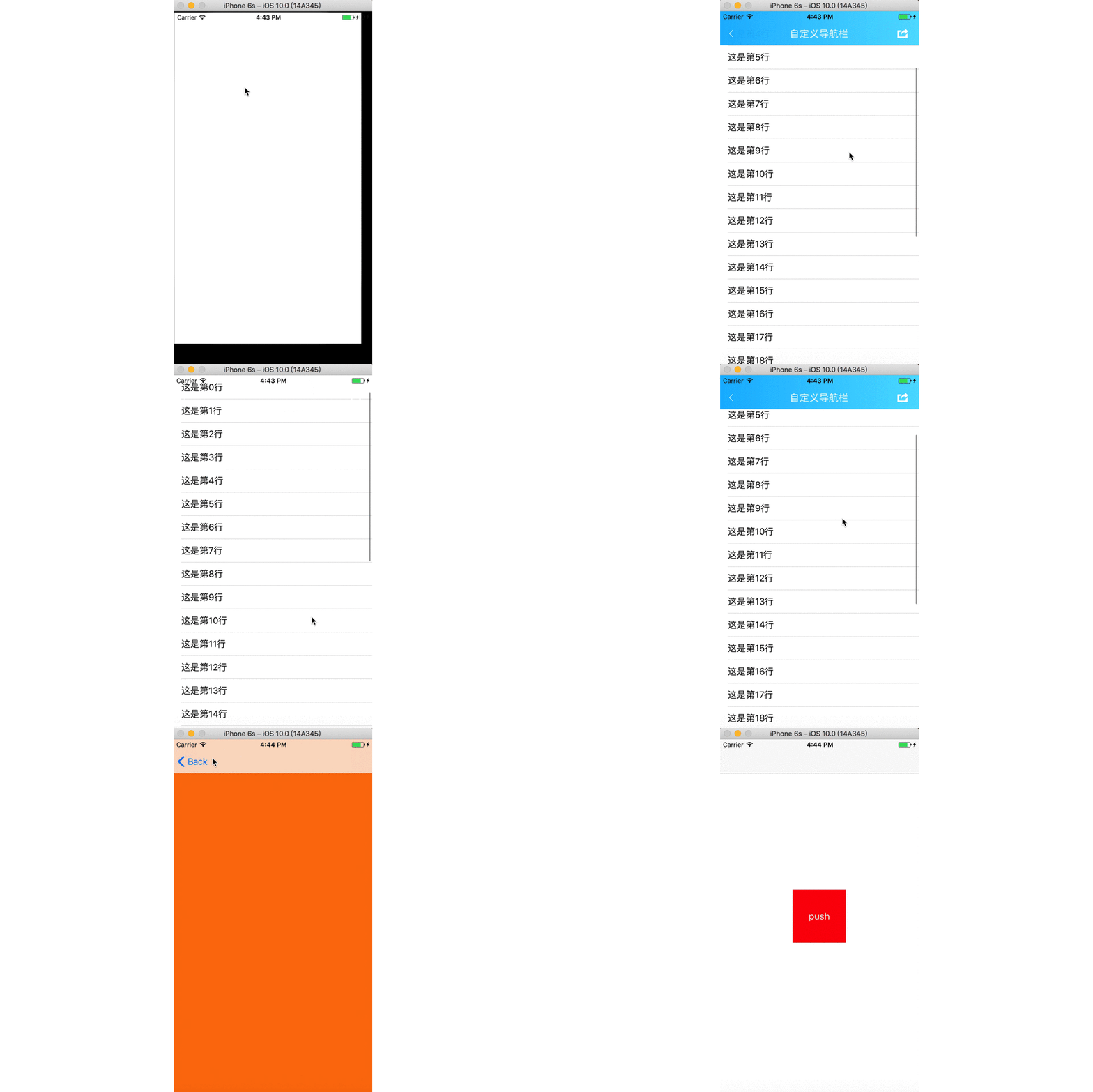
六、下载
github:https://github.com/xiayuanquan/XYQNavigationBar.git
iOS:自定义导航栏,随着tableView滚动显示和隐藏的更多相关文章
- iOS 自定义导航栏笔记
一.UINavigationBar的结构 导航栏几乎是每个页面都会碰到的问题,一般两种处理方式:1.隐藏掉不显示 2.自定义 1. 添加导航栏 TestViewController * mainVC ...
- iOS 自定义导航栏 和状态栏
一.更改状态栏颜色 (StatusBar) 就是比如导航栏是红色的状态栏是绿色的. 要实现这样的效果其实很简单,就是添加一个背景view. 简单的实现过程如下: 1 // 设置导航颜色 可用 2 [s ...
- ios 自定义导航栏,开启侧滑返回手势
自定义一个常用ListViewController .h文件 #import <UIKit/UIKit.h> @interface ListViewController : UIViewC ...
- IOS 自定义导航栏背景
//- (void)setBackgroundImage:(UIImage *)backgroundImage forBarMetrics:(UIBarMetrics)barMetrics NS_AV ...
- iOS 自定义导航栏
参考链接:https://blog.csdn.net/huanglinxiao/article/details/100537988 demo下载地址:https://github.com/huangx ...
- iOS 11 导航栏 item 偏移问题 和 Swift 下 UIButton 设置 title、image 显示问题
html,body,div,span,applet,object,iframe,h1,h2,h3,h4,h5,h6,p,blockquote,pre,a,abbr,acronym,address,bi ...
- [RN] React Native 自定义导航栏随滚动渐变
React Native 自定义导航栏随滚动渐变 实现效果预览: 代码实现: 1.定义导航栏 NavPage.js import React, {Component} from 'react'; im ...
- iOS个人中心渐变动画、微信对话框、标签选择器、自定义导航栏、短信验证输入框等源码
iOS精选源码 简单的个人中心页面-自定义导航栏并予以渐变动画 程序员取悦女票的正确姿势---Tip1(iOS美容篇) iOS 前台重启应用和清除角标的问题 微信原生提醒对话框3.0 JHLikeBu ...
- 微信小程序自定义导航栏组件,完美适配所有手机,可实现各种功能和情况
背景 在做小程序时,关于默认导航栏,我们遇到了以下的问题: Android.IOS 手机对于页面 title 的展示不一致,安卓 title 的显示不居中 页面的 title 只支持纯文本级别的样式控 ...
随机推荐
- RN Android全面屏适配
像现在市面上新出的手机,例如华为P30 pro,小米9,iPhone XS MAX,屏占比都惊人的达到90%以上,这些手机具备了以下几个特点 大,屏占比高,长宽比都不再是16:9,都达到了19.5:9 ...
- sublime安装package control 的方法
1.安装sublime3后,点击菜单 view>show console,复制以下代码按回车即可,安装时稍微有些卡,需要耐心等待. import urllib.request,os; pf = ...
- 多线程学习笔记六之并发工具类CountDownLatch和CyclicBarrier
目录 简介 CountDownLatch 示例 实现分析 CountDownLatch与Thread.join() CyclicBarrier 实现分析 CountDownLatch和CyclicBa ...
- IO读 BufferedReader+FileReader
private static final String FILENAME = "c:\\temp\\in.txt"; public static void main(String[ ...
- jquery 下拉列表选择值
选择下拉列表值样例方式 $("#updateAppName").get(0).selectedIndex = 0; $("#updateAppName").ge ...
- 任何一个大于1的自然数n,总可以拆分成若干个小于n的自然数之和。
任何一个大于1的自然数n,总可以拆分成若干个小于n的自然数之和. 当n=7共14种拆分方法: 7=1+1+1+1+1+1+1 7=1+1+1+1+1+2 7=1+1+1+1+3 7=1+1+1+2+2 ...
- 一些收集的MikroTik RouterOS破解版虚拟机VMware
会不定期更新,也许后续自己来做,现在是收集.持续关注这个分享链接即可. 链接:https://pan.baidu.com/s/1j7ciesPm1yAgCJ26dLJ8sg 密码:i64w
- excel宏整理
工作以后发现excel很强大,用好excel已经成功工作中很重要的一部分内容,最近写了一些宏, 整理如下: 根据excel生成sql脚本的sc_template Sub GenSCTemplateFi ...
- STM32F103 TIM3定时器初始化程序
//TIM3 分频 #define TIM3_DIV1 (1-1) #define TIM3_DIV18 (18-1) #define TIM3_DIV72 (72-1) //************ ...
- ASP.NET Web API实践系列07,获取数据, 使用Ninject实现依赖倒置,使用Knockout实现页面元素和视图模型的双向绑定
本篇接着上一篇"ASP.NET Web API实践系列06, 在ASP.NET MVC 4 基础上增加使用ASP.NET WEB API",尝试获取数据. 在Models文件夹下创 ...