
防火墙 Firewalld
RHEL7支持的防火墙:
IPTABLES
IP6TABLES
FIREWALL
EBTABLES
命令模式:
firewall-cmd
图形化界面:
firewall-config
Firewall的区域zone:
Drop 任何流入网络的包都被丢弃,并且不给出任何响应
Block 任何进入的网络都被拒绝,会给出响应。
Public 系统默认zone,允许指定的规则。
External 用在路由器等启用伪装的外部网络
Dmz 允许隔离区dmz中的电脑有限地被外界网络访问
Work 工作网络,允许受信任的计算机被限制的进入连接,类似workgroup
Home 家庭网络,同上,类似homegroup
Internal 内部网络,同上,针对所有互联网用户。
Trusted 允许所有网络连接。
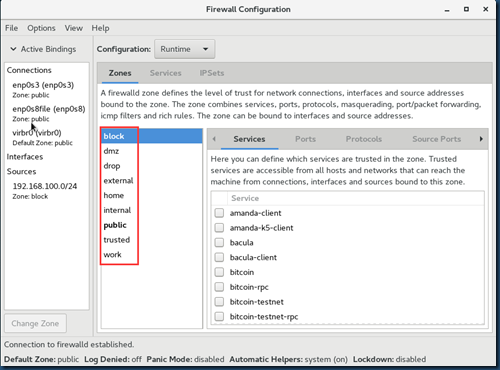
一些常用的基本操作命令
#systemctl state/status/start/stop firewalld
#systemctl mask iptables ---RHEL7中建议使用firewalld,把其它三个防火墙mask掉
#systemctl mask ip6tables
#systemctl mask ebtables
#firewall-cmd --help
#firewall-cmd --list-all --列出默认zone-public中的防火墙规则
|
[root@rhel1 ~]# firewall-cmd --list-all |
#firewall-cmd --get-active-zones --列出活动有zone,也就是配置过防火墙策略的zone
|
[root@rhel1 ~]# firewall-cmd --get-active-zones |
#firewall-cmd --zone=block --add-source=192.168.100.2 --来自这个IP的数据包全部被拒绝了。
|
从RHEL2客户机ping RHEL1测试: [root@rhel2 ~]# ping 192.168.100.1 |
# firewall-cmd --zone=block --remove-source=192.168.100.2 --删除防火墙策略
# firewall-cmd --zone=drop --add-source=192.168.100.2 --来自source网络的数据包全部被丢弃了。从rhel2 ping rhel1 测试时,没任何提示。从这可以看出block和drob的区别。生产环境一般用drop,就是直接丢弃数据包,不返回任何提示,这样更安全。
#firewall-cmd --zone=work --list-all --列出指定zone中已配置的防火墙规则
|
[root@rhel1 ~]# firewall-cmd --zone=block --list-all |
#firewall-cmd --get-default-zone --查看默认zone
|
[root@rhel1 ~]# firewall-cmd --get-default-zone |
#firewall-cmd --set-default-zone=public --设置默认zone,添加防火墙策略时,如果不指定zone参数,则默认添加到public区域中
#firewall-cmd --add-service=http --添加服务
#firewall-cmd --remove-service=http --删除服务
#firewall-cmd --add-port=8080/tcp --添加端口
#firewall-cmd --remove-port=8080/tcp --删除端口
#firewall-cmd --add-source=192.168.100.0/24 --添加源地址
#firewall-cmd --remove-source=192.168.100.0/24
#firewall-cmd --add-icmp-block=echo-request --添加echo-request屏蔽
#firewall-cmd --remove-icmp-block=echo-request
#firewall-cmd --zone=work --add-service=http ---指定zone添加服务
#firewall-cmd --permanent --zone=work --add-service=http --加permanent参数,表示永久生效,即,将防火墙策略写入到配置文件/etc/firewalld下。否则重启防火墙或重启服务器之后,防火墙策略就不生效了。
#firewall-cmd –reload --重读配置文件
# firewall-cmd --get-zone-of-interface=enp0s3 --查看指定接口的Zone信息
public
#firewall-cmd --zone=public --list-interfaces --查看指定级别的接口
enp0s3
# firewall-cmd --zone=public --list-all --查看指定zone的所有信息
# firewall-cmd --zone=public --add-interface=eth0 --添加某接口到指定zone
===============
配置public zone端口转发
# firewall-cmd --zone=public --add-masquerade --打开端口转发
# firewall-cmd --zone=public --add-forward-port=port=12345:proto=tcp:toport=80 --将tcp12345转发到80端口
转发 22 端口数据至另一个 ip 的相同端口上
# firewall-cmd --zone=public --add-forward-port=port=22:proto=tcp:toaddr=192.168.1.100
转发 22 端口数据至另一ip的 2055 端口上
# firewall-cmd --zone=public --add-forward-port=port=22:proto=tcp:toport=2055:toaddr=192.168.1.100
富规则端口转发
把80端口转向8899:
# firewall-cmd –permanent --add-rich-rule="rule family="ipv4" forward-port port="80" protocol="tcp" to-port="8899""
#firewall-cmd --reload
其它富规则例子(拒绝192.168.100.111通过ssh方式连接进来):
[root@localhost ~]# firewall-cmd --permanent --add-rich-rule="rule family=ipv4 source address=192.168.100.111/24 service name=ssh reject"

success

[root@localhost ~]# firewall-cmd --list-all

public (active)

  target: default

  icmp-block-inversion: no

  interfaces: enp0s3

  sources:

  services: ssh dhcpv6-client

  ports:

  protocols:

  masquerade: no

  forward-ports:

  source-ports:

  icmp-blocks:

  rich rules:

[root@localhost ~]# firewall-cmd --reload

success

[root@localhost ~]# firewall-cmd --list-all

public (active)

  target: default

  icmp-block-inversion: no

  interfaces: enp0s3

  sources:

  services: ssh dhcpv6-client

  ports:

  protocols:

  masquerade: no

  forward-ports:

  source-ports:

  icmp-blocks:

  rich rules:

        rule family="ipv4" source address="192.168.100.111/24" service name="ssh" reject

[root@localhost ~]#
firewall-cmd --permanent --add-rich-rule="这里面的内容也可以不加引号,系统会自动添加引号“
防火墙 Firewalld的更多相关文章
- Centos 7防火墙firewalld开放80端口(转)
开启80端口 firewall-cmd --zone=public --add-port=80/tcp --permanent 出现success表明添加成功 命令含义: --zone #作用域 -- ...
- fedora/centos7防火墙FirewallD详解
1 使用 FirewallD 构建动态防火墙 1.1 “守护进程” 1.2 静态防火墙(system-config-firewall/lokkit) 1.3 使用 iptables 和 ip6tabl ...
- 第一篇:动态防火墙firewalld和静态防火墙iptables
动态防火墙firewalld firewalld提供了一个动态管理的防火墙,它支持网络(network)/防火墙区域(firewall zones )来定义网络连接( network connecti ...
- 防火墙firewalld的基础操作
防火墙Firewalld.iptables 1.systemctl模式 systemctl status firewalld #查看状态 2 systemctl start firewalld #启动 ...
- centos 7.0 修改ssh默认连接22端口 和 添加防火墙firewalld 通过端口
首先 先做的就是 修改ssh的默认端口22 需要修改文件 /etc/ssh/sshd_config 使用命令 vi /etc/ssh/sshd_config [root@localhost ~]# v ...
- Centos 7防火墙firewalld开放80端口
开启80端口 1.firewall-cmd --zone=public --add-port=80/tcp --permanent 出现success表明添加成功 命令含义: --zone #作用域 ...
- linux 防火墙--firewalld学习
firewalld是centos7默认的防火墙,相比于iptables重要的优势: 1 支持动态更新: 2 不用重启服务: 同时增加了防火墙的“zone”概念,具体差异没做过多了解,这篇文章只记录fi ...
- 【Centos7】5分钟理解防火墙firewalld
Centos7中默认将原来的防火墙iptables升级为了firewalld,firewalld跟iptables比起来至少有两大好处: 1.firewalld可以动态修改单条规则,而不需要像ipta ...
- Centos 7 防火墙firewalld命令
今天自己在Hyper-v下搭建三台Linux服务器集群,用于学习ELKstack(即大数据日志解决技术栈Elasticsearch,Logstash,Kibana的简称),下载的Linux版本为cen ...
- CentOS7 防火墙firewalld详细操作
1.firewalld的基本使用 启动: systemctl start firewalld 查看状态: systemctl status firewalld 停止: systemctl disab ...
随机推荐
- 【BZOJ】【3673】可持久化并查集 & 【3674】可持久化并查集加强版
可持久化并查集 Orz hzwer & zyf 呃学习了一下可持久化并查集的姿势……其实并查集就是一个fa数组(可能还要带一个size或rank数组),那么我们对并查集可持久化其实就是实现一个 ...
- (八十七)AutoLayout的简单介绍与实例
AutoLayout是继AutoResizing之后的一种自己主动布局方法.攻克了AutoResizing无法处理控件间相互关系的问题. AutoLayout在storyboard中通过底部工具条设置 ...
- Tomcat访问(access)日志配置
在tomcat的access中打印出请求的情况可以帮助我们分析问题,通常比较关注的有访问IP.线程号.访问url.返回状态码.访问时间.持续时间. 最近在跟一个图片请求超时的问题,需要在项目的acce ...
- java正则校验,密码必须由字母和数字组成
一个匹配数字和字母密码的正则表达式 2011 年 12 月 14 日 | Filed under: 正则表达式 and tagged with: 密码 , 正则表达式 , 零宽断言 一个用户注册功能的 ...
- windows下mysql忘记root密码的解决办法
今天早上 一朋友说自己的mysql 忘记root密码了 让我帮忙给看看,因为没有接触过mysql 所以从网上找了一下信息经我亲身实践 已经成功!mysql版本是5.1以下是从网上找的信息: 1. 首 ...
- 使用numba加速python程序
前面说过使用Cython来加速python程序的运行速度,但是相对来说程序改动较大,这次就说一种简单的方式来加速python计算速度的方法,就是使用numba库来进行,numba库可以使用JIT技术即 ...
- 左手坐标系和右手坐标系 ZZ
今天记录一下一些基本的数学知识,左手坐标系和右手坐标系.这些对于搞图像开发或者游戏开发的朋友来说,应该是很基础的东西,不过对于大部分人来说还是比较陌生的知识.之所以看这方面资料主要是因为在使用Andr ...
- 【GRPC】GRPC-负载均衡
GRPC-负载均衡 grpc nginx_百度搜索 grpc(1):Centos 安装java的grpc服务,使用haproxy进行负载均衡,nginx不支持 - freewebsys的专栏 - CS ...
- GridViewColumn.CellTemplate
<GridViewColumn Header="Sig" Width="210"> <GridViewColumn.CellTemplate& ...
- thinkphp5在URL地址里隐藏模块名
新的Thinkphp5的路由功能很强大,完全可以自定义以满足自己的要求 ThinkPHP5.0的路由规则如下:http://serverName/index.php/module/controll ...