
微信小程序——自定义导航栏
微信头部导航栏可能通过json配置:
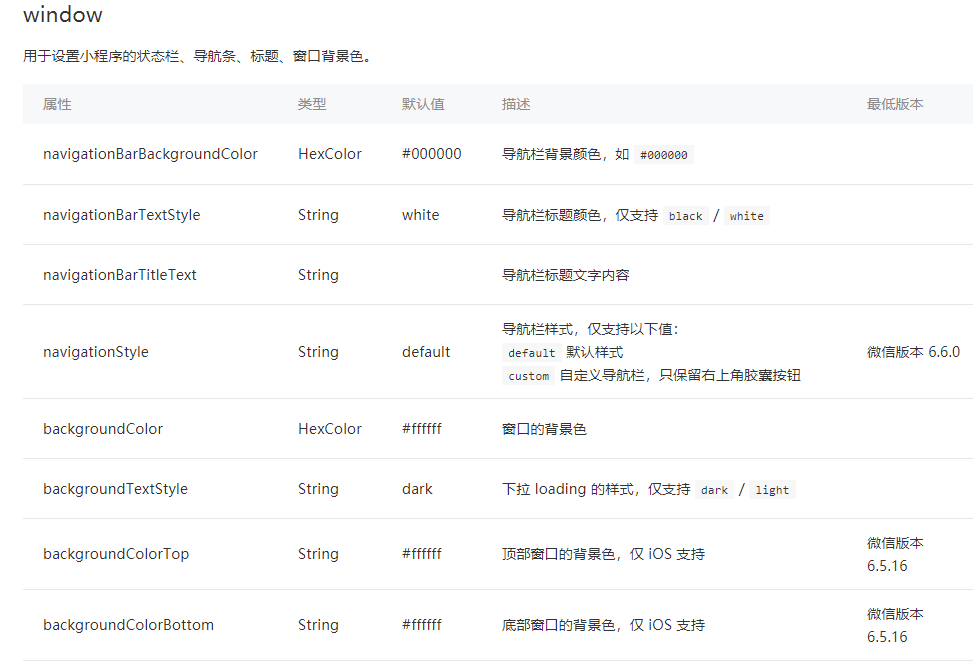
但是有时候我们项目需求可能需要自定义头部导航栏,如下图所示:
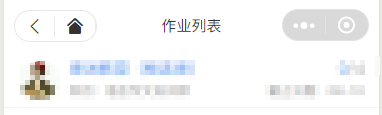
现在具体说一下实现步骤及使用方法:
步骤:
1.在 app.json 里面把 "navigationStyle" 设置为 "custom"
这样子之后就只会保留右上角胶囊按钮了。

2.计算相关值
因为在不同的手机型号头部那条栏目高度可能不一致,所以为了我们适配更多型号,我们需要计算3个值:
如下图:

1. 整个导航栏的高度;
2. 胶囊按钮与顶部的距离;
3. 胶囊按钮与右侧的距离。
小程序可以通过 wx.getMenuButtonBoundingClientRect() 获取胶囊按钮的信息 和 wx.getSystemInfo() 获取设备信息。
如下图:

通过这些信息我们可以计算出上面说的3个值:
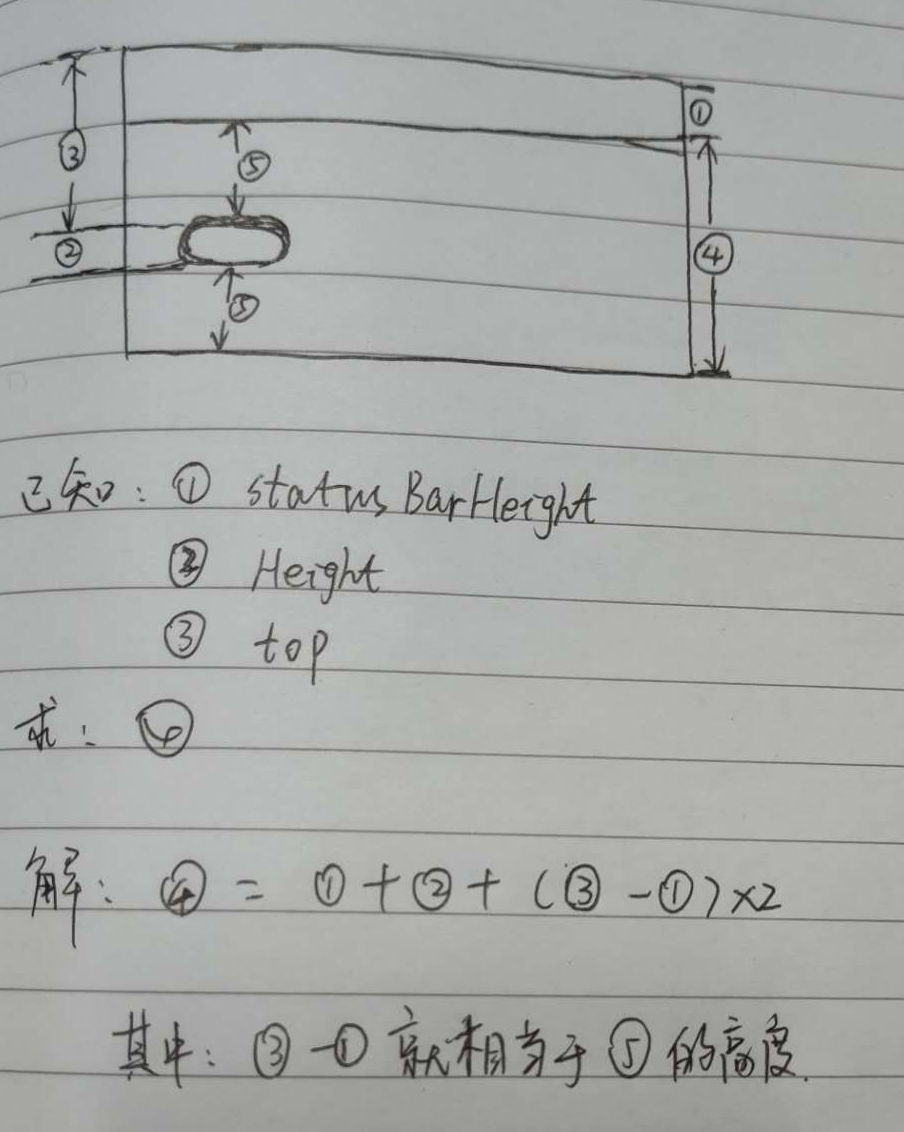
1. 整个导航栏高度 = statausBarHeight + height + (top-statausBarHeight )*2;
2. 胶囊按钮与顶部的距离 = top;
3.胶囊按钮与右侧的距离 = windowWidth - right。
关于第1步中,为啥要乘以2的原因,请看灵魂画手般的我画的图纸:
App.js 代码如下:
App({

  globalData: {

  },

  onLaunch: function () {

    let menuButtonObject = wx.getMenuButtonBoundingClientRect();

    wx.getSystemInfo({

      success: res => {

        let statusBarHeight = res.statusBarHeight,

          navTop = menuButtonObject.top,//胶囊按钮与顶部的距离

          navHeight = statusBarHeight + menuButtonObject.height + (menuButtonObject.top - statusBarHeight)*2;//导航高度

        this.globalData.navHeight = navHeight;

        this.globalData.navTop = navTop;

        this.globalData.windowHeight = res.windowHeight;

      },

      fail(err) {

        console.log(err);

      }

    })

  }

})
3.因为这个头部导航是公共的,所以我们最好把它设置成一个组件,命名为navbar

index.wxml:
<view class="navbar custom-class" style='height:{{navHeight}}px;background-color:{{bgColor}}'>

  <view wx:if="{{showNav}}" class="navbar-action-wrap navbar-action-group row item-center" style='top:{{navTop}}px;background-color:rgba(255,255,255,.6)'>

      <ss-icon name="back" color="{{iconColor}}" size="15px" block="{{true}}" class="navbar-action_item" bind:click="_navBack"></ss-icon>

      <ss-icon name="index" color="{{iconColor}}" size="15px" block="{{true}}" class="navbar-action_item last" bind:click="_toIndex"></ss-icon>

  </view>

  <view class='navbar-title' style='top:{{navTop}}px'>

    {{pageName}}

  </view>

</view>
index.js:
// components/navbar/index.js

const App = getApp();

Component({

  options: {

    addGlobalClass: true,

  },

  /**

   * 组件的属性列表

   */

  properties: {

    pageName:String,

    showNav:{

      type:Boolean,

      value:true

    },

    showHome: {

      type: Boolean,

      value: true

    }

  },

  /**

   * 组件的初始数据

   */

  data: {

  },

  lifetimes: {

    attached: function () {

      this.setData({

        navH: App.globalData.navHeight

      })

     }

  },

  /**

   * 组件的方法列表

   */

  methods: {

    //回退

    navBack: function () {

        wx.navigateBack({

          delta: 1

        })

    },

    //回主页

    toIndex: function () {

      wx.navigateTo({

        url: '/pages/admin/home/index/index'

      })

    },

  }

})
index.wxss:
/* components/navbar/index.wxss */

.navbar {

  width: 100%;

  overflow: hidden;

  position: relative;

  top:;

  left:;

  z-index:;

  flex-shrink:;

}

.navbar-title {

  width: 100%;

  box-sizing: border-box;

  padding-left: 115px;

  padding-right: 115px;

  height: 32px;

  line-height: 32px;

  text-align: center;

  position: absolute;

  left:;

  z-index:;

  color: #333;

  font-size: 16px;

  font-weight: bold;

  text-overflow: ellipsis;

  overflow: hidden;

  white-space: nowrap;

}

.navbar-action-wrap {

  display: -webkit-flex;

  display: flex;

  -webkit-box-align: center;

  -ms-flex-align: center;

  -webkit-align-items: center;

  align-items: center;

  position: absolute;

  left: 10px;

  z-index:;

  line-height:;

  padding-top: 4px;

  padding-bottom: 4px;

}

.navbar-action-group {

  border: 1px solid #f0f0f0;

  border-radius: 20px;

  overflow: hidden;

}

.navbar-action_item {

  padding: 3px 0;

  color: #333;

}

.navbar-action-group .navbar-action_item {

  border-right: 1px solid #f0f0f0;

  padding: 3px 14px;

}

.navbar-action-group .last {

  border-right: none;

}
index.json:
{

  "component": true,

  "usingComponents": {

    "ss-icon": "../icon/index"

  }

}
ss-icon 是我自定义的一个 icon 组件,点击查看。 如果你没有这个组件,可以在我使用<ss-icon></ss-icon>的地方换成<view></view>组件,然后里面放入你的图标就可以了。
对于组件不太明白的,可以看下微信小程序组件相关组件的介绍。
组件已创建完毕,现在说下该组件的使用方法:
假设我们需要在index.wxml中需要调用这个组件,
1.在index.json中引用该组件:
{

  "usingComponents": {

    "navbar": "/components/navbar/index"

  }

}
2.在index.wxml中使用该组件:
<view class='view-page'>

  <navbar page-name="你当前页面的名字"></navbar>

  <view class='page-content'>

    <!--这里放你的内容-->

  </view>

</view>
最后的结果如下图所示:

3.参数说明
| 参数 | 说明 | 类型 | 默认值 |
| page-name | 当前页面名称 | String | -- |
| show-nav | 是否显示左侧图标按钮 | Boolean | true |
| bg-color | 导航背景颜色 | String | #fff |
| icon-color | 左侧图标颜色 | String | #000 |
| custom-class | 导航样式 |
完整代码git地址:微信小程序自定义导航栏
微信小程序——自定义导航栏的更多相关文章
- 微信小程序自定义导航栏组件,完美适配所有手机,可实现各种功能和情况
背景 在做小程序时,关于默认导航栏,我们遇到了以下的问题: Android.IOS 手机对于页面 title 的展示不一致,安卓 title 的显示不居中 页面的 title 只支持纯文本级别的样式控 ...
- 微信小程序自定义导航栏
微信小程序需要自定义导航栏,特别是左上角的自定义设置,可以设置返回按钮,菜单按钮,配置如下: 1.在app.json的window属性中增加: navigationStyle:custom 顶部导航栏 ...
- 微信小程序自定义导航栏组件
1.首先,要在json文件中设置为自定义的形式 "navigationStyle": "custom" 2.计算相关值 导航栏分为状态栏和标题栏,只要能算出每台 ...
- 微信小程序 - 自定义导航栏(提示)
点击下载: 自定义导航栏示例
- 获取不同机型微信小程序状态栏+导航栏高度
获取不同机型微信小程序状态栏+导航栏高度 一. 前言 很多时候我们开发微信小程序,都需要先知道状态栏和导航栏的高度,才能去做其他功能 二. 获取微信小程序状态栏高度 用wx.getSystemInfo ...
- 微信小程序 自定义导航组件 nav头部 全面屏设计
nav-dynamic 微信小程序自定义nav头部组件:适配全面屏设计: 实现功能 初始进入页面时,展示初始状态下的nav样式: 页面滚动时,监听页面滚动事件,展示滚动状态下的nav样式: 根据配置字 ...
- Taro 小程序 自定义导航栏
在小程序中,有的页面需求可能需要我们做一个自定义的导航栏, 今天就来踩一踩坑 首先需要在app.js 中给全局的导航栏隐藏, // app.js window: { navigationStyle: ...
- 微信小程序底部导航栏部署
在微信小程序开发app.json(app.json它是定义全局页面) 只是用来部署微信底部的图标,最多不能大于五个 "tabBar":{ "selectedColor&q ...
- 微信小程序底部导航栏(tabbar)
在app.json处设置“tabBar”,例子如下: { "pages": [ "pages/index/index", "pages/pages1/ ...
随机推荐
- HAproxy通过X-Forwarded-For 获取代理的上一层用户真实IP地址
现在有一个场景就是我们的haproxy作为反向代理,但是我们接了一个抗DDoS设备.所以现在haproxy记录的IP都是抗DDoS设备的IP地址,获取不到用户的真实IP 这样,我们在haproxy 上 ...
- 查看Android内存的8中方法
方法一: 通过手机上Running services的Activity查看,可以通过Setting->Applications->Running services进. 关于Running ...
- nodejs中的框架介绍
Sequelize 关系型数据库对象模型映射框架 mongoose 非关系型数据库文档模型映射框架
- DBeaver利用方式简介
当攻击者能够进入内网,同时发现某台服务器装有弱口令的数据库时,除了在console中查看数据库信息外, 还可以利用第三方工具进行数据库读取,本例中使用DBeaver进行查看. 1. 下载DBeaver ...
- mysql++ Query
mysqlpp:: Query类存储了Connection的指针,可以用它进行SQL语句的增删改查. 连上数据库后,使用mysqlpp::Connection::query()获取Query对象 Qu ...
- DIOCP3-关于TIOCPConsole和编码解码器
TIOCPConsole是继承至TIocpTcpServer,做了管理和调用编码和解码器器的功能.可以通过向他注册编码和解码器可以忽略粘包的问题. 这样如果TIOCPConsole客户端必须按照一 ...
- 【web技术】html特效代码(一)
小续 还记得当初和八哥一起制作百家成员chm电子书的时候,各种特效啊,这里收集了一些个人比较喜欢的html特效,看个人喜欢了,不喜勿喷啊 html特效代码(一) html特效代码(二) 3D相册代码 ...
- 在IIS服务器上屏蔽IP的访问
今天就跟大家分享一下在IIS服务器上如何屏蔽特定IP的访问,希望对大家有所帮助. 第一种方法:通过iis中的ip地址和域名限制. 此方法简单有效,建议使用 点击网站--右键属性--目录安全性--IP地 ...
- ubuntu mysql 远程连接问题解决方法
在shell下输入mysql -uroot -p是可以登录的,所以问题应该是mysql不允许root用户远程登录的问题,于是通过输入下面命令: GRANT ALL PRIVILEGES ON *.* ...
- 基于jQuery实现汉字转换成拼音代码
基于jQuery实现汉字转换成拼音代码.这是一款基于jQuery.Hz2Py.js插件实现的汉字转拼音特效.效果图如下: 在线预览 源码下载 实现的代码. html代码: <br /> ...