
Selenium FF WebDriver 加载firebug 和设置代理
首先这次使用的webDriver for Firefox的
由于项目的原因,需要在测试的时候加载Firebug和使用vpn,加载代理
Firefox 加载代理,可以从FF菜单上看,代理分为好几种

我这里使用的是type 为2 的情况
FirefoxProfile profile = new FirefoxProfile();

        profile.setPreference("network.proxy.type", 2);

        profile.setPreference("network.proxy.autoconfig_url", "http://proxy.myweb.com:8083"); //自动代理配置

WebDriver driver = new FirefoxDriver(profile);
如果type 为1 ,需要这么设置
FirefoxProfile profile = new FirefoxProfile();

        profile.setPreference("network.proxy.type", 1);

        profile.setPreference("network.proxy.http", "proxy.domain.example.com");

        profile.setPreference("network.proxy.http_port", 8080);

        profile.setPreference("network.proxy.ssl", "proxy.domain.example.com");

        profile.setPreference("network.proxy.ssl_port", 8080);

        profile.setPreference("network.proxy.ftp", "proxy.domain.example.com");

        profile.setPreference("network.proxy.ftp_port", 8080);

        profile.setPreference("network.proxy.socks", "proxy.domain.example.com");

        profile.setPreference("network.proxy.socks_port", 8080);

WebDriver driver = new FirefoxDriver(profile);
public class sfLogin {

    static String company="autoPM2CandU";

    static String user="athompson";

    static String password="pwd";

    public static void main(String[] args) {

        // TODO Auto-generated method stub

        WindowsUtils.tryToKillByName("firefox.exe");

        WindowsUtils.getProgramFilesPath();

        WebDriver driver=DriverFactory.getFirefoxDriver();

        driver.get("https://qaautocand.successfactors.com/login");

        driver.manage().window().maximize();

        driver.manage().timeouts().implicitlyWait(60, TimeUnit.SECONDS);

        driver.manage().timeouts().pageLoadTimeout(60, TimeUnit.SECONDS);

        WebElement comp=driver.findElement(By.xpath("//*[@id='company']"));

        Actions actions =new Actions(driver);

        actions.sendKeys(Keys.F12).perform();//.keyUp(Keys.F12)

        WebElement username=driver.findElement(By.xpath("//*[@id='username']"));

        WebElement passwordHints=driver.findElement(By.xpath("//*[@id='passwordHints']"));

        passwordHints.click();

        WebElement pw=driver.findElement(By.xpath("//*[@id='password']"));

        WebElement login=driver.findElement(By.xpath("//*[@id='loginSubmitBtn']"));

        comp.sendKeys(company);

        username.sendKeys(user);

        passwordHints.click();

        pw.sendKeys(password);

        login.submit();

        WebElement home=driver.findElement(By.xpath("//*[@id='8:label']"));

        actions.moveToElement(home).click().build().perform();

        WebElement performance=driver.findElement(By.xpath("//*[@id='10:2']"));

        performance.click();

        WebElement endBox=driver.findElement(By.xpath("//*[@id='tablist']/tbody/tr[2]/td/div/div/div/table/tbody/tr[3]/td[2]/a"));

        endBox.click();

        WebElement auditTrailButton =driver.findElement(By.xpath("//*[@id='form_list_table']/tbody/tr/td[10]/a[2]/img"));

        auditTrailButton.click();

        WebElement action =driver.findElement(By.xpath("//*[@id='contentBodyTable']/tbody/tr[2]/td/div[2]/div/div[2]/div/div/div[2]/div/table/tbody/tr/td/table[2]/tbody/tr[2]/td/table/tbody/tr[4]/td/table/tbody/tr[4]/td[9]"));

        System.out.println(action.getText());

    }

}

如果需要加载firebug
    File file=new File("d:\\firebug-2.0.4-fx.xpi");//设置Firebug路径

        FirefoxProfile profile = new FirefoxProfile();

        profile.setPreference("network.proxy.type", 1);

        profile.setPreference("network.proxy.http", "proxy.domain.example.com");

        profile.setPreference("network.proxy.http_port", 8080);

        profile.setPreference("network.proxy.ssl", "proxy.domain.example.com");

        profile.setPreference("network.proxy.ssl_port", 8080);

        profile.setPreference("network.proxy.ftp", "proxy.domain.example.com");

        profile.setPreference("network.proxy.ftp_port", 8080);

        profile.setPreference("network.proxy.socks", "proxy.domain.example.com");

        profile.setPreference("network.proxy.socks_port", 8080);

        try {

            profile.addExtension(file);

            profile.setPreference("extensions.firebug.currentVersion", "2.0.4");//设置firebug 版本

        } catch (IOException e3) {

            // TODO Auto-generated catch block

            e3.printStackTrace();

        }

        WebDriver driver = new FirefoxDriver(profile);

        return driver;
如果需要在运行时候firebug执行
Actions actions =new Actions(driver);

actions.sendKeys(Keys.F12).perform();//使用F12调出firebug
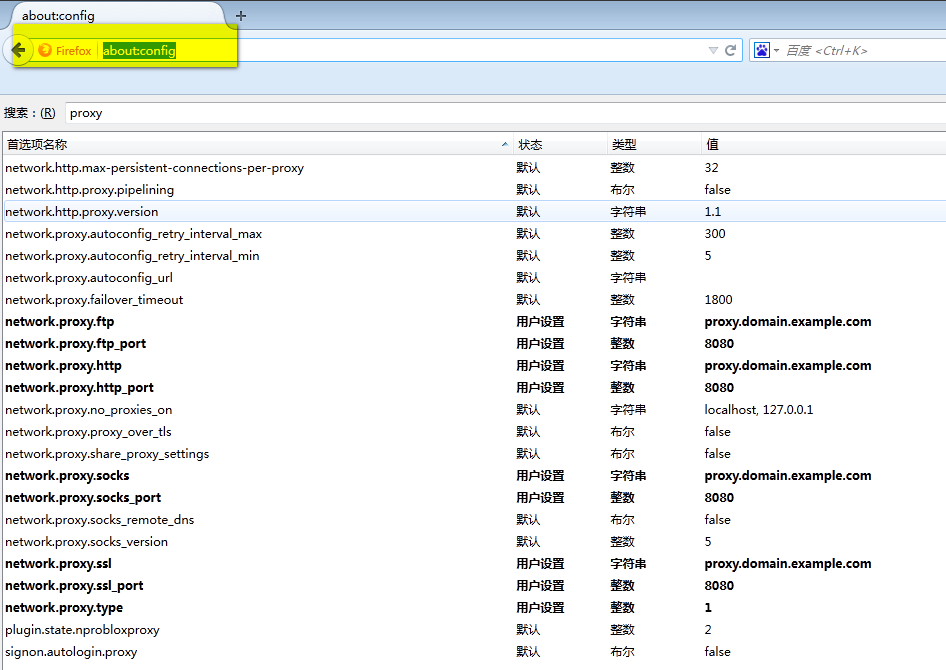
扩展,为什么这么设置
你可以使用about:config 在Firefox里边看看
Selenium FF WebDriver 加载firebug 和设置代理的更多相关文章
- Selenium FF WebDriver运行时开启firebug的2种方式
上一次我实测FF webdriver 加载firefoxhttp://www.cnblogs.com/tobecrazy/p/3997375.html 那么问题就来了,既然能加载firebug能否在运 ...
- js不需要知道图片宽高的懒加载方法(经过实际测试,不加宽高仍然是无法正常加载的,设置height:auto,height:100%,仍然显示高度为0)
js不需要知道图片宽高的懒加载方法 懒加载是如何实现的? - 简书https://www.jianshu.com/p/e86c61468285找到一个不需要知道图片宽高的懒加载方法了(经过实际测试,不 ...
- selenium2入门 用selenium安装、加载、启用插件(一)
一:下载 下载地址是:http://docs.seleniumhq.org/download/
- selenium2 用selenium安装、加载、启用插件(一)
一:下载 下载地址是:http://docs.seleniumhq.org/download/
- selenium自动化之加载浏览器的配置文件
做seleniumUI自动化关于选用哪个浏览器方面,对于我来说,火狐浏览器只是用于定位元素,因为有firebug(注意高版本的火狐已经安装不了这个插件了),而真正执行自动化脚本用的是谷歌,感觉谷歌的速 ...
- selenium 等待页面加载完成
一.隐形加载等待: file:///C:/Users/leixiaoj/Desktop/test.html 该页面负责创建一个div <html> <head> <tit ...
- Selenium WebDriver- 指定页面加载时间
#encoding=utf-8 import unittest import time from selenium import webdriver from selenium.webdriver i ...
- Selenium 的页面加载以及几种等待的问题
1. PageLoadStrategy : 当调用driver.get("https://xxxx.xxx.xxx")来访问某页面时,get方法通常会阻塞浏览器直到页面完全加载后才 ...
- python3 selenium 超时停止加载,并且捕捉异常, 进行下一步【亲测有效】
from selenium import webdriver import os import re class GetPage: def __init__(self, url_path): self ...
随机推荐
- Win7 on VirtualBox 看不到 usb device
sudo usermod -G vboxusers -a your_user_name 我的用上面指令不能建立, 需先使用 sudo su 切到root 再執行 usermod -G vboxuser ...
- Vue2.0组件间数据传递
Vue1.0组件间传递 使用$on()监听事件: 使用$emit()在它上面触发事件: 使用$dispatch()派发事件,事件沿着父链冒泡: 使用$broadcast()广播事件,事件向下传导给所有 ...
- EntityFramework之监听者判断SQL性能指标
前言 当我们利用EF这个ORM框架时,我们可能会利用LINQ或者原生的SQL语句来进行数据操作,此时我们无法确定我们的代码是否会给数据库带来一定的负载,当给数据库带来一定的压力时,由于项目中对数据进行 ...
- Spring_跨项目读取properties文件
应用背景:工程中有40~50个项目,分为4个模块,分别是核心模块.服务接口模块.服务实现模块.Web模块.其它模块(包括消息队列.quartz任务等).工程中很多配置项都是多个项目共有调用的,所以单独 ...
- thinkphp-二次开发1
Thinkphp是一个国人使用的比较多的一个框架 ,具体的也不多了,不知道的可以去百度一下. 现在我们要讲的是如何利用现有的半成品的系统实现二次开发 讲到thinkphp的二次开发不得不说他的兄弟on ...
- localStorage使用总结
一.什么是localStorage.sessionStorage 在HTML5中,新加入了一个localStorage特性,这个特性主要是用来作为本地存储来使用的,解决了cookie存储空间不足的问题 ...
- 在 Linux 中查看时区
1.date date +"%Z %z" 或者 date -R 2.timedatectl timedatectl|grep "Timezone" 可以使用 t ...
- iOS 安装应用
1.itool 安装 不是本文重点 2.fruitstrap安装 2.1 前往 https://github.com/ghughes/fruitstrap 下载源代码 (git clone 即可) 2 ...
- QEMU/KVM虚拟机安装配置
1.安装相关组件: [root@KVM ~]# yum install qemu-img qemu-kvm qemu-kvm-tools virt-manager virt-viewer virt-v ...
- 18. class
Class 基本用法 class n { constructor(x,y) { this.x = x; this.y = y; console.log(x,y) } proint() { consol ...