
基于surging 的木舟平台如何通过HTTP网络组件接入设备
一、概述
上篇文章介绍了木舟如何上传模块热部署,那么此篇文章将介绍如何利用HTTP网络组件接入设备,那么有些人会问木舟又是什么,是什么架构为基础,能做什么呢?
木舟 (Kayak) 是什么?
木舟(Kayak)是基于.NET6.0软件环境下的surging微服务引擎进行开发的, 平台包含了微服务和物联网平台。支持异步和响应式编程开发,功能包含了物模型,设备,产品,网络组件的统一管理和微服务平台下的注册中心,服务路由,模块,中间服务等管理。还有多协议适配(TCP,MQTT,UDP,CoAP,HTTP,Grpc,websocket,rtmp,httpflv,webservice,等),通过灵活多样的配置适配能够接入不同厂家不同协议等设备。并且通过设备告警,消息通知,数据可视化等功能。能够让你能快速建立起微服务物联网平台系统。
那么下面就为大家介绍如何从创建组件、协议、设备网关,设备到设备网关接入,再到设备数据上报,把整个流程通过此篇文章进行阐述。
二、网络组件
1.编辑创建HTTP协议的网络组件,可以选择共享配置和独立配置(独立配置是集群模式),然后可以选择开启swagger和webservice.

开启成功后,可以看看swagger 是否可以访问

又或者是访问一下中间服务,以上篇文章上传的Testapi 模块为例:

三、自定义协议
- 如何创建自定义协议模块
如果是网络编程开发,必然会涉及到协议报文的编码解码处理,那么对于平台也是做到了灵活处理,首先是协议模块创建,通过以下代码看出协议模块可以添加协议说明md文档, 身份鉴权处理,HTTP路由,消息编解码,元数据配置。下面一一介绍如何进行编写
  public class Demo5ProtocolSupportProvider : ProtocolSupportProvider

    {

        public override IObservable<ProtocolSupport> Create(ProtocolContext context)

        {
            var support = new ComplexProtocolSupport();
              support.Id = "demo5";
              support.Name = "演示协议5";
              support.Description = "演示协议5";

              support.AddDocument(MessageTransport.Http, "Document/document-http.md");

           support.AddAuthenticator(MessageTransport.Http, new Demo5Authenticator());

           support.AddRoutes(MessageTransport.Http, new List<BasicMessageCodec>() {

            BasicMessageCodec.DeviceOnline,

             BasicMessageCodec.ReportProperty,

             BasicMessageCodec.WriteProperty,

              BasicMessageCodec.ReadProperty,

              BasicMessageCodec.Event

       }.Select(p => HttpDescriptor.Instance(p.Pattern)

           .GroupName(p.Route.GroupName())

           .HttpMethod(p.Route.HttpMethod())

           .Path(p.Pattern)

           .ContentType(MediaType.ToString(MediaType.ApplicationJson))

           .Description(p.Route.Description())

           .Example(p.Route.Example())

           ).ToList());

       support.AddMessageCodecSupport(MessageTransport.Http, () => Observable.Return(new HttpDeviceMessageCodec()));

       support.AddConfigMetadata(MessageTransport.Http, _httpConfig);

       return Observable.Return(support);

        }

     }
1. 添加协议说明文档如代码: support.AddDocument(MessageTransport.Http, "Document/document-http.md");,文档仅支持 markdown文件,如下所示
### 使用HTTP推送设备数据

上报属性例子:

POST /{productId}/{deviceId}/properties/report

Authorization:{产品或者设备中配置的Token}

Content-Type: application/json

{

 "properties":{

   "temp":11.5

 }

}

上报事件例子:

POST /{productId}/{deviceId}/event/{eventId}

Authorization:{产品或者设备中配置的Token}

Content-Type: application/json

{

 "data":{

   "createtime": ""

 }

}
2. 添加身份鉴权如代码: support.AddAuthenticator(MessageTransport.Http, new Demo5Authenticator()) ,自定义身份鉴权Demo5Authenticator 代码如下:
       public class Demo5Authenticator : IAuthenticator

       {

           public IObservable<AuthenticationResult> Authenticate(IAuthenticationRequest request, IDeviceOperator deviceOperator)

           {

               var result = Observable.Return<AuthenticationResult>(default);

               if (request is DefaultAuthRequest)

               {

                   var authRequest = request as DefaultAuthRequest;

                   deviceOperator.GetConfig(authRequest.GetTransport()==MessageTransport.Http?"token": "key").Subscribe(  config =>

                   {

                       var password = config.Convert<string>();

                       if (authRequest.Password.Equals(password))

                       {

                           result= result.Publish(AuthenticationResult.Success(authRequest.DeviceId));

                       }

                       else

                       {

                           result= result.Publish(AuthenticationResult.Failure(StatusCode.CUSTOM_ERROR, "验证失败,密码错误"));

                       }

                   });

               }

               else

               result = Observable.Return<AuthenticationResult>(AuthenticationResult.Failure(StatusCode.CUSTOM_ERROR, "不支持请求参数类型"));

               return result;

           }

           public IObservable<AuthenticationResult> Authenticate(IAuthenticationRequest request, IDeviceRegistry registry)

           {

               var result = Observable.Return<AuthenticationResult>(default);

               var authRequest = request as DefaultAuthRequest;

               registry

                 .GetDevice(authRequest.DeviceId)

                 .Subscribe(async p => {

                    var config=  await p.GetConfig(authRequest.GetTransport() == MessageTransport.Http ? "token" : "key");

                     var password= config.Convert<string>();

                    if(authRequest.Password.Equals(password))

                     {

                         result= result.Publish(AuthenticationResult.Success(authRequest.DeviceId));

                     }

                     else

                     {

                         result= result.Publish(AuthenticationResult.Failure(StatusCode.CUSTOM_ERROR, "验证失败,密码错误"));

                     }

                 });

               return result;

           }

       }
3. 添加Http路由代码support.AddRoutes,那么如何配置呢,代码如下:
    public static BasicMessageCodec ReportProperty =>

 new BasicMessageCodec("/*/properties/report", typeof(ReadPropertyMessage), route => route.GroupName("属性上报")

                     .HttpMethod("Post")

                     .Description("上报物模型属性数据")

                     .Example("{\"properties\":{\"属性ID\":\"属性值\"}}"));
4.添加消息编解码代码 support.AddMessageCodecSupport(MessageTransport.Http, () => Observable.Return(new HttpDeviceMessageCodec())), 可以自定义编解码,HttpDeviceMessageCodec代码如下:
  public class HttpDeviceMessageCodec : DeviceMessageCodec

  {

      private readonly MessageTransport _transport;

      public HttpDeviceMessageCodec() : this(MessageTransport.Http)

      {

      }

      private static DefaultHttpResponseMessage Unauthorized(String msg)

      {

          return new DefaultHttpResponseMessage()

                  .ContentType(MediaType.ApplicationJson)

                  .Body("{\"success\":false,\"code\":\"unauthorized\",\"message\":\"" + msg + "\"}")

                  .Status(HttpStatus.AuthorizationFailed);

      }

      private static DefaultHttpResponseMessage BadRequest()

      {

          return new DefaultHttpResponseMessage()

                  .ContentType(MediaType.ApplicationJson)

                  .Body("{\"success\":false,\"code\":\"bad_request\"}")

                  .Status(HttpStatus.RequestError);

      }

      public HttpDeviceMessageCodec(MessageTransport transport)

      {

          _transport = transport;

      }

      public override IObservable<IDeviceMessage> Decode(MessageDecodeContext context)

      {

          if (context.GetMessage() is HttpRequestMessage)

          {

              return DecodeHttpRequestMessage(context);

          }

          return Observable.Return<IDeviceMessage>(default);

      }

      public override  IObservable<IEncodedMessage> Encode(MessageEncodeContext context)

      {

          return Observable.Return<IEncodedMessage>(default);

      }

      private IObservable<IDeviceMessage> DecodeHttpRequestMessage(MessageDecodeContext context)

      {

          var result = Observable.Return<IDeviceMessage>(default);

          var message = (HttpExchangeMessage)context.GetMessage();

          Header? header = message.Request.GetHeader("Authorization");

          if (header == null || header.Value == null || header.Value.Length == 0)

          {

              message

                   .Response(Unauthorized("Authorization header is required")).ToObservable()

                   .Subscribe(p => result = result.Publish(default));

              return result;

          }

          var httpToken = header.Value[0];

          var paths = message.Path.Split("/");

          if (paths.Length == 0)

          {

              message.Response(BadRequest()).ToObservable()

                 .Subscribe(p => result = result.Publish(default));

              return result;

          }

          String deviceId = paths[1];

          context.GetDevice(deviceId).Subscribe(async deviceOperator =>

          {

              var config = deviceOperator==null?null: await deviceOperator.GetConfig("token");

              var token = config?.Convert<string>();

              if (token == null || !httpToken.Equals(token))

              {

                  await message

                       .Response(Unauthorized("Device not registered or authentication failed"));

              }

              else

              {

                  var deviceMessage = await DecodeBody(message, deviceId);

                  if (deviceMessage != null)

                  {

                      await message.Success("{\"success\":true,\"code\":\"success\"}");

                      result = result.Publish(deviceMessage);

                  }

                  else

                  {

                      await message.Response(BadRequest());

                  }

              }

          });

          return result;

      }

      private async Task<IDeviceMessage> DecodeBody(HttpExchangeMessage message,string deviceId)

      {

          byte[] body = new byte[message.Payload.ReadableBytes];

          message.Payload.ReadBytes(body);

          var deviceMessage = await TopicMessageCodec.Dodecode(message.Path, body);

          deviceMessage.DeviceId = deviceId;

          return deviceMessage;

      }

  }
5.添加元数据配置代码 support.AddConfigMetadata(MessageTransport.Http, _httpConfig); _httpConfig代码如下
        private readonly DefaultConfigMetadata _httpConfig = new DefaultConfigMetadata(

        "Http认证配置"

        , "token为http认证令牌")

        .Add("token", "token", "http令牌", StringType.Instance);
- 如何加载协议模块,协议模块包含了协议模块支持添加引用加载和上传热部署加载。
引用加载模块

上传热部署协议模块

四、设备网关
创建设备网关

五、产品管理
以下是添加产品。

设备接入

六、设备管理
添加设备

HTTP认证配置

创建告警阈值

七、测试
利用Postman 进行测试,以调用http://127.0.0.1:168/{productid}/{deviceid}/properties/report 为例,Authorization设置:123456
1.正常数据测试
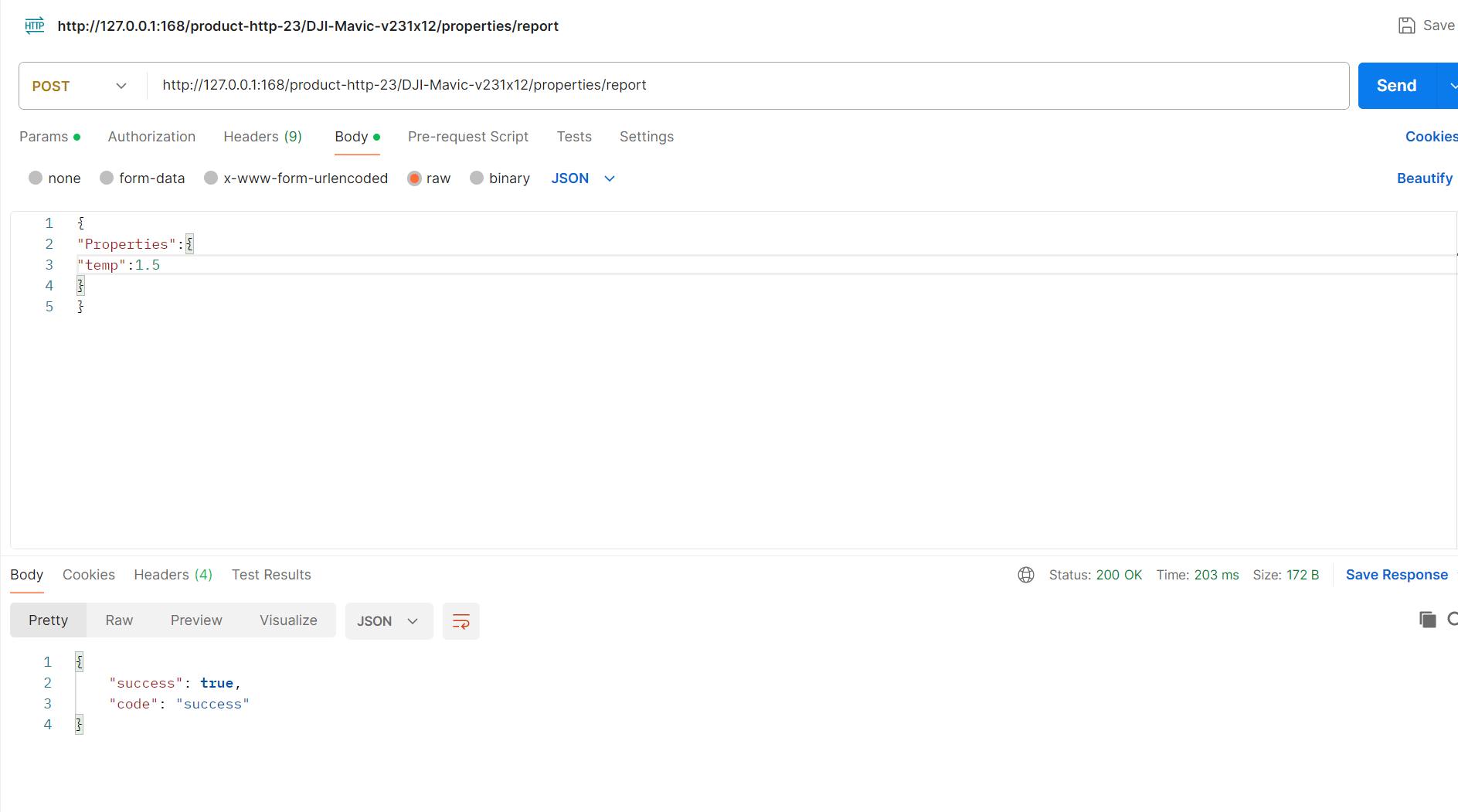
2. 如果是选用Get方式调用,会因为找不到ServiceRoute而返回错误。

3. 把Authorization改成1111,会返回错误Device not registered or authentication failed,从而上报数据失败

以上上传的数据可以在设备信息-》运行状态中查看

告警信息可以在超临界数据中查看

七、总结
以上是基于HTTP网络组件设备接入,现有平台网络组件可以支持TCP,MQTT,UDP,CoAP,HTTP,Grpc,websocket,rtmp,httpflv,webservice,tcpclient, 而设备接入支持TCP,UDP,HTTP网络组件,后面会陆续添加支持所有网络组件接入,后面我也会陆续介绍其它网路组件设备接入 , 然后定于11月20日发布1.0测试版平台。也请大家到时候关注捧场。
基于surging 的木舟平台如何通过HTTP网络组件接入设备的更多相关文章
- 低代码平台--基于surging开发微服务编排流程引擎构思
前言 微服务对于各位并不陌生,在互联网浪潮下不是在学习微服务的路上,就是在使用改造的路上,每个人对于微服务都有自己理解,有用k8s 就说自己是微服务,有用一些第三方框架spring cloud, du ...
- 基于surging网络组件多协议适配的平台化发展
前言 Surging 发展已经有快6年的时间,经过这些年的发展,功能框架也趋于成熟,但是针对于商业化需求还需要不断的打磨,前段时间客户找到我想升级成平台化,针对他的需求我 ...
- 星舟平台的使用(GIT、spring Boot 的使用以及swagger组件的使用)
一.介绍星舟平台 1.星舟简介 2.网关kong的介绍 3.客户端 1).服务注册:Eureka 2).客户端负载均衡:Ribbon 4 ...
- Monotype推出基于HTML5的Web字体平台
著名字体公司Monotype近日宣布推出基于HTML5的Web字体平台,设计者可以访问近10万字体的目录. Monotype推出基于HTML5的Web字体平台 Monotype推出基于HTML5的We ...
- 基于AutoCAD的空间数据共享平台雏形
好久没有更新博客了,今天先透露一个新的产品——AutoMap.我自己对于这个产品的定位是“基于AutoCAD的空间数据共享平台”.用一句话来概括AutoMap的功能:为用户提供一个在AutoCAD下访 ...
- 基于React Native的移动平台研发实践分享
转载:http://blog.csdn.net/haozhenming/article/details/72772787 本文目录: 一.React Native 已经成为了移动前端技术的趋势 二.基 ...
- (二): 基于ZeroMQ的实时通讯平台
基于ZeroMQ的实时通讯平台 上篇:C++分布式实时应用框架 (Cpp Distributed Real-time Application Framework)----(一):整体介绍 通讯平台作为 ...
- 基于HttpRunner的接口自动化测试平台HttpRunnerManager(二)
https://github.com/HttpRunner/HttpRunnerManager HttpRunnerManager Design Philosophy 基于HttpRunner的接口自 ...
- 基于代码生成器的快速开发平台 JEECG
JEECG是一款基于代码生成器的J2EE快速开发平台,开源界“小普元”超越传统商业企业级开发平台.引领新的开发模式(Online Coding模式(在线开发)->代码生成器模式->手工ME ...
- nyoj 71-独木舟上的旅行(贪心)
71-独木舟上的旅行 内存限制:64MB 时间限制:3000ms 特判: No 通过数:10 提交数:15 难度:2 题目描述: 进行一次独木舟的旅行活动,独木舟可以在港口租到,并且之间没有区别.一条 ...
随机推荐
- Layui Upload 多文件上传访问多次接口问题解决
Layui 多文件上传访问多次接口 点我访问 LayUI框架官网 话不多数直接看源码 文件地址: layui/modules/upload.js // 通过each循环文件列表 layui.each( ...
- Microsoft Ignite 2022 After Party (Placeholder)
通过Microsoft Ignite 2022了解最新的创新成果,向产品专家和合作伙伴学习,优化自身技能组合,并与来自世界各地的人士建立联系.请于 PDT 时间 10 月 12 日至 14 日早上 9 ...
- MFC树形控件加载Access数据库数据
研究了好几天,今天终于弄好了,下面是代码 [dlg.cpp] 在初始函数OnInitDialog()中加 HICON hIcon[3]; HTREEITEM hRoot; //加载三个图标 hIcon ...
- python3实现url全编码/解码
最近在学习SQL注入,绕过方法中有编码注入绕过,需要将关键词进行全编码,百度了一下没有找到全编码工具,所有的编码工具里"and"编码完还是"and",于是查了一 ...
- 在使用Nacos作为统一配置中心的时候,项目中使用@Value注解从Nacos获取值,一直报错Could not resolve placeholder 'blog.website' in value "${blog.website}".如下图:
在使用Nacos作为统一配置中心的时候,项目中使用@Value注解从Nacos获取值,一直报错Could not resolve placeholder 'blog.website' in value ...
- 【YashanDB知识库】如何使用yasldr导入lob类型?
问题现象 在各个项目实施中,有时候会使用到yasldr工具进行csv数据的导入.关于yasldr一般的使用方法,官方文档已经有详细的介绍,具体可见:yasldr使用指导.但在涉及LOB类型的导入时,会 ...
- angular 知识
看完以下内容应该就可以上手Angular了 https://angular.io/start Udemy - Complete Angular 14 Course - Learn Frontend D ...
- Time Zone, Leap Year, Date Format, Epoch Time 时区, 闰年, 日期格式
前言 以前有写过一篇了, 但很乱, 这篇就作为它的整理版吧. Leap Year 闰年 闰年是指那些有 366 天, 二月份有 29号 的年份. 比如 2020年 有 2月29日, 所以 2020 就 ...
- grid网格布局
https://ruanyifeng.com/blog/2019/03/grid-layout-tutorial.html Grid 布局只对项目生效 划分网格的线,称为"网格线" ...
- MyBatis——案例——查询-查询详情
查询-查询详情 (根据id获取商品全部信息(即商品对象)) 1.编写Mapper接口方法:Brand selectById(int id); 2.编写SQL ...