
基于HarmonyOS NEXT 5.0自定义增强版导航栏组件|鸿蒙ArkUI自定义标题栏
这段时间比较热门的莫过于华为推出的自主研发的面向全场景分布式操作系统HarmonyOS。
最新一直潜心学习鸿蒙os开发,于是基于HarmonyOS NEXT 5.0 API12 Release开发了一款自定义多功能导航条组件。

HMNavBar组件支持自定义返回键、标题/副标题、标题居中、背景色/背景图片/背景渐变色、标题颜色、搜索、右侧操作区等功能。
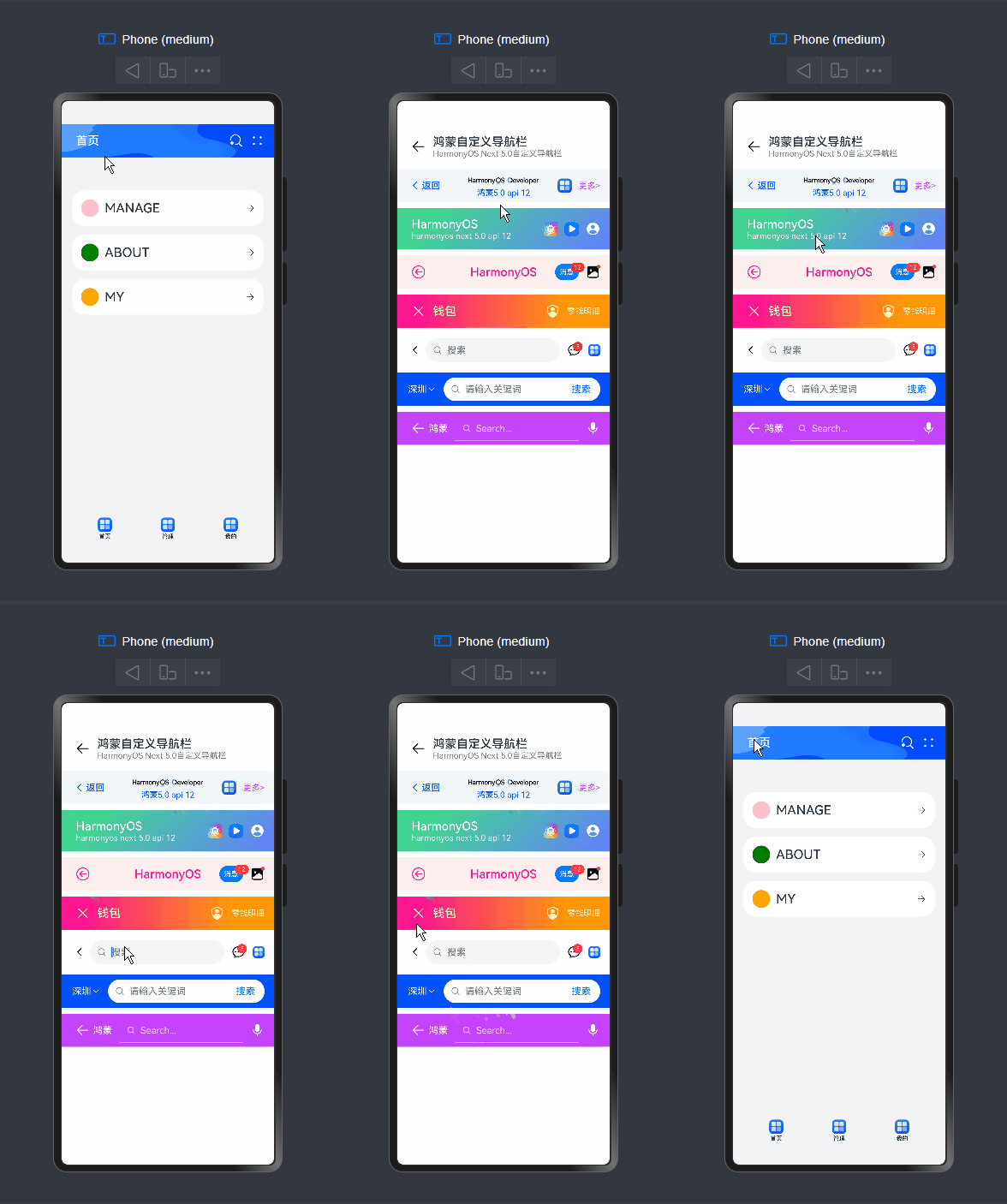
如下图:组件结构非常简单。
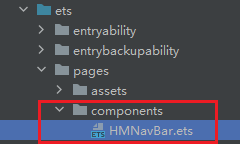
组件参数配置
@Component

export struct HMNavBar {

  // 是否隐藏左侧的返回键

  @Prop hideBackButton: boolean

  // 标题(支持字符串|自定义组件)

  @BuilderParam title: ResourceStr | CustomBuilder = BuilderFunction

  // 副标题

  @BuilderParam subtitle: ResourceStr | CustomBuilder = BuilderFunction

  // 返回键图标

  @Prop backButtonIcon: Resource | undefined = $r('sys.symbol.chevron_left')

  // 返回键标题

  @Prop backButtonTitle: ResourceStr

  // 背景色

  @Prop bgColor: ResourceColor = $r('sys.color.background_primary')

  // 渐变背景色

  @Prop bgLinearGradient: LinearGradient

  // 图片背景

  @Prop bgImage: ResourceStr | PixelMap

  // 标题颜色

  @Prop fontColor: ResourceColor

  // 标题是否居中

  @Prop centerTitle: boolean

  // 右侧按钮区域

  @BuilderParam actions: Array<ActionMenuItem> | CustomBuilder = BuilderFunction

  // 导航条高度

  @Prop navbarHeight: number = 56

  // ...

}
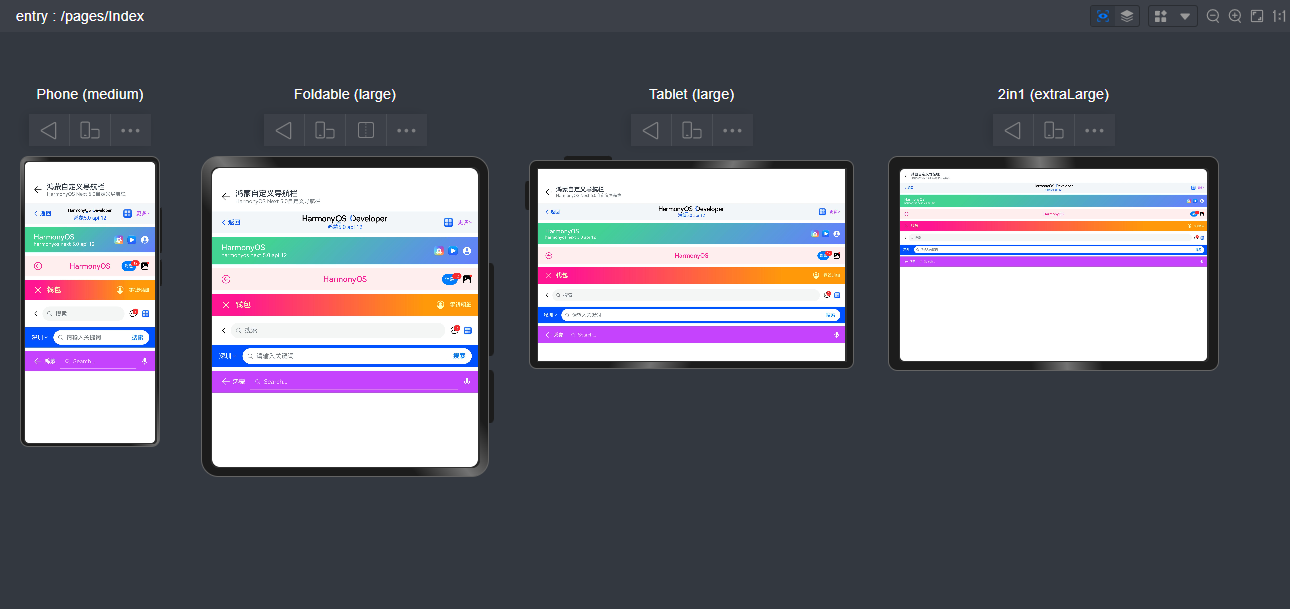
调用方式非常简单易上手。
- 基础用法
HMNavBar({

  backButtonIcon: $r('sys.symbol.arrow_left'),

  title: '鸿蒙自定义导航栏',

  subtitle: 'HarmonyOS Next 5.0自定义导航栏',

})
- 自定义返回图标/文字、标题、背景色、右键操作按钮
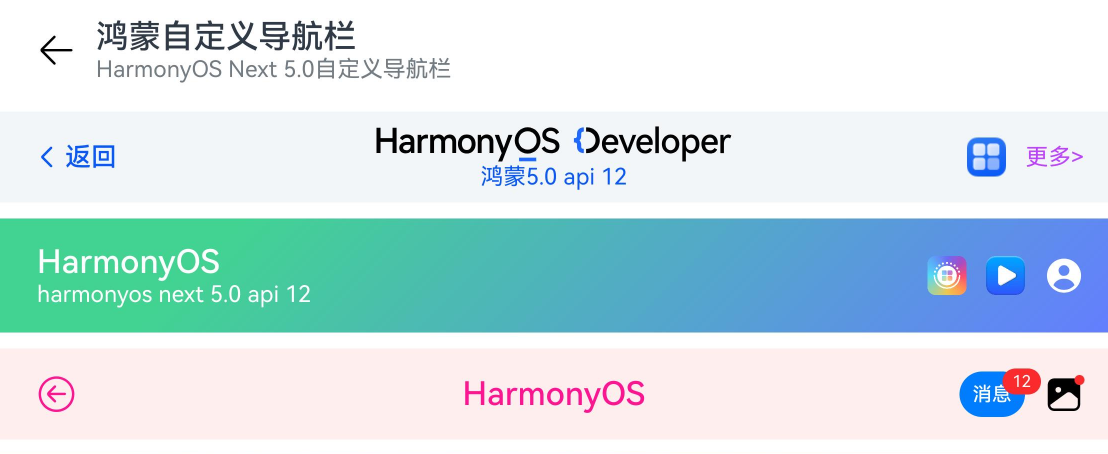
@Builder customImgTitle() {

  Image('https://developer.huawei.com/allianceCmsResource/resource/HUAWEI_Developer_VUE/images/logo-developer-header.svg').height(24).objectFit(ImageFit.Contain)

}

HMNavBar({

  backButtonIcon: $r('sys.symbol.chevron_left'),

  backButtonTitle: '返回',

  title: this.customImgTitle,

  subtitle: '鸿蒙5.0 api 12',

  centerTitle: true,

  bgColor: '#f3f6f9',

  fontColor: '#0a59f7',

  actions: [

    {

      icon: $r('app.media.app_icon'),

      action: () => promptAction.showToast({ message: "show toast index 1" })

    },

    {

      // icon: $r('sys.symbol.plus'),

      label: '更多>',

      color: '#bd43ff',

      action: () => promptAction.showToast({ message: "show toast index 2" })

    }

  ]

})
// 自定义渐变背景、背景图片、右侧操作区

HMNavBar({

  hideBackButton: true,

  title: 'HarmonyOS',

  subtitle: 'harmonyos next 5.0 api 12',

  bgLinearGradient: {

    angle: 135,

    colors: [['#42d392 ',0.2], ['#647eff',1]]

  },

  // bgImage: 'pages/assets/nav_bg.png',

  // bgImage: 'https://developer.huawei.com/allianceCmsResource/resource/HUAWEI_Developer_VUE/images/1025-pc-banner.jpeg',

  fontColor: '#fff',

  actions: [

    {

      icon: 'https://developer.huawei.com/allianceCmsResource/resource/HUAWEI_Developer_VUE/images/yuanfuwuicon.png',

      action: () => promptAction.showToast({ message: "show toast index 1" })

    },

    {

      icon: 'https://developer.huawei.com/allianceCmsResource/resource/HUAWEI_Developer_VUE/images/0620logo4.png',

      action: () => promptAction.showToast({ message: "show toast index 2" })

    },

    {

      icon: $r('sys.symbol.person_crop_circle_fill_1'),

      action: () => promptAction.showToast({ message: "show toast index 3" })

    }

  ],

  navbarHeight: 70

})
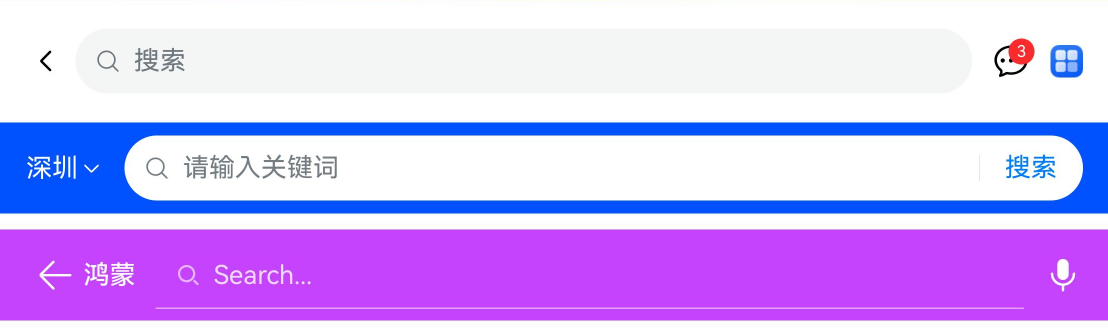
如上图:还支持自定义导航搜索功能。
HMNavBar({

  title: this.customSearchTitle1,

  actions: this.customSearchAction

})

HMNavBar({

  hideBackButton: true,

  title: this.customSearchTitle2,

  bgColor: '#0051ff',

})

HMNavBar({

  backButtonIcon: $r('sys.symbol.arrow_left'),

  backButtonTitle: '鸿蒙',

  title: this.customSearchTitle3,

  bgColor: '#c543fd',

  fontColor: '#fff',

  actions: [

    {

      icon: $r('sys.symbol.mic_fill'),

      action: () => promptAction.showToast({ ... })

    }

  ]

})
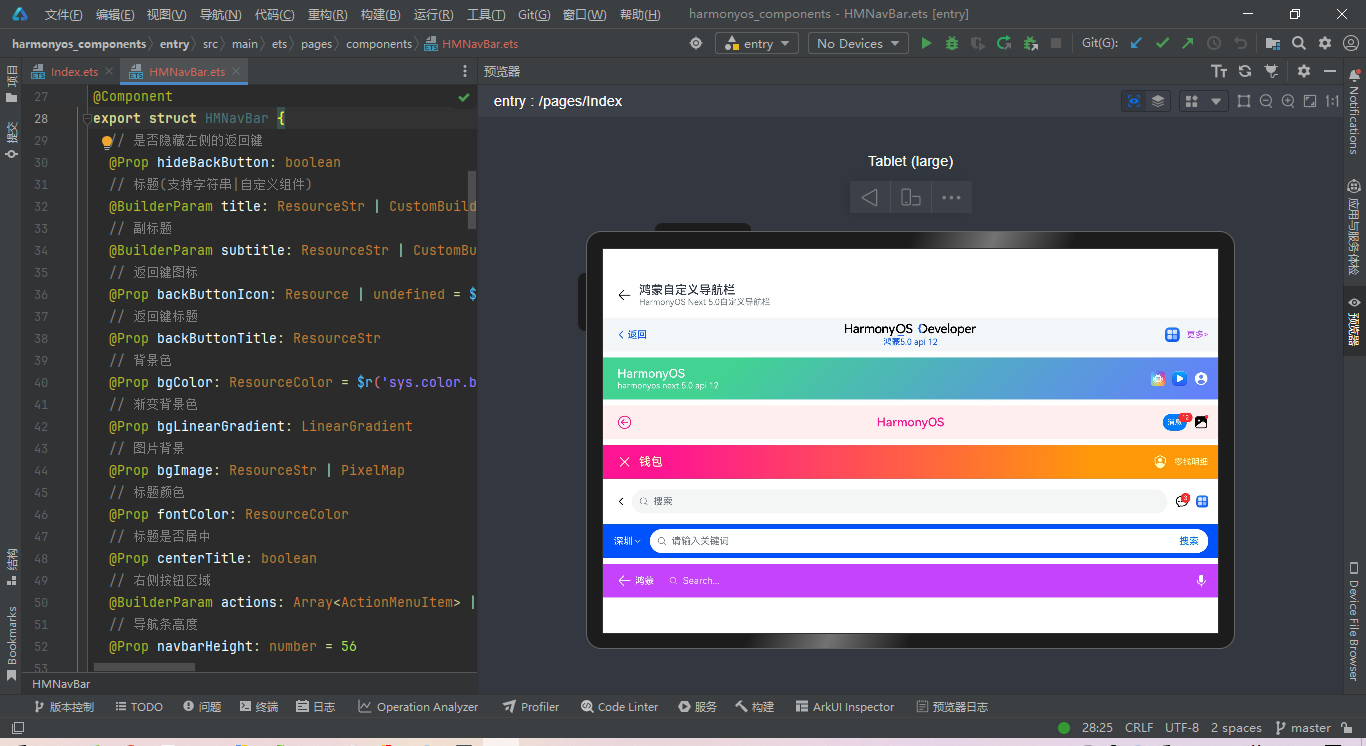
HMNavBar导航组件布局结构如下。
build() {

    Flex() {

      // 左侧模块

      Stack({ alignContent: Alignment.Start }) {

        Flex(){

          if(!this.hideBackButton) {

            this.backBuilder()

          }

          if(!this.centerTitle) {

            this.contentBuilder()

          }

        }

        .height('100%')

      }

      .height('100%')

      .layoutWeight(1)

      // 中间模块

      if(this.centerTitle) {

        Stack() {

          this.contentBuilder()

        }

        .height('100%')

        .layoutWeight(1)

      }

      // 右键操作模块

      Stack({ alignContent: Alignment.End }) {

        this.actionBuilder()

      }

      .padding({ right: 16 })

      .height('100%')

      .layoutWeight(this.centerTitle ? 1 : 0)

    }

    .backgroundColor(this.bgColor)

    .linearGradient(this.bgLinearGradient)

    .backgroundImage(this.bgImage, ImageRepeat.NoRepeat).backgroundImageSize(ImageSize.FILL)

    .height(this.navbarHeight)

    .width('100%')

}
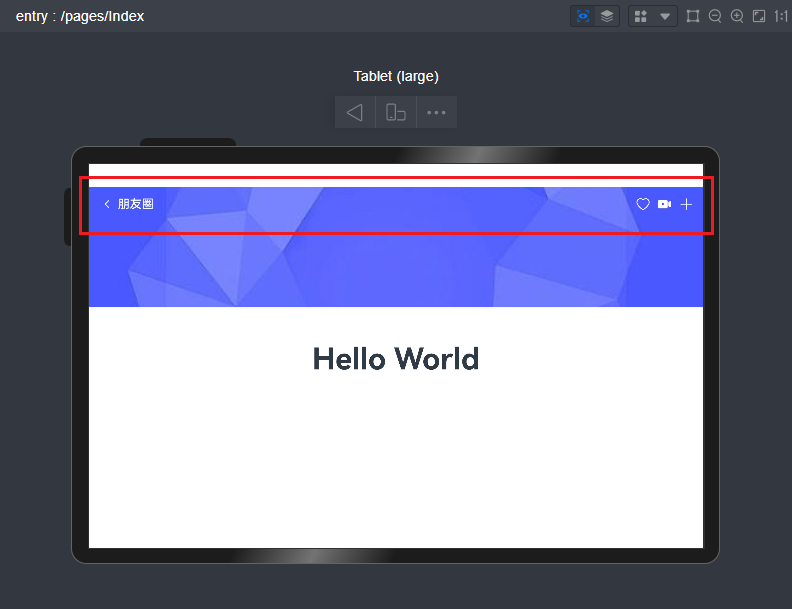
支持悬浮在背景图上面。
最后,附上几个最新研发的跨平台实例项目。
Tauri2.0+Vite5聊天室|vue3+tauri2+element-plus仿微信|tauri聊天应用
tauri2.0-admin桌面端后台系统|tauri2+vite5+element-plus管理后台EXE程序
Ok,今天的分享就到这里,希望以上的分享对大家有所帮助!

基于HarmonyOS NEXT 5.0自定义增强版导航栏组件|鸿蒙ArkUI自定义标题栏的更多相关文章
- 微信小程序自定义底部导航栏组件+跳转
微信小程序本来封装有底部导航栏,但对于想自定义样式和方法的开发者来说,这并不是很好. 参考链接:https://github.com/ljybill/miniprogram-utils/tree/ma ...
- 微信小程序自定义导航栏组件,完美适配所有手机,可实现各种功能和情况
背景 在做小程序时,关于默认导航栏,我们遇到了以下的问题: Android.IOS 手机对于页面 title 的展示不一致,安卓 title 的显示不居中 页面的 title 只支持纯文本级别的样式控 ...
- 微信小程序自定义导航栏组件
1.首先,要在json文件中设置为自定义的形式 "navigationStyle": "custom" 2.计算相关值 导航栏分为状态栏和标题栏,只要能算出每台 ...
- iOS:自定义工具栏、导航栏、标签栏
工具栏为UIToolBar,导航栏UINavigationBar,标签栏UITabBar.它们的样式基本上时差不多的,唯一的一点区别就是,工具栏一般需要自己去创建,然后添加到视图中,而导航栏和标签栏不 ...
- Apache Pulsar 2.6.1 版本正式发布:2.6.0 功能增强版,新增 OAuth2 支持
在 Apache Pulsar 2.6.0 版本发布后的 2 个月,2020 年 8 月 21 日,Apache Pulsar 2.6.1 版本正式发布! Apache Pulsar 2.6.1 修复 ...
- 更改系统相机UIImagePickerController导航栏的cancle为自定义按钮
有时候需要对系统相册里面的取消按钮进行自定义,并获取点击事件做一些操作,那么你可以这样做. 第一:实现navigationController代理 - (void)navigationControll ...
- iview修改tabbar实现小程序自定义中间圆形导航栏及多页面登录功能
emmm,用iview改了个自定义中间圆形的tabbar. 如下图所示, 重点,什么鬼是“多页面登录”? 例如:我现在要做一个功能,要说自己长得帅才能进去页面. 一个两个页面还好,但是我现在要每个页面 ...
- 解决ios7.0 以后自己定义导航栏左边button靠右的问题
1.自己定义button //左button UIButton *leftBtn = [[UIButton , , , )]; [leftBtn addTarget:self action:@sele ...
- 自定义iOS7导航栏背景,标题和返回按钮文字颜色
在iOS7下,默认导航栏背景,颜色是这样的,接下来我们就进行自定义,如果你仅仅是更改一下背景和颜色,代码会很简单,不需要很复杂的自定义View来替代leftBarItem 更改导航栏的背景和文字Col ...
- 【转】自定义iOS7导航栏背景,标题和返回按钮文字颜色 -- 不错不错!!
原文网址:http://blog.csdn.net/mad1989/article/details/41516743 在iOS7下,默认导航栏背景,颜色是这样的,接下来我们就进行自定义,如果你仅仅是更 ...
随机推荐
- 9组-Beta冲刺-4/5
一.基本情况(15分) 队名:不行就摆了吧 组长博客:9组-Beta冲刺-4/5 GitHub链接:https://github.com/miaohengming/studynote/tree/mai ...
- 恶补基础知识:Java 栈与队列详解
@ 目录 前言 简介 栈 Java实现栈的示例代码: 栈的主要应用场景包括: 队列 Java实现队列的示例代码: LinkedList中的add方法和offer方法的区别 队列主要应用场景: 总结 前 ...
- Camera | 12.瑞芯微摄像头自动焦距马达驱动移植
本为你主要讲解如何让摄像头ov13850支持自动对焦功能. 摄像头的对角主要通过VCM马达驱动芯片DW9714来实现的. 一.环境 soc : rk3568 board: EVB1-DDR4-V10 ...
- 【YashanDB知识库】收集分区表统计信息采样率小于1导致SQL执行计划走偏
[问题分类]性能优化,BUG [关键字]分区表,统计信息,采样率 [问题描述]收集表(分区表)级别的统计信息时,如果采样率小于1,dba_ind_statistics中partition_name i ...
- 最小化安装killall不可用
最小化安装killall不可用 最小化安装Centos7.4后,发现killall命令不可用 使用了以下命令,查看软件包名: yum search killall 查找后发现应使用这个安装包 yum ...
- Tenzing and Random Operations CF1842G 题解
[1] 分析 设 \(m\) 次选的位置分别为 \(b_{1\sim m}\). 于是答案为 \(\mathbb E(\prod\limits_{i = 1}^{n}(a_i + \sum\limit ...
- Qt 中实现异步散列器
[写在前面] 在很多工作中,我们需要计算数据或者文件的散列值,例如登录或下载文件. 而在 Qt 中,负责这项工作的类为 QCryptographicHash. 关于 QCryptographicHas ...
- vue+webpack工程中怎样在vue页面中引入第三方非标准的JS库或者方法
方法一:异步加载第三方库 在我们的vue工程中新建如下路径:src/utils/index.js,在index.js中实现如下方法: export function loadScript(url) { ...
- Angular Material 18+ 高级教程 – Material Ripple
介绍 Ripple (波纹) 是 Material Design 中一个标志性的特色. 点击 button 会溅起水波的感觉. 参考 Docs – Ripples When to use it? 一般 ...
- CSS – Font / Text 属性
前言 之前学 W3Schools 时记入过一些 W3Schools 学习笔记 (1) – CSS Fonts. 由于太简单就没有另外写一篇, 现在感觉内容比较整齐了, 所以整理一篇出来. 属性 fon ...