
node-sass安装问题
前情
最近在开发一个小程序项目,为了开发速度,部分页面使用原有H5,但原有H5需要对小程序做一定兼容适配,发现原有H5项目是个很古老项目。
坑位
在项目启动前,需要执行npm install安装项目依赖,但是卡在node-sass一直安装不成功
控制台报错如下:
> node-sass@3.13.1 install E:\work\code\mall-order\node_modules\gulp-sass\node_modules\node-sass

> node scripts/install.js

Downloading binary from https://github.com/sass/node-sass/releases/download/v3.13.1/win32-x64-57_binding.node

Cannot download "https://github.com/sass/node-sass/releases/download/v3.13.1/win32-x64-57_binding.node":

HTTP error 404 Not Found

Hint: If github.com is not accessible in your location

      try setting a proxy via HTTP_PROXY, e.g.

      export HTTP_PROXY=http://example.com:1234

or configure npm proxy via

      npm config set proxy http://example.com:8080

> node-sass@4.14.1 install E:\work\code\mall-order\node_modules\node-sass

> node scripts/install.js

Cached binary found at C:\Users\xiewu1\AppData\Roaming\npm-cache\node-sass\4.14.1\win32-x64-57_binding.node

> core-js@2.6.12 postinstall E:\work\code\mall-order\node_modules\core-js

> node -e "try{require('./postinstall')}catch(e){}"

Thank you for using core-js ( https://github.com/zloirock/core-js ) for polyfilling JavaScript standard library!

The project needs your help! Please consider supporting of core-js on Open Collective or Patreon:

> https://opencollective.com/core-js

> https://www.patreon.com/zloirock

Also, the author of core-js ( https://github.com/zloirock ) is looking for a good job -)

> node-sass@3.13.1 postinstall E:\work\code\mall-order\node_modules\gulp-sass\node_modules\node-sass

> node scripts/build.js

Building: D:\software\nvm\nodejs\node.exe E:\work\code\mall-order\node_modules\node-gyp\bin\node-gyp.js rebuild --verbose --libsass_ext= --libsass_cflags= --libsass_ldflags= --libsass_library=

gyp info it worked if it ends with ok

gyp verb cli [ 'D:\\software\\nvm\\nodejs\\node.exe',

gyp verb cli   'E:\\work\\code\\mall-order\\node_modules\\node-gyp\\bin\\node-gyp.js',

gyp verb cli   'rebuild',

gyp verb cli   '--verbose',

gyp verb cli   '--libsass_ext=',

gyp verb cli   '--libsass_cflags=',

gyp verb cli   '--libsass_ldflags=',

gyp verb cli   '--libsass_library=' ]

gyp info using node-gyp@3.8.0

gyp info using node@8.11.4 | win32 | x64

gyp verb command rebuild []

gyp verb command clean []

gyp verb clean removing "build" directory

gyp verb command configure []

gyp verb check python checking for Python executable "python2" in the PATH

gyp verb `which` succeeded python2 C:\Python27\python2.EXE

gyp verb check python version `C:\Python27\python2.EXE -c "import sys; print "2.7.11

gyp verb check python version .%s.%s" % sys.version_info[:3];"` returned: %j

gyp verb get node dir no --target version specified, falling back to host node version: 8.11.4

gyp verb command install [ '8.11.4' ]

gyp verb install input version string "8.11.4"

gyp verb install installing version: 8.11.4

gyp verb install --ensure was passed, so won't reinstall if already installed

gyp verb install version is already installed, need to check "installVersion"

gyp verb got "installVersion" 9

gyp verb needs "installVersion" 9

gyp verb install version is good

gyp verb get node dir target node version installed: 8.11.4

gyp verb build dir attempting to create "build" dir: E:\work\code\mall-order\node_modules\gulp-sass\node_modules\node-sass\build

gyp verb build dir "build" dir needed to be created? E:\work\code\mall-order\node_modules\gulp-sass\node_modules\node-sass\build

gyp verb find vs2017 Found installation at: C:\Program Files (x86)\Microsoft Visual Studio\2017\BuildTools

gyp verb find vs2017   - Found Microsoft.VisualStudio.Component.VC.Tools.x86.x64

gyp verb find vs2017   - Found Microsoft.VisualStudio.VC.MSBuild.Base

gyp verb find vs2017   - Missing a Windows SDK (Microsoft.VisualStudio.Component.Windows10SDK.* or Microsoft.VisualStudio.Component.Windows81SDK)

gyp verb find vs2017   - Some required components are missing, not using this installation

gyp verb Not using VS2017: No usable installation of VS2017 found

gyp verb build/config.gypi creating config file

gyp verb build/config.gypi writing out config file: E:\work\code\mall-order\node_modules\gulp-sass\node_modules\node-sass\build\config.gypi

gyp verb config.gypi checking for gypi file: E:\work\code\mall-order\node_modules\gulp-sass\node_modules\node-sass\config.gypi

gyp verb common.gypi checking for gypi file: E:\work\code\mall-order\node_modules\gulp-sass\node_modules\node-sass\common.gypi

gyp verb gyp gyp format was not specified; forcing "msvs"

gyp info spawn C:\Python27\python2.EXE

gyp info spawn args [ 'E:\\work\\code\\mall-order\\node_modules\\node-gyp\\gyp\\gyp_main.py',

gyp info spawn args   'binding.gyp',

gyp info spawn args   '-f',

gyp info spawn args   'msvs',

gyp info spawn args   '-G',

gyp info spawn args   'msvs_version=auto',

gyp info spawn args   '-I',

gyp info spawn args   'E:\\work\\code\\mall-order\\node_modules\\gulp-sass\\node_modules\\node-sass\\build\\config.gypi',

gyp info spawn args   '-I',

gyp info spawn args   'E:\\work\\code\\mall-order\\node_modules\\node-gyp\\addon.gypi',

gyp info spawn args   '-I',

gyp info spawn args   'C:\\Users\\xiewu1\\.node-gyp\\8.11.4\\include\\node\\common.gypi',

gyp info spawn args   '-Dlibrary=shared_library',

gyp info spawn args   '-Dvisibility=default',

gyp info spawn args   '-Dnode_root_dir=C:\\Users\\xiewu1\\.node-gyp\\8.11.4',

gyp info spawn args   '-Dnode_gyp_dir=E:\\work\\code\\mall-order\\node_modules\\node-gyp',

gyp info spawn args   '-Dnode_lib_file=C:\\Users\\xiewu1\\.node-gyp\\8.11.4\\<(target_arch)\\node.lib',

gyp info spawn args   '-Dmodule_root_dir=E:\\work\\code\\mall-order\\node_modules\\gulp-sass\\node_modules\\node-sass',

gyp info spawn args   '-Dnode_engine=v8',

gyp info spawn args   '--depth=.',

gyp info spawn args   '--no-parallel',

gyp info spawn args   '--generator-output',

gyp info spawn args   'E:\\work\\code\\mall-order\\node_modules\\gulp-sass\\node_modules\\node-sass\\build',

gyp info spawn args   '-Goutput_dir=.' ]

gyp verb command build []

gyp verb build type Release

gyp verb architecture x64

gyp verb node dev dir C:\Users\xiewu1\.node-gyp\8.11.4

gyp verb found first Solution file build/binding.sln

gyp verb could not find "msbuild.exe" in PATH - finding location in registry

gyp info spawn C:\Windows\Microsoft.NET\Framework\v4.0.30319\msbuild.exe

gyp info spawn args [ 'build/binding.sln',

gyp info spawn args   '/nologo',

gyp info spawn args   '/p:Configuration=Release;Platform=x64' ]

在此解决方案中一次生成一个项目。若要启用并行生成,请添加“/m”开关。

生成启动时间为 2023/1/17 18:06:29。

节点 1 上的项目“E:\work\code\mall-order\node_modules\gulp-sass\node_modules\node-sass\build\binding.sln”(默认目标)。

ValidateSolutionConfiguration:

  正在生成解决方案配置“Release|x64”。

MSBUILD : error MSB3428: 未能加载 Visual C++ 组件“VCBuild.exe”。要解决此问题,1) 安装 .NET Framework 2.0 SDK;2) 安装 Microsoft Visual Studio 2005;或 3) 如果将该组件安装到了其他位置,请将其

位置添加到系统路径中。 [E:\work\code\mall-order\no

de_modules\gulp-sass\node_modules\node-sass\build\binding.sln]

已完成生成项目“E:\work\code\mall-order\node_modules\gulp-sass\node_modules\node-sass\build\binding.sln”(默认目标)的操作 - 失败。

生成失败。

“E:\work\code\mall-order\node_modules\gulp-sass\node_modules\node-sass\build\binding.sln”(默认目标) (1) ->

(_src_\libsass 目标) ->

  MSBUILD : error MSB3428: 未能加载 Visual C++ 组件“VCBuild.exe”。要解决此问题,1) 安装 .NET Framework 2.0 SDK;2) 安装 Microsoft Visual Studio 2005;或 3) 如果将该组件安装到了其他位置,请将

其位置添加到系统路径中。 [E:\work\code\mall-order\

node_modules\gulp-sass\node_modules\node-sass\build\binding.sln]

    0 个警告

    1 个错误

已用时间 00:00:00.84

gyp ERR! build error

gyp ERR! stack Error: `C:\Windows\Microsoft.NET\Framework\v4.0.30319\msbuild.exe` failed with exit code: 1

gyp ERR! stack     at ChildProcess.onExit (E:\work\code\mall-order\node_modules\node-gyp\lib\build.js:262:23)

gyp ERR! stack     at emitTwo (events.js:126:13)

gyp ERR! stack     at ChildProcess.emit (events.js:214:7)

gyp ERR! stack     at Process.ChildProcess._handle.onexit (internal/child_process.js:198:12)

gyp ERR! System Windows_NT 10.0.19044

gyp ERR! command "D:\\software\\nvm\\nodejs\\node.exe" "E:\\work\\code\\mall-order\\node_modules\\node-gyp\\bin\\node-gyp.js" "rebuild" "--verbose" "--libsass_ext=" "--libsass_cflags=" "--libsass_ldflags=" "--libsass_library="

gyp ERR! cwd E:\work\code\mall-order\node_modules\gulp-sass\node_modules\node-sass

gyp ERR! node -v v8.11.4

gyp ERR! node-gyp -v v3.8.0

gyp ERR! not ok

npm WARN optional SKIPPING OPTIONAL DEPENDENCY: fsevents@~2.3.2 (node_modules\chokidar\node_modules\fsevents):

npm WARN notsup SKIPPING OPTIONAL DEPENDENCY: Unsupported platform for fsevents@2.3.2: wanted {"os":"darwin","arch":"any"} (current: {"os":"win32","arch":"x64"})

npm WARN optional SKIPPING OPTIONAL DEPENDENCY: fsevents@^1.0.0 (node_modules\watchpack\node_modules\chokidar\node_modules\fsevents):

npm WARN notsup SKIPPING OPTIONAL DEPENDENCY: Unsupported platform for fsevents@1.2.13: wanted {"os":"darwin","arch":"any"} (current: {"os":"win32","arch":"x64"})

npm WARN sass-loader@6.0.7 requires a peer of webpack@^2.0.0 || ^3.0.0 || ^4.0.0 but none is installed. You must install peer dependencies yourself.

npm WARN ws@8.2.3 requires a peer of bufferutil@^4.0.1 but none is installed. You must install peer dependencies yourself.

npm WARN ws@8.2.3 requires a peer of utf-8-validate@^5.0.2 but none is installed. You must install peer dependencies yourself.

npm WARN order@1.1.0 No repository field.

npm WARN order@1.1.0 No license field.

npm ERR! code ELIFECYCLE

npm ERR! errno 1

npm ERR! node-sass@3.13.1 postinstall: `node scripts/build.js`

npm ERR! Exit status 1

npm ERR!

npm ERR! Failed at the node-sass@3.13.1 postinstall script.

npm ERR! This is probably not a problem with npm. There is likely additional logging output above.

npm ERR! A complete log of this run can be found in:

npm ERR!     C:\Users\xiewu1\AppData\Roaming\npm-cache\_logs\2023-01-17T10_06_51_657Z-debug.log

PS E:\work\code\mall-order> npm i

npm WARN deprecated request@2.88.2: request has been deprecated, see https://github.com/request/request/issues/3142

npm WARN deprecated uuid@3.4.0: Please upgrade  to version 7 or higher.  Older versions may use Math.random() in certain circumstances, which is known to be problematic.  See https://v8.dev/blog/math-random for details.

npm WARN deprecated fsevents@1.2.13: fsevents 1 will break on node v14+ and could be using insecure binaries. Upgrade to fsevents 2.

> node-sass@3.13.1 install E:\work\code\mall-order\node_modules\gulp-sass\node_modules\node-sass

> node scripts/install.js

Downloading binary from https://npm.taobao.org/mirrors/node-sass//v3.13.1/win32-x64-57_binding.node

Cannot download "https://npm.taobao.org/mirrors/node-sass//v3.13.1/win32-x64-57_binding.node":

HTTP error 404 Not Found

Hint: If github.com is not accessible in your location

      try setting a proxy via HTTP_PROXY, e.g.

      export HTTP_PROXY=http://example.com:1234

or configure npm proxy via

      npm config set proxy http://example.com:8080

> node-sass@3.13.1 postinstall E:\work\code\mall-order\node_modules\gulp-sass\node_modules\node-sass

> node scripts/build.js

Building: D:\software\nvm\nodejs\node.exe E:\work\code\mall-order\node_modules\node-gyp\bin\node-gyp.js rebuild --verbose --libsass_ext= --libsass_cflags= --libsass_ldflags= --libsass_library=

gyp info it worked if it ends with ok

gyp verb cli [ 'D:\\software\\nvm\\nodejs\\node.exe',

gyp verb cli   'E:\\work\\code\\mall-order\\node_modules\\node-gyp\\bin\\node-gyp.js',

gyp verb cli   'rebuild',

gyp verb cli   '--verbose',

gyp verb cli   '--libsass_ext=',

gyp verb cli   '--libsass_cflags=',

gyp verb cli   '--libsass_ldflags=',

gyp verb cli   '--libsass_library=' ]

gyp info using node-gyp@3.8.0

gyp info using node@8.11.4 | win32 | x64

gyp verb command rebuild []

gyp verb command clean []

gyp verb clean removing "build" directory

gyp verb command configure []

gyp verb check python checking for Python executable "python2" in the PATH

gyp verb `which` succeeded python2 C:\Python27\python2.EXE

gyp verb check python version `C:\Python27\python2.EXE -c "import sys; print "2.7.11

gyp verb check python version .%s.%s" % sys.version_info[:3];"` returned: %j

gyp verb get node dir no --target version specified, falling back to host node version: 8.11.4

gyp verb command install [ '8.11.4' ]

gyp verb install input version string "8.11.4"

gyp verb install installing version: 8.11.4

gyp verb install --ensure was passed, so won't reinstall if already installed

gyp verb install version is already installed, need to check "installVersion"

gyp verb got "installVersion" 9

gyp verb needs "installVersion" 9

gyp verb install version is good

gyp verb get node dir target node version installed: 8.11.4

gyp verb build dir attempting to create "build" dir: E:\work\code\mall-order\node_modules\gulp-sass\node_modules\node-sass\build

gyp verb build dir "build" dir needed to be created? E:\work\code\mall-order\node_modules\gulp-sass\node_modules\node-sass\build

gyp verb find vs2017 Found installation at: C:\Program Files (x86)\Microsoft Visual Studio\2017\BuildTools

gyp verb find vs2017   - Found Microsoft.VisualStudio.Component.VC.Tools.x86.x64

gyp verb find vs2017   - Found Microsoft.VisualStudio.VC.MSBuild.Base

gyp verb find vs2017   - Missing a Windows SDK (Microsoft.VisualStudio.Component.Windows10SDK.* or Microsoft.VisualStudio.Component.Windows81SDK)

gyp verb find vs2017   - Some required components are missing, not using this installation

gyp verb Not using VS2017: No usable installation of VS2017 found

gyp verb build/config.gypi creating config file

gyp verb build/config.gypi writing out config file: E:\work\code\mall-order\node_modules\gulp-sass\node_modules\node-sass\build\config.gypi

gyp verb config.gypi checking for gypi file: E:\work\code\mall-order\node_modules\gulp-sass\node_modules\node-sass\config.gypi

gyp verb common.gypi checking for gypi file: E:\work\code\mall-order\node_modules\gulp-sass\node_modules\node-sass\common.gypi

gyp verb gyp gyp format was not specified; forcing "msvs"

gyp info spawn C:\Python27\python2.EXE

gyp info spawn args [ 'E:\\work\\code\\mall-order\\node_modules\\node-gyp\\gyp\\gyp_main.py',

gyp info spawn args   'binding.gyp',

gyp info spawn args   '-f',

gyp info spawn args   'msvs',

gyp info spawn args   '-G',

gyp info spawn args   'msvs_version=auto',

gyp info spawn args   '-I',

gyp info spawn args   'E:\\work\\code\\mall-order\\node_modules\\gulp-sass\\node_modules\\node-sass\\build\\config.gypi',

gyp info spawn args   '-I',

gyp info spawn args   'E:\\work\\code\\mall-order\\node_modules\\node-gyp\\addon.gypi',

gyp info spawn args   '-I',

gyp info spawn args   'C:\\Users\\xiewu1\\.node-gyp\\8.11.4\\include\\node\\common.gypi',

gyp info spawn args   '-Dlibrary=shared_library',

gyp info spawn args   '-Dvisibility=default',

gyp info spawn args   '-Dnode_root_dir=C:\\Users\\xiewu1\\.node-gyp\\8.11.4',

gyp info spawn args   '-Dnode_gyp_dir=E:\\work\\code\\mall-order\\node_modules\\node-gyp',

gyp info spawn args   '-Dnode_lib_file=C:\\Users\\xiewu1\\.node-gyp\\8.11.4\\<(target_arch)\\node.lib',

gyp info spawn args   '-Dmodule_root_dir=E:\\work\\code\\mall-order\\node_modules\\gulp-sass\\node_modules\\node-sass',

gyp info spawn args   '-Dnode_engine=v8',

gyp info spawn args   '--depth=.',

gyp info spawn args   '--no-parallel',

gyp info spawn args   '--generator-output',

gyp info spawn args   'E:\\work\\code\\mall-order\\node_modules\\gulp-sass\\node_modules\\node-sass\\build',

gyp info spawn args   '-Goutput_dir=.' ]

gyp verb command build []

gyp verb build type Release

gyp verb architecture x64

gyp verb node dev dir C:\Users\xiewu1\.node-gyp\8.11.4

gyp verb found first Solution file build/binding.sln

gyp verb could not find "msbuild.exe" in PATH - finding location in registry

gyp info spawn C:\Windows\Microsoft.NET\Framework\v4.0.30319\msbuild.exe

gyp info spawn args [ 'build/binding.sln',

gyp info spawn args   '/nologo',

gyp info spawn args   '/p:Configuration=Release;Platform=x64' ]

在此解决方案中一次生成一个项目。若要启用并行生成,请添加“/m”开关。

生成启动时间为 2023/1/17 18:14:17。

节点 1 上的项目“E:\work\code\mall-order\node_modules\gulp-sass\node_modules\node-sass\build\binding.sln”(默认目标)。

ValidateSolutionConfiguration:

  正在生成解决方案配置“Release|x64”。

MSBUILD : error MSB3428: 未能加载 Visual C++ 组件“VCBuild.exe”。要解决此问题,1) 安装 .NET Framework 2.0 SDK;2) 安装 Microsoft Visual Studio 2005;或 3) 如果将该组件安装到了其他位置,请将其

位置添加到系统路径中。 [E:\work\code\mall-order\no

de_modules\gulp-sass\node_modules\node-sass\build\binding.sln]

已完成生成项目“E:\work\code\mall-order\node_modules\gulp-sass\node_modules\node-sass\build\binding.sln”(默认目标)的操作 - 失败。

生成失败。

“E:\work\code\mall-order\node_modules\gulp-sass\node_modules\node-sass\build\binding.sln”(默认目标) (1) ->

(_src_\libsass 目标) ->

  MSBUILD : error MSB3428: 未能加载 Visual C++ 组件“VCBuild.exe”。要解决此问题,1) 安装 .NET Framework 2.0 SDK;2) 安装 Microsoft Visual Studio 2005;或 3) 如果将该组件安装到了其他位置,请将

其位置添加到系统路径中。 [E:\work\code\mall-order\

node_modules\gulp-sass\node_modules\node-sass\build\binding.sln]

    0 个警告

    1 个错误

已用时间 00:00:00.91

gyp ERR! build error

gyp ERR! stack Error: `C:\Windows\Microsoft.NET\Framework\v4.0.30319\msbuild.exe` failed with exit code: 1

gyp ERR! stack     at ChildProcess.onExit (E:\work\code\mall-order\node_modules\node-gyp\lib\build.js:262:23)

gyp ERR! stack     at emitTwo (events.js:126:13)

gyp ERR! stack     at ChildProcess.emit (events.js:214:7)

gyp ERR! stack     at Process.ChildProcess._handle.onexit (internal/child_process.js:198:12)

gyp ERR! System Windows_NT 10.0.19044

gyp ERR! command "D:\\software\\nvm\\nodejs\\node.exe" "E:\\work\\code\\mall-order\\node_modules\\node-gyp\\bin\\node-gyp.js" "rebuild" "--verbose" "--libsass_ext=" "--libsass_cflags=" "--libsass_ldflags=" "--libsass_library="

gyp ERR! cwd E:\work\code\mall-order\node_modules\gulp-sass\node_modules\node-sass

gyp ERR! node -v v8.11.4

gyp ERR! node-gyp -v v3.8.0

gyp ERR! not ok
Why?
从错误提示看,需要你去安装.NET Framework 2.0 SDK,我也去做了,但是没一点鸟用,但是我们注意日志的最前面有一句话:
Cannot download "https://npm.taobao.org/mirrors/node-sass//v3.13.1/win32-x64-57_binding.node",可以推断node-sass安装失败的原因是网络限制导致无法下载.node文件
解决方案
方案1:
STEP 1:手动下载此文件,再到此网页下Releases · sass/node-sass (github.com)下载指定版本的win32-x64-57_binding.node文件到本地
STEP 2:设置环境变量:SASS_BINARY_PATH,值为你存放下载文件的路径
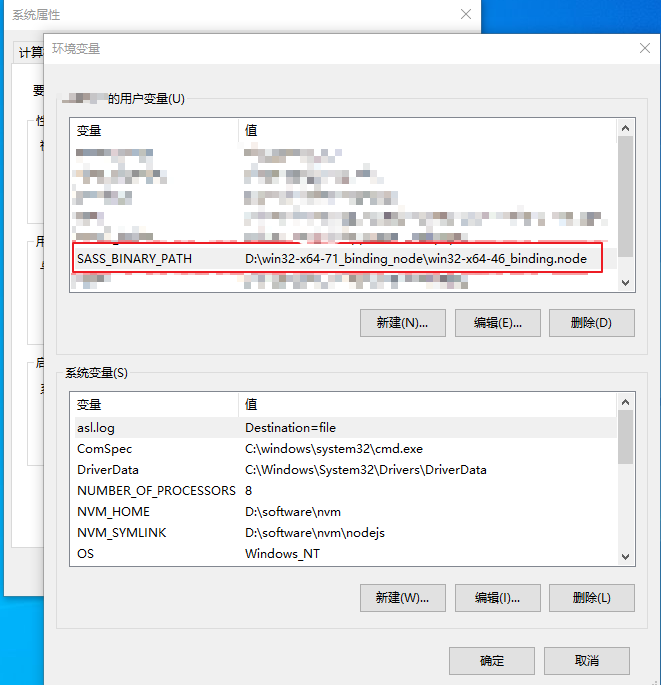
STEP 3:再执行npm install,安装node-sass的时候就会直接使用本地的win32-x64-57_binding.node,不会去远程拉取了。
方案2:
如果项目有修改的可能,可以把node-sass换成dart-sass
node-sass安装问题的更多相关文章
- npm node sass 安装报错
报错为 不能找到python2.7,记得曾经已经安装过python,结果npm install cnpm install npm install node-sass 各种不行,结果在cmd 输入pyt ...
- taro安装使用 Node Sass does not yet support your current environment: Windows 64-bit with Unsupported runtime (64)错误
1. 安装node.js 官网下载:https://nodejs.org/en/ 下载推荐版本: 2. Npm安装慢,可以使用cnpm,安装淘宝镜像: npm install -g cnpm - ...
- sass 安装与使用
1.安装. 安装ruby :http://rubyinstaller.org/downloads 创建项目:在f盘创建一个名为sass的文件夹 ruby命令行:f: ruby命令行:cd sass r ...
- 怎么解决ERROR in Node Sass does not yet support your current environmen问题?
好久没有重新安装node.js,昨天和小伙伴们一起安装,由于自己是在网上自行下载的node,安装地比较顺利,但另外两个小伙伴用的共享文件夹里自带的node,却是屡次碰到问题,快被逼疯,在运行Vue时总 ...
- Node Sass does not yet support your current environment: Windows 64-bit然如何解决,cnpm此问题解决方法
这里直接说了node sass不支持当前环境,所以可以直接删掉原来不支持本机的node sass,再重新安装就行了 删除: npm uninstall --save node-sass 安装: npm ...
- 【Problem】前端项目运行:Module build failed:Error Node Sass does not yet support my current environmen
我在运行renren-fast-vue前端项目时,安装完依赖cnpm install 启动服务npm run dev 出现问题. Module build failed: Error: Node Sa ...
- Node Sass could not find a binding for your current environment: Windows 64-bit with Node.js 1x.x
出现问题原因: nodejs和node-sass版本不匹配 解决办法: 下载node-sass指定版本的nodejs 1)node-sass的节点版本支持政策 ① 支持的 Node.js版本因版本而异 ...
- sass 安装、配置,css规则
http://blog.csdn.net/oyuemijindu/article/details/51036096 --sass 安装 一安装 1.ruby下载,可以到官网下载 ,注意如果是系统如果 ...
- Sass安装(windows版)
Sass安装(windows版) 在 Windows 平台下安装 Ruby 需要先有 Ruby 安装包,大家可以到 Ruby 的官网(http://rubyinstaller.org/download ...
- win下sass安装失败的一种可能
首先声明,本篇转自CSDN的LZGS_4. 今天我也遇到这个问题,就把文章擅自转载了,方便自己也方便更多的人吧. 因为sass和compass依赖于ruby环境,所以装之前先确认装了ruby.可到官网 ...
随机推荐
- Figma 学习笔记 – Interactive Components
参考: Input Field Interaction using Interactive Components in Figma Create interactive components with ...
- 痞子衡嵌入式:MCUBootUtility v6.3发布,支持获取与解析启动日志
-- 痞子衡维护的 NXP-MCUBootUtility 工具距离上一个大版本(v5.3.0)发布过去一年了,期间痞子衡也做过三个版本更新,但不足以单独介绍.这一次痞子衡为大家带来了全新重要版本v6. ...
- 基于全息感知的智慧高速IT设施监控运维方案
作为智能交通的重要细分领域,建设智慧高速是实施交通强国战略的重要基础.在信息化时代,交通行业已经依托信息化建设取得了显著的成果,其中以收费网络.办公网络.监控网络和通讯网络为基础的网络架构已经形成,并 ...
- springboot起步依赖
<parent> <groupId>org.springframework.boot</groupId> <artifactId>spring-boot ...
- iOS使用SourceTree回滚回滚小结
代码回滚,适用于的场景: 1.提交错代码,想放弃刚刚提交的部分:2.代码发生冲突,处理比较麻烦,为了代码安全,直接回滚到之前干净的代码.我个人理解,可以分为本地回滚和远程回滚: 一.本地回滚,回滚自己 ...
- 开源函数计算平台 OpenFunction 保姆级入门教程
OpenFunction 0.6.0 上周已经正式发布了,带来了许多值得注意的功能,包括函数插件.函数的分布式跟踪.控制自动缩放.HTTP 函数触发异步函数等.同时,异步运行时定义也被重构了.核心 A ...
- 函数计算平台 OpenFunction 在自动驾驶领域的应用
嘉宾 | 霍秉杰 整理 | 王新 出品 | CSDN 云原生 2022 年 5 月 10 日,在 CSDN 云原生系列在线峰会第 4 期"ApacheSkyWalking 峰会"上 ...
- Machine Learning Week_7 Support Vector Machines
目录 1 Large Margin Classification 1.1 Optimization Objective 1.1 Logistic Regresson 1.2 Cost 1.3 Supp ...
- LeetCode题目练习记录 _数组和链表01 _20211007
LeetCode题目练习记录 _数组和链表01 _20211007 26. 删除有序数组中的重复项 难度简单2247 给你一个有序数组 nums ,请你原地 删除重复出现的元素,使每个元素 只出现一次 ...
- 使用wxpython开发跨平台桌面应用,基类对话框窗体的封装处理
在开发桌面界面的时候,往往都需要对一些通用的窗体进行一些抽象封装处理,以便统一界面效果,以及继承一些通用的处理过程,减少重复编码.本篇随笔介绍使用wxpython开发跨平台桌面应用,基类对话框窗体的封 ...