
openwrt上网配置的一些理解(三)
接着上面的继续捣腾multiwan,首先考虑一下上一篇中记录的multiwan配置,这里的配置是否正确,得研究一下。先贴一下上一篇的配置文件,如下:
config 'multiwan' 'config'

    option 'default_route' 'balancer'

    # health_monitor below is defaulted to parallel, and can be set to

    # serial to save system resources.

    # option 'health_monitor' 'serial'

    # option 'debug' ''

config 'interface' 'wan'

    option 'weight' ''

    option 'health_interval' ''

    option 'icmp_hosts' 'gateway'

    # icmp_count is defaulted to , and can be increased to reduce

    # false positives.

    # option 'icmp_count' ''

    option 'timeout' ''

    option 'health_fail_retries' ''

    option 'health_recovery_retries' ''

    option 'failover_to' 'wan1'

    option 'dns' 'auto'

config 'interface' 'wan1'

    option 'weight' ''

    option 'health_interval' ''

    option 'icmp_hosts' 'gateway'

    option 'timeout' ''

    option 'health_fail_retries' ''

    option 'health_recovery_retries' ''

    option 'failover_to' 'wan2'

    option 'dns' 'auto'

config 'interface' 'wan2'

    option 'weight' ''

    option 'health_interval' ''

    option 'icmp_hosts' 'gateway'

    option 'timeout' ''

    option 'health_fail_retries' ''

    option 'health_recovery_retries' ''

    option 'failover_to' 'wan'

    option 'dns' 'auto'

#config 'mwanfw'

#    option 'src' '192.168.1.0/24'

#    option 'dst' 'ftp.netlab7.com'

#    option 'proto' 'tcp'

#    option 'ports' ''

#    option 'wanrule' 'lan'

# VoIP traffic goes through wan

# config 'mwanfw'

    # option 'src' '192.168.1.0/24'

    # option 'proto' 'udp'

    # option 'port_type' 'source-ports'

    # option 'ports' '5060,16384:16482'

    # option 'wanrule' 'wan'

config 'mwanfw'

#    option 'src' '192.168.0.3'

#    option 'proto' 'icmp'

    option 'wanrule' 'balancer'

config 'mwanfw'

#    option 'dst' 'www.whatismyip.com'

    option 'wanrule' 'fastbalancer'
还是在网上找找有没有相关人士做过这个:
http://www.openwrt.org.cn/bbs/forum.php?mod=viewthread&tid=9848&extra=&page=1实验多WAN带宽叠加——Multiwan篇
这个帖子做实验很严谨,于是我跟着做了跟我网络环境对应的实验,发现确实是不行的。当然根据帖子我把multiwan修改了,就是把failover_to全部修改成balancer。但是还是不行。后来我在http://wiki.openwrt.org/doc/uci/multiwan看到这么一句话:Note: Multiwan will NOT work if the WAN connections are on the same subnet and share the same default gateway.
我的是啥情况:用一张图来说明我的网络。
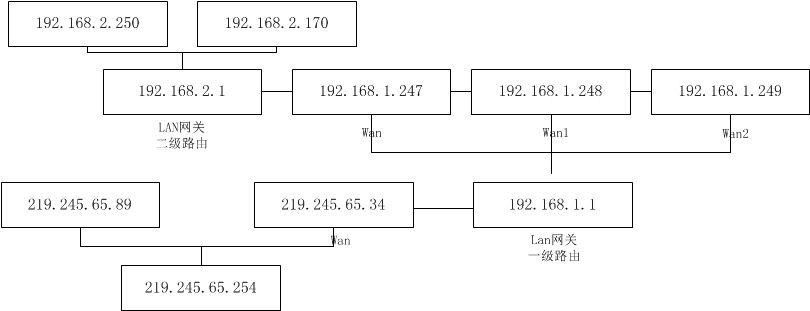
3个wan口,全部连上时,都会走eth1,也就是wan口,拔掉wan口网线,ping 百度不通,ping219.245.65.89可以回来一个数据,然后停止。很明显没有自动切换,但是不知道有没有叠加,其实我不关心叠不叠加,我只关心我随便插哪个,他就用哪个,我是要确保网络畅通。所以还得继续想办法。
根据帖子的内容我又进一步了解了下ip route。结果如下:
ip route show table

192.168.2.0/ dev br-lan    proto kernel    scope    link      src    192.168.2.1

192.168.1.0/ dev eth2     proto kernel     scope    link     src  192.168.1.247

default    proto    static

    nexthop    via    192.168.1.1    dev    eth1    weight

    nexthop     via     192.168.1.1    dev    eth2 weight

    nexthop     via     192.168.1.1    dev    eth3 weight

ip route show table

192.168.2.0/    dev    br-lan    proto    kernel    scope    link    src    192.168.2.1

192.168.1.0/    dev    eth1        proto    kernel    scope    link    src    192.168.1.247

Default    via    192.168.1.1    dev    eth1    proto    static    src    192.168.1.247

ip route show table

192.168.2.0/    dev    br-lan    proto    kernel    scope    link    src    192.168.2.1

192.168.1.0/    dev    eth1        proto    kernel    scope    link    src    192.168.1.247

Default    via    192.168.1.1    dev    eth1    proto    static    src    192.168.1.248

ip route show table

192.168.2.0/    dev    br-lan    proto    kernel    scope    link    src    192.168.2.1

192.168.1.0/    dev    eth1        proto    kernel    scope    link    src    192.168.1.247

Default    via    192.168.1.1    dev    eth1    proto    static    src    192.168.1.249
就是都会往eth1走,所以,把wan拔了肯定就有问题。回去检查了下multiwan,因为这个文件还是上一次的,只是根据这个帖子修改了failover_to,都改成balancer了,那么再看看这个帖子:http://www.openwrt.org.cn/bbs/forum.php?mod=viewthread&tid=14861&page=1&extra=#pid108970
里面multiwan的第一项中,我少了个option enabled 1.加上一试,还真是,我拿luci界面进行3个wan口的connect和stop。发现可以了,我把任意两个关了,还是可以上网。那就满足我的要求了,不过还是要研究一下luci界面机制。还是记录一下multiwan。
config 'multiwan' 'config'

    option 'default_route' 'balancer'

    # health_monitor below is defaulted to parallel, and can be set to

    # serial to save system resources.

    # option 'health_monitor' 'serial'

    option 'enabled' ''

config 'interface' 'wan'

    option 'weight' ''

    option 'health_interval' ''

    option 'icmp_hosts' 'gateway'

    # icmp_count is defaulted to , and can be increased to reduce

    # false positives.

    # option 'icmp_count' ''

    option 'timeout' ''

    option 'health_fail_retries' ''

    option 'health_recovery_retries' ''

    option 'failover_to' 'balancer'

    option 'dns' 'auto'

config 'interface' 'wan1'

    option 'weight' ''

    option 'health_interval' ''

    option 'icmp_hosts' 'gateway'

    option 'timeout' ''

    option 'health_fail_retries' ''

    option 'health_recovery_retries' ''

    option 'failover_to' 'balancer'

    option 'dns' 'auto'

config 'interface' 'wan2'

    option 'weight' ''

    option 'health_interval' ''

    option 'icmp_hosts' 'gateway'

    option 'timeout' ''

    option 'health_fail_retries' ''

    option 'health_recovery_retries' ''

    option 'failover_to' 'balancer'

    option 'dns' 'auto'

#config 'mwanfw'

#    option 'src' '192.168.1.0/24'

#    option 'dst' 'ftp.netlab7.com'

#    option 'proto' 'tcp'

#    option 'ports' ''

#    option 'wanrule' 'lan'

# VoIP traffic goes through wan

# config 'mwanfw'

    # option 'src' '192.168.1.0/24'

    # option 'proto' 'udp'

    # option 'port_type' 'source-ports'

    # option 'ports' '5060,16384:16482'

    # option 'wanrule' 'wan'

config 'mwanfw'

#    option 'src' '192.168.0.3'

#    option 'proto' 'icmp'

    option 'wanrule' 'balancer'

config 'mwanfw'

#    option 'dst' 'www.whatismyip.com'

    option 'wanrule' 'fastbalancer'
接下来还要把3g上网的也加进来试试。
openwrt上网配置的一些理解(三)的更多相关文章
- openwrt上网配置的一些理解
其实已经有很多帖子讲过openwrt路由器上网配置了,我这里主要是讲我自己的一块硬件路由使用openwrt后的一些上网配置.之所以要研究我自己的配置,是因为硬件,硬件不一样,配置也就不一样,但是总的原 ...
- openwrt上网配置的一些理解(四)
这次要解决的问题是3g上网和wan口上往可以随意切换,当然能够叠加也是好事,不过这不是我关心的.下面还是修改3个文件network,firewall,multiwan.首先在network中加入界面配 ...
- openwrt上网配置的一些理解(二)
上一篇里面遇到了只能静态上网的问题,动态不行.所以再接再励,问题总是要解决的,偷懒的下场就是一直停留在菜鸟的水平. 首先分析下问题,要动态上网,首先我要明确不是动态获取不了IP,是获取了,上不了外网. ...
- 【转】logback logback.xml常用配置详解(三) <filter>
原创文章,转载请指明出处:http://aub.iteye.com/blog/1110008, 尊重他人即尊重自己 详细整理了logback常用配置, 不是官网手册的翻译版,而是使用总结,旨在更快更透 ...
- [转]ubuntu server上网配置
[转]ubuntu server上网配置 http://blog.sina.com.cn/s/blog_6c9d65a101011pyt.html 今天我的ubuntu server上不去网了,所以重 ...
- OpenWRT 路由配置技巧
随着最近 Google 在国内已经完全无法访问,使得通过 VPN 访问网络的需求更加强烈,本文介绍的方法可以使一个普通的路由具备稳定连接 VPN 的能力,并能够根据目标访问网站选择国内外线路,从而得到 ...
- ElasticSearch 深入理解 三:集群部署设计
ElasticSearch 深入理解 三:集群部署设计 ElasticSearch从名字中也可以知道,它的Elastic跟Search是同等重要的,甚至以Elastic为主要导向. Elastic即可 ...
- VMware Workstation虚拟机中的Linux通过NAT模式共享上网配置教程
VMware Workstation虚拟机中的Linux通过NAT模式共享上网配置教程 在VMware Workstation虚拟机下面,Linux虚机要上网,一般是桥接模式,但我自己的电脑上网的环境 ...
- 联通光纤上网配置+华为HG8240光猫+TL-WR842N
最近搬家改用北京联通宽带,光纤入户的那种.联通送的光猫是华为HG8240,没看到天线,应该是不带无线路由.然后自己再买了个TP-Link的TL-WR842N,用来组局域网,也供ipad.kindle. ...
随机推荐
- 【转】Multithreaded Python Tutorial with the “Threadworms” Demo
The code for this tutorial can be downloaded here: threadworms.py or from GitHub. This code works wi ...
- Eclipse利用代理快速安装插件
在eclipse启动时增加以下参数: eclipse.exe -vmargs -DproxySet=true -DproxyHost=aProxyAddress -DproxyPort=aProxyP ...
- chrome Provisional headers are shown错误提示
1.一般出现这个错误是请求没有发送成功 可能原因:在上传文件或ajax上传时指定的timeout,过时时间小 其他资料: http://www.duanzhihe.com/575.html http: ...
- ASP.NET实现年月日三级联动(局部刷新)
直接上代码,不多说别的了 <asp:ScriptManager ID="ScriptManager1" runat="server"> </a ...
- Mybatis学习总结(二)—使用接口实现数据的增删改查
在这一篇中,让我们使用接口来实现一个用户数据的增删改查. 完成后的项目结构如下图所示: 在这里,person代表了一个用户的实体类.在该类中,描述了相关的信息,包括id.name.age.id_num ...
- 3D跑酷游戏《月影忍者之疾风狂逃》
<月影忍者之疾风狂逃>是一款3D跑酷游戏,也是我实习的时候参与的一个项目,在那个公司我学到了很多东西,谢谢他们.大家可以去玩玩这个游戏啊,还是不错的哦.
- Java中解析XML的四种方法
XML现在已经成为一种通用的数据交换格式,它的平台无关性,语言无关性,系统无关性,给数据集成与交互带来了极大的方便.对于XML本身的语法知识与技术细节,需要阅读相关的技术文献,这里面包括的内容有DOM ...
- Python一路走来 - python基础 数据类型
对于Python,一切事物都是对象,对象基于类创建 Python数据类型 python主要的数据类型主要包括以下几种类型: (1) 数字型 (2) 字符串 (3) 列表 (4) 元组 (5) 字典 ( ...
- cxf-webservice-在was6服务器上运行
最近开发了一个webservice服务,采用了常用的cxf框架. 本地jetty测试一切ok,发布到现场环境was服务器中,就报错,不能运行. 访问services页面报错为 Error 500: S ...
- Xcode中将图片放入Images.xcassets和直接拖入的区别
将图片放入Images.xcassets 在mainBundle里面Xcode会生成一个Assets.car文件,将我们放在Images.xcassets的图片打包在里面.(程序会变大(?)) 无论是 ...