
Hadoop 电话通信清单
一、实例要求
现有一批电话通信清单,记录了用户A拨打某些特殊号码(如120,10086,13800138000等)的记录。需要做一个统计结果,记录拨打给用户B的所有用户A。
二、测试样例
样例输入:
file.txt:
13599999999 10086
13899999999 120
13944444444 1380013800
13722222222 1380013800
18800000000 120
13722222222 10086
18944444444 10086
样例输出:
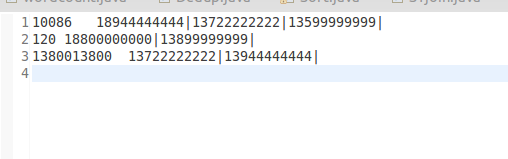
三、算法思路
源文件——》Mapper(分隔原始数据,以被叫作为key,以主叫作为value)——》Reducer(把拥有相同被叫的主叫号码用|分隔汇总)——》输出到HDFS
四、程序代码
程序代码如下:
import java.io.IOException;

import org.apache.hadoop.conf.Configuration;

import org.apache.hadoop.fs.Path;

import org.apache.hadoop.io.LongWritable;

import org.apache.hadoop.io.Text;

import org.apache.hadoop.mapreduce.Job;

import org.apache.hadoop.mapreduce.Mapper;

import org.apache.hadoop.mapreduce.Reducer;

import org.apache.hadoop.mapreduce.lib.input.FileInputFormat;

import org.apache.hadoop.mapreduce.lib.output.FileOutputFormat;

import org.apache.hadoop.util.GenericOptionsParser;

public class Tel {

    public static class Map extends Mapper<LongWritable, Text, Text, Text>{

        @Override

        protected void map(LongWritable key, Text value,Mapper<LongWritable, Text, Text, Text>.Context context)

                throws IOException, InterruptedException {

            //  super.map(key, value, context);

            String line = value.toString();

            Text word = new Text();

            String [] lineSplite = line.split(" ");

            String anum = lineSplite[0];

            String bnum = lineSplite[1];

            context.write(new Text(bnum), new Text(anum));

        }

    }

    public static class Reduce extends Reducer<Text, Text, Text, Text>{

        @Override

        protected void reduce(Text key, Iterable<Text> values,Reducer<Text, Text, Text, Text>.Context context)

                throws IOException, InterruptedException {

            //  super.reduce(arg0, arg1, arg2);

            String valueString;

            String out ="";

            for(Text value: values){

                valueString=value.toString();

                out += valueString+"|";

            }

            context.write(key, new Text(out));

        }

    }

    public static void main(String[] args) throws IOException, ClassNotFoundException, InterruptedException {

        Configuration conf = new Configuration();

        String[] otherArgs = new GenericOptionsParser(conf,args).getRemainingArgs();

        if(otherArgs.length!=2){

            System.out.println("Usage:wordcount <in> <out>");

            System.exit(2);

        }

        Job job = new Job(conf,"Tel");

        job.setJarByClass(Tel.class);

        job.setOutputKeyClass(Text.class);

        job.setOutputValueClass(Text.class);

        job.setMapperClass(Map.class);

        job.setReducerClass(Reduce.class);

        FileInputFormat.addInputPath(job, new Path(args[0]));

        FileOutputFormat.setOutputPath(job, new Path(args[1]));

        job.waitForCompletion(true);

    }

}
Hadoop 电话通信清单的更多相关文章
- 想从事分布式系统,计算,hadoop等方面,需要哪些基础,推荐哪些书籍?--转自知乎
作者:廖君链接:https://www.zhihu.com/question/19868791/answer/88873783来源:知乎 分布式系统(Distributed System)资料 < ...
- 从事分布式系统,计算,hadoop
作者:廖君链接:https://www.zhihu.com/question/19868791/answer/88873783来源:知乎 分布式系统(Distributed System)资料 < ...
- mapreduce编程练习(二)倒排索引 Combiner的使用以及练习
问题一:请使用利用Combiner的方式:根据图示内容编写maprdeuce程序 示例程序 package com.greate.learn; import java.io.IOException; ...
- 分布式系统(Distributed System)资料
这个资料关于分布式系统资料,作者写的太好了.拿过来以备用 网址:https://github.com/ty4z2008/Qix/blob/master/ds.md 希望转载的朋友,你可以不用联系我.但 ...
- [Hadoop in Action] 第7章 细则手册
向任务传递定制参数 获取任务待定的信息 生成多个输出 与关系数据库交互 让输出做全局排序 1.向任务传递作业定制的参数 在编写Mapper和Reducer时,通常会想让一些地方可以配 ...
- [Hadoop in Action] 第6章 编程实践
Hadoop程序开发的独门绝技 在本地,伪分布和全分布模式下调试程序 程序输出的完整性检查和回归测试 日志和监控 性能调优 1.开发MapReduce程序 [本地模式] 本地模式 ...
- [Hadoop in Action] 第5章 高阶MapReduce
链接多个MapReduce作业 执行多个数据集的联结 生成Bloom filter 1.链接MapReduce作业 [顺序链接MapReduce作业] mapreduce-1 | mapr ...
- [Hadoop in Action] 第4章 编写MapReduce基础程序
基于hadoop的专利数据处理示例 MapReduce程序框架 用于计数统计的MapReduce基础程序 支持用脚本语言编写MapReduce程序的hadoop流式API 用于提升性能的Combine ...
- [hadoop in Action] 第3章 Hadoop组件
管理HDFS中的文件 分析MapReduce框架中的组件 读写输入输出数据 1.HDFS文件操作 [命令行方式] Hadoop的文件命令采取的形式为: hadoop fs -cmd < ...
随机推荐
- Mybatis SqlsessionFactory
在Mybatis 与 Spring 进行整合的时候,我们会进行sqlSessionFactory 的配置,来创建sqlSessionFactory 对象:如下: <bean id="s ...
- Centos7系统安装部署docker
一.安装docker #创建docker相关的目录 mkdir -p /data/docker #安装docker运行必要工具 sudo yum install -y yum-utilsdevice- ...
- HTTP协议转码
为什么要有转义的功能? 一些特殊字符需要转义,才能被访问,否则变为空格 UrlEnCode与UrlDeCode 有些符号在URL中是不能直接传递的,如果要在URL中传递这些特殊符号,那么就要使用他们的 ...
- 【深度好文】多线程之WaitHandle-->派生EventWaitHandle事件构造-》AutoResetEvent、ManualResetEvent
AutoResetEvent/ManualResetEvent 都是继承自 EventWaitHandle ,EventWaitHandle继承自WaitHandle. 在讨论这个问题之前,我们先了解 ...
- ASP .NetCore 部署500错误 查看异常详情
部署.net core 网站后,访问报错:500 按照教程设置完成,但访问时总是提示 服务器内部错误,没有详细的异常信息,无从下手. 解决办法: 1.在站点根目录下按住shift+鼠标右键,选择在此处 ...
- C++概念小结
API:应用程序编程接口 SDK:软件开发包 调用程序是通过消息来进行的 事件驱动方式的程序设计模式,主要是基于消息的.消息,是由MSG结构体表示的. 消息队列:用来存放该程序创建的窗口的消息 Win ...
- GUI学习之七——单选框QRadioButton和QButtonGroup的学习总结
一.单选框QRadioButton的使用 1.类的描述 a.单选框按钮用于给用户提供若干选项中的单选操作,当一个被选中时,会自动取消选中的那个.(如果只有一个时可以通过单击该按钮改变其状态:而存在多个 ...
- sql语句性能优化
需要的准备知识 1最左前缀匹配 mysql会一直向右匹配直到遇到范围查询(>.<.between.like)就停止匹配, 对于where条件 a = 1 and b> 2 and c ...
- Unity Button事件的简洁处理
看到很多人依然还是通过最原始的方法给button绑定事件并处理,这种通过Find往子集一个个的查找,获取到后再绑定事件这种操作很费事,有些人则是对查找对象写了个方法自动往子集遍历更方便获取对象,但还是 ...
- ApocalypseSomeday
ApocalypseSomeday CountDownLatch和CyclicBarrier分别都是在什么时候使用的? Charles使用(apphttp抓包,request拦截,response拦截 ...