
python之多线程 queue 实践 筛选有效url
0.目录
1.背景
某号码卡申请页面通过省份+城市切换归属地,每次返回10个号码。
通过 Fiddler 抓包确认 url 关键参数规律:
provinceCode 两位数字
cityCode 三位数字
groupKey 与 provinceCode 为一一对应
所以任务是手动遍历省份,取得 provinceCode 和 groupKey 组合列表,对组合列表的每个组合执行 for 循环 cityCode ,确认有效 url 。
url 不对的时候正常返回,而使用 squid 多代理经常出现代理失效,需要排除 requests 相关异常,尽量避免错判。
# In [88]: r.text

# Out[88]: u'jsonp_queryMoreNums({"numRetailList":[],"code":"M1","uuid":"a95ca4c6-957e-462a-80cd-0412b

# d5672df","numArray":[]});'
获取号码归属地信息:
url = 'http://www.ip138.com:8080/search.asp?action=mobile&mobile=%s' %num
中文转换拼音:
from pypinyin import lazy_pinyin
province_pinyin = ''.join(lazy_pinyin(province_zh))
确认任务队列已完成:
https://docs.python.org/2/library/queue.html#module-Queue
Queue.task_done()

Indicate that a formerly enqueued task is complete. Used by queue consumer threads. For each get() used to fetch a task, a subsequent call to task_done() tells the queue that the processing on the task is complete.

If a join() is currently blocking, it will resume when all items have been processed (meaning that a task_done() call was received for every item that had been put() into the queue).

Raises a ValueError if called more times than there were items placed in the queue.
2.完整代码
referer 和 url 细节已#!/usr/bin/env python# -*- coding: UTF-8 -*import timeimport reimport jsonimport traceback
import threading
lock = threading.Lock()
import Queue
task_queue = Queue.Queue()
write_queue = Queue.Queue() import requests
from requests.exceptions import (ConnectionError, ConnectTimeout, ReadTimeout, SSLError,
ProxyError, RetryError, InvalidSchema)
s = requests.Session()
s.headers.update({'user-agent':'Mozilla/5.0 (iPhone; CPU iPhone OS 9_3_5 like Mac OS X) AppleWebKit/601.1.46 (KHTML, like Gecko) Mobile/13G36 MicroMessenger/6.5.12 NetType/4G'})
# 隐藏 referer 细节,实测可不用
# s.headers.update({'Referer':'https://servicewechat.com/xxxxxxxx'})
s.verify = False
s.mount('https://', requests.adapters.HTTPAdapter(pool_connections=1000, pool_maxsize=1000)) import copy
sp = copy.deepcopy(s)
proxies = {'http': 'http://127.0.0.1:3128', 'https': 'https://127.0.0.1:3128'}
sp.proxies = proxies from urllib3.exceptions import InsecureRequestWarning
from warnings import filterwarnings
filterwarnings('ignore', category = InsecureRequestWarning) from bs4 import BeautifulSoup as BS
from pypinyin import lazy_pinyin
import pickle import logging
def get_logger():
logger = logging.getLogger("threading_example")
logger.setLevel(logging.DEBUG) # fh = logging.FileHandler("d:/threading.log")
fh = logging.StreamHandler()
fmt = '%(asctime)s - %(threadName)-10s - %(levelname)s - %(message)s'
formatter = logging.Formatter(fmt)
fh.setFormatter(formatter) logger.addHandler(fh)
return logger logger = get_logger() # url 不对的时候正常返回:
# In [88]: r.text
# Out[88]: u'jsonp_queryMoreNums({"numRetailList":[],"code":"M1","uuid":"a95ca4c6-957e-462a-80cd-0412b
# d5672df","numArray":[]});'
results = []
def get_nums():
global results
pattern = re.compile(r'({.*?})') #, re.S | re.I | re.X)
while True:
try: #尽量缩小try代码块大小
_url = task_queue.get()
url = _url + str(int(time.time()*1000))
resp = sp.get(url, timeout=10)
except (ConnectionError, ConnectTimeout, ReadTimeout, SSLError,
ProxyError, RetryError, InvalidSchema) as err:
task_queue.task_done() ############### 重新 put 之前需要 task_done ,才能保证释放 task_queue.join()
task_queue.put(_url)
except Exception as err:
logger.debug('\nstatus_code:{}\nurl:{}\nerr: {}\ntraceback: {}'.format(resp.status_code, url, err, traceback.format_exc()))
task_queue.task_done() ############### 重新 put 之前需要 task_done ,才能保证释放 task_queue.join()
task_queue.put(_url)
else:
try:
# rst = resp.content
# match = rst[rst.index('{'):rst.index('}')+1]
# m = re.search(r'({.*?})',resp.content)
m = pattern.search(resp.content)
match = m.group()
rst = json.loads(match)
nums = [num for num in rst['numArray'] if num>10000]
nums_len = len(nums)
# assert nums_len == 10
num = nums[-1]
province_zh, city_zh, province_pinyin, city_pinyin = get_num_info(num)
result = (str(num), province_zh, city_zh, province_pinyin, city_pinyin, _url)
results.append(result)
write_queue.put(result)
logger.debug(u'results:{} threads: {} task_queue: {} {} {} {} {}'.format(len(results), threading.activeCount(), task_queue.qsize(),
num, province_zh, city_zh, _url)) except (ValueError, AttributeError, IndexError) as err:
pass
except Exception as err:
# print err,traceback.format_exc()
logger.debug('\nstatus_code:{}\nurl:{}\ncontent:{}\nerr: {}\ntraceback: {}'.format(resp.status_code, url, resp.content, err, traceback.format_exc()))
finally:
task_queue.task_done() ############### def get_num_info(num):
try:
url = 'http://www.ip138.com:8080/search.asp?action=mobile&mobile=%s' %num
resp = s.get(url)
soup = BS(resp.content, 'lxml')
# pro, cit = re.findall(r'<TD class="tdc2" align="center">(.*?)<', resp.content)[0].decode('gbk').split(' ')
rst = soup.select('tr td.tdc2')[1].text.split()
if len(rst) == 2:
province_zh, city_zh = rst
else:
province_zh = city_zh = rst[0]
province_pinyin = ''.join(lazy_pinyin(province_zh))
city_pinyin = ''.join(lazy_pinyin(city_zh))
except Exception as err:
print err,traceback.format_exc()
province_zh = city_zh = province_pinyin = city_pinyin = 'xxx' return province_zh, city_zh, province_pinyin, city_pinyin def write_result():
with open('10010temp.txt','w',0) as f: # 'w' open时会截去之前内容,所以放在 while True 之上
while True:
try:
rst = ' '.join(write_queue.get()) + '\n'
f.write(rst.encode('utf-8'))
write_queue.task_done()
except Exception as err:
print err,traceback.format_exc() if __name__ == '__main__': province_groupkey_list = [
('', ''),
('', ''),
('', ''),
('', ''),
('', ''),
('', ''),
('', ''),
('', ''),
('', ''),
('', ''),
('', ''),
('', ''),
('', ''),
('', ''),
('', ''),
('', ''),
('', ''),
('', ''),
('', ''),
('', ''),
('', ''),
('', ''),
('', ''),
('', ''),
('', ''),
('', ''),
('', ''),
('', ''),
('', ''),
('', ''),
('', '')] # province_groupkey_list = [('51', '21236872')]
import itertools
for (provinceCode, groupKey) in province_groupkey_list:
# for cityCode in range(1000):
for cityCode in [''.join(i) for i in itertools.product('',repeat=3)]:
fmt = 'https://m.1xxxx.com/xxxxx&provinceCode={provinceCode}&cityCode={cityCode}&xxxxx&groupKey={groupKey}&xxxxx' # url 细节已被隐藏
url = fmt.format(provinceCode=provinceCode, cityCode=cityCode, groupKey=groupKey)#, now=int(float(time.time())*1000))
task_queue.put(url) threads = []
for i in range(300):
t = threading.Thread(target=get_nums) #args接收元组,至少(a,)
threads.append(t) t_write_result = threading.Thread(target=write_result)
threads.append(t_write_result) # for t in threads:
# t.setDaemon(True)
# t.start()
# while True:
# pass for t in threads:
t.setDaemon(True)
t.start()
# for t in threads:
# t.join() task_queue.join()
print 'task done'
write_queue.join()
print 'write done' with open('10010temp','w') as f:
pickle.dump(results, f)
print 'all done' # while True:
# pass
3.运行结果
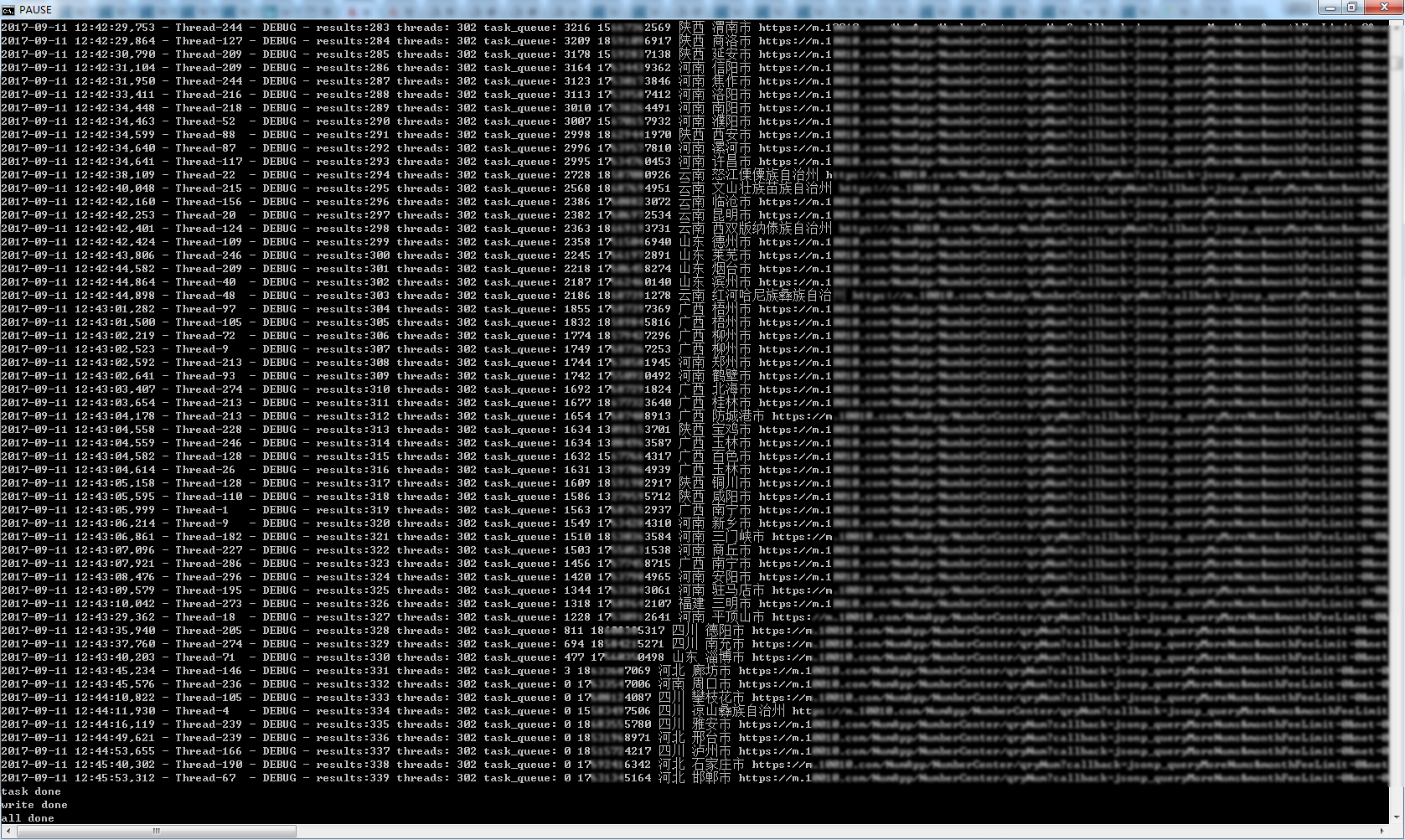
多运行几次,确认最终 results 数量339
python之多线程 queue 实践 筛选有效url的更多相关文章
- 【python】多线程queue导致的死锁问题
写了个多线程的python脚本,结果居然死锁了.调试了一整天才找到原因,是我使用queue的错误导致的. 为了说明问题,下面是一个简化版的代码.注意,这个代码是错的,后面会说原因和解决办法. impo ...
- day11学python 多线程+queue
多线程+queue 两种定义线程方法 1调用threading.Thread(target=目标函数,args=(目标函数的传输内容))(简洁方便) 2创建一个类继承与(threading.Threa ...
- 【转】使用python进行多线程编程
1. python对多线程的支持 1)虚拟机层面 Python虚拟机使用GIL(Global Interpreter Lock,全局解释器锁)来互斥线程对共享资源的访问,暂时无法利用多处理器的优势.使 ...
- Python编程-多线程
一.python并发编程之多线程 1.threading模块 multiprocess模块的完全模仿了threading模块的接口,二者在使用层面,有很大的相似性,因而不再详细介绍 1.1 开启线程的 ...
- PythonI/O进阶学习笔记_10.python的多线程
content: 1. python的GIL 2. 多线程编程简单示例 3. 线程间的通信 4. 线程池 5. threadpool Future 源码分析 ================== ...
- Python的多线程(threading)与多进程(multiprocessing )
进程:程序的一次执行(程序载入内存,系统分配资源运行).每个进程有自己的内存空间,数据栈等,进程之间可以进行通讯,但是不能共享信息. 线程:所有的线程运行在同一个进程中,共享相同的运行环境.每个独立的 ...
- Python实现多线程HTTP下载器
本文将介绍使用Python编写多线程HTTP下载器,并生成.exe可执行文件. 环境:windows/Linux + Python2.7.x 单线程 在介绍多线程之前首先介绍单线程.编写单线程的思路为 ...
- Python实现多线程调用GDAL执行正射校正
python实现多线程参考http://www.runoob.com/python/python-multithreading.html #!/usr/bin/env python # coding: ...
- Python之多线程和多进程
一.多线程 1.顺序执行单个线程,注意要顺序执行的话,需要用join. #coding=utf-8 from threading import Thread import time def my_co ...
随机推荐
- java接口可以继承多个接口
接口是常量值和方法定义的集合.接口是一种特殊的抽象类. java类是单继承的.classB Extends classA java接口可以多继承.Interface3 Extends Interf ...
- 虚拟机静态ip设置
1.安装之后,用ifconfig命令发现没有ip信息,如下图,发现没有ip信息(好坑). 网上找了各种资料,最后才发现实自己的网卡没有启动,虽然使用service restart network,但是 ...
- php 汉字的首字母
<?php//php获取中文字符拼音首字母function getFirstCharter($str){ if(empty($str)) { return ''; } $fchar=ord($s ...
- 计算机中K到底是1000还是1024?
1000和1024的争论,其实是传输领域和存储领域概念不清引起的;在传输领域,1秒钟传输多少字位(即b,bit),肯定是用10进制表示,所以是1kb=1000b,即1秒钟传输1000个比特位;就好像: ...
- hbase搭建
0. 软件版本下载 http://mirror.bit.edu.cn/apache/hbase/ 1. 集群环境 Master 172.16.11.97 Slave1 172.16.11.98 S ...
- ACM-ICPC 2018 焦作赛区网络预赛 G Give Candies
There are NNN children in kindergarten. Miss Li bought them NNN candies. To make the process more in ...
- swift 实践- 06 -- UITextView
import UIKit class ViewController: UIViewController { override func viewDidLoad() { super.viewDidLoa ...
- 【java】转:Windows系统下面多个jdk版本切换
转自:https://blog.csdn.net/iamcaochong/article/details/56008545 1.系统-高级系统设置-环境变量 里面的Path值最前面的C:\Progra ...
- SpringMVC文件下载与JSON格式
点击查看上一章 现在JSON这种数据格式是被使用的非常的广泛的,SpringMVC作为目前最受欢迎的框架,它对JSON这种数据格式提供了非常友好的支持,可以说是简单到爆. 在我们SpringMVC中只 ...
- LeetCode(75):分类颜色
Medium! 题目描述: 给定一个包含红色.白色和蓝色,一共 n 个元素的数组,原地对它们进行排序,使得相同颜色的元素相邻,并按照红色.白色.蓝色顺序排列. 此题中,我们使用整数 0. 1 和 2 ...