
LeNet训练MNIST
jupyter notebook: https://github.com/Penn000/NN/blob/master/notebook/LeNet/LeNet.ipynb
LeNet训练MNIST
 import warnings
 warnings.filterwarnings('ignore')  # 不打印 warning

 import tensorflow as tf
 import numpy as np
 import os
加载MNIST数据集
分别加载MNIST训练集、测试集、验证集
 from tensorflow.examples.tutorials.mnist import input_data

 mnist = input_data.read_data_sets("MNIST_data/", one_hot=True)
 X_train, y_train = mnist.train.images, mnist.train.labels
 X_test, y_test = mnist.test.images, mnist.test.labels
 X_validation, y_validation = mnist.validation.images, mnist.validation.labels
Extracting MNIST_data/train-images-idx3-ubyte.gz
Extracting MNIST_data/train-labels-idx1-ubyte.gz
Extracting MNIST_data/t10k-images-idx3-ubyte.gz
Extracting MNIST_data/t10k-labels-idx1-ubyte.gz
 print("Image Shape: {}".format(X_train.shape))
 print("label Shape: {}".format(y_train.shape))
 print()
 print("Training Set:   {} samples".format(len(X_train)))
 print("Validation Set: {} samples".format(len(X_validation)))
 print("Test Set:       {} samples".format(len(X_test)))
Image Shape: (55000, 784)
label Shape: (55000, 10)

Training Set:   55000 samples
Validation Set: 5000 samples
Test Set:       10000 samples
数据处理
由于LeNet的输入为32x32xC(C为图像通道数),而MNIST每张图像的尺寸为28x28,所以需要对图像四周进行填充,并添加一维,使得每幅图像的形状为32x32x1。
 # 使用0对图像四周进行填充
 X_train = np.array([np.pad(X_train[i].reshape((28, 28)), (2, 2), 'constant')[:, :, np.newaxis] for i in range(len(X_train))])
 X_validation = np.array([np.pad(X_validation[i].reshape((28, 28)), (2, 2), 'constant')[:, :, np.newaxis] for i in range(len(X_validation))])
 X_test = np.array([np.pad(X_test[i].reshape((28, 28)), (2, 2), 'constant')[:, :, np.newaxis] for i in range(len(X_test))])

 print("Updated Image Shape: {}".format(X_train.shape))
Updated Image Shape: (55000, 32, 32, 1)
MNIST数据展示
 import random
 import numpy as np
 import matplotlib.pyplot as plt
 %matplotlib inline

 index = random.randint(0, len(X_train))
 image = X_train[index].squeeze().reshape((32, 32))

 plt.figure(figsize=(2,2))
 plt.imshow(image, cmap="gray")
 print(y_train[index])
[0. 0. 0. 0. 0. 1. 0. 0. 0. 0.]
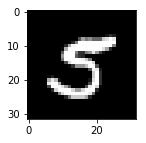
LeNet网络结构

Input
The LeNet architecture accepts a 32x32xC image as input, where C is the number of color channels. Since MNIST images are grayscale, C is 1 in this case. LeNet的输入为32x32xC的图像,C为图像的通道数。在MNIST中,图像为灰度图,因此C等于1。
Architecture
Layer 1: Convolutional. 输出为28x28x6的张量。
Activation. 激活函数。
Pooling. 输出为14x14x6的张量。
Layer 2: Convolutional. 输出为10x10x16的张量。
Activation. 激活函数。
Pooling. 输出为5x5x16的张量。
Flatten. 将张量展平为一维向量,使用tf.contrib.layers.flatten可以实现。
Layer 3: Fully Connected. 输出为120长度的向量。
Activation. 激活函数。
Layer 4: Fully Connected. 输出为84长度的向量。
Activation. 激活函数。
Layer 5: Fully Connected (Logits). 输出为10长度的向量。
 # 卷积层
 def conv_layer(x, filter_shape, stride, name):
     with tf.variable_scope(name):
         W = tf.get_variable('weights', shape=filter_shape, initializer=tf.truncated_normal_initializer())
         b = tf.get_variable('biases', shape=filter_shape[-1], initializer=tf.zeros_initializer())
     return tf.nn.conv2d(x, W, strides=stride, padding='VALID', name=name) + b
 # 全连接层
 def fc_layer(x, in_size, out_size, name):
     with tf.variable_scope(name):
         W = tf.get_variable('weights', shape=(in_size, out_size), initializer=tf.truncated_normal_initializer())
         b = tf.get_variable('biases', shape=(out_size), initializer=tf.zeros_initializer())

     return tf.nn.xw_plus_b(x, W, b, name=name)
 def relu_layer(x, name):
     return tf.nn.relu(x, name=name)
 from tensorflow.contrib.layers import flatten

 def LeNet(x):
     conv1 = conv_layer(x, filter_shape=(5, 5, 1, 6), stride=[1, 1, 1, 1], name='conv1')
     relu1 = relu_layer(conv1, 'relu1')
     max_pool1 = max_pool_layer(relu1,  kernel_size=[1, 2, 2, 1], stride=[1, 2, 2, 1], name='max_pool1')

     conv2 = conv_layer(max_pool1, filter_shape=(5, 5, 6, 16), stride=[1, 1, 1, 1], name='conv2')
     relu2 = relu_layer(conv2, 'relu2')
     max_pool2 = max_pool_layer(relu2,  kernel_size=[1, 2, 2, 1], stride=[1, 2, 2, 1], name='max_pool1')

     flat = flatten(max_pool2)

     fc3 = fc_layer(flat, 400, 120, name='fc3')
     relu3 = relu_layer(fc3, 'relu3')

     fc4 = fc_layer(relu3, 120, 84, name='fc4')
     relu4 = relu_layer(fc4, 'relu4')

     logits = fc_layer(relu4, 84, 10, name='fc5')

     return logits
TensorFlow设置
 EPOCHS = 10
 BATCH_SIZE = 128
 log_dir = './log/'

 x = tf.placeholder(tf.float32, (None, 32, 32, 1))
 y = tf.placeholder(tf.int32, (None, 10))

 # 定义损失函数
 logits = LeNet(x)
 cross_entropy = tf.nn.softmax_cross_entropy_with_logits(labels=y, logits=logits)
 loss = tf.reduce_mean(cross_entropy)
 train = tf.train.AdamOptimizer(learning_rate=0.01).minimize(loss)
训练
 from sklearn.utils import shuffle
 import shutil
 log_dir = './logs/'
 if os.path.exists(log_dir):
     shutil.rmtree(log_dir)
 os.makedirs(log_dir)
 train_writer = tf.summary.FileWriter(log_dir+'train/')
 valid_writer = tf.summary.FileWriter(log_dir+'valid/')

 ckpt_path = './ckpt/'
 saver = tf.train.Saver()

 with tf.Session() as sess:
     sess.run(tf.global_variables_initializer())
     n_samples = len(X_train)

     step = 0
     for i in range(EPOCHS):
         X_train, y_train = shuffle(X_train, y_train) # 打乱数据
         # 使用mini-batch训练
         for offset in range(0, n_samples, BATCH_SIZE):
             end = offset + BATCH_SIZE
             batch_x, batch_y = X_train[offset:end], y_train[offset:end]
             sess.run(train, feed_dict={x: batch_x, y: batch_y})

             train_loss = sess.run(loss, feed_dict={x: batch_x, y: batch_y})
             train_summary = tf.Summary(value=[
                 tf.Summary.Value(tag="loss", simple_value=train_loss)
             ])
             train_writer.add_summary(train_summary, step)
             train_writer.flush()
             step += 1

         # 每个epoch使用验证集对网络进行验证
         valid_loss = sess.run(loss, feed_dict={x: X_validation, y: y_validation})
         valid_summary = tf.Summary(value=[
                 tf.Summary.Value(tag="loss", simple_value=valid_loss)
         ])
         valid_writer.add_summary(valid_summary, step)
         valid_writer.flush()

         print('epoch', i, '>>> loss:', valid_loss)

     # 保存模型
     saver.save(sess, ckpt_path + 'model.ckpt')
     print("Model saved")
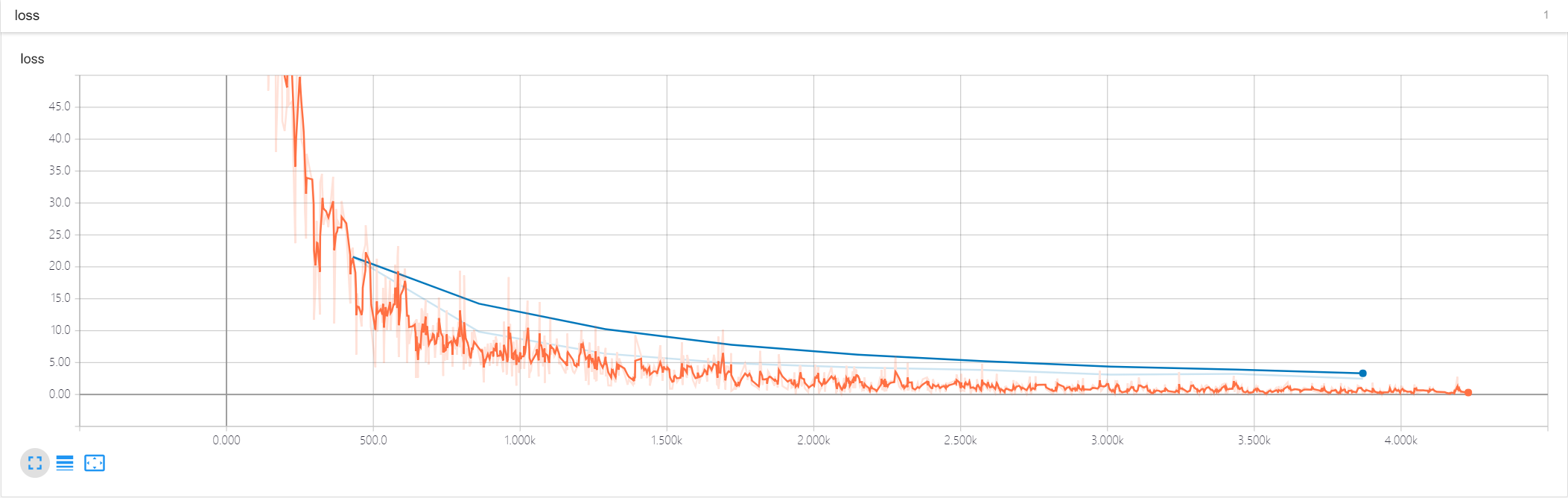
epoch 0 >>> validation loss: 39.530758
epoch 1 >>> validation loss: 19.649899
epoch 2 >>> validation loss: 11.780323
epoch 3 >>> validation loss: 8.7316675
epoch 4 >>> validation loss: 6.396747
epoch 5 >>> validation loss: 5.4544454
epoch 6 >>> validation loss: 4.5326686
epoch 7 >>> validation loss: 3.5578024
epoch 8 >>> validation loss: 3.2353864
epoch 9 >>> validation loss: 3.5096574
Model saved
训练和验证的loss曲线
测试
 correct = tf.equal(tf.argmax(logits, 1), tf.argmax(y, 1))
 accuracy = tf.reduce_mean(tf.cast(correct, tf.float32))

 with tf.Session() as sess:
     saver.restore(sess, tf.train.latest_checkpoint('./ckpt'))

     test_accuracy = sess.run(accuracy, feed_dict={x: X_test, y: y_test})
     print("Test Accuracy = {}".format(test_accuracy))
INFO:tensorflow:Restoring parameters from ./ckpt/model.ckpt
Test Accuracy = 0.9574000239372253
LeNet训练MNIST的更多相关文章
- Window10 上MindSpore(CPU)用LeNet网络训练MNIST
本文是在windows10上安装了CPU版本的Mindspore,并在mindspore的master分支基础上使用LeNet网络训练MNIST数据集,实践已训练成功,此文为记录过程中的出现问题: ( ...
- 使用caffe训练mnist数据集 - caffe教程实战(一)
个人认为学习一个陌生的框架,最好从例子开始,所以我们也从一个例子开始. 学习本教程之前,你需要首先对卷积神经网络算法原理有些了解,而且安装好了caffe 卷积神经网络原理参考:http://cs231 ...
- 实践详细篇-Windows下使用VS2015编译的Caffe训练mnist数据集
上一篇记录的是学习caffe前的环境准备以及如何创建好自己需要的caffe版本.这一篇记录的是如何使用编译好的caffe做训练mnist数据集,步骤编号延用上一篇 <实践详细篇-Windows下 ...
- CAFFE学习笔记(一)Caffe_Example之训练mnist
0.参考文献 [1]caffe官网<Training LeNet on MNIST with Caffe>; [2]薛开宇<读书笔记4学习搭建自己的网络MNIST在caffe上进行训 ...
- Caffe_Example之训练mnist
0.参考文献 [1]caffe官网<Training LeNet on MNIST with Caffe>; [2]薛开宇<读书笔记4学习搭建自己的网络MNIST在caffe上进行训 ...
- 【Caffe 测试】Training LeNet on MNIST with Caffe
Training LeNet on MNIST with Caffe We will assume that you have Caffe successfully compiled. If not, ...
- 2、TensorFlow训练MNIST
装载自:http://www.tensorfly.cn/tfdoc/tutorials/mnist_beginners.html TensorFlow训练MNIST 这个教程的目标读者是对机器学习和T ...
- TensorFlow训练MNIST报错ResourceExhaustedError
title: TensorFlow训练MNIST报错ResourceExhaustedError date: 2018-04-01 12:35:44 categories: deep learning ...
- mxnet卷积神经网络训练MNIST数据集测试
mxnet框架下超全手写字体识别—从数据预处理到网络的训练—模型及日志的保存 import numpy as np import mxnet as mx import logging logging. ...
随机推荐
- Git使用详细教程(7):.gitignore使用详解
Git提供了一个.gitignore文件,帮助我们忽略掉一些不想或者不能提交到版本控制器中的文件.这个文件的使用时必须要掌握的. *.a # 忽略所有目录下的.a结尾的文件 !lib.a # 但lib ...
- 微信小程序新闻信息列表展示
微信小程序信息展示列表 wxml <!-- 轮播图 --> <view class='haibao' bindtap="seeDetail" id="{ ...
- 简单读!spring-mvc源码之穿越http请求
相信spring-mvc这种被玩坏了的架构理念,大家都烂熟于胸了,不过还是想来扒一扒他的细节. 一个http请求,怎么样被 spring 接收,又怎样做出响应呢? 一般地,我们会配置一个 web.xm ...
- 边学边做,简单的 GraphQL 实例
项目中有功能要调用 API,对方 API 用的是 GraphQL 实现,就简单学了下,感叹技术进步真快,Facebook 发明的这玩意儿咋这么牛逼,使前端开发人员变得主动起来,想要什么接口.返回什么结 ...
- python高级-面向对象(11)
一.面向过程和面向对象 面向过程:根据业务逻辑从上到下写代码 面向对象:将数据与函数绑定到一起,进行封装,这样能够更快速的开发程序,减少了重复代码的重写过程 二.类和对象 1.类的概念 面向对象编程的 ...
- python高级-模块(14)
一.python中的模块 有过C语言编程经验的朋友都知道在C语言中如果要引用sqrt函数,必须用语句#include <math.h>引入math.h这个头文件,否则是无法正常进行调用的. ...
- 如何批量添加图片到ppt的方法
如何批量添加图片到ppt 许多时候会做一些幻灯片,需要大量的图片,但是往往一张以张的加图片,会很浪费时间,如何快速添加图片,一次解决呢? 步骤:插入-相册-点击相册 点击文件,批量选择你要插入的图片, ...
- Java核心技术及面试指南 IO部分的面试题归纳以及答案
4.6.1 java中有几种类型的流? Java中的流分为两种,一种是字节流,另一种是字符流,分别由四个抽象类来表示(每种流包括输入和输出两种所以一共四个):InputStream,OutputStr ...
- [Shell]sed命令在MAC和Linux下的不同使用方式
---------------------------------------------------------------------------------------------------- ...
- java jar 后台运行
nohup java -jar $APP_NAME.jar >/dev/null &