
AIDL基本使用
1、概述
Binder能干什么?Binder可以提供系统中任何程序都可以访问的全局服务。这个功能当然是任何系统都应该提供的,下面我们简单看一下Android的Binder的框架
Android Binder框架分为服务器接口、Binder驱动、以及客户端接口;简单想一下,需要提供一个全局服务,那么全局服务那端即是服务器接口,任何程序即客户端接口,它们之间通过一个Binder驱动访问。
服务器端接口:实际上是Binder类的对象,该对象一旦创建,内部则会启动一个隐藏线程,会接收Binder驱动发送的消息,收到消息后,会执行Binder对象中的onTransact()函数,并按照该函数的参数执行不同的服务器端代码。
Binder驱动:该对象也为Binder类的实例,客户端通过该对象访问远程服务。
客户端接口:获得Binder驱动,调用其transact()发送消息至服务器
如果大家对上述不了解,没关系,下面会通过例子来更好的说明,实践是检验真理的唯一标准嘛
2、AIDL的使用
如果对Android比较熟悉,那么一定使用过AIDL,如果你还不了解,那么也没关系,下面会使用一个例子展示AIDL的用法。
我们使用AIDL实现一个跨进程的加减法调用
1、服务端
新建一个项目,创建一个包名:com.zhy.calc.aidl,在包内创建一个ICalcAIDL文件:
package com.zhy.calc.aidl;

interface ICalcAIDL

{

    int add(int x , int y);

    int min(int x , int y );

}
注意,文件名为ICalcAIDL.aidl
然后在项目的gen目录下会生成一个ICalcAIDL.java文件,暂时不贴这个文件的代码了,后面会详细说明
然后我们在项目中新建一个Service,代码如下:
package com.example.zhy_binder;

import com.zhy.calc.aidl.ICalcAIDL;

import android.app.Service;

import android.content.Intent;

import android.os.IBinder;

import android.os.RemoteException;

import android.util.Log;

public class CalcService extends Service

{

    private static final String TAG = "server";

    public void onCreate()

    {

        Log.e(TAG, "onCreate");

    }

    public IBinder onBind(Intent t)

    {

        Log.e(TAG, "onBind");

        return mBinder;

    }

    public void onDestroy()

    {

        Log.e(TAG, "onDestroy");

        super.onDestroy();

    }

    public boolean onUnbind(Intent intent)

    {

        Log.e(TAG, "onUnbind");

        return super.onUnbind(intent);

    }

    public void onRebind(Intent intent)

    {

        Log.e(TAG, "onRebind");

        super.onRebind(intent);

    }

    private final ICalcAIDL.Stub mBinder = new ICalcAIDL.Stub()

    {

        @Override

        public int add(int x, int y) throws RemoteException

        {

            return x + y;

        }

        @Override

        public int min(int x, int y) throws RemoteException

        {

            return x - y;

        }

    };

}
在此Service中,使用生成的ICalcAIDL创建了一个mBinder的对象,并在Service的onBind方法中返回
最后记得在AndroidManifest中注册
<service android:name="com.example.zhy_binder.CalcService" >

           <intent-filter>

               <action android:name="com.zhy.aidl.calc" />

               <category android:name="android.intent.category.DEFAULT" />

           </intent-filter>

 </service>
这里我们指定了一个name,因为我们一会会在别的应用程序中通过Intent来查找此Service;这个不需要Activity,所以我也就没写Activity,安装完成也看不到安装图标,悄悄在后台运行着。
到此,服务端编写完毕。下面开始编写客户端
2、客户端
客户端的代码比较简单,创建一个布局,里面包含4个按钮,分别为绑定服务,解除绑定,调用加法,调用减法
布局文件:
<LinearLayout xmlns:android="http://schemas.android.com/apk/res/android"

    xmlns:tools="http://schemas.android.com/tools"

    android:layout_width="match_parent"

    android:layout_height="match_parent"

    android:orientation="vertical" >

    <Button

        android:layout_width="fill_parent"

        android:layout_height="wrap_content"

        android:onClick="bindService"

        android:text="BindService" />

    <Button

        android:layout_width="fill_parent"

        android:layout_height="wrap_content"

        android:onClick="unbindService"

        android:text="UnbindService" />

    <Button

        android:layout_width="fill_parent"

        android:layout_height="wrap_content"

        android:onClick="addInvoked"

        android:text="12+12" />

    <Button

        android:layout_width="fill_parent"

        android:layout_height="wrap_content"

        android:onClick="minInvoked"

        android:text="50-12" />

</LinearLayout>
主Activity
package com.example.zhy_binder_client;

import android.app.Activity;

import android.content.ComponentName;

import android.content.Context;

import android.content.Intent;

import android.content.ServiceConnection;

import android.os.Bundle;

import android.os.IBinder;

import android.util.Log;

import android.view.View;

import android.widget.Toast;

import com.zhy.calc.aidl.ICalcAIDL;

public class MainActivity extends Activity

{

    private ICalcAIDL mCalcAidl;

    private ServiceConnection mServiceConn = new ServiceConnection()

    {

        @Override

        public void onServiceDisconnected(ComponentName name)

        {

            Log.e("client", "onServiceDisconnected");

            mCalcAidl = null;

        }

        @Override

        public void onServiceConnected(ComponentName name, IBinder service)

        {

            Log.e("client", "onServiceConnected");

            mCalcAidl = ICalcAIDL.Stub.asInterface(service);

        }

    };

    @Override

    protected void onCreate(Bundle savedInstanceState)

    {

        super.onCreate(savedInstanceState);

        setContentView(R.layout.activity_main);

    }

    /**

     * 点击BindService按钮时调用

     * @param view

     */

    public void bindService(View view)

    {

        Intent intent = new Intent();

        intent.setAction("com.zhy.aidl.calc");

        bindService(intent, mServiceConn, Context.BIND_AUTO_CREATE);

    }

    /**

     * 点击unBindService按钮时调用

     * @param view

     */

    public void unbindService(View view)

    {

        unbindService(mServiceConn);

    }

    /**

     * 点击12+12按钮时调用

     * @param view

     */

    public void addInvoked(View view) throws Exception

    {

        if (mCalcAidl != null)

        {

            int addRes = mCalcAidl.add(12, 12);

            Toast.makeText(this, addRes + "", Toast.LENGTH_SHORT).show();

        } else

        {

            Toast.makeText(this, "服务器被异常杀死,请重新绑定服务端", Toast.LENGTH_SHORT)

                    .show();

        }

    }

    /**

     * 点击50-12按钮时调用

     * @param view

     */

    public void minInvoked(View view) throws Exception

    {

        if (mCalcAidl != null)

        {

            int addRes = mCalcAidl.min(58, 12);

            Toast.makeText(this, addRes + "", Toast.LENGTH_SHORT).show();

        } else

        {

            Toast.makeText(this, "服务端未绑定或被异常杀死,请重新绑定服务端", Toast.LENGTH_SHORT)

                    .show();

        }

    }

}
很标准的绑定服务的代码。
直接看运行结果:

我们首先点击BindService按钮,查看log
08-09 22:56:38.959: E/server(29692): onCreate

08-09 22:56:38.959: E/server(29692): onBind

08-09 22:56:38.959: E/client(29477): onServiceConnected
可以看到,点击BindService之后,服务端执行了onCreate和onBind的方法,并且客户端执行了onServiceConnected方法,标明服务器与客户端已经联通
然后点击12+12,50-12可以成功的调用服务端的代码并返回正确的结果
下面我们再点击unBindService
08-09 22:59:25.567: E/server(29692): onUnbind

08-09 22:59:25.567: E/server(29692): onDestroy
由于我们当前只有一个客户端绑定了此Service,所以Service调用了onUnbind和onDestory
然后我们继续点击12+12,50-12,通过上图可以看到,依然可以正确执行,也就是说即使onUnbind被调用,连接也是不会断开的,那么什么时候会端口呢?
即当服务端被异常终止的时候,比如我们现在在手机的正在执行的程序中找到该服务:

点击停止,此时查看log
08-09 23:04:21.433: E/client(30146): onServiceDisconnected
可以看到调用了onServiceDisconnected方法,此时连接被断开,现在点击12+12,50-12的按钮,则会弹出Toast服务端断开的提示。
说了这么多,似乎和Binder框架没什么关系,下面我们来具体看一看AIDL为什么做了些什么。
3、分析AIDL生成的代码
1、服务端
先看服务端的代码,可以看到我们服务端提供的服务是由
private final ICalcAIDL.Stub mBinder = new ICalcAIDL.Stub()

    {

        @Override

        public int add(int x, int y) throws RemoteException

        {

            return x + y;

        }

        @Override

        public int min(int x, int y) throws RemoteException

        {

            return x - y;

        }

    };
ICalcAILD.Stub来执行的,让我们来看看Stub这个类的声明:
public static abstract class Stub extends android.os.Binder implements com.zhy.calc.aidl.ICalcAIDL
清楚的看到这个类是Binder的子类,是不是符合我们文章开通所说的服务端其实是一个Binder类的实例
接下来看它的onTransact()方法:
@Override public boolean onTransact(int code, android.os.Parcel data, android.os.Parcel reply, int flags) throws android.os.RemoteException

{

switch (code)

{

case INTERFACE_TRANSACTION:

{

reply.writeString(DESCRIPTOR);

return true;

}

case TRANSACTION_add:

{

data.enforceInterface(DESCRIPTOR);

int _arg0;

_arg0 = data.readInt();

int _arg1;

_arg1 = data.readInt();

int _result = this.add(_arg0, _arg1);

reply.writeNoException();

reply.writeInt(_result);

return true;

}

case TRANSACTION_min:

{

data.enforceInterface(DESCRIPTOR);

int _arg0;

_arg0 = data.readInt();

int _arg1;

_arg1 = data.readInt();

int _result = this.min(_arg0, _arg1);

reply.writeNoException();

reply.writeInt(_result);

return true;

}

}

return super.onTransact(code, data, reply, flags);

}
文章开头也说到服务端的Binder实例会根据客户端依靠Binder驱动发来的消息,执行onTransact方法,然后由其参数决定执行服务端的代码。
可以看到onTransact有四个参数
code , data ,replay , flags
code 是一个整形的唯一标识,用于区分执行哪个方法,客户端会传递此参数,告诉服务端执行哪个方法
data客户端传递过来的参数
replay服务器返回回去的值
flags标明是否有返回值,0为有(双向),1为没有(单向)
我们仔细看case TRANSACTION_min中的代码
data.enforceInterface(DESCRIPTOR);与客户端的writeInterfaceToken对用,标识远程服务的名称
int _arg0;
_arg0 = data.readInt();
int _arg1;
_arg1 = data.readInt();
接下来分别读取了客户端传入的两个参数
int _result = this.min(_arg0, _arg1);
reply.writeNoException();
reply.writeInt(_result);
然后执行this.min,即我们实现的min方法;返回result由reply写回。
add同理,可以看到服务端通过AIDL生成Stub的类,封装了服务端本来需要写的代码。
2、客户端
客户端主要通过ServiceConnected与服务端连接
private ServiceConnection mServiceConn = new ServiceConnection()

    {

        @Override

        public void onServiceDisconnected(ComponentName name)

        {

            Log.e("client", "onServiceDisconnected");

            mCalcAidl = null;

        }

        @Override

        public void onServiceConnected(ComponentName name, IBinder service)

        {

            Log.e("client", "onServiceConnected");

            mCalcAidl = ICalcAIDL.Stub.asInterface(service);

        }

};
如果你比较敏锐,应该会猜到这个onServiceConnected中的IBinder实例,其实就是我们文章开通所说的Binder驱动,也是一个Binder实例
在ICalcAIDL.Stub.asInterface中最终调用了:
return new com.zhy.calc.aidl.ICalcAIDL.Stub.Proxy(obj);
这个Proxy实例传入了我们的Binder驱动,并且封装了我们调用服务端的代码,文章开头说,客户端会通过Binder驱动的transact()方法调用服务端代码
直接看Proxy中的add方法
@Override public int add(int x, int y) throws android.os.RemoteException

{

android.os.Parcel _data = android.os.Parcel.obtain();

android.os.Parcel _reply = android.os.Parcel.obtain();

int _result;

try {

_data.writeInterfaceToken(DESCRIPTOR);

_data.writeInt(x);

_data.writeInt(y);

mRemote.transact(Stub.TRANSACTION_add, _data, _reply, 0);

_reply.readException();

_result = _reply.readInt();

}

finally {

_reply.recycle();

_data.recycle();

}

return _result;

}
首先声明两个Parcel对象,一个用于传递数据,一个用户接收返回的数据
_data.writeInterfaceToken(DESCRIPTOR);与服务器端的enforceInterfac对应
_data.writeInt(x);
_data.writeInt(y);写入需要传递的参数
mRemote.transact(Stub.TRANSACTION_add, _data, _reply, 0);
终于看到了我们的transact方法,第一个对应服务端的code,_data,_repay分别对应服务端的data,reply,0表示是双向的
_reply.readException();
_result = _reply.readInt();
最后读出我们服务端返回的数据,然后return。可以看到和服务端的onTransact基本是一行一行对应的。
到此,我们已经通过AIDL生成的代码解释了Android Binder框架的工作原理。Service的作用其实就是为我们创建Binder驱动,即服务端与客户端连接的桥梁。
AIDL其实通过我们写的aidl文件,帮助我们生成了一个接口,一个Stub类用于服务端,一个Proxy类用于客户端调用。那么我们是否可以不通过写AIDL来实现远程的通信呢?下面向大家展示如何完全不依赖AIDL来实现客户端与服务端的通信。
4、不依赖AIDL实现程序间通讯
1、服务端代码
我们新建一个CalcPlusService.java用于实现两个数的乘和除
package com.example.zhy_binder;

import android.app.Service;

import android.content.Intent;

import android.os.Binder;

import android.os.IBinder;

import android.os.Parcel;

import android.os.RemoteException;

import android.util.Log;

public class CalcPlusService extends Service

{

    private static final String DESCRIPTOR = "CalcPlusService";

    private static final String TAG = "CalcPlusService";

    public void onCreate()

    {

        Log.e(TAG, "onCreate");

    }

    @Override

    public int onStartCommand(Intent intent, int flags, int startId)

    {

        Log.e(TAG, "onStartCommand");

        return super.onStartCommand(intent, flags, startId);

    }

    public IBinder onBind(Intent t)

    {

        Log.e(TAG, "onBind");

        return mBinder;

    }

    public void onDestroy()

    {

        Log.e(TAG, "onDestroy");

        super.onDestroy();

    }

    public boolean onUnbind(Intent intent)

    {

        Log.e(TAG, "onUnbind");

        return super.onUnbind(intent);

    }

    public void onRebind(Intent intent)

    {

        Log.e(TAG, "onRebind");

        super.onRebind(intent);

    }

    private MyBinder mBinder = new MyBinder();

    private class MyBinder extends Binder

    {

        @Override

        protected boolean onTransact(int code, Parcel data, Parcel reply,

                int flags) throws RemoteException

        {

            switch (code)

            {

            case 0x110:

            {

                data.enforceInterface(DESCRIPTOR);

                int _arg0;

                _arg0 = data.readInt();

                int _arg1;

                _arg1 = data.readInt();

                int _result = _arg0 * _arg1;

                reply.writeNoException();

                reply.writeInt(_result);

                return true;

            }

            case 0x111:

            {

                data.enforceInterface(DESCRIPTOR);

                int _arg0;

                _arg0 = data.readInt();

                int _arg1;

                _arg1 = data.readInt();

                int _result = _arg0 / _arg1;

                reply.writeNoException();

                reply.writeInt(_result);

                return true;

            }

            }

            return super.onTransact(code, data, reply, flags);

        }

    };

}
我们自己实现服务端,所以我们自定义了一个Binder子类,然后复写了其onTransact方法,我们指定服务的标识为CalcPlusService,然后0x110为乘,0x111为除;
记得在AndroidMenifest中注册
<service android:name="com.example.zhy_binder.CalcPlusService" >

           <intent-filter>

               <action android:name="com.zhy.aidl.calcplus" />

               <category android:name="android.intent.category.DEFAULT" />

           </intent-filter>

</service>
服务端代码结束。
2、客户端代码
单独新建了一个项目,代码和上例很类似
package com.example.zhy_binder_client03;

import android.app.Activity;

import android.content.ComponentName;

import android.content.Context;

import android.content.Intent;

import android.content.ServiceConnection;

import android.os.Bundle;

import android.os.IBinder;

import android.os.RemoteException;

import android.util.Log;

import android.view.View;

import android.widget.Toast;

public class MainActivity extends Activity

{

    private IBinder mPlusBinder;

    private ServiceConnection mServiceConnPlus = new ServiceConnection()

    {

        @Override

        public void onServiceDisconnected(ComponentName name)

        {

            Log.e("client", "mServiceConnPlus onServiceDisconnected");

        }

        @Override

        public void onServiceConnected(ComponentName name, IBinder service)

        {

            Log.e("client", " mServiceConnPlus onServiceConnected");

            mPlusBinder = service;

        }

    };

    @Override

    protected void onCreate(Bundle savedInstanceState)

    {

        super.onCreate(savedInstanceState);

        setContentView(R.layout.activity_main);

    }

    public void bindService(View view)

    {

        Intent intentPlus = new Intent();

        intentPlus.setAction("com.zhy.aidl.calcplus");

        boolean plus = bindService(intentPlus, mServiceConnPlus,

                Context.BIND_AUTO_CREATE);

        Log.e("plus", plus + "");

    }

    public void unbindService(View view)

    {

        unbindService(mServiceConnPlus);

    }

    public void mulInvoked(View view)

    {

        if (mPlusBinder == null)

        {

            Toast.makeText(this, "未连接服务端或服务端被异常杀死", Toast.LENGTH_SHORT).show();

        } else

        {

            android.os.Parcel _data = android.os.Parcel.obtain();

            android.os.Parcel _reply = android.os.Parcel.obtain();

            int _result;

            try

            {

                _data.writeInterfaceToken("CalcPlusService");

                _data.writeInt(50);

                _data.writeInt(12);

                mPlusBinder.transact(0x110, _data, _reply, 0);

                _reply.readException();

                _result = _reply.readInt();

                Toast.makeText(this, _result + "", Toast.LENGTH_SHORT).show();

            } catch (RemoteException e)

            {

                e.printStackTrace();

            } finally

            {

                _reply.recycle();

                _data.recycle();

            }

        }

    }

    public void divInvoked(View view)

    {

        if (mPlusBinder == null)

        {

            Toast.makeText(this, "未连接服务端或服务端被异常杀死", Toast.LENGTH_SHORT).show();

        } else

        {

            android.os.Parcel _data = android.os.Parcel.obtain();

            android.os.Parcel _reply = android.os.Parcel.obtain();

            int _result;

            try

            {

                _data.writeInterfaceToken("CalcPlusService");

                _data.writeInt(36);

                _data.writeInt(12);

                mPlusBinder.transact(0x111, _data, _reply, 0);

                _reply.readException();

                _result = _reply.readInt();

                Toast.makeText(this, _result + "", Toast.LENGTH_SHORT).show();

            } catch (RemoteException e)

            {

                e.printStackTrace();

            } finally

            {

                _reply.recycle();

                _data.recycle();

            }

        }

    }

}
为了明了,我直接在mulInvoked里面写了代码,和服务端都没有抽象出一个接口。首先绑定服务时,通过onServiceConnected得到Binder驱动即mPlusBinder;
然后准备数据,调用transact方法,通过code指定执行服务端哪个方法,代码和上面的分析一致。
下面看运行结果:
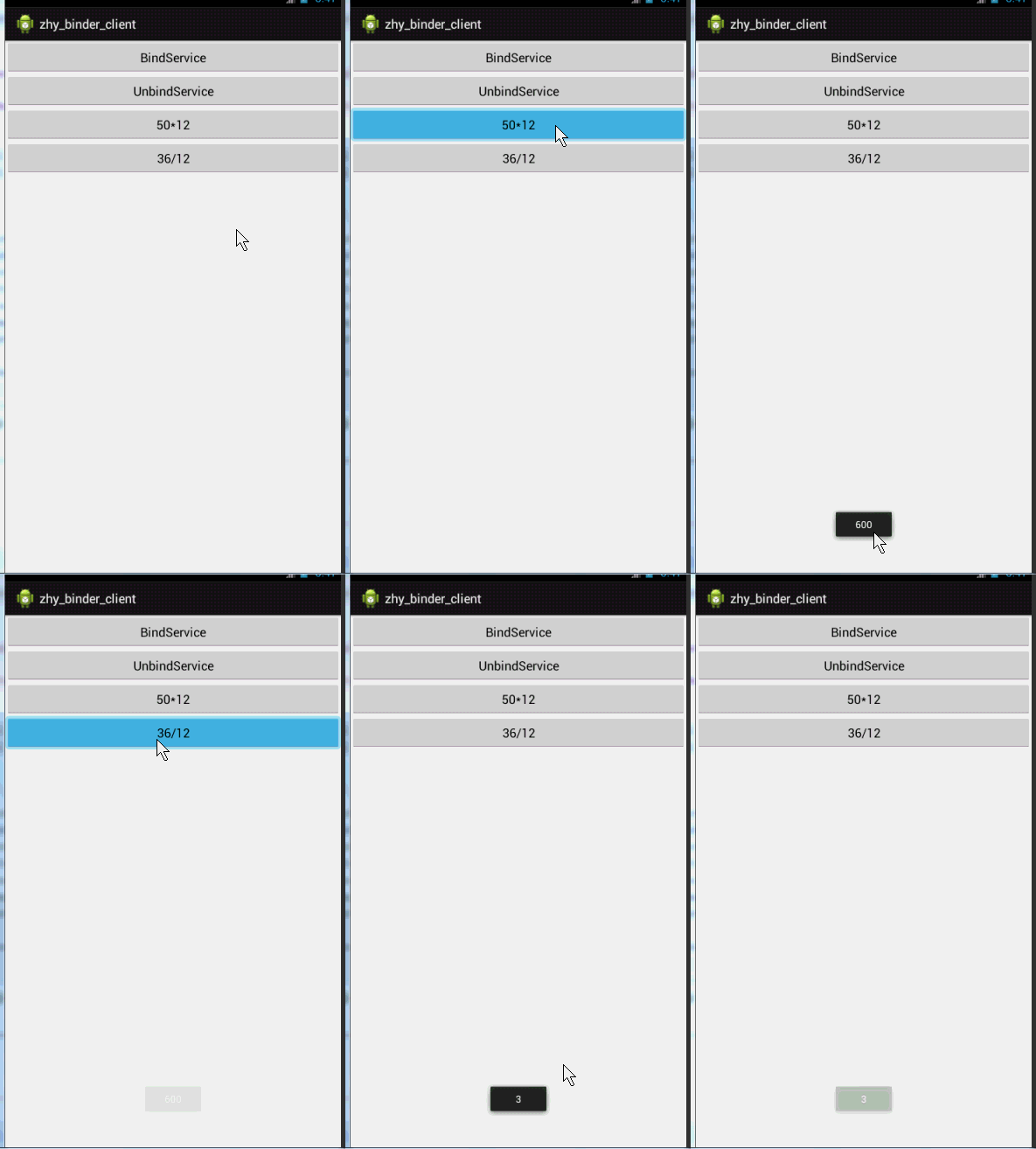
是不是很好的实现了我们两个应用程序间的通讯,并没有使用aidl文件,也从侧面分析了我们上述分析是正确的。
AIDL基本使用的更多相关文章
- Android探索之AIDL实现进程间通信
前言: 前面总结了程序间共享数据,可以使用ContentProvider也可以使用SharedPreference,那么进程间怎么共享内存呢?Android系统中的进程之间不能共享内存,因此,需要提供 ...
- 了解AIDL
1.什么是AIDL? Android Interface Definition Lauguage(android接口描述语言)是一个IDL语言. 2.AIDL的作用? 背景:在android平台 中, ...
- Android开发aidl使用中linkToDeath和unlinkToDeath的使用
1.Binder死亡代理 这一节首先将介绍Binder类中比较重要的两个方法linkToDeath和unlinkToDeath.我们知道Binder是运行在服务进程,若服务端进程因为某种原因“ ...
- android不需要Socket的跨进程推送消息AIDL!
上篇介绍了跨进程实时通讯http://www.cnblogs.com/xiaoxiaing/p/5818161.html 但是他有个缺点就是服务端无法推送消息给客户端,今天这篇文章主要说的就是服务器推 ...
- Android中利用AIDL机制调用远程服务
服务端: //CalculateInterface.aidl package com.itheima.aidl.calculate; interface CalculateInterface { do ...
- Android中AIDL的理解与使用(二)——跨应用绑定Service并通信
跨应用绑定Service并通信: 1.(StartServiceFromAnotherApp)AIDL文件中新增接口: void setData(String data); AppService文件中 ...
- Android中AIDL的理解与使用(一)——跨应用启动/绑定Service
AIDL(Android Interface Definition Language)--安卓接口定义语言 一.startService/stopService 1.同一个应用程序启动Service: ...
- 安卓中AIDL的使用方法快速入门
1.AIDL是什么? AIDL全称是Android Interface Definition Language,即安卓接口定义语言. 2.AIDL是用来做什么的?(为什么要有AIDL) AIDL是用来 ...
- make: *** [out/host/linux-x86/obj/EXECUTABLES/aidl_intermediates/aidl] 错误 1,make: *** [out/host/linux-x86/obj/lib/libESR_Portable.so] 错误 1
错误3: g++: g++: selected multilib '32' not installed selected multilib '32' not installed make: *** [ ...
- 使用AIDL调用远程服务设置系统时间
在实际工作中,经常遇到客户需要用代码设置系统时间的需求,但是Android非系统应用是无法设置系统时间的.于是,我设计了一个使用系统签名的时间设置服务,客户通过bind调用服务里的方法就能达到设置时间 ...
随机推荐
- [原创]K8飞刀Final
法律声明: 工具仅供安全研究或授权渗透,非法用途后果自负. 工具: K8飞刀Final作者: K8哥哥博客: https://www.cnblogs.com/k8gege简介: 一款多功能网络安全渗透 ...
- freemarker变量自加
[#assign i = 0][#list dateList as item][#assign i = i + 1]<li><input type="radio" ...
- mysql 开发进阶篇系列 46 物理备份与恢复( xtrabackup的 选项说明,增加备份用户,完全备份案例)
一. xtrabackup 选项说明 在操作xtrabackup备份与恢复之前,先看下该工具的选项,下面记录了xtrabackup二进制文件的部分命令行选项,后期把常用的选项在补上.点击查看xtrab ...
- Ambari集群移动现有复制到另外地方或更改ip地址,导致各项服务组件上为黄色问号代表心跳丢失的解决方案(图文详解)(博主推荐)
前言 最近,是在做集群搬移工作,大家肯定会遇到如下的场景. (1) 比如,你新购买的电脑,初步者学习使用Ambari集群.从旧电脑复制到新电脑这边来. (2) 比如,你公司Ambari集群的ip,因业 ...
- java与json,一篇就够了
本示例使用的json包为阿里的fastjson 首先写三个工具类(seter和geter方法省略,自行补上): /** * 屏幕实体类 */ public class Screen { private ...
- iOS逆向开发(2):获取APP的类声明 | class-dump | dumpdecrypted
之前介绍了怎么操作越狱的iOS设备(以下简称为手机),但简单操作手机并不是目标,小程的目标是手机上特定的APP,比如微信.淘宝.QQ音乐等等,因为小程可以从这些APP上拿到一些有用的信息或资源--比如 ...
- 【转载】app测试的过程和重点关注内容
针对 app测试的过程和重点关注内容,做以下梳理和总结: 1 . 首先是测试资源确认及准备 ( 1 ) 产品需求文档.产品原型图.接口说明文档以及设计说明文档等应齐全: ( 2 ) 测试设备及工具 ...
- How Tomcat works — 三、tomcat启动(2)
在了解了tomcat 的一些基本组件之后,学习启动过程就更容易理解了,因为启动过程就是启动各个组件. 目录 启动顺序 Bootstrap类 Catalina类 StandardServer类和Stan ...
- 第9条:try-with-resources优于try-finally
try-finally例子 打开文件读取第一行 static String firstLineOffFile(String path) throws IOException { BufferedRea ...
- python 闯关之路二(模块的应用)
1.有如下字符串:n = "路飞学城"(编程题) - 将字符串转换成utf-8的字符编码的字节,再将转换的字节重新转换为utf-8的字符编码的字符串 - 将字符串转换成gbk的字符 ...