
Asp.net core 向Consul 注册服务
Consul服务发现的使用方法:
1. 在每台电脑上都以Client Mode的方式运行一个Consul代理, 这个代理只负责与Consul Cluster高效地交换最新注册信息(不参与Leader的选举)
2. 每台电脑上的服务Service都向本机的consul代理注册 服务名称和提供服务的url
3. 当Computer1上部署的程序ServiceA需要调用服务ServiceB时, 程序ServiceA直接从本机的Consul Agent通过服务名称获取ServiceB的访问地址, 然后直接向ServiceB的url发出请求
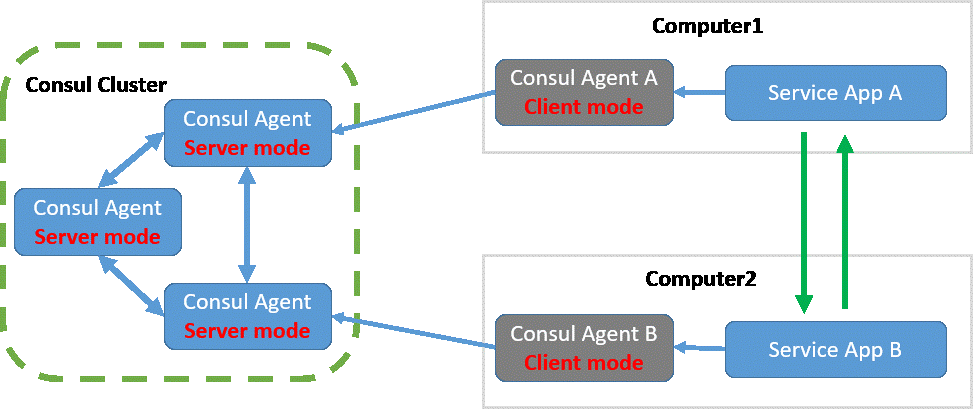
本文的重点不是描述上述过程, 只是准备分享一下自己编写的服务注册代码, 虽然网上已经有不少类似的文章, 个人觉得自己的代码要智能一点
其他文章一般要求在参数中提供 服务访问的外部地址, 但我想可以直接从 IWebHostBuilder.UseUrls(params string[] urls)获取, 这样就可以少输入一个参数.
但是在实现的时候才发现, 问题很多
1. urls可以输入多个, 要有一个种最佳匹配的方式, 从里面选取一个注册到consul里
这里假设该服务会被不同服务器的程序调用, 那么localhost(127.0.0.1)首先要排除掉, 剩下urls随便选取一个供其他程序调用, 当然用户也可以指定一个ip
2. urls可以使用 "0.0.0.0"、"[::]", 表示绑定所有网卡地址的80端口, 而物理服务器往往有多个网卡
假如服务器确实只有一个IP, 直接使用即可; 假如有多个IP, 还是必须让用户传入通过参数指定一个IP
3. urls还可以使用 "192.168.1.2:0"这种动态端口, asp.net core会随机选择一个端口让外部访问, 但这要服务器完全启动后才能得知是哪个端口
使用IApplicationLifetime.ApplicationStarted 发起注册请求
4. IPv6地址表示方式解析起来非常麻烦
System.Uri这个类已经支持IPv6, 可以直接
下面就是实现代码, 需要nuget Consul
using Consul;

using Microsoft.AspNetCore.Builder;

using Microsoft.AspNetCore.Hosting;

using Microsoft.AspNetCore.Hosting.Server.Features;

using Microsoft.Extensions.Configuration;

using System;

using System.Collections.Generic;

using System.Linq;

public static class RegisterCansulExtension

{

    public static void RegisterToConsul(this IApplicationBuilder app, IConfiguration configuration, IApplicationLifetime lifetime)

    {

        lifetime.ApplicationStarted.Register(() =>

        {

            string serviceName = configuration.GetValue<string>("serviceName");

            string serviceIP = configuration.GetValue<string>("serviceIP");

            string consulClientUrl = configuration.GetValue<string>("consulClientUrl");

            string healthCheckRelativeUrl = configuration.GetValue<string>("healthCheckRelativeUrl");

            int healthCheckIntervalInSecond = configuration.GetValue<int>("healthCheckIntervalInSecond");

            ICollection<string> listenUrls = app.ServerFeatures.Get<IServerAddressesFeature>().Addresses;

            if (string.IsNullOrWhiteSpace(serviceName))

            {

                throw new Exception("Please use --serviceName=yourServiceName to set serviceName");

            }

            if (string.IsNullOrEmpty(consulClientUrl))

            {

                consulClientUrl = "http://127.0.0.1:8500";

            }

            if (string.IsNullOrWhiteSpace(healthCheckRelativeUrl))

            {

                healthCheckRelativeUrl = "health";

            }

            healthCheckRelativeUrl = healthCheckRelativeUrl.TrimStart('/');

            if (healthCheckIntervalInSecond <= )

            {

                healthCheckIntervalInSecond = ;

            }

            string protocol;

            int servicePort = ;

            if (!TryGetServiceUrl(listenUrls, out protocol, ref serviceIP, out servicePort, out var errorMsg))

            {

                throw new Exception(errorMsg);

            }

            var consulClient = new ConsulClient(ConsulClientConfiguration => ConsulClientConfiguration.Address = new Uri(consulClientUrl));

            var httpCheck = new AgentServiceCheck()

            {

                DeregisterCriticalServiceAfter = TimeSpan.FromSeconds(),//服务启动多久后注册

                Interval = TimeSpan.FromSeconds(healthCheckIntervalInSecond),

                HTTP = $"{protocol}://{serviceIP}:{servicePort}/{healthCheckRelativeUrl}",

                Timeout = TimeSpan.FromSeconds()

            };

            // 生成注册请求

            var registration = new AgentServiceRegistration()

            {

                Checks = new[] { httpCheck },

                ID = Guid.NewGuid().ToString(),

                Name = serviceName,

                Address = serviceIP,

                Port = servicePort,

                Meta = new Dictionary<string, string>() { ["Protocol"] = protocol },

                Tags = new[] { $"{protocol}" }

            };

            consulClient.Agent.ServiceRegister(registration).Wait();

            //服务停止时, 主动发出注销

            lifetime.ApplicationStopping.Register(() =>

            {

                try

                {

                    consulClient.Agent.ServiceDeregister(registration.ID).Wait();

                }

                catch

                { }

            });

        });

    }

    private static bool TryGetServiceUrl(ICollection<string> listenUrls, out string protocol, ref string serviceIP, out int port, out string errorMsg)

    {

        protocol = null;

        port = ;

        errorMsg = null;

        if (!string.IsNullOrWhiteSpace(serviceIP)) // 如果提供了对外服务的IP, 只需要检测是否在listenUrls里面即可

        {

            foreach (var listenUrl in listenUrls)

            {

                Uri uri = new Uri(listenUrl);

                protocol = uri.Scheme;

                var ipAddress = uri.Host;

                port = uri.Port;

                if (ipAddress == serviceIP || ipAddress == "0.0.0.0" || ipAddress == "[::]")

                {

                    return true;

                }

            }

            errorMsg = $"The serviceIP that you provide is not in urls={string.Join(',', listenUrls)}";

            return false;

        }

        else // 没有提供对外服务的IP, 需要查找本机所有的可用IP, 看看有没有在 listenUrls 里面的

        {

            var allIPAddressOfCurrentMachine = System.Net.NetworkInformation.NetworkInterface.GetAllNetworkInterfaces()

                    .Select(p => p.GetIPProperties())

                    .SelectMany(p => p.UnicastAddresses)

                    // 这里排除了 127.0.0.1 loopback 地址

                    .Where(p => p.Address.AddressFamily == System.Net.Sockets.AddressFamily.InterNetwork && !System.Net.IPAddress.IsLoopback(p.Address))

                    .Select(p => p.Address.ToString()).ToArray();

            var uris = listenUrls.Select(listenUrl => new Uri(listenUrl)).ToArray();

            // 本机所有可用IP与listenUrls进行匹配, 如果listenUrl是"0.0.0.0"或"[::]", 则任意IP都符合匹配

            var matches = allIPAddressOfCurrentMachine.SelectMany(ip =>

                    uris.Where(uri => ip == uri.Host || uri.Host == "0.0.0.0" || uri.Host == "[::]")

                    .Select(uri => new { Protocol = uri.Scheme, ServiceIP = ip, Port = uri.Port })

            ).ToList();

            if (matches.Count == )

            {

                errorMsg = $"This machine has IP address=[{string.Join(',', allIPAddressOfCurrentMachine)}], urls={string.Join(',', listenUrls)}, none match.";

                return false;

            }

            else if (matches.Count == )

            {

                protocol = matches[].Protocol;

                serviceIP = matches[].ServiceIP;

                port = matches[].Port;

                return true;

            }

            else

            {

                errorMsg = $"Please use --serviceIP=yourChosenIP to specify one IP, which one provide service: {string.Join(",", matches)}.";

                return false;

            }

        }

    }

}
使用时可以提供5个参数, 只有serviceName是必须要由参数提供的, serviceIP会自动尽可能匹配出来, consulClientUrl默认是http://127.0.0.1:8500, healthCheckRelativeUrl默认是 /health, healthCheckIntervalInSecond默认是1秒
使用方法
上面代码里 健康检查 使用了asp.net core的HealthChecks中间件, 需要在Startup.ConfigureServices(IServiceCollection services)中增加
services.AddHealthChecks();
在Startup.Configure也要增加UseHealthChecks()
public class Startup

{

    public Startup(IConfiguration configuration)

    {

        Configuration = configuration;

    }

    public IConfiguration Configuration { get; }

    public void ConfigureServices(IServiceCollection services)

    {

        services.AddHealthChecks();

        services.AddMvc().SetCompatibilityVersion(CompatibilityVersion.Version_2_2);

    }

    public void Configure(IApplicationBuilder app, IHostingEnvironment env, IApplicationLifetime lifetime)

    {

        if (env.IsDevelopment())

        {

            app.UseDeveloperExceptionPage();

        }

        // consul的http check只需要返回是200, 就认为服务可用; 这里必须把Degraded改为503

        app.UseHealthChecks("/Health", new HealthCheckOptions()

        {

            ResultStatusCodes =

            {

                [Microsoft.Extensions.Diagnostics.HealthChecks.HealthStatus.Healthy] = StatusCodes.Status200OK,

                [Microsoft.Extensions.Diagnostics.HealthChecks.HealthStatus.Degraded] = StatusCodes.Status503ServiceUnavailable,

                [Microsoft.Extensions.Diagnostics.HealthChecks.HealthStatus.Unhealthy] = StatusCodes.Status503ServiceUnavailable

            }

        });

        app.UseMvc();

        app.RegisterToConsul(Configuration, lifetime);

    }

}
调试的时候, 也不能使用默认的 http://localhost:5000了

后记: 这段代码也是很久以前写的了, 后来发现Ocelot是个功能很丰富的网关, 帮我们做了很大部分工作, 实施微服务的基础功能就不再写了.
后来又学习了Kubernetes, 感觉这才是微服务的正道, 但Kubernetes更复杂, 对运维有更高的要求, 幸好各大云服务商都提供了Kubernetes的基础设施, 这样只需要开发人员提升开发方式即可
现在Service Mesh不断发展, 但还没形成统一的解决方案, 其中Consul也支持Mesh, 有时间再写吧
End
Asp.net core 向Consul 注册服务的更多相关文章
- ASP.NET CORE 使用Consul实现服务治理与健康检查(2)——源码篇
题外话 笔者有个习惯,就是在接触新的东西时,一定要先搞清楚新事物的基本概念和背景,对之有个相对全面的了解之后再开始进入实际的编码,这样做最主要的原因是尽量避免由于对新事物的认知误区导致更大的缺陷,Bu ...
- ASP.NET CORE 使用Consul实现服务治理与健康检查(1)——概念篇
背景 笔者所在的公司正在进行微服务改造,这其中服务治理组件是必不可少的组件之一,在一番讨论之后,最终决定放弃 Zookeeper 而采用 Consul 作为服务治理框架基础组件.主要原因是 Consu ...
- Ubuntu & Docker & Consul & Fabio & ASP.NET Core 2.0 微服务跨平台实践
相关博文: Ubuntu 简单安装 Docker Mac OS.Ubuntu 安装及使用 Consul Consul 服务注册与服务发现 Fabio 安装和简单使用 阅读目录: Docker 运行 C ...
- Docker & Consul & Fabio & ASP.NET Core 2.0 微服务跨平台实践
相关博文: Ubuntu 简单安装 Docker Mac OS.Ubuntu 安装及使用 Consul Consul 服务注册与服务发现 Fabio 安装和简单使用 阅读目录: Docker 运行 C ...
- .Net Core Grpc Consul 实现服务注册 服务发现 负载均衡
本文是基于..net core grpc consul 实现服务注册 服务发现 负载均衡(二)的,很多内容是直接复制过来的,..net core grpc consul 实现服务注册 服务发现 负载均 ...
- 微服务(入门二):netcore通过consul注册服务
基础准备 1.创建asp.net core Web 应用程序选择Api 2.appsettings.json 配置consul服务器地址,以及本机ip和端口号信息 { "Logging&qu ...
- asp.net core 和consul
consul集群搭建 Consul是HashiCorp公司推出的使用go语言开发的开源工具,用于实现分布式系统的服务发现与配置,内置了服务注册与发现框架.分布一致性协议实现.健康检查.Key/Valu ...
- 在 ASP.NET Core 中执行租户服务
在 ASP.NET Core 中执行租户服务 不定时更新翻译系列,此系列更新毫无时间规律,文笔菜翻译菜求各位看官老爷们轻喷,如觉得我翻译有问题请挪步原博客地址 本博文翻译自: http://gunna ...
- ASP.NET Core 2.0 : 五.服务是如何加载并运行的, Kestrel、配置与环境
"跨平台"后的ASP.Net Core是如何接收并处理请求的呢? 它的运行和处理机制和之前有什么不同? 本章从"宏观"到"微观"地看一下它的 ...
随机推荐
- Android学习笔记二之初始Activity
初识Activity,跟着教程学习敲了一遍这一章的内容,下面根据目录结构总结知识点: 一.活动是什么 上篇博文中我们提到了Android四大组件,其中有一个Activity,我们将之称为活动.活动是最 ...
- (最完美)红米手机4的USB调试模式在哪里开启的经验
每次我们使用安卓手机通过数据线连接上Pc的时候,或者使用的有些应用比如我们团队营销部门每次使用的应用引号精灵,之前的老版本就需要开启Usb开发者调试模式下使用,现每次新版本不需要了,如果手机没有开启U ...
- thinkphp中插入ueditor编辑器的代码
1.需要在header中加入以下js内容:<script type="text/javascript" src="{$smarty.const.__ROOT__}/ ...
- Promise实现ajax
利用Promise实现ajax GET function getAjax(url) { return new Promise((resolved,rejected)=>{ //创建ajax对象 ...
- The requested URL /xxxx.html was not found on this server
The requested URL /xxxx.html was not found on this server 的原因是,Apache没有开启重写 apache 打开 httpd.conf 文件找 ...
- matlab-单位圆内射线数次反射
转载自 https://zhidao.baidu.com/question/2268408219692883828.html 先贴代码和放图,然后我再做出一点解释(其实只是觉得这个思路好厉害,所以想保 ...
- Jmeter5.1.1的汉化
Jmeter的汉化: 在菜单导航栏,选择options-->choose language-->chinese(simplified)中文简体 默认打开汉化: 编辑jmeter.bat: ...
- Windows服务器
知道了怎么装VMware workstation并且创建虚拟机装上了系统配好网络
- react 和 seamless-immutable
在 react 中,默认改变组件状态或者属性,是会整个组件全部重新渲染,但是 如果只是修改一个地方,而全部渲染,就会浪费资源,大项目中会造成性能问题 shouldComponentUpdate s ...
- dataTable转换成Json格式
#region dataTable转换成Json格式 /// <summary> /// /// </summary> /// <param name="dt& ...