
JFrame2
package com.fxb.gui;

import java.awt.FlowLayout;

import java.awt.GridLayout;

import java.awt.TextField;

import java.awt.event.ActionEvent;

import java.awt.event.ActionListener;

import javax.swing.GroupLayout.Alignment;

import javax.swing.ButtonGroup;

import javax.swing.JButton;

import javax.swing.JCheckBox;

import javax.swing.JComboBox;

import javax.swing.JFrame;

import javax.swing.JPanel;

import javax.swing.JRadioButton;

import javax.swing.JTextArea;

import javax.swing.UIManager;

public class Test2_JFrame extends JFrame{

    JButton button1 = new JButton("Button1");

    JButton button2 = new JButton("Button2");

    JButton button3 = new JButton("Button3");

    TextField field = new TextField(10);

    JComboBox comboBox = new JComboBox();

    JCheckBox checkBox = new JCheckBox("Check1");

    JRadioButton radioButton1 = new JRadioButton("Radio1");

    JRadioButton radioButton2 = new JRadioButton("Radio1");

    ButtonGroup buttonGroup = new ButtonGroup();

    public Test2_JFrame(){

//        try{

////            UIManager.setLookAndFeel( UIManager.getCrossPlatformLookAndFeelClassName( ) );

////            UIManager.setLookAndFeel( "com.sun.java.swing.plaf.windows.WindowsLookAndFeel" );

////            UIManager.setLookAndFeel("com.sun.java.swing.plaf.motif.MotifLookAndFeel" );

//        }catch(Exception e){

//            e.printStackTrace();

//        }

        setVisible(true);

        setLayout(new FlowLayout(FlowLayout.LEFT ));

//        setLayout(new FlowLayout(FlowLayout.CENTER ));

        setSize(300, 300);

        setAutoRequestFocus(false);

        setResizable(false);

        JPanel panel = new JPanel();

        panel.setLayout(new GridLayout(4, 2, 10, 5));

        panel.setSize(200, 200);

        add(panel);

        panel.add(button1);

        panel.add(button2);

        panel.add(button3);

        //panel.add(field);

        comboBox.addItem("Item1");

        comboBox.addItem("Item2");

        comboBox.addItem("Item3");

        panel.add(comboBox);

        panel.add(checkBox);

        buttonGroup.add(radioButton1);

        buttonGroup.add(radioButton2);

        panel.add(radioButton1);

        panel.add(radioButton2);

        JTextArea textArea = new JTextArea();

        textArea.setSize(100, 100);

        add(textArea);

//        add(button1);

//        add(button2);

//        add(button3);

        button1.addActionListener(actionListener);

        button2.addActionListener(actionListener);

        button3.addActionListener(actionListener);

    }

    private ActionListener actionListener = new ActionListener(){

        public void actionPerformed(ActionEvent e) {

            if(e.getSource() == button1){

                pt("button1");

            }else if(e.getSource() == button2){

                pt("button2");

            }else if(e.getSource() == button3){

                pt("button3");

            }

        }

    };

    private static StringBuilder builder = new StringBuilder();

    public static void pt(Object a){

        builder.setLength(0);

        builder.append(a);

        System.out.println(builder.toString());

    }

    public static void main(String[] args){

        new Test2_JFrame();

    }

}
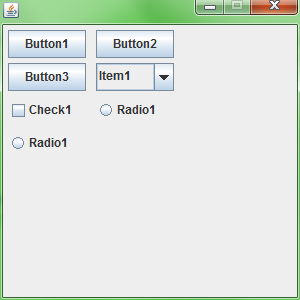
JFrame2的更多相关文章
随机推荐
- 山东理工大学SDUT - ACM OJ 题: Python代码 及分析
Python基础语法学习完成,先刷基础题100道巩固 ,附 题目.代码.知识分析 题目:http://acm.sdut.edu.cn/onlinejudge2/index.php/Home/Index ...
- 键盘ascll码表
键盘ascll码表-自用
- springboot 学习之路 6(定时任务)
目录:[持续更新.....] spring 部分常用注解 spring boot 学习之路1(简单入门) spring boot 学习之路2(注解介绍) spring boot 学习之路3( 集成my ...
- JavaScript中,JSON格式的字符串与JSON格式的对象相互转化
前言:JSON是一个独立于任何语言的数据格式,因此,严格来说,没有“JSON对象”和“JSON字符串”这个说法(然而”菜鸟教程“和”W3school“使用了“JSON对象”和“JSON字符串”这个说法 ...
- STL之迭代器(iterator)
1 头文件 所有容器有含有其各自的迭代器型别(iterator types),所以当你使用一般的容器迭代器时,并不需要含入专门的头文件.不过有几种特别的迭代器,例如逆向迭代器,被定义于<iter ...
- ctf学习(web题二)
web 下面是做bugku上一些web的总结 内容链接
- LeetCode算法题-N-ary Tree Level Order Traversal(Java实现)
这是悦乐书的第225次更新,第238篇原创 01 看题和准备 今天介绍的是LeetCode算法题中Easy级别的第92题(顺位题号是429).给定n-ary树,返回其节点值的级别顺序遍历.(即,从左到 ...
- Vue编写的todolist小例子
Vue编写的todolist小例子 本篇博客主要包含一个内容: 1.第一个内容:使用Vue编写todolist例子,包含的主要知识是v-model,v-for,el表达式,以及Vue中使用method ...
- Teradata的profile使用
1.proflie优势 使用profile可以批量管理用户参数,尤其是在一批用户具有相同的参数配置时,十分便捷. 2.profile可配置用户参数 [Account id][Default datab ...
- UVA1613-K-Graph Oddity(贪心)
Problem UVA1613-K-Graph Oddity Accept: 108 Submit: 884Time Limit: 3000 mSec Problem Description Inp ...