
eslint prettier vetur eslint
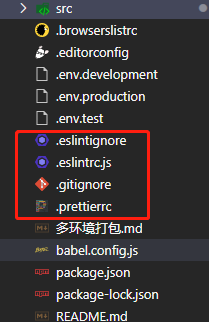
VScode (版本 1.47.3)安装 eslint prettier vetur 插件 .vue 文件使用 vetur 进行格式化
在文件 .prettierrc 里写 属于你的 pettier 规则
{

   "printWidth": 120,

   "tabWidth": 2,

   "singleQuote": true,

   "trailingComma": "none",

   "semi": false,

   "wrap_line_length": 120,

   "wrap_attributes": "auto",

   "proseWrap": "always",

   "arrowParens": "avoid",

   "bracketSpacing": false,

   "jsxBracketSameLine": true,

   "useTabs": false,

   "overrides": [{

       "files": ".prettierrc",

       "options": {

           "parser": "json"

       }

   }]

}
Vscode setting.json 设置


{

  // 将设置放入此文件中以覆盖默认设置

  "files.autoSave": "off",

  // 控制字体系列。

  "editor.fontFamily": "Consolas, 'Courier New', monospace,'宋体'",

  "terminal.integrated.shell.windows": "C:\\Program Files\\Git\\bin\\bash.exe",

  // 以像素为单位控制字号。

  "editor.fontSize": 16,

  // 控制选取范围是否有圆角

  "editor.roundedSelection": false,

  // 建议小组件的字号

  "editor.suggestFontSize": 16,

  // 在“打开的编辑器”窗格中显示的编辑器数量。将其设置为 0 可隐藏窗格。

  "explorer.openEditors.visible": 0,

  // 是否已启用自动刷新

  "git.autorefresh": true,

  // 以像素为单位控制终端的字号,这是 editor.fontSize 的默认值。

  "terminal.integrated.fontSize": 14,

  // 控制终端游标是否闪烁。

  "terminal.integrated.cursorBlinking": true,

  // 一个制表符等于的空格数。该设置在 `editor.detectIndentation` 启用时根据文件内容进行重写。

  // Tab Size

  "editor.tabSize": 2,

  // By default, common template. Do not modify it!!!!!

  "editor.formatOnType": true,

  "window.zoomLevel": 0,

  "editor.detectIndentation": false,

  "css.fileExtensions": ["css", "scss"],

  "files.associations": {

    "*.string": "html",

    "*.vue": "vue",

    "*.wxss": "css",

    "*.wxml": "wxml",

    "*.wxs": "javascript",

    "*.cjson": "jsonc",

    "*.js": "javascript"

  },

  // 为指定的语法定义配置文件或使用带有特定规则的配置文件。

  "emmet.syntaxProfiles": {

    "vue-html": "html",

    "vue": "html"

  },

  "search.exclude": {

    "**/node_modules": true,

    "**/bower_components": true

  },

  //保存时eslint自动修复错误

  "editor.formatOnSave": true,

  // Enable per-language

  //配置 ESLint 检查的文件类型

  "editor.quickSuggestions": {

    "strings": true

  },

  // 添加 vue 支持

  // 这里是针对vue文件的格式化设置,vue的规则在这里生效

  "vetur.format.options.tabSize": 2,

  "vetur.format.options.useTabs": false,

  "vetur.format.defaultFormatter.html": "js-beautify-html",

  "vetur.format.defaultFormatter.css": "prettier",

  "vetur.format.defaultFormatter.scss": "prettier",

  "vetur.format.defaultFormatter.postcss": "prettier",

  "vetur.format.defaultFormatter.less": "prettier",

  "vetur.format.defaultFormatter.js": "vscode-typescript",

  "vetur.format.defaultFormatter.sass": "sass-formatter",

  "vetur.format.defaultFormatter.ts": "prettier",

  "vetur.format.defaultFormatterOptions": {

    "js-beautify-html": {

      "wrap_attributes": "aligned-multiple", // 超过150折行

      "wrap-line-length": 150

    },

    // #vue组件中html代码格式化样式

    "prettier": {

      "printWidth": 120,

      "tabWidth": 2,

      "singleQuote": false,

      "trailingComma": "none",

      "semi": false,

      "wrap_line_length": 120,

      "wrap_attributes": "aligned-multiple", // 超过150折行

      "proseWrap": "always",

      "arrowParens": "avoid",

      "bracketSpacing": true,

      "jsxBracketSameLine": true,

      "useTabs": false,

      "overrides": [

        {

          "files": ".prettierrc",

          "options": {

            "parser": "json"

          }

        }

      ]

    }

  },

  // Enable per-language

  "[json]": {

    "editor.defaultFormatter": "esbenp.prettier-vscode"

  },

  "vetur.validation.template": false,

  "html.format.enable": false,

  "json.format.enable": false,

  "javascript.format.enable": false,

  "typescript.format.enable": false,

  "javascript.format.insertSpaceAfterFunctionKeywordForAnonymousFunctions": false,

  "[html]": {

    "editor.defaultFormatter": "esbenp.prettier-vscode"

  },

  "[javascript]": {

    "editor.defaultFormatter": "esbenp.prettier-vscode"

  },

  "[jsonc]": {

    "editor.defaultFormatter": "esbenp.prettier-vscode"

  },

  "[vue]": {

    "editor.defaultFormatter": "octref.vetur"

  },

  "emmet.includeLanguages": {

    "wxml": "html"

  },

  "[typescriptreact]": {

    "editor.defaultFormatter": "esbenp.prettier-vscode"

  },

  // 开启eslint自动修复js/ts功能

  "editor.codeActionsOnSave": {

    "source.fixAll.eslint": true

  },

  "minapp-vscode.disableAutoConfig": true,

  "javascript.implicitProjectConfig.experimentalDecorators": true,

  "editor.maxTokenizationLineLength": 200000,

  "workbench.colorTheme": "Dracula Soft",

  "workbench.iconTheme": "vscode-icons",

  "workbench.editorAssociations": []

}
.eslintrc.js
module.exports = {

  root: true,

  env: {

    node: true

  },

  extends: ['plugin:vue/essential', '@vue/standard'],

  parserOptions: {

    parser: 'babel-eslint'

  },

  rules: {

    'vue/max-attributes-per-line': [

      2,

      {

        singleline: 10,

        multiline: {

          max: 1,

          allowFirstLine: false

        }

      }

    ],

    'vue/singleline-html-element-content-newline': 'off',

    'vue/multiline-html-element-content-newline': 'off',

    'vue/name-property-casing': ['error', 'PascalCase'],

    'vue/no-v-html': 'off',

    'accessor-pairs': 2,

    'arrow-spacing': [

      2,

      {

        before: true,

        after: true

      }

    ],

    'block-spacing': [2, 'always'],

    'brace-style': [

      2,

      '1tbs',

      {

        allowSingleLine: true

      }

    ],

    camelcase: [

      0,

      {

        properties: 'always'

      }

    ],

    'comma-dangle': [2, 'never'],

    'comma-spacing': [

      2,

      {

        before: false,

        after: true

      }

    ],

    'comma-style': [2, 'last'],

    'constructor-super': 2,

    curly: [2, 'multi-line'],

    'dot-location': [2, 'property'],

    'eol-last': 2,

    eqeqeq: ['error', 'always', { null: 'ignore' }],

    'generator-star-spacing': [

      2,

      {

        before: true,

        after: true

      }

    ],

    'handle-callback-err': [2, '^(err|error)$'],

    indent: [

      2,

      2,

      {

        SwitchCase: 1

      }

    ],

    'jsx-quotes': [2, 'prefer-single'],

    'key-spacing': [

      2,

      {

        beforeColon: false,

        afterColon: true

      }

    ],

    'keyword-spacing': [

      2,

      {

        before: true,

        after: true

      }

    ],

    'new-cap': [

      2,

      {

        newIsCap: true,

        capIsNew: false

      }

    ],

    'new-parens': 2,

    'no-array-constructor': 2,

    'no-caller': 2,

    'no-console': 'off',

    'no-class-assign': 2,

    'no-cond-assign': 2,

    'no-const-assign': 2,

    'no-control-regex': 0,

    'no-delete-var': 2,

    'no-dupe-args': 2,

    'no-dupe-class-members': 2,

    'no-dupe-keys': 2,

    'no-duplicate-case': 2,

    'no-empty-character-class': 2,

    'no-empty-pattern': 2,

    'no-eval': 2,

    'no-ex-assign': 2,

    'no-extend-native': 2,

    'no-extra-bind': 2,

    'no-extra-boolean-cast': 2,

    'no-extra-parens': [2, 'functions'],

    'no-fallthrough': 2,

    'no-floating-decimal': 2,

    'no-func-assign': 2,

    'no-implied-eval': 2,

    'no-inner-declarations': [2, 'functions'],

    'no-invalid-regexp': 2,

    'no-irregular-whitespace': 2,

    'no-iterator': 2,

    'no-label-var': 2,

    'no-labels': [

      2,

      {

        allowLoop: false,

        allowSwitch: false

      }

    ],

    'no-lone-blocks': 2,

    'no-mixed-spaces-and-tabs': 2,

    'no-multi-spaces': 2,

    'no-multi-str': 2,

    'no-multiple-empty-lines': [

      2,

      {

        max: 1

      }

    ],

    'no-native-reassign': 2,

    'no-negated-in-lhs': 2,

    'no-new-object': 2,

    'no-new-require': 2,

    'no-new-symbol': 2,

    'no-new-wrappers': 2,

    'no-obj-calls': 2,

    'no-octal': 2,

    'no-octal-escape': 2,

    'no-path-concat': 2,

    'no-proto': 2,

    'no-redeclare': 2,

    'no-regex-spaces': 2,

    'no-return-assign': [2, 'except-parens'],

    'no-self-assign': 2,

    'no-self-compare': 2,

    'no-sequences': 2,

    'no-shadow-restricted-names': 2,

    'no-spaced-func': 2,

    'no-sparse-arrays': 2,

    'no-this-before-super': 2,

    'no-throw-literal': 2,

    'no-trailing-spaces': 2,

    'no-undef': 2,

    'no-undef-init': 2,

    'no-unexpected-multiline': 2,

    'no-unmodified-loop-condition': 2,

    'no-unneeded-ternary': [

      2,

      {

        defaultAssignment: false

      }

    ],

    'no-unreachable': 2,

    'no-unsafe-finally': 2,

    'no-unused-vars': [

      2,

      {

        vars: 'all',

        args: 'none'

      }

    ],

    'no-useless-call': 2,

    'no-useless-computed-key': 2,

    'no-useless-constructor': 2,

    'no-useless-escape': 0,

    'no-whitespace-before-property': 2,

    'no-with': 2,

    'one-var': [

      2,

      {

        initialized: 'never'

      }

    ],

    'operator-linebreak': [

      2,

      'after',

      {

        overrides: {

          '?': 'before',

          ':': 'before'

        }

      }

    ],

    'padded-blocks': [2, 'never'],

    quotes: [

      2,

      'single',

      {

        avoidEscape: true,

        allowTemplateLiterals: true

      }

    ],

    semi: [2, 'never'],

    'semi-spacing': [

      2,

      {

        before: false,

        after: true

      }

    ],

    'space-before-blocks': [2, 'always'],

    'space-before-function-paren': [2, 'never'],

    'space-in-parens': [2, 'never'],

    'space-infix-ops': 2,

    'space-unary-ops': [

      2,

      {

        words: true,

        nonwords: false

      }

    ],

    'spaced-comment': [

      2,

      'always',

      {

        markers: ['global', 'globals', 'eslint', 'eslint-disable', '*package', '!', ',']

      }

    ],

    'template-curly-spacing': [2, 'never'],

    'use-isnan': 2,

    'valid-typeof': 2,

    'wrap-iife': [2, 'any'],

    'yield-star-spacing': [2, 'both'],

    yoda: [2, 'never'],

    'prefer-const': 2,

    'no-debugger': process.env.NODE_ENV === 'production' ? 2 : 0,

    'object-curly-spacing': [

      2,

      'always',

      {

        objectsInObjects: false

      }

    ],

    'array-bracket-spacing': [2, 'never']

  }

}
.eslintignore
build/*.js

src/assets

public

dist
eslint prettier vetur eslint的更多相关文章
- vscode, eslint, prettier, vetur冲突及解决
这3工具都必须安装. 但是安装之后, 规则冲突又让人头疼. 讲下解决方案吧.一 从0开始1. 禁止工作区插件, 如下图: 2. 清空用户设置(Code–>首选项–>设置–>[右上角 ...
- vscode 中 eslint prettier 和 eslint -loader 配置关系
前置 本文将探究 vscode prettier 插件 和 eslint 插件在 vscode 中的配置以及这两者对应的在项目中的配置文件的关系,最后提及 vscode eslint 插件配置与 es ...
- 在vscode中使用eslint+prettier格式化vue项目代码 (转载)
ESlint:javascript代码检测工具,可以配置每次保存时格式化js,但每次保存只格式化一点点,你得连续按住Ctrl+S好几次,才格式化好,自行体会~~ vetur:可以格式化html.标准c ...
- VS Code 自动修改和保存 代码风格 == eslint+prettier
最近因为用到VS Code,需要统一所有人的代码风格(前端语言js/html/css等,或者后端语言 go/python等也可以这么用). 所以参考了一些网络资料,记录下设置步骤,以便后续查阅. St ...
- vs Code + Eslint + Prettier 代码格式化(vue开发)
一.什么是Eslint 通过查看eslint官网(官网传送门),我们就可以知道,eslint就是一个用来识别 ECMAScript/JavaScript 并且按照规则给出报告的代码检测工具,主要用来检 ...
- eslint prettier editrorconfig - 写出干净的前端代码
FConfidence 关注 2018.12.30 02:38* 字数 2912 阅读 195评论 0喜欢 0 VSCode 插件安装 Prettier - Code Formatter ESLint ...
- React-native ESLint & Prettier & Pre-commit Hook配置
目录 前言 一 eslint 1.1. 局部安装eslint 1.2 初始化配置文件 1.3 安装步骤 1.3.1 ESLint 风格 选Use a popular style guide 1.3.2 ...
- VSCode 使用 ESLint + Prettier 来统一 JS 代码
环境: VSCode 1.33.1 Node.js 8.9.1 一.ESLint 1.介绍 ESLint是最流行的JavaScript Linter. Linter 是检查代码风格/错误的小工具.其他 ...
- 使用ESLint+Prettier来统一前端代码风格
Prettier 简单使用 ESLint 与 Prettier配合使用 首先肯定是需要安装 prettier ,并且你的项目中已经使用了 ESLint ,有 eslintrc.js 配置文件. npm ...
随机推荐
- mysql删除数据库提示mysql Error dropping database (can't rmdir './db'...
1.执行ps aux | grep mysql,查看mysql的data目录,比如结果是--datadir=/var/lib/mysql. 2.进入data目录,删除以该数据库为名字的文件夹.cd / ...
- CI4框架应用一 - 环境搭建
CI框架 (codeigniter)算是一个古老的框架了,由于在工作中一直在使用这个框架,还是比较有感情的.我对CI的感觉就是,简单易用,学习曲线平滑,对于新手友好. 目前CI框架已经更新到CI4了, ...
- C# Thread.Name 的作用和意义
Thread.Name属性 C#的线程提供Thread.Name属性.这意味着每个线程可以设定一个Name属性来标志它们. Name属性的使用时特性 线程的Name属性默认情况下是null.该值只能被 ...
- 程序流程结构——if语句
c语言支持最基本的三种运行结构: 顺序结构:程序按顺序执行,不发生跳转 选择结构:根据是否满足条件 ,有选择的执行相应功能 循环结构:依据条件是否满足,循环多次执行某段代码 #define _CRT_ ...
- 关于什么时候用,怎么用:ExecuteNonQuery(),还有其它返回值
ExecuteScalar方法返回的类型是object类型,这个方法返回sql语句执行后的第一行第一列的值,由于不知到sql语句到底是什么样的结构(有可能是int,有可能是char等等),所以Exec ...
- JavaScript基础-06-正则表达式
正则表达式 1. 正则表达式用于定义一些字符串的规则:计算机可以根据正则表达式,来检查一个字符串是否符合规则,将字符串中符合规则的内容提取出来. 2. 创建正则表达式对象: var reg=new R ...
- Java学习之反射篇
Java学习之反射篇 0x00 前言 今天简单来记录一下,反射与注解的一些东西,反射这个机制对于后面的java反序列化漏洞研究和代码审计也是比较重要. 0x01 反射机制概述 Java反射是Java非 ...
- 单元测试新方法:用setUp方法 @Before注释
public class CentralizedPUDMatchServicePacTest { PacMatchService pacMatchService; @Before public voi ...
- SparkSQL /DataFrame /Spark RDD谁快?
如题所示,SparkSQL /DataFrame /Spark RDD谁快? 按照官方宣传以及大部分人的理解,SparkSQL和DataFrame虽然基于RDD,但是由于对RDD做了优化,所以性能会优 ...
- 【算法•日更•第三十二期】教你用出windows体验的Linux
▎前言 小编昨天闲的不行,就装了一个linux系统,linux的发行版很多,小编认为ubuntu很好用,于是就在使用ubuntu. 没错,我现在就在使用ubuntu来写博客. 刚才还装了一个QQ,不过 ...