
[WPF系列]-ListBox
引言
本文就WPF中的ListBox常用项给以实例代码演示,包括隐蔽属性的设置,Style设置,以及ControlTemplate的自定义。
Listbox平滑滚动
<ListBox ItemsSource="{Binding ActorList}" Width="300"

         ScrollViewer.CanContentScroll="False"/>
或者
 <ListBox.Template>

    <ControlTemplate>

      <ScrollViewer Focusable="False" CanContentScroll="True">

        <ItemsPresenter />

      </ScrollViewer>

    </ControlTemplate>

  </ListBox.Template>
参考:http://stackoverflow.com/a/3031298/1616023
StackPanel implements the IScrollInfo interface to do logical scrolling, but if ScrollViewer can't find an IScrollInfo child it falls back to doing physical scrolling.
There are three ways to obtain logical scrolling inside a ScrollViewer:
- Let the ScrollViewer's direct child be a panel that can do logical scrolling (such as a StackPanel)
- Let the ScrollViewer's direct child be an ItemsPresenter which presents such a panel
- Let the ScrollViewer's direct child be a custom class you write yourself that implements IScrollInfo
点击ListboxItem任意位置选中ListBoxItem
<ListBox.Resources>

    <Style TargetType="{x:Type ListBoxItem}">

        <Style.Triggers>

            <Trigger Property="IsKeyboardFocusWithin" Value="True">

                <Setter Property="IsSelected" Value="True" />

            </Trigger>

        </Style.Triggers>

    </Style>

</ListBox.Resources>
引用:Trigger SelectedIndex changed whilst clicking on any control within a ListBoxItem area
控制滚动条的显示
ScrollViewer.VerticalScrollBarVisibility="Visible"

ScrollViewer.HorizontalScrollBarVisibility="Disabled"
更改Items的container
 <ListBox.ItemsPanel>

                    <ItemsPanelTemplate>

                        <WrapPanel/>

                    </ItemsPanelTemplate>

                </ListBox.ItemsPanel>
或者
<ListBox.Style>

    <Style TargetType="{x:Type ListBox}">

        <Setter Property="Visibility" Value="Visible" />

        <Setter Property="ItemsPanel">

            <Setter.Value>

                <ItemsPanelTemplate>

                    <WrapPanel />

                </ItemsPanelTemplate>

            </Setter.Value>

        </Setter>

</Style>

</ListBox.Style>
自定义ItemsControl template
<ItemsControl x:Name="activitiesControl" Margin="10">

    <ItemsControl.Template>

        <ControlTemplate>

            <WrapPanel  Width="{TemplateBinding Width}" Height="{TemplateBinding Height}"

                    FlowDirection="LeftToRight" IsItemsHost="true">

            </WrapPanel>

        </ControlTemplate>

    </ItemsControl.Template>

    <ItemsControl.ItemTemplate>

        <DataTemplate>

            <Button Style="{DynamicResource ActionButton}" HorizontalAlignment="Right" Margin="5"

                Content="{Binding Value}" Width="200"

                Command="{Binding Path=ViewModel.ActionTypeCommand,

                    RelativeSource={RelativeSource Mode=FindAncestor,

                AncestorType=local:CustomerEditView}}" CommandParameter="{Binding Key}"/>

        </DataTemplate>

    </ItemsControl.ItemTemplate>

</ItemsControl>
参考另一文章数据邦定之DataTemplate 根据对象属性切换模板
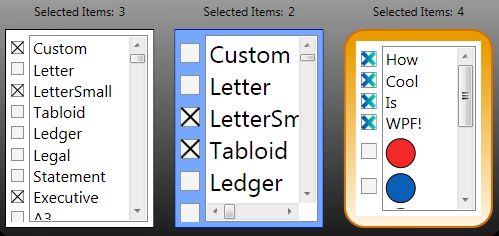
自定ListBox
A WPF Problem Solved Two Very Different Ways - Using XAML Only - Using a Custom Control

Listbox 为空时显示
利用AdornerLayer实现如下:

EmptyItemsControlOverlay
另一简单办法:
<Style TargetType="{x:Type ListBox}">

            <Style.Triggers>

                <DataTrigger Binding="{Binding Path=Items.Count,

                    RelativeSource={RelativeSource Self}}"  Value="0">

                    <Setter Property="Background">

                        <Setter.Value>

                            <VisualBrush Stretch="None">

                                <VisualBrush.Visual>

                                    <TextBlock  Text="No Items" VerticalAlignment="Center"  HorizontalAlignment="Center" IsEnabled="False" />

                                </VisualBrush.Visual>

                            </VisualBrush>

                        </Setter.Value>

                    </Setter>
<!--方法二-->

                    <!--<Setter Property="Template">

                        <Setter.Value>

                            <ControlTemplate>

                                <Border BorderThickness="1" BorderBrush="Black"

                                    Padding="10" Margin="10" Background="Transparent">

                                    --><!--<TextBlock>No items to display</TextBlock>--><!--

                                </Border>

                            </ControlTemplate>

                        </Setter.Value>

                    </Setter>-->

                </DataTrigger>

            </Style.Triggers>

        </Style>
参考
WPF : Using Adorner for overlaying Empty Collections
[WPF系列]-ListBox的更多相关文章
- [WPF系列]-数据邦定之DataTemplate 根据对象属性切换模板
引言 书接上回[WPF系列-数据邦定之DataTemplate],本篇介绍如何根据属性切换模板(DataTemplate) 切换模板的两种方式: 使用DataTemplateSelecto ...
- [WPF系列]-数据邦定之DataTemplate 对分层数据的支持
到目前为止,我们仅讨论如何绑定和显示单个集合. 某些时候,您要绑定的集合包含其他集合. HierarchicalDataTemplate 类专用于 HeaderedItemsControl 类型以显示 ...
- [WPF系列]-TreeView的常用事项
引言 项目经常会用Treeview来组织一些具有层级结构的数据,本节就将项目使用Treeview常见的问题作一个总结. DataBinding数据绑定 DataTemplate自定义 <Hier ...
- [WPF系列]从基础起步学习系列计划
引言 WPF技术已经算不什么新技术,一搜一大把关于WPF基础甚至高级的内容.之前工作中一直使用winform所以一直没有深入学习WPF,这次因项目中使用了WPF技术来实现比较酷的展示界面.我在这里只是 ...
- WPF ItemsControl ListBox ListView比较
在进行列表信息展示时,WPF中提供多种列表可供选择.这篇博客将对WPF ItemsControl, ListBox, ListView进行比较. 相同点: 1. 这三个控件都是列表型控件,可以进行列表 ...
- C# WinForm开发系列 - ListBox/ListView/Panel
转自会飞的小猪文章 C# WinForm开发系列 - ListBox/ListView/Panel 在博客园看到了一篇博文,觉得很不错,就转载过来了. 包含自定义绘制的ListBox, 带拖动, ...
- WPF中ListBox的项ListBoxItem被选中的时候Background变化
使用WPF 中ListBox,点击ListBoxItem的时候,自定义它的背景色,曾经在网上找了一些方法, 不是很理想,后来在StackOverflow上找到了,贴出代码和效果图: 效果图:
- WPF系列教程——(三)使用Win10 Edge浏览器内核 - 简书
原文:WPF系列教程--(三)使用Win10 Edge浏览器内核 - 简书 在需要显示一些 H5网站的时候自带的WebBrowser总是显示不了,WebBrowser使用的是IE内核,许多H5新特性都 ...
- WPF系列教程——(一)仿TIM QQ界面 - 简书
原文:WPF系列教程--(一)仿TIM QQ界面 - 简书 TIM QQ 我们先来看一下TIM QQ长什么样,整体可以将界面分为三个部分 TIM QQ 1. 准备 阅读本文假设你已经有XAML布局的基 ...
随机推荐
- .Net语言 APP开发平台——Smobiler学习日志:如何在手机上实现电子签名功能
最前面的话:Smobiler是一个在VS环境中使用.Net语言来开发APP的开发平台,也许比Xamarin更方便 一.目标样式 我们要实现上图中的效果,需要如下的操作: 1.从工具栏上的“Smobil ...
- [Asp.net 5] Configuration-新一代的配置文件
微软新一代asp.net(vnext),也叫asp.net 5,开源代码都放在网址https://github.com/aspnet下. 本文介绍的是Configuration工程,下载路径为http ...
- Asp.net 面向接口可扩展框架之“Mvc扩展框架及DI”
标题“Mvc扩展框架及DI”有点绕口,我也想不出好的命名,因为这个内容很杂,涉及多个模块,但在日常开发又密不可分 首先说Mvc扩展框架,该Mvc扩展就是把以前的那个Mvc分区扩展框架迁移过来,并优化整 ...
- Java--Stream,NIO ByteBuffer,NIO MappedByteBuffer性能对比
目前Java中最IO有多种文件读取的方法,本文章对比Stream,NIO ByteBuffer,NIO MappedByteBuffer的性能,让我们知道到底怎么能写出性能高的文件读取代码. pack ...
- C++_系列自学课程_第_3_课_变量和基本类型_《C++ Primer 第四版》
最近复习C++相关内容,决定在这里记录自己复习的过程. 以前写过部分文字,但是没有坚持连续写,因此学完后 基本又忘光啦,主要是没有实践,这一次决定自学完后,在这里在复习一遍增强自己的记忆和理解程度. ...
- 用eclipse做项目中常遇到的问题-如何创建并读取properties文件
在用eclipse做项目开发的时候我们常常会将一些重要的内容写在配置文件里面, 特别是连接数据库的url,username,password等信息,我们常常会新建一个properties文件将所有信息 ...
- async.whilst 的一个简化版实现
function whilst(condition, todo, fin){ var cb = function(){ if(condition()){ todo(cb); }else{ fin(); ...
- Verilog HDL模型的不同抽象级别
所谓不同的抽象类别,实际上是指同一个物理电路,可以在不同层次上用Verilog语言来描述.如果只从行为功能的角度来描述某一电路模块,就称作行为模块.如果从电路结构的角度来描述该电路模块,就称作结构模块 ...
- MongoDB索引
1.目的 索引就是用来加速查询的.数据库索引与书籍的索引类似:有了索引就不需要翻遍整本书,数据库则可以直接在索引中查找,使得查找速度能提高几个数量级.在索引中找到条目以后,就可以直接跳转到目标文档的位 ...
- Javaweb——过滤器映射
什么是过滤器? 过滤器:从字面上看,可以理解为将具有杂质的水过滤,留下干净的水.那么从IT的角度上理解.过滤器:是处在源数据(数据库之类的)和目标数据(显示页面)的中间组件.对于Web应用来说,过滤器 ...