
iOS 购物车动画
先看看动画效果:

项目结构:
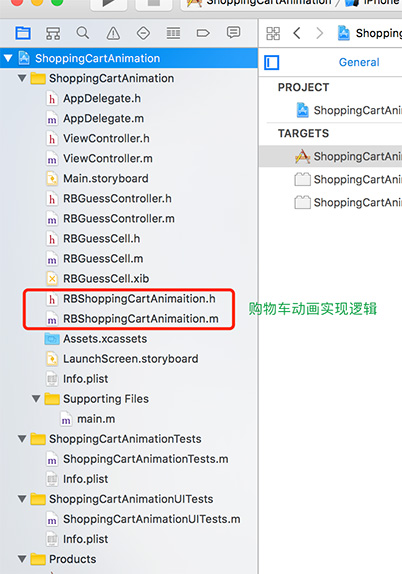
接下来开始具体实现过程:
一、先计算动画开始结束位置
方法:
- (CGPoint)convertPoint:(CGPoint)point toView:(nullable UIView *)view;
用该方法计算动画view相对于window的位置
1) 计算动画开始位置fromCenter
CGPoint fromCenter = [animationView convertPoint:CGPointMake(animationView.frame.size.width * 0.5f, animationView.frame.size.height * 0.5f) toView:keyWindow];
2)计算动画结束位置endCenter
CGPoint endCenter = [endView convertPoint:CGPointMake(endView.frame.size.width * 0.5f, endView.frame.size.height * 0.5f) toView:keyWindow];
二、计算贝塞尔曲线(抛物线)的两个控制点
用UIBezierPath 画出抛物线,需要找到两个控制点controlPoint1 和 controlPoint2

controlPoint1是控制点1controlPoint2是控制点2A是controlPoint1和controlPoint2的中点controlPointC是fromCenter和B的中点
1)先设置控制点距最高点(fromCenter或endCenter)的水平距离controlPointEY,本篇默认controlPointEY = 100,即图1中点controlPointC到点A的距离。
2)计算控制点相对于点A的距离controlPointEX,即controlPoint1到A距离或controlPoint2到A距离,本篇设置为fromCenter.x到endCenter.x的1/4,即controlPointEX = (endCenter.x - fromCenter.x) * 0.25f;
3)计算两个控制点位置
CGPoint controlPoint1 = CGPointMake(controlPointCX - controlPointEX, controlPointCY - controlPointEY);

CGPoint controlPoint2 = CGPointMake(controlPointCX + controlPointEX, controlPointCY - controlPointEY);
三、复制动画的layer
复制cell上需要做动画的view,add到window上做动画
NSString *str = ((UIButton *)animationView).titleLabel.text;

_animationLayer = [CATextLayer layer];

_animationLayer.bounds = animationView.bounds;

_animationLayer.position = fromCenter;

_animationLayer.alignmentMode = kCAAlignmentCenter;//文字对齐方式

_animationLayer.wrapped = YES;

_animationLayer.contentsScale = [UIScreen mainScreen].scale;

_animationLayer.string = str;

_animationLayer.backgroundColor = [UIColor redColor].CGColor;

[keyWindow.layer addSublayer:_animationLayer];
四、动画组合
整合所有动画,让view动起来
1)运动轨迹(抛物线)
UIBezierPath *path = [UIBezierPath bezierPath];

[path moveToPoint:fromCenter];

[path addCurveToPoint:endCenter controlPoint1:controlPoint1 controlPoint2:controlPoint2];

CAKeyframeAnimation *pathAnimation = [CAKeyframeAnimation animationWithKeyPath:@"position"];

pathAnimation.path = path.CGPath;
2)旋转起来
CABasicAnimation *rotateAnimation = [CABasicAnimation animationWithKeyPath:@"transform.rotation"];

rotateAnimation.removedOnCompletion = YES;

rotateAnimation.fromValue = [NSNumber numberWithFloat:0];

rotateAnimation.toValue = [NSNumber numberWithFloat:10 * M_PI];

rotateAnimation.timingFunction=[CAMediaTimingFunction functionWithName:kCAMediaTimingFunctionEaseIn]
3)缩放动画
CABasicAnimation *scaleAnimation = [CABasicAnimation animationWithKeyPath:@"transform.scale"];

scaleAnimation.removedOnCompletion = NO;

scaleAnimation.fromValue = [NSNumber numberWithFloat:1.0];

scaleAnimation.toValue = [NSNumber numberWithFloat:0.2];
4)透明度动画
CABasicAnimation *alphaAnimation = [CABasicAnimation animationWithKeyPath:@"opacity"];

alphaAnimation.removedOnCompletion = NO;

alphaAnimation.fromValue = [NSNumber numberWithFloat:1.0];

alphaAnimation.toValue = [NSNumber numberWithFloat:0.1];
5)动画组合
CAAnimationGroup *groups = [CAAnimationGroup animation];

groups.animations = @[pathAnimation,rotateAnimation, scaleAnimation, alphaAnimation];

groups.duration = kShoppingCartDuration;

groups.removedOnCompletion=NO;

groups.fillMode=kCAFillModeForwards;

groups.delegate = self;

[_animationLayer addAnimation:groups forKey:@"group"];
五、其他
iOS 购物车动画
注:本文著作权归作者,由demo大师代发,拒绝转载,转载需要作者授权
iOS 购物车动画的更多相关文章
- iOS 手机淘宝加入购物车动画分析
1.最终效果 仿淘宝动画 2.核心代码 _cartAnimView=[[UIImageView alloc] initWithFrame:CGRectMake(_propView.frame.size ...
- iOS手机淘宝加入购物车动画分析
本文转载至 http://www.jianshu.com/p/e77e3ce8ee24 1.最终效果 仿淘宝动画 2.核心代码 _cartAnimView=[[UIImageView alloc] i ...
- ios 学习动画的套路 (一)
你也肯定喜欢炫酷的动画! 在APP中,动画就是一个点睛之笔!可以给用户增加一些独特的体验感,估计也有许多的和我一样的,看着那些觉得不错的动画,也就只能流口水的孩子,毕竟~不知道从哪里下手去写!会连续的 ...
- iOS核心动画学习整理
最近利用业余时间终于把iOS核心动画高级技巧(https://zsisme.gitbooks.io/ios-/content/chapter1/the-layer-tree.html)看完,对应其中一 ...
- IOS 核心动画之CAKeyframeAnimation - iBaby
- IOS 核心动画之CAKeyframeAnimation - 简单介绍 是CApropertyAnimation的子类,跟CABasicAnimation的区别是:CABasicAnimation ...
- javascript仿天猫加入购物车动画效果
javascript仿天猫加入购物车动画效果 注意:首先需要声明的是:代码原思路不是我写的,是在网上找的这种效果,自己使用代码封装了下而已:代码中都有注释,我们最主要的是理解抛物线的思路及在工作中 ...
- iOS各种动画效果
ios各种动画效果 最普通动画: //开始动画 [UIView beginAnimations:nil context:nil]; //设定动画持续时间 [UIView setAnimationDu ...
- 【转】Android 实现蘑菇街购物车动画效果
原文出处:http://blog.csdn.net/wangjinyu501/article/details/38400479 1.思路 目前想到两种方式实现这种效果,一是使用Tween动画,直截 ...
- IOS之动画
IOS之动画 15.1 动画介绍 15.2 Core Animation基础 15.3 隐式动画 15.4 显式动画 15.5 关键帧显式动画 15.6 UIView级别动画 15.1 动画介绍 ...
随机推荐
- JavaScript中的Date类型
ECMAScript中的Date类型是在早起Java中的java.util.Date类基础上构建的.为此,Date类型使用自UTC(Coordinated Universal Time,国际协调时间) ...
- webpack2 热加载js 文件
如果只要普通的热加载 只要如下配置就好了 package.json { "devDependencies": { "webpack": "^2.6.1 ...
- 客户端 localStorage, sessionStorage, cookie 的区别
SessionStorage, LocalStorage, Cookie这三者都可以被用来在浏览器端存储数据,而且都是字符串类型的键值对! 区别在于前两者属于WebStorage,创建它们的目的便是存 ...
- Java 对象池实现
http://blog.csdn.net/bryantd/article/details/1100019 http://www.cnblogs.com/devinzhang/archive/2012/ ...
- java中ThreadLocal类的使用
ThreadLocal是解决线程安全问题一个很好的思路,ThreadLocal类中有一个Map,用于存储每一个线程的变量副本,Map中元素的键为线程对象,而值对应线程的变量副本,由于Key值不可重复, ...
- [COCI2011-2012#7] KAMPANJA
这个题似曾相识啊,以前是用搜索剪枝+0/1边权bfs做的(题面可以参照上一篇这个题的博客). 有一类问题就是求 包含若干关键点的最小强联通子图大小是多少. 如果关键点数量是变量,那么就是NP问题了.. ...
- Android ANR优化 2
在实际情况中,当Android项目的用户量特别大时候,一些细小的问题也会被放大,ANR问题就是一个典型的例子. 一些ANR问题只会发生在用户实际使用的情景,当系统资源比较紧张等一些特殊情况下才会遇到, ...
- JS isNaN()函数
1.作用 isNaN() 函数用于检查其参数是否是非数字值. 2.JS <script> document.write(isNaN(123)); document.write(isNaN( ...
- Openshift 节点添加和删除
1.节点添加 在新节点上编辑yum源/etc/yum.repo.d/ocp.repo /etc/hosts在主和节点上都加上相应信息 编辑host文件,加入 [OSEv3:children] mast ...
- Git 学习(一)简介及安装
Git 简介及安装 Git是目前世界上最先进的分布式版本控制系统(没有之一).它的诞生也颇具传奇,Linux创始人Linus花了两周时间自己用C写了一个分布式版本控制系统,这就是Git!有兴趣的话,可 ...