
IOS之动画
15.1 动画介绍
15.2 Core Animation基础
15.3 隐式动画
15.4 显式动画
15.5 关键帧显式动画
15.6 UIView级别动画
15.1 动画介绍
在iOS中动画实现技术主要是:Core Animation。 Core Animation负责所有的滚动、旋转、缩小和放大以及所有的iOS动画效果。其中UIKit类通常都有animated:参数部分,它可以允许是否使用动画。
Core Animation还与Quartz紧密结合在一起,每个UIView都关联到一个CALayer对象,CALayer是Core Animation中的图层。
15.2 Core Animation基础
Core Animation创建动画时候会修改CALayer属性,然后让这些属性流畅地变化。Core Animation相关知识点:
图层,图层是动画发生的地方,CALayer总是与UIView关联,通过layer属性访问。
隐式动画,这是一种最简单的动画,不用设置定时器,不用考虑线程或者重画。
显式动画,是一种使用CABasicAnimation创建的动画,通过CABasicAnimation,可以更明确地定义属性如何改变动 画。
关键帧动画,这是一种更复杂的显式动画类型,这里可以定义动画的起点和终点,还可以定义某些帧之间的动画。
15.3 隐式动画
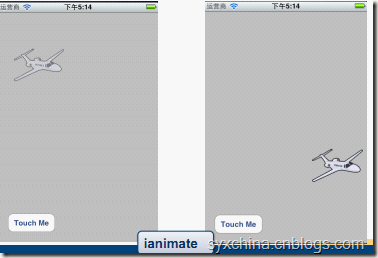
实例ianimate:

#import <UIKit/UIKit.h>

#import <QuartzCore/QuartzCore.h>

@interface ianimateViewController : UIViewController {

    IBOutlet UIImageView *plane;

}

-(IBAction)movePlane:(id)sender;

@end

//--m

-(IBAction)movePlane:(id)sender {

    [UIView beginAnimations:nil context:NULL];

    CGAffineTransform moveTransform = CGAffineTransformMakeTranslation(180, 200);

    plane.layer.affineTransform=moveTransform;

    plane.layer.opacity = 1;

    [UIView commitAnimations];

}
飞机图片的不透明度(opacity)初始为0.25,然后在动画过程中不透明度设置为1.0。这个过程是设置飞机图片对象的层属性的,plane.layer.opacity = 1;
[plane.layer setAffineTransform:moveTransform];设置飞机图片层对象的仿射移动变换。
15.4 显式动画
eanimate关键代码:
#import <UIKit/UIKit.h>

#import <QuartzCore/QuartzCore.h>

@interface eanimateViewController : UIViewController {

    IBOutlet UIImageView *plane;

}

-(IBAction)movePlane:(id)sender;

@end

//--m

-(IBAction)movePlane:(id)sender {

    CABasicAnimation *opAnim = [CABasicAnimation animationWithKeyPath:@"opacity"];

    opAnim.duration = 3.0;

    opAnim.fromValue = [NSNumber numberWithFloat:.25];

    opAnim.toValue= [NSNumber numberWithFloat:1.0];

    opAnim.cumulative = YES;

    opAnim.repeatCount = 2;

    [plane.layer addAnimation:opAnim forKey:@"animateOpacity"];

    CGAffineTransform moveTransform = CGAffineTransformMakeTranslation(180, 200);

    CABasicAnimation *moveAnim = [CABasicAnimation animationWithKeyPath:@"transform"];

    moveAnim.duration = 6.0;

    moveAnim.toValue= [NSValue valueWithCATransform3D:

        CATransform3DMakeAffineTransform(moveTransform)];

    [plane.layer addAnimation:moveAnim forKey:@"animateTransform"];

}
显式动画时候,不必定义CALayer的变化,也不必执行它们,而是通过CABasicAnimation逐个定义动画。其中每个动画都含有各自的duration、repeatCount等属性。然后,使用addAnimation:forKey:方法分别将每个动画应用到层中。
[CABasicAnimation animationWithKeyPath:@“opacity”]获得透明度动画对象,@“transform”是指定转换动画。
opAnim.cumulative 属性是指定累计
opAnim.repeatCount 重复执行次数
CATransform3DMakeAffineTransform函数是将仿射变换矩阵变成Core Animation使用的Transform3D类型的矩阵。
15.5 关键帧显式动画
eanimate_keyFrame关键代码:
#import <UIKit/UIKit.h>

#import <QuartzCore/QuartzCore.h>

@interface eanimateViewController : UIViewController {

    IBOutlet UIImageView *plane;

}

-(IBAction)movePlane:(id)sender;

@end

//-m

-(IBAction)movePlane:(id)sender {

    CAKeyframeAnimation *opAnim = [CAKeyframeAnimation animationWithKeyPath:@"opacity"];

    opAnim.duration = 6.0;

    opAnim.values =[NSArray arrayWithObjects:

                    [NSNumber numberWithFloat:0.25],

                    [NSNumber numberWithFloat:0.75],

                    [NSNumber numberWithFloat:1.0],

                    nil];

    opAnim.keyTimes = [NSArray arrayWithObjects:

                       [NSNumber numberWithFloat:0.0],

                       [NSNumber numberWithFloat:0.5],

                       [NSNumber numberWithFloat:1.0], nil];

    [plane.layer addAnimation:opAnim forKey:@"animateOpacity"];

    CGAffineTransform moveTransform = CGAffineTransformMakeTranslation(180, 200);

    CABasicAnimation *moveAnim = [CABasicAnimation animationWithKeyPath:@"transform"];

    moveAnim.duration = 6.0;

    moveAnim.toValue= [NSValue valueWithCATransform3D:

                       CATransform3DMakeAffineTransform(moveTransform)];

    [plane.layer addAnimation:moveAnim forKey:@"animateTransform"];

}
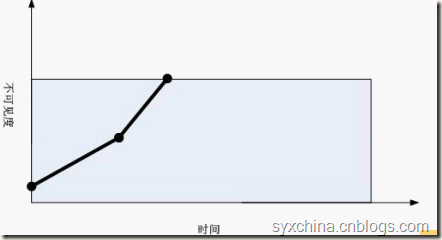
animation.values是一个值的数组。
animation.keyTimes是一个每个帧片段持续的时间比例,取值范围0.0-1.0之间。
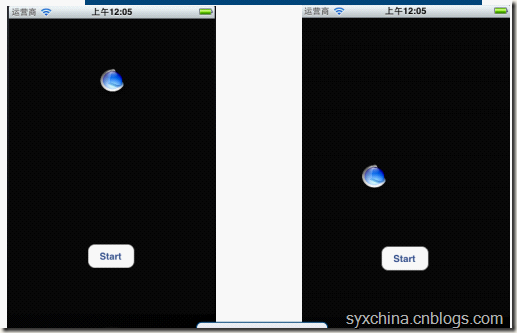
关键帧之路径实例BallSteps
#import <UIKit/UIKit.h>

#import <QuartzCore/CoreAnimation.h>

@interface BallStepsViewController : UIViewController {

    UIButton *drawButton;

    UIImageView *imageView;

}

@property (nonatomic, retain) IBOutlet UIButton *drawButton;

@property (nonatomic, retain) IBOutlet UIImageView *imageView;

- (IBAction)drawStar:(id)sender;

@end

//--m

#import "BallStepsViewController.h"

@implementation BallStepsViewController

@synthesize drawButton;

@synthesize imageView;

- (IBAction)drawStar:(id)sender {

    [drawButton setEnabled:NO];

    CGMutablePathRef starPath = CGPathCreateMutable();

    CGPathMoveToPoint(starPath,NULL,160.0f, 100.0f);

    CGPathAddLineToPoint(starPath, NULL, 100.0f, 280.0f);

    CGPathAddLineToPoint(starPath, NULL, 260.0, 170.0);

    CGPathAddLineToPoint(starPath, NULL, 60.0, 170.0);

    CGPathAddLineToPoint(starPath, NULL, 220.0, 280.0);

    CGPathCloseSubpath(starPath);

    CAKeyframeAnimation *animation = nil;

    animation = [CAKeyframeAnimation animationWithKeyPath:@"position"];

    [animation setDuration:10.0f];

    [animation setDelegate:self];

    [animation setPath:starPath];

    CFRelease(starPath);

    starPath = nil;

    [[imageView layer] addAnimation:animation forKey:@"position"];

}

- (void)animationDidStop:(CAAnimation *)theAnimation finished:(BOOL)flag {

    [drawButton setEnabled:YES];

}

- (void)dealloc {

    [drawButton release];

    [imageView release];

    [super dealloc];

}

@end
[CAKeyframeAnimation animationWithKeyPath:@“position”];创建一个position类型的关键帧动画。
关键帧动画中可以定义路径,把这些路径放入到CGMutablePathRef 中与CG中的很相似。
CGPathCloseSubpath(starPath);结束路径。
[animation setPath:starPath];设置路径。
[animation setDelegate:self];设置委托对象为本身,即回调方法 animationDidStop:finished:。
最后CFRelease(starPath);释放路径。
15.6 UIView级别动画
除了直接使用Core Animation 层实现动画,我们还有UIView直接实现隐式动画。
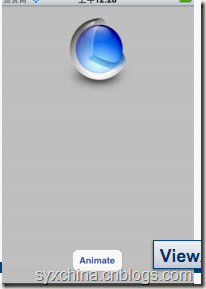
实例ViewAnimation:
@interface MainViewController : UIViewController

{

  UIImageView *animImageView;

  UIButton *button;

}

@property (assign) IBOutlet UIImageView *animImageView;

@property (assign) IBOutlet UIButton *button;

- (IBAction)action:(id)sender;

@end
//--m

#import "MainViewController.h"

@implementation MainViewController

@synthesize animImageView;

@synthesize button;

- (IBAction)action:(id)sender {

  [UIView beginAnimations:@"Hide Button" context:nil];

  [[self button] setAlpha:0.0];

  [UIView commitAnimations];

  [UIView beginAnimations:@"Slide Around" context:nil];

  [UIView setAnimationDuration:1.0];

  [UIView setAnimationDelegate:self];

  [UIView setAnimationDidStopSelector:@selector(viewAnimationDone:)];

  [UIView setAnimationRepeatCount:3];

  [UIView setAnimationRepeatAutoreverses:YES];

  CGPoint center = [[self animImageView] center];

  center.y += 100;

  [[self animImageView] setCenter:center];

  [UIView commitAnimations];

}

- (void)viewAnimationDone:(NSString*)name {

  [UIView beginAnimations:@"Show Button" context:nil];

  [[self button] setAlpha:1.0];

  [UIView commitAnimations];

}

@end
UIView中的动画是在动画块中定义的,动画块是UIView beginAnimations:context:开始, 在UIView commitAnimations结束。
首先开始将按钮设置透明度为0的,结果是开始动画时候隐藏了。
然后,又开始新的动画中设置委托事件:
[UIView setAnimationDelegate:self]
[UIView setAnimationDidStopSelector:@selector(viewAnimationDone:)];
当动画结束的时候调用viewAnimationDone:方法。
内置UIView动画
UIView具有一个UIViewAnimationTransition属性可以设定动画,这些动画是iOS提供几个常用动画有:
UIViewAnimationTransitionNone
UIViewAnimationTransitionFlipFromLeft
UIViewAnimationTransitionFlipFromRight
UIViewAnimationTransitionCurlUp
UIViewAnimationTransitionCurlDown
实例UIViewAnimation
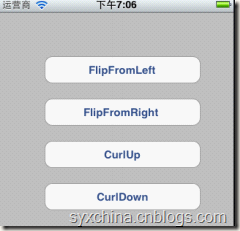
#import <UIKit/UIKit.h>

@interface UIViewAnimationViewController : UIViewController {

}

- (IBAction)doUIViewAnimation:(id)sender;

@end

//-m

#import "UIViewAnimationViewController.h"

@implementation UIViewAnimationViewController

- (IBAction)doUIViewAnimation:(id)sender{

    [UIView beginAnimations:@"animationID" context:nil];

    [UIView setAnimationDuration:1.5f];

    [UIView setAnimationCurve:UIViewAnimationCurveEaseInOut];

    [UIView setAnimationRepeatAutoreverses:NO];

    UIButton *theButton = (UIButton *)sender;

    switch (theButton.tag) {

        case 1:

            [UIView setAnimationTransition:UIViewAnimationTransitionFlipFromLeft forView:self.view cache:YES];//oglFlip, fromLeft

            break;

        case 2:

            [UIView setAnimationTransition:UIViewAnimationTransitionFlipFromRight forView:self.view cache:YES];//oglFlip, fromRight

            break;

        case 3:

            [UIView setAnimationTransition:UIViewAnimationTransitionCurlUp forView:self.view cache:YES];

            break;

        case 4:

            [UIView setAnimationTransition:UIViewAnimationTransitionCurlDown forView:self.view cache:YES];

            break;

        default:

            break;

    }

    //[self.view exchangeSubviewAtIndex:1 withSubviewAtIndex:0];

    [UIView commitAnimations];

}

- (void)viewDidUnload {

    // Release any retained subviews of the main view.

    // e.g. self.myOutlet = nil;

}

- (void)dealloc {

    [super dealloc];

}

@end
[UIView setAnimationCurve:UIViewAnimationCurveEaseInOut]设置动画曲线,动画曲线指定的是动画进入和退出的方式,它也有几个常量:
UIViewAnimationCurveEaseInOut
UIViewAnimationCurveEaseIn
UIViewAnimationCurveEaseOut
UIViewAnimationCurveLinear
setAnimationTransition: forView: cache:方法第一个参数定义动画类型,第二个参数是当前视图对象,第三个参数上使用缓冲区。
IOS之动画的更多相关文章
- iOS核心动画学习整理
最近利用业余时间终于把iOS核心动画高级技巧(https://zsisme.gitbooks.io/ios-/content/chapter1/the-layer-tree.html)看完,对应其中一 ...
- IOS 核心动画之CAKeyframeAnimation - iBaby
- IOS 核心动画之CAKeyframeAnimation - 简单介绍 是CApropertyAnimation的子类,跟CABasicAnimation的区别是:CABasicAnimation ...
- iOS各种动画效果
ios各种动画效果 最普通动画: //开始动画 [UIView beginAnimations:nil context:nil]; //设定动画持续时间 [UIView setAnimationDu ...
- IOS 动画专题 --iOS核心动画
iOS开发系列--让你的应用“动”起来 --iOS核心动画 概览 通过核心动画创建基础动画.关键帧动画.动画组.转场动画,如何通过UIView的装饰方法对这些动画操作进行简化等.在今天的文章里您可以看 ...
- ios 学习动画的套路 (一)
你也肯定喜欢炫酷的动画! 在APP中,动画就是一个点睛之笔!可以给用户增加一些独特的体验感,估计也有许多的和我一样的,看着那些觉得不错的动画,也就只能流口水的孩子,毕竟~不知道从哪里下手去写!会连续的 ...
- Bodymovin:Bodymovin和Lottie:把AE动画转换成HTML5/Android/iOS原生动画
转自:https://www.cnblogs.com/zamhown/p/6688369.html 大杀器Bodymovin和Lottie:把AE动画转换成HTML5/Android/iOS原生动画 ...
- 大杀器Bodymovin和Lottie:把AE动画转换成HTML5/Android/iOS原生动画
前段时间听部门老大说,Airbnb出了个移动端的动画库Lottie,可以和一个名叫Bodymovin的AE插件结合起来,把在AE上做好的动画导出为json文件,然后以Android/iOS原生动画的形 ...
- [iOS]过渡动画之高级模仿 airbnb
注意:我为过渡动画写了两篇文章:第一篇:[iOS]过渡动画之简单模仿系统,主要分析系统简单的动画实现原理,以及讲解坐标系.绝对坐标系.相对坐标系,坐标系转换等知识,为第二篇储备理论基础.最后实现 Ma ...
- iOS 购物车动画
代码地址如下:http://www.demodashi.com/demo/11155.html 先看看动画效果: 项目结构: 接下来开始具体实现过程: 一.先计算动画开始结束位置 方法:- (CGPo ...
随机推荐
- Delphi TcxTreeList 怎们显示下拉列表
TcxTreeList 怎们显示下拉列表, 操作如下: 1.定义一个TStringlist中存储你的信息. 2.然后选定在TcxTreeList的哪个列要变成TCombobox, 如下图: 3. ...
- Symmetric Tree——LeetCode
Given a binary tree, check whether it is a mirror of itself (ie, symmetric around its center). For e ...
- 2. Singleton模式
这两种方法都提到了使用模版: (1) 参考文章:http://www.cnblogs.com/08shiyan/archive/2012/03/16/2399617.html 不同: a. 该方法直接 ...
- date命令使用总结【转载】
本文转载自:http://blog.sina.com.cn/s/blog_674b5aae0100o0w9.html 由于跨年.跨月.闰平年等特殊性,在日常编程过程中对日期的处理总是异常麻烦.目前,各 ...
- IMPLEMENTED IN PYTHON +1 | CART生成树
Introduction: 分类与回归树(classification and regression tree, CART)模型由Breiman等人在1984年提出,CART同样由特征选择.树的生成及 ...
- puppet常用调试命令
yum快速部署puppet测试环境(C/S端) rpm -ivh http://yum.puppetlabs.com/puppetlabs-release-el-7.noarch.rpm yum r ...
- 封装实现UIButton左文字右图片
#import "TitleButton.h" @implementation TitleButton - (instancetype)initWithFrame:(CGRect) ...
- 自然语言.例如:求n!。
(1).定义3个变量i.n及mul,并为i和mul均赋初值为1. (2).从键盘中输入一个数赋给n. (3).将mul乘以i的结果赋给mul. (4)i的值加1,判断i的值是否大于n.如果大于n,则执 ...
- 【转】ASP.NET MVC 数据验证及相关内容
原文地址:http://www.jb51.net/article/56713.htm 一.数据验证 数据验证的步骤在模型类中添加与验证相关的特性标记在客户端导入与验证相关的js文件和css文件使用与验 ...
- Shell脚本:判断用户和用户组是否已经存在/创建用户和用户组
通常作为一个应用程序的部署脚本,开始的第一项工作是为当前应用创建一个专用(dedicated)的用户和用户组.这个脚本很简单,这里贴一个参考样本: #!/bin/sh user=test_user ...