
iOS 购物车动画
先看看动画效果:

项目结构:
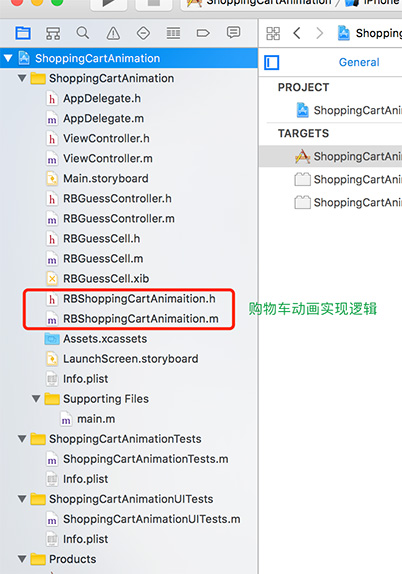
接下来开始具体实现过程:
一、先计算动画开始结束位置
方法:
- (CGPoint)convertPoint:(CGPoint)point toView:(nullable UIView *)view;
用该方法计算动画view相对于window的位置
1) 计算动画开始位置fromCenter
CGPoint fromCenter = [animationView convertPoint:CGPointMake(animationView.frame.size.width * 0.5f, animationView.frame.size.height * 0.5f) toView:keyWindow];
2)计算动画结束位置endCenter
CGPoint endCenter = [endView convertPoint:CGPointMake(endView.frame.size.width * 0.5f, endView.frame.size.height * 0.5f) toView:keyWindow];
二、计算贝塞尔曲线(抛物线)的两个控制点
用UIBezierPath 画出抛物线,需要找到两个控制点controlPoint1 和 controlPoint2

controlPoint1是控制点1controlPoint2是控制点2A是controlPoint1和controlPoint2的中点controlPointC是fromCenter和B的中点
1)先设置控制点距最高点(fromCenter或endCenter)的水平距离controlPointEY,本篇默认controlPointEY = 100,即图1中点controlPointC到点A的距离。
2)计算控制点相对于点A的距离controlPointEX,即controlPoint1到A距离或controlPoint2到A距离,本篇设置为fromCenter.x到endCenter.x的1/4,即controlPointEX = (endCenter.x - fromCenter.x) * 0.25f;
3)计算两个控制点位置
CGPoint controlPoint1 = CGPointMake(controlPointCX - controlPointEX, controlPointCY - controlPointEY);

CGPoint controlPoint2 = CGPointMake(controlPointCX + controlPointEX, controlPointCY - controlPointEY);
三、复制动画的layer
复制cell上需要做动画的view,add到window上做动画
NSString *str = ((UIButton *)animationView).titleLabel.text;

_animationLayer = [CATextLayer layer];

_animationLayer.bounds = animationView.bounds;

_animationLayer.position = fromCenter;

_animationLayer.alignmentMode = kCAAlignmentCenter;//文字对齐方式

_animationLayer.wrapped = YES;

_animationLayer.contentsScale = [UIScreen mainScreen].scale;

_animationLayer.string = str;

_animationLayer.backgroundColor = [UIColor redColor].CGColor;

[keyWindow.layer addSublayer:_animationLayer];
四、动画组合
整合所有动画,让view动起来
1)运动轨迹(抛物线)
UIBezierPath *path = [UIBezierPath bezierPath];

[path moveToPoint:fromCenter];

[path addCurveToPoint:endCenter controlPoint1:controlPoint1 controlPoint2:controlPoint2];

CAKeyframeAnimation *pathAnimation = [CAKeyframeAnimation animationWithKeyPath:@"position"];

pathAnimation.path = path.CGPath;
2)旋转起来
CABasicAnimation *rotateAnimation = [CABasicAnimation animationWithKeyPath:@"transform.rotation"];

rotateAnimation.removedOnCompletion = YES;

rotateAnimation.fromValue = [NSNumber numberWithFloat:0];

rotateAnimation.toValue = [NSNumber numberWithFloat:10 * M_PI];

rotateAnimation.timingFunction=[CAMediaTimingFunction functionWithName:kCAMediaTimingFunctionEaseIn]
3)缩放动画
CABasicAnimation *scaleAnimation = [CABasicAnimation animationWithKeyPath:@"transform.scale"];

scaleAnimation.removedOnCompletion = NO;

scaleAnimation.fromValue = [NSNumber numberWithFloat:1.0];

scaleAnimation.toValue = [NSNumber numberWithFloat:0.2];
4)透明度动画
CABasicAnimation *alphaAnimation = [CABasicAnimation animationWithKeyPath:@"opacity"];

alphaAnimation.removedOnCompletion = NO;

alphaAnimation.fromValue = [NSNumber numberWithFloat:1.0];

alphaAnimation.toValue = [NSNumber numberWithFloat:0.1];
5)动画组合
CAAnimationGroup *groups = [CAAnimationGroup animation];

groups.animations = @[pathAnimation,rotateAnimation, scaleAnimation, alphaAnimation];

groups.duration = kShoppingCartDuration;

groups.removedOnCompletion=NO;

groups.fillMode=kCAFillModeForwards;

groups.delegate = self;

[_animationLayer addAnimation:groups forKey:@"group"];
五、其他
iOS 购物车动画
注:本文著作权归作者,由demo大师代发,拒绝转载,转载需要作者授权
iOS 购物车动画的更多相关文章
- iOS 手机淘宝加入购物车动画分析
1.最终效果 仿淘宝动画 2.核心代码 _cartAnimView=[[UIImageView alloc] initWithFrame:CGRectMake(_propView.frame.size ...
- iOS手机淘宝加入购物车动画分析
本文转载至 http://www.jianshu.com/p/e77e3ce8ee24 1.最终效果 仿淘宝动画 2.核心代码 _cartAnimView=[[UIImageView alloc] i ...
- ios 学习动画的套路 (一)
你也肯定喜欢炫酷的动画! 在APP中,动画就是一个点睛之笔!可以给用户增加一些独特的体验感,估计也有许多的和我一样的,看着那些觉得不错的动画,也就只能流口水的孩子,毕竟~不知道从哪里下手去写!会连续的 ...
- iOS核心动画学习整理
最近利用业余时间终于把iOS核心动画高级技巧(https://zsisme.gitbooks.io/ios-/content/chapter1/the-layer-tree.html)看完,对应其中一 ...
- IOS 核心动画之CAKeyframeAnimation - iBaby
- IOS 核心动画之CAKeyframeAnimation - 简单介绍 是CApropertyAnimation的子类,跟CABasicAnimation的区别是:CABasicAnimation ...
- javascript仿天猫加入购物车动画效果
javascript仿天猫加入购物车动画效果 注意:首先需要声明的是:代码原思路不是我写的,是在网上找的这种效果,自己使用代码封装了下而已:代码中都有注释,我们最主要的是理解抛物线的思路及在工作中 ...
- iOS各种动画效果
ios各种动画效果 最普通动画: //开始动画 [UIView beginAnimations:nil context:nil]; //设定动画持续时间 [UIView setAnimationDu ...
- 【转】Android 实现蘑菇街购物车动画效果
原文出处:http://blog.csdn.net/wangjinyu501/article/details/38400479 1.思路 目前想到两种方式实现这种效果,一是使用Tween动画,直截 ...
- IOS之动画
IOS之动画 15.1 动画介绍 15.2 Core Animation基础 15.3 隐式动画 15.4 显式动画 15.5 关键帧显式动画 15.6 UIView级别动画 15.1 动画介绍 ...
随机推荐
- 在intellij idea 中进行android 单元测试
本次用来测试的代码是sqlite进行数据操作. ######右键选择要进行单元测试的应用 #############弹出选择框,选择Android>Test Module>Next ### ...
- Topcoder Srm 673 Div2 1000 BearPermutations2
\(>Topcoder \space Srm \space 673 \space Div2 \space 1000 \space BearPermutations2<\) 题目大意 : 对 ...
- [2018湖南省队集训] 6.28 T2 color
毒瘤计数题2333,(小声)k其实可以出到1e9,不过这样求组合数的时候就要记1000种数的1~1000次下降幂(用到的组合数中第一维在1e9级别的只有1000种左右,第二维都是<=1000), ...
- BZOJ 1700 [Usaco2007 Jan]Problem Solving 解题(单调DP)
[题目链接] http://www.lydsy.com/JudgeOnline/problem.php?id=1700 [题目大意] 共有p道题目要做,每个月收入只有n元,用于付钱做题之外的部分都会吃 ...
- ubuntu16 安装docker
本文开发环境为Ubuntu 16.04 LTS 64位系统,通过apt的docker官方源安装最新的Docker CE(Community Edition),即Docker社区版,是开发人员和小型团队 ...
- RMI(Remote Method Invocation ) 概念恢复
1.RMI是远程方法调用的简称,像其名称暗示的那样,它能够帮助我们查找并执行远程对象,通俗的说,远程调用就像一个class放在A机器上,然后在B机器中调用这个class的方法. 2.EMI术语 在研究 ...
- Educational Codeforces Round 8 C. Bear and String Distance 贪心
C. Bear and String Distance 题目连接: http://www.codeforces.com/contest/628/problem/C Description Limak ...
- 搭建maven支持的web工程的步骤
搭建一个新的web project的整体思路:先用maven搭建项目的骨架,生成mvn project,然后将mvn project转换为web project,最后添加相关的Spring,hiber ...
- synchronized和lock区别
synchronized 快速回顾: 1.当代码块 加上 synchrozized之后,代码会发生什么改变? 答案:有两条改变.一个是原子性(atomicity),一个是可见性(visibility) ...
- zk选举过程
1. 服务器启动时期的Leader选举 若进行Leader选举,则至少需要两台机器,这里选取3台机器组成的服务器集群为例.在集群初始化阶段,当有一台服务器Server1启动时,其单独无法进行和完成Le ...