
Tracing SQL Queries in Real Time for MySQL Databases using WinDbg and Basic Assembler Knowledge
Introduction
One of the more interesting things for any person is to see how the internal engines from the server software work. The purpose of this article is to show how we can apply basic assembler knowledge to find interesting runtime information.
Few days ago, my friend was involved on PHP+MYSQL site development. He was experiencing some issues.
Ok, we can start.
- You will need MySQL installation download and install any version of MySQL. Please make sure that your MySQLD service is running successfully (In other words, ensure that your MySQL is working properly).
- Download the latest version of Windbg for Windows from the Microsoft site.
- Launch Windbg.
- Press F6 and attach the mysqld.exe process.
- Set the Windbg symbols properly by using File->Symbols File Path:srv*c:\windows*http://msdl.microsoft.com/download/symbols.
- On Windbg command line, execute
.reload. - Press F5 to run the process (When you attach the process, this gets frozen). Using F5 or with G command, the process runs.
- Here is the tricky part. MYSQLD.exe process (or service in this case) is in charge of executing the SQL Queries from PHP pages, or MYSQL different clients. Navicat is a cool MYSQL client which allows us to see the MYSQL Server in a graphical mode, like Microsoft Management Studio does with SQL Server.
- Let's start navicat tool for educative purposes (if you want), or use your own PHP or any other application which is a MYSQL Client.
EXECUTEis the magic word. The tricky part is: Why if MYSQLD.EXE process performs a SQL Query executing any kind ofEXECUTEfunction on any part of their internal code? Let's put a breakpoint there.- Breakpoint: Stop the current
MYSQLDExecution by CTRL+Break on Windbg and put the following command:bm *mysqld*!*execute*(BM=break on mask, library all *mysqld* and function *execute*). - Press F5 and perform any client operation with PHP Page or Navicat or any other MYSQL client.
- You will see a freeze in your page or navicat: Why? Because MYSQLD was stopped. Lets see the windbg.
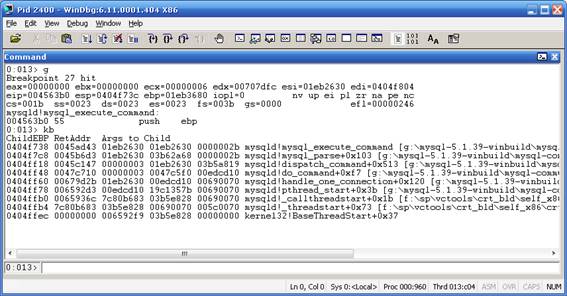
- Nice, the MYSQLD process stopped on
MYSQLD!MYSQL_EXECUTE_COMMAND, let's see the Stack Trace: Use KB command: - As you can see, you can observe directly the input parameters for
MYSQL_EXECUTE_COMMANDon Args to Child section. Every hexadecimal value there represents normally a pointer to any specified data structure. Is anystringthere on any of the Args to Child pointer? Let's examine this. - Click on View->Memory. On Address, write the Pointer (captured from Args to child) try with 01eb2630 and the other args to child:

- We did not see any interesting thing on all args to child parameters for
MYSQL_EXECUTE_COMMAND, but what about the previous function:mysql_parse?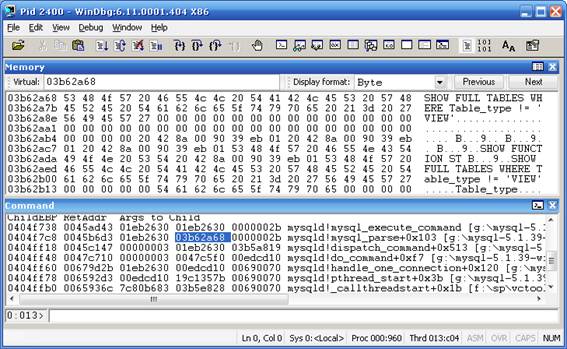
- Eureka! There is something interesting there. What if we print the value there? Let's execute:
.printf “%ma”.03b62a68:
- Yes, this is definitely a SQL Query captured from MYSQLD process. Now when we have the function that we want, delete all breakpoints by using the command
BC *and usebp mysqld!mysql_parseand continue the execution by using F5 or G windbg command line. - Now our windbg stopped on
mysqld!mysql_parse. - The one million question is: everytime that any MYSQL Query executes something, it will freeze my app until press F5 app? The answer is no, if we use a more intelligent breakpoint. We know the function
mysql_parse, but in which memory address it is stored? This is a call stack theory: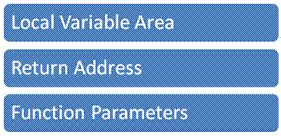
- Let's explain this, when the process is starting a function, it pushes the Function parameters to be used. Then what happens with ESP processor register? Example:
VOID SUM(INT X,INT *Y).ESPrepresents theTOPof the stack, andEBPthe base address for theStack. Let's assume thatESP=1000. - The process pushes the pointer to the
Yvalue andESPdecreases their value, decreases the top of the stack? Sounds confusing, Yes it'strue, in the Windows operative system, theTOPof the stack is in the lower part of memory than EBP (Base pointer of the stack)ESP=ESP-4 : 996. - The process pushes the value of
X ESP=ESP-4 : 992. - The process push the return address for the previous function:
ESP=ESP-4 : 998. - When the Windbg stops, the stack is in the
cstate. For example, you can find the second parameter by just executing a simple math operation: 2º parameter is located in thePOI(ESP+8), as we can see the Windbg previous picture, YES, ourstringis the second parameter. Let's try this: - Printing the 2º parameter:
.printf “%ma”,poi(esp+8).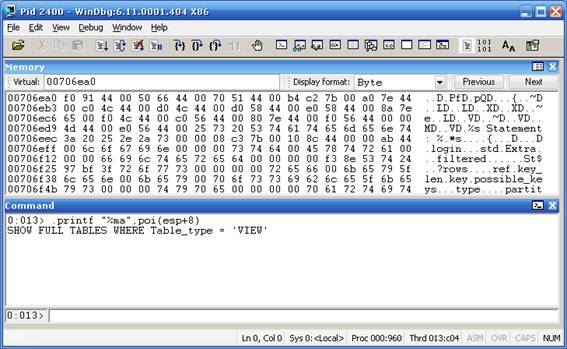
- Why POI? Poi in windbg represents or gets the pointer address of
ESP+8,%mameans or represent just a ASCII chars.%murepresents Unicode. - Good, now we can put together in a simple breakpoint.
- The complete breakpoint:
bp mysqld!mysql_parse ".printf \"\\n%ma\",poi(esp+8);gc" - When we set
Bp=breakpointin the functionmysqld!mysql_parse, it prints an ASCIIstringgiven a pointer to theesp+8(second parameter, andgcto continue the execution without stop.
License
This article, along with any associated source code and files, is licensed under The Code Project Open License (CPOL)
Tracing SQL Queries in Real Time for MySQL Databases using WinDbg and Basic Assembler Knowledge的更多相关文章
- 【MySQL笔记】解除输入的安全模式,Error Code: 1175. You are using safe update mode and you tried to update a table without a WHERE that uses a KEY column To disable safe mode, toggle the option in Preferences -> SQL Queries and reconnect.
Error Code: 1175. You are using safe update mode and you tried to update a table without a WHERE tha ...
- Error Code: 1175. You are using safe update mode and you tried to update a table without a WHERE that uses a KEY column To disable safe mode, toggle the option in Preferences -> SQL Queries and reconn
使用MySQL执行update的时候报错: MySQL 在使用mysql执行update的时候,如果不是用主键当where语句,会报如下错误,使用主键用于where语句中正常. 异常内容: ...
- Monitor All SQL Queries in MySQL (alias mysql profiler)
video from youtube: http://www.youtube.com/watch?v=79NWqv3aPRI one blog post: Monitor All SQL Querie ...
- java.sql.SQLException: Streaming result set com.mysql.jdbc.RowDataDynamic@27ce24aa is still active. No statements may be issued when any streaming result sets are open and in use on a given connection
在Sqoop往mysql导出数据的时候报了这个错误,一开始还以为是jar包没有打进去或者打错位置了,未解便上网查询. Error reading from database: java.sql.SQL ...
- EF: Raw SQL Queries
Raw SQL Queries Entity Framework allows you to query using LINQ with your entity classes. However, t ...
- Executing Raw SQL Queries using Entity Framework
原文 Executing Raw SQL Queries using Entity Framework While working with Entity Framework developers m ...
- Thinkphp中查询复杂sql查询表达式,如何表达MYSQL中的某字段不为空is not null?
Thinkphp中查询复杂sql查询表达式,如何表达MYSQL中的某字段不为空is not null?先上两种实现方式的实例:$querys["house_type_image"] ...
- EF Core 2.1 Raw SQL Queries (转自MSDN)
Entity Framework Core allows you to drop down to raw SQL queries when working with a relational data ...
- Debezium SQL Server Source Connector+Kafka+Spark+MySQL 实时数据处理
写在前面 前段时间在实时获取SQLServer数据库变化时候,整个过程可谓是坎坷.然后就想在这里记录一下. 本文的技术栈: Debezium SQL Server Source Connector+K ...
随机推荐
- GitHub创建项目入门学习
第一次创建git项目注意事项还是挺多了,这里就写个操作步骤,方便以后查看. 网页部分 1.打开自己的主页,点击“New repository”创建远程仓库. 2.填写信息 本地部分 前提: 下载git ...
- 算法题之Median of Two Sorted Arrays
这道题是LeetCode上的题目,难度级别为5,刚开始做没有找到好的思路,以为是自己智商比较低,后来发现确实也比较低... 题目: There are two sorted arrays nums1 ...
- 分割线用CSS样式做出来的效果
一:单个标签实现分隔线:. ; ; line-height: 1px; border-left: 200px solid #ddd; border-right: 200px solid #ddd; t ...
- 【python】时间戳、字典列表排序
记录一下昨天学到的知识: 一.文件相关 文件追加:f = open("fname","a") 文件不存在时创建 二.时间戳相关 http://www.jb ...
- Windows7 + OSG3.6 + VS2017 + Qt5.11
一.准备工作 下载需要的材料: 1. OSG稳定版源代码, 3.6.3版本 2. 第三方库,选择VS2017对应的版本 https://download.osgvisual.org/3rdParty ...
- Qt笔记——QSqlLite
静态数据库,简单方便 在.pro文件里添加 +sql #ifndef WIDGET_H #define WIDGET_H #include <QWidget> namespace Ui { ...
- Linux下服务器搭建
一.安装前准备工作 yum -y install gcc yum -y install gcc-c++ yum -y install make yum -y install ncurses-d ...
- Linux文件系统中/tmp的临时文件清理说明
https://www.cnblogs.com/MonkeyAC/articles/3631401.html
- Ext 目录
adapter:负责将里面提供第三方底层库(包括Ext自带的底层库)映射为Ext所支持的底层库. build: 压缩后的ext全部源码(里面分类存放). docs: API帮助文档. exmaples ...
- cookie笔记(二)
小荔枝 增 删 查 改 <form action="javascript:void(0)" method="get" accept-charset=&qu ...