
centos上mailx通过465端口发送邮件
首先请求数字证书
root@PLAY ~]# mkdir -p /root/.certs/ ####创建目录,用来存放证书
[root@PLAY ~]# echo -n | openssl s_client -connect smtp.163.com:465 | sed -ne '/-BEGIN CERTIFICATE-/,/-END CERTIFICATE-/p' > ~/.certs/163.crt ####向163请求证书
depth=2 C = US, O = GeoTrust Inc., CN = GeoTrust Global CA
verify return:1
depth=1 C = US, O = GeoTrust Inc., CN = GeoTrust SSL CA - G3
verify return:1
depth=0 C = CN, ST = Zhejiang, L = Hangzhou, O = "NetEase (Hangzhou) Network Co., Ltd", OU = MAIL Dept., CN = *.163.com
verify return:1
DONE
[root@PLAY ~]# certutil -A -n "GeoTrust SSL CA" -t "C,," -d ~/.certs -i ~/.certs/163.crt ####添加一个证书到证书数据库中
[root@PLAY ~]# certutil -A -n "GeoTrust Global CA" -t "C,," -d ~/.certs -i ~/.certs/163.crt ####添加一个证书到证书数据库中
[root@PLAY ~]# certutil -L -d /root/.certs ####列出目录下证书
Certificate Nickname Trust Attributes
SSL,S/MIME,JAR/XPI
GeoTrust SSL CA
然后前往163邮箱打开smtp并获取客户端授权码


最后配置/etc/mail.rc
set bsdcompat
set from=17737156701@163.com
set smtp=smtps://smtp.163.com:465
set smtp-auth-user=17737156701@163.com
set smtp-auth-password=*********
set smtp-auth=login
set ssl-verify=ignore
set nss-config-dir=/root/.certs
登录QQ邮箱查看
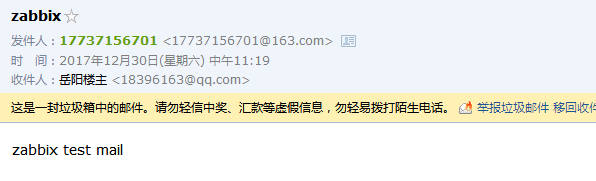
看起来已经成功了,但是发送完邮件还有报错:证书不被信任,且命令行就此卡住,需要按键才能出现命令提示符
Error in certificate: Peer's certificate issuer is not recognized.
[root@PLAY ~]# cd /root/.certs/
[root@PLAY .certs]# ll
total 80
-rw-r--r-- 1 root root 1793 Jul 6 14:36 163.crt
-rw------- 1 root root 65536 Jul 6 14:37 cert8.db
-rw------- 1 root root 16384 Jul 6 14:37 key3.db
-rw------- 1 root root 16384 Jul 6 14:37 secmod.db
[root@PLAY .certs]# certutil -A -n "GeoTrust SSL CA - G3" -t "Pu,Pu,Pu" -d ./ -i 163.crt
Notice: Trust flag u is set automatically if the private key is present.
centos上mailx通过465端口发送邮件的更多相关文章
- mailx使用465端口发邮件
centos上mailx通过465端口发送邮件 最近在看zabbix发送邮件的时候,发现自己的邮件总是无法发送,这里可能是外网防火墙禁止25端口,那么如何绕过25端口呢? 我使用的是163邮箱的 ...
- jumpservice使用465端口发送邮件
阿里云.华为云等云服务器默认屏蔽掉了25端口后,内网服务器如何通过跳板机发送邮件到外网邮箱. 如果是可联网的阿里云机器,可以直接配置mailx使用465端口发送邮件.需要进行ssl验证配置. Cent ...
- 阿里云 Linux 启用465端口发送邮件
阿里云 Linux 启用465端口发送邮件 环境:阿里云 Linux Centos 7.4 x64 注:阿里云默认禁用25邮件端口,需要启动465端口加密进行邮件发送. 注:确保邮箱开启SMTP服务, ...
- Spring Boot 使用465端口发送邮件
2017年10月27日 15:04:24 伊宇紫 阅读数:2710 标签: 465端口邮件springboot 更多 个人分类: Java 版权声明:本文为博主原创文章,未经博主允许不得转载. h ...
- java 465端口发送邮件
package com.fr.function; import java.io.IOException; import java.security.Security; import java.util ...
- CentOS使用465端口发送邮件
1)邮件发送示例 方法1:echo "This is a test mail" | mail -s '邮件测试' 452666750@qq.com 方法2:mail -s '服务运 ...
- Centos 配置mailx使用外部smtp发送邮件
安装mailx yum install mailx 配置mailx 笔者推荐163邮箱,当然,QQ邮箱也是可以的,PS:记得要进邮箱打开SMTP vi /etc/mail.rc //如果不存在,则编辑 ...
- python3使用465端口发送邮件来解决阿里云封闭25端口问题
import smtplibfrom email.mime.text import MIMETextfrom email.utils import formataddr #发件人邮箱账号my_send ...
- 阿里云ECS屏蔽25端口,官方建议使用465 SSL端口发送邮件
阿里云ECS VPC网络,搭建了zabbix,想通过三方邮件系统发送邮件,本机开虚拟机测试发邮件一切正常,到阿里ECS的时候邮件各种发不出去,到处找原因,最后度娘告诉了我真想,原来阿里把25端口屏蔽 ...
随机推荐
- Segmented 标签栏 切换效果
转载:http://www.jcodecraeer.com/a/anzhuokaifa/androidkaifa/2014/0512/1615.html http://www.it165.net/pr ...
- 编写高质量代码–改善python程序的建议(五)
原文发表在我的博客主页,转载请注明出处! 建议二十三:遵循异常处理的几点基本原则 python中常用的异常处理语法是try.except.else.finally,它们可以有多种组合,语法形式如下: ...
- Linux增加swap分区的方法
在装完Linux系统之后,建立Swap分区有两种方法. 1.新建磁盘分区作为swap分区2.用文件作为swap分区 (操作更简单,我更常用) 一.新建磁盘分区作为swap分区 1. # swapoff ...
- SharePoint服务器端对象模型 之 使用LINQ进行数据访问操作(Part 4)
(六)高效合理的使用LINQ 1.DataContext中的两个属性 为了能够使用DataContext进行数据提交,在DataContext进行数据查询和操作的过程中,内部会进行数据状态的保持和追踪 ...
- SharePoint BI
本篇博客主要针对SharePoint BI整体结构进行整理,为读者分析几种Sharepoint BI场景 先附一张自己做的结构图:
- ThinkPHP中通过URL重写隐藏应用的入口文件index.php的相关服务器的配置
[ Apache ] 将httpd.conf配置文件中mod_rewrite.so所在行前面的‘#’去掉 AllowOverride None 将None改为 All 效果图
- android 反汇编一些资料
Android软件安全与逆向分析 http://book.2cto.com/201212/12432.html Smali--Dalvik虚拟机指令语言 http://blog.csdn.net/ ...
- Howto: Performance Benchmarks a Webserver
Howto: Performance Benchmarks a Webserver last updated June 9, 2006 in CategoriesApache, FreeBSD, Ho ...
- mysqld.sock
sudo service mysql start https://dev.mysql.com/doc/refman/5.7/en/problems-with-mysql-sock.html B.5. ...
- unity里无损实现制定物体bloom
虽然标题是实现hdr+bloom,但实际感觉更像是控制单个物体bloom https://blog.csdn.net/zsy654321/article/details/80682651