
grpc-gateway:grpc转换为http协议对外提供服务
我所在公司的项目是采用基于Restful的微服务架构,随着微服务之间的沟通越来越频繁,就希望可以做成用rpc来做内部的通讯,对外依然用Restful。于是就想到了google的grpc。
使用grpc的优点很多,二进制的数据可以加快传输速度,基于http2的多路复用可以减少服务之间的连接次数,和函数一样的调用方式也有效的提升了开发效率。
不过使用grpc也会面临一个问题,我们的微服务对外一定是要提供Restful接口的,如果内部调用使用grpc,在某些情况下要同时提供一个功能的两套API接口,这样就不仅降低了开发效率,也增加了调试的复杂度。于是就想着有没有一个转换机制,让Restful和gprc可以相互转化。
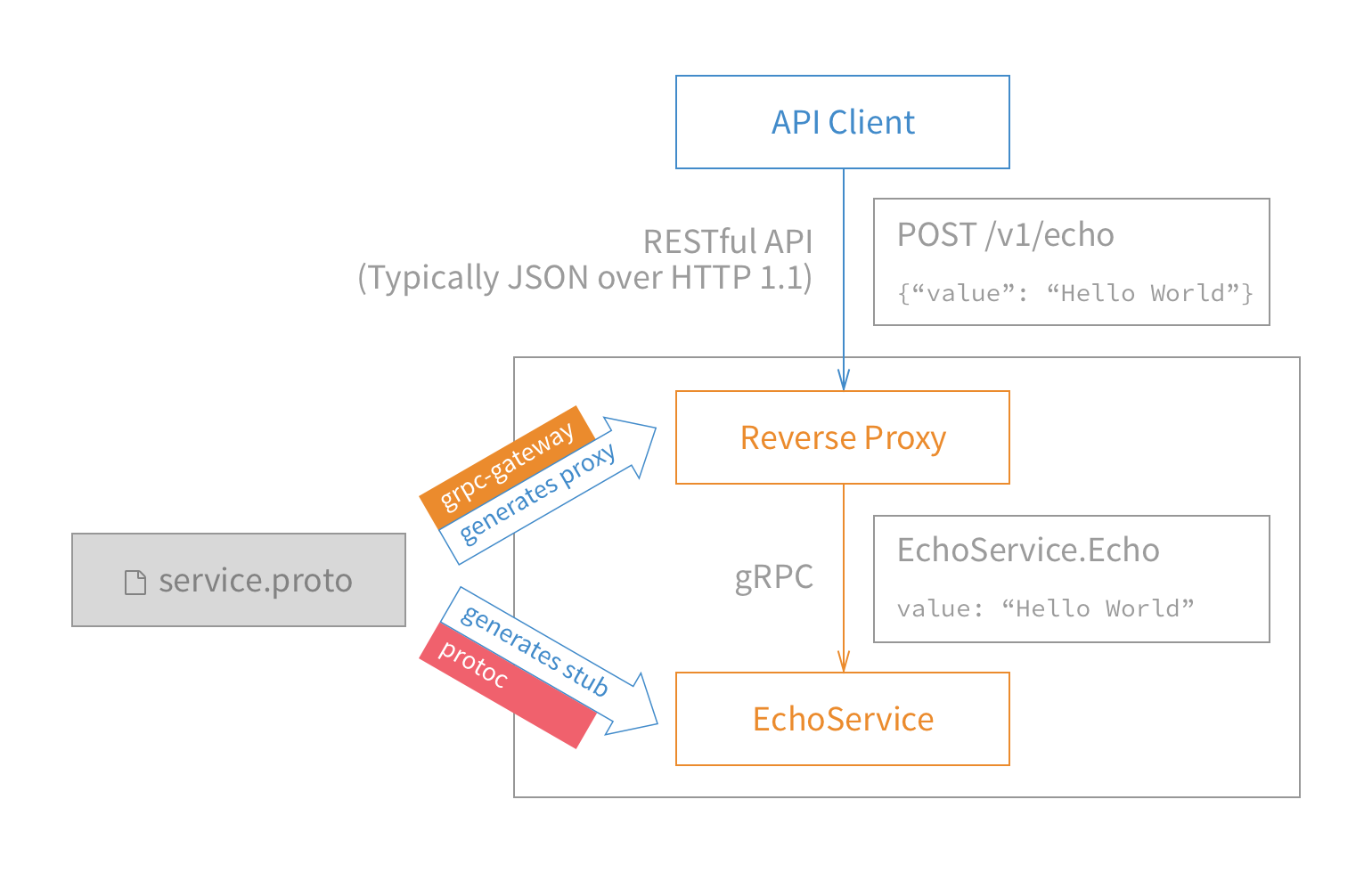
在网上看到一个解决方案,https://github.com/grpc-ecosystem/grpc-gateway,简单的说就是有一个网关服务器负责转化和代理转发。
如下图:
安装
首先要安装ProtocolBuffers 3.0及以上版本。
mkdir tmp

cd tmp

git clone https://github.com/google/protobuf

cd protobuf

./autogen.sh

./configure

make

make check

sudo make install
然后使用go get获取grpc-gateway。
go get -u github.com/grpc-ecosystem/grpc-gateway/protoc-gen-grpc-gateway

go get -u github.com/grpc-ecosystem/grpc-gateway/protoc-gen-swagger

go get -u github.com/golang/protobuf/protoc-gen-go
这里最好把编译生成的二进制文件的目录放在$PATH中,可以把$GOPATH/bin放入$PATH中。
示例
本示例是基于我的上一篇博客《google的grpc在glang中的使用》中的示例,如果有必要请先了解上一篇博客。
示例代码获取地址:https://github.com/andyidea/go-example。
代码文件结构如下
└── src

    └── grpc-helloworld-gateway

        ├── gateway

        │   └── main.go

        ├── greeter_server

        │   └── main.go

        └── helloworld

            ├── helloworld.pb.go

            ├── helloworld.pb.gw.go

            └── helloworld.proto
我们还是先看一下协议文件。helloworld.proto有一些变动,引入了google官方的api相关的扩展,为grpc的http转换提供了支持。
具体改动如下:
syntax = "proto3";

option java_multiple_files = true;

option java_package = "io.grpc.examples.helloworld";

option java_outer_classname = "HelloWorldProto";

package helloworld;

import "google/api/annotations.proto";

// The greeting service definition.

service Greeter {

  // Sends a greeting

  rpc SayHello (HelloRequest) returns (HelloReply) {

        option (google.api.http) = {

        post: "/v1/example/echo"

        body: "*"

    };

  }

}

// The request message containing the user's name.

message HelloRequest {

  string name = 1;

}

// The response message containing the greetings

message HelloReply {

  string message = 1;

}
和之前的proto文件比较,新的文件增了
import "google/api/annotations.proto";
和
option (google.api.http) = {

        post: "/v1/example/echo"

        body: "*"
这里增加了对http的扩展配置。
然后编译proto文件,生成对应的go文件
cd src/grpc-helloworld-gateway

protoc -I/usr/local/include -I. \

-I$GOPATH/src \

-I$GOPATH/src/github.com/grpc-ecosystem/grpc-gateway/third_party/googleapis \

--go_out=Mgoogle/api/annotations.proto=github.com/grpc-ecosystem/grpc-gateway/third_party/googleapis/google/api,plugins=grpc:. \

helloworld/helloworld.proto
这里生成了helloworld/helloworld.pb.go文件。
helloworld.pb.go是server服务需要的,下一步我们需要使用protoc生成gateway需要的go文件。
cd src/grpc-helloworld-gateway

protoc -I/usr/local/include -I. \

-I$GOPATH/src  -I$GOPATH/src/github.com/grpc-ecosystem/grpc-gateway/third_party/googleapis \

--swagger_out=logtostderr=true:. \

helloworld/helloworld.proto
这里生成了helloworld/helloworld.pb.gw.go文件。这个文件就是gateway用来的协议文件,用来做grpc和http的协议转换。
协议文件处理完毕,就需要写gateway代码了。
gateway代码如下:
package main

import (

	"flag"

	"net/http"

	"github.com/golang/glog"

	"github.com/grpc-ecosystem/grpc-gateway/runtime"

	"golang.org/x/net/context"

	"google.golang.org/grpc"

	gw "grpc-helloworld-gateway/helloworld"

)

var (

	echoEndpoint = flag.String("echo_endpoint", "localhost:50051", "endpoint of YourService")

)

func run() error {

	ctx := context.Background()

	ctx, cancel := context.WithCancel(ctx)

	defer cancel()

	mux := runtime.NewServeMux()

	opts := []grpc.DialOption{grpc.WithInsecure()}

	err := gw.RegisterGreeterHandlerFromEndpoint(ctx, mux, *echoEndpoint, opts)

	if err != nil {

		return err

	}

	return http.ListenAndServe(":8080", mux)

}

func main() {

	flag.Parse()

	defer glog.Flush()

	if err := run(); err != nil {

		glog.Fatal(err)

	}

}
首先echoEndpoint存储了需要连接的server信息,然后将这些信息和新建的server用gw.go中的RegisterGreeterHandlerFromEndpoint进行一个注册和绑定,这时低层就会连接echoEndpoint提供的远程server地址,这样gateway就作为客户端和远程server建立了连接,之后用http启动新建的server,gateway就作为服务器端对外提供http的服务了。
代码到此就完成了,我们测试一下。
先启动greeter_server服务,再启动gateway,这时gatway连接上greeter_server后,对外建立http的监听。
然后我们用curl发送http请求
curl -X POST -k http://localhost:8080/v1/example/echo -d '{"name": " world"}'

{"message":"Hello  world"}
流程如下:curl用post向gateway发送请求,gateway作为proxy将请求转化一下通过grpc转发给greeter_server,greeter_server通过grpc返回结果,gateway收到结果后,转化成json返回给前端。
这样,就通过grpc-gateway完成了从http json到内部grpc的转化过程。
grpc-gateway:grpc转换为http协议对外提供服务的更多相关文章
- grpc gateway 使用以及docker compose 集成
1. grpc gateway 安装 参考,比较简单,有需要的依赖可以参考相资料 mkdir tmp cd tmp git clone https://github.com/google/protob ...
- gRPC+gRPC Gateway+swagger小记
前言 本文记录了grpc-gateway的简单使用. 定义proto 先来看看最常规的 syntax = "proto3"; package protos; service Gre ...
- Go gRPC进阶-gRPC转换HTTP(十)
前言 我们通常把RPC用作内部通信,而使用Restful Api进行外部通信.为了避免写两套应用,我们使用grpc-gateway把gRPC转成HTTP.服务接收到HTTP请求后,grpc-gatew ...
- 带入gRPC:gRPC Streaming, Client and Server
带入gRPC:gRPC Streaming, Client and Server 原文地址:带入gRPC:gRPC Streaming, Client and Server 前言 本章节将介绍 gRP ...
- 带入gRPC:gRPC Deadlines
带入gRPC:gRPC Deadlines 原文地址:带入gRPC:gRPC Deadlines项目地址:https://github.com/EDDYCJY/go... 前言 在前面的章节中,已经介 ...
- gRPC Motivation and Design Principles | gRPC https://grpc.io/blog/principles/
gRPC Motivation and Design Principles | gRPC https://grpc.io/blog/principles/
- gRPC官方文档(通讯协议)
文章来自gRPC 官方文档中文版 HTTP2 协议上的 gRPC 本文档作为 gRPC 在 HTTP2 草案17框架上的实现的详细描述,假设你已经熟悉 HTTP2 的规范.产品规则采用的是ABNF 语 ...
- grpc(二)记一次grpc debug--io.grpc.StatusRuntimeException: UNKNOWN
1.起初是dingding一直报错: instance:服务器名 err:GrpcClient#placeOrder: io.grpc.StatusRuntimeException: UNKNOWN ...
- grpc:gRPC Concepts
本文介绍一些主要的gRPC概念. 服务定义 gRPC支持4种方法: 1.Unary RPCs where the client sends a single request to the server ...
随机推荐
- 乱码之UTF-8 &GBK
在提交JSP时对于乱码问题,首先我们要搞清楚为什么会出现乱码? 看JSP的头文件:<%@ page contentType="text/html;charset=UTF-8" ...
- 全选练习-原生版和jQuery
今天来做一些练习,做全选练习 原生版的实现: <!DOCTYPE html> <html> <head> <meta charset="UTF-8& ...
- k米案例分析
K米产品分析 第一部分 调研.评测 评测 上手体验 大一暑假的时候,在ktv和同学唱k的时候就接触过了. - -.所以对于k米的第一次上手体验已经不记得了(ps:尴尬)!~其实以前用它的时候想法很简单 ...
- 蜗牛慢慢爬 LeetCode 10. Regular Expression Matching [Difficulty: Hard]
题目 Implement regular expression matching with support for '.' and '*'. '.' Matches any single charac ...
- Beta阶段 敏捷冲刺day1
一.提供当天站立式会议照片一张: 二. 每个人的工作 (有work item 的ID) (1) 昨天已完成的工作: (2) 今天计划完成的工作: 今天大家一起讨论了一下之后几天的任务,以及如何对网页进 ...
- beta发布的评论
1. 组名:飞天小女警 项目名:礼物挑选小工具 评价:对于我们学生来说,选礼物小工具相对来说新颖,小组添加了前十名热门礼物的推荐.发布到服务器上了,未来也有很多选择的空间可以做成礼物挑选手机app,也 ...
- Python入门:参数传递方式
这是关于Python的第5篇文章,主要介绍下参数传递方式和如何设计自己的函数. (一) 本篇主要介绍2种参数传递方式. 位置参数 调用函数时,根据函数定义的参数位置来传递参数. def right_t ...
- jQ返回定位插件
一.jQuery 提供开发者开发插件的几种模式 1.$.extend(); //这个方法是绑定在$上面的.可以通过$直接调用 2.$.fn.方法名 //这个方法是绑定在Dom对象上面的 ...
- CentOS下Neo4j安装教程
本文记录一下在CentOS 6.7上,安装neo4j图数据库,本文安装的版本为neo4j-community-2.3.9-unix.tar.gz. 下载Neo4j安装包 使用wget命令获取Neo4j ...
- 增加kms计数
@echo offset skms=10.15.68.62for %%i in (. . . . . . . . . . . . . . . . . . . . . . . . . .) do cal ...