
Angular待办事项应用4——模拟web服务
内存服务器
angular提供了一个快速建立测试用的web服务方法,内存服务器(in-memory),让我们不用等待后端开发的进度
安装npm包
npm install --save angular-in-memory-web-api
构建数据模型
在todo文件夹创建文件todo-data.ts
import { InMemoryDbService } from "angular-in-memory-web-api";

import { Todo } from "./todo.model";

export class InMemoryTodoDbService implements InMemoryDbService{

    createDb(){

        let todos:Todo[]=[

            {id:'c24743b1-942e-0527-4810-fa1175b92d90',desc:'hello world',completed:false},

            {id:'c24743b1-942e-0527-4810-fa1175b92d91',desc:'hello',completed:false},

            {id:'c24743b1-942e-0527-4810-fa1175b92d92',desc:'hello',completed:false},

            {id:'c24743b1-942e-0527-4810-fa1175b92d93',desc:' world',completed:false},

            {id:'c24743b1-942e-0527-4810-fa1175b92d94',desc:' world',completed:false},

            {id:'c24743b1-942e-0527-4810-fa1175b92d95',desc:'hello world',completed:false},

            {id:'c24743b1-942e-0527-4810-fa1175b92d96',desc:'hello world',completed:false},

        ];

        return {todos};

    }

}

我们创建了一个InMemoryDbService的内存数据库
内存web服务
首先在app.module.ts加入类引用
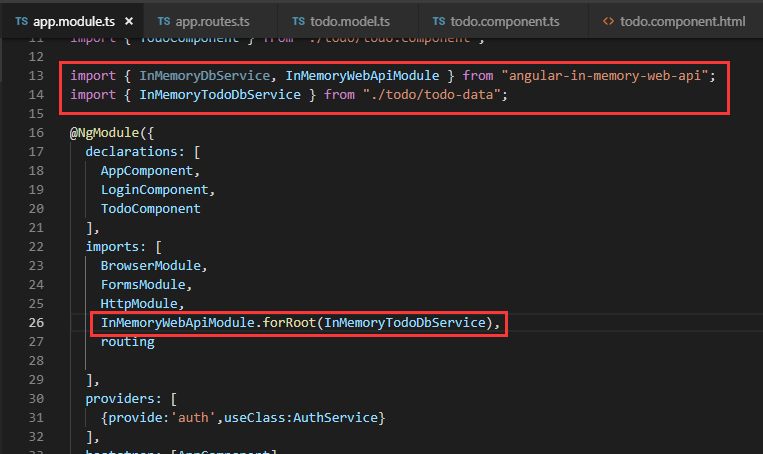
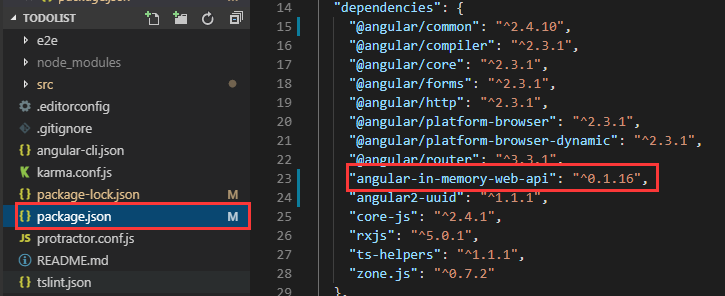
之前这里的angular-in-memory-web-api总是报错@angular/common/http找不到,原来是我的版本太高了(难道是不兼容,天啊
),解决的办法就是使用低版本的,找到package.json并修改依赖,然后在命令行使用:npm install,进行安装
调用“假的web服务”
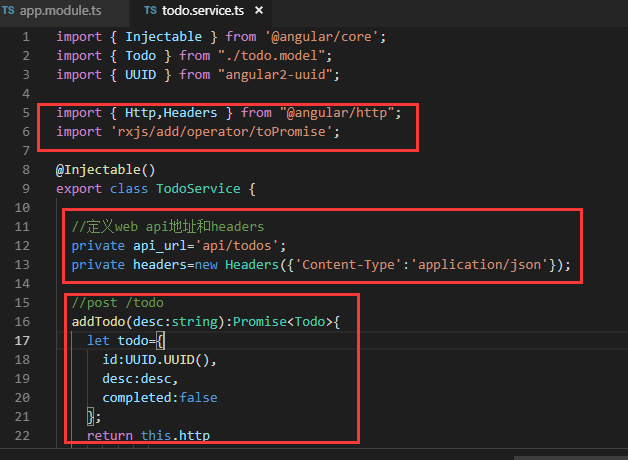
修改todo.service.ts
import { Injectable } from '@angular/core';

import { Todo } from "./todo.model";

import { UUID } from "angular2-uuid";

import { Http,Headers } from "@angular/http";

import 'rxjs/add/operator/toPromise';

@Injectable()

export class TodoService {

  //定义web api地址和headers

  private api_url='api/todos';

  private headers=new Headers({'Content-Type':'application/json'});

  //post /todo

  addTodo(desc:string):Promise<Todo>{

    let todo={

      id:UUID.UUID(),

      desc:desc,

      completed:false

    };

    return this.http

              .post(this.api_url,JSON.stringify(todo),{headers:this.headers})

              .toPromise()

              .then(res=>res.json().data as Todo)

              .catch(this.handleError);

  }

  //error处理

  private handleError(error:any):Promise<any>{

    console.log('an error occurred:',error);

    return Promise.reject(error.message||error);

  }

  todos:Todo[]=[];

  constructor(private http:Http) { }

}
其实最重要的是“颜值,也就是样式”
.todoapp {

    background: #fff;

    margin: 130px 0 40px 0;

    position: relative;

    box-shadow: 0 2px 4px 0 rgba(0, 0, 0, 0.2),

                0 25px 50px 0 rgba(0, 0, 0, 0.1);

}

.todoapp input::-webkit-input-placeholder {

    font-style: italic;

    font-weight: 300;

    color: #e6e6e6;

}

.todoapp input::-moz-placeholder {

    font-style: italic;

    font-weight: 300;

    color: #e6e6e6;

}

.todoapp input::input-placeholder {

    font-style: italic;

    font-weight: 300;

    color: #e6e6e6;

}

.todoapp h1 {

    position: absolute;

    top: -155px;

    width: 100%;

    font-size: 100px;

    font-weight: 100;

    text-align: center;

    color: rgba(175, 47, 47, 0.15);

    -webkit-text-rendering: optimizeLegibility;

    -moz-text-rendering: optimizeLegibility;

    text-rendering: optimizeLegibility;

}

.new-todo,

.edit {

    position: relative;

    margin: 0;

    width: 100%;

    font-size: 24px;

    font-family: inherit;

    font-weight: inherit;

    line-height: 1.4em;

    border: 0;

    color: inherit;

    padding: 6px;

    border: 1px solid #999;

    box-shadow: inset 0 -1px 5px 0 rgba(0, 0, 0, 0.2);

    box-sizing: border-box;

    -webkit-font-smoothing: antialiased;

    -moz-osx-font-smoothing: grayscale;

}

.new-todo {

    padding: 16px 16px 16px 60px;

    border: none;

    background: rgba(0, 0, 0, 0.003);

    box-shadow: inset 0 -2px 1px rgba(0,0,0,0.03);

}

.main {

    position: relative;

    z-index: 2;

    border-top: 1px solid #e6e6e6;

}

label[for='toggle-all'] {

    display: none;

}

.toggle-all {

    position: absolute;

    top: -55px;

    left: -12px;

    width: 60px;

    height: 34px;

    text-align: center;

    border: none; /* Mobile Safari */

}

.toggle-all:before {

    content: '❯';

    font-size: 22px;

    color: #e6e6e6;

    padding: 10px 27px 10px 27px;

}

.toggle-all:checked:before {

    color: #737373;

}

.todo-list {

    margin: 0;

    padding: 0;

    list-style: none;

}

.todo-list li {

    position: relative;

    font-size: 24px;

    border-bottom: 1px solid #ededed;

}

.todo-list li:last-child {

    border-bottom: none;

}

.todo-list li.editing {

    border-bottom: none;

    padding: 0;

}

.todo-list li.editing .edit {

    display: block;

    width: 506px;

    padding: 12px 16px;

    margin: 0 0 0 43px;

}

.todo-list li.editing .view {

    display: none;

}

.todo-list li .toggle {

    text-align: center;

    width: 40px;

    /* auto, since non-WebKit browsers doesn't support input styling */

    height: auto;

    position: absolute;

    top: 0;

    bottom: 0;

    margin: auto 0;

    border: none; /* Mobile Safari */

    -webkit-appearance: none;

    appearance: none;

}

.todo-list li .toggle:after {

    content: url('data:image/svg+xml;utf8,<svg xmlns="http://www.w3.org/2000/svg" width="40" height="40" viewBox="-10 -18 100 135"><circle cx="50" cy="50" r="50" fill="none" stroke="#ededed" stroke-width="3"/></svg>');

}

.todo-list li .toggle:checked:after {

    content: url('data:image/svg+xml;utf8,<svg xmlns="http://www.w3.org/2000/svg" width="40" height="40" viewBox="-10 -18 100 135"><circle cx="50" cy="50" r="50" fill="none" stroke="#bddad5" stroke-width="3"/><path fill="#5dc2af" d="M72 25L42 71 27 56l-4 4 20 20 34-52z"/></svg>');

}

.todo-list li label {

    word-break: break-all;

    padding: 15px 60px 15px 15px;

    margin-left: 45px;

    display: block;

    line-height: 1.2;

    transition: color 0.4s;

}

.todo-list li.completed label {

    color: #d9d9d9;

    text-decoration: line-through;

}

.todo-list li .destroy {

    display: none;

    position: absolute;

    top: 0;

    right: 10px;

    bottom: 0;

    width: 40px;

    height: 40px;

    margin: auto 0;

    font-size: 30px;

    color: #cc9a9a;

    margin-bottom: 11px;

    transition: color 0.2s ease-out;

}

.todo-list li .destroy:hover {

    color: #af5b5e;

}

.todo-list li .destroy:after {

    content: '×';

}

.todo-list li:hover .destroy {

    display: block;

}

.todo-list li .edit {

    display: none;

}

.todo-list li.editing:last-child {

    margin-bottom: -1px;

}

.footer {

    color: #777;

    padding: 10px 15px;

    height: 20px;

    text-align: center;

    border-top: 1px solid #e6e6e6;

}

.footer:before {

    content: '';

    position: absolute;

    right: 0;

    bottom: 0;

    left: 0;

    height: 50px;

    overflow: hidden;

    box-shadow: 0 1px 1px rgba(0, 0, 0, 0.2),

                0 8px 0 -3px #f6f6f6,

                0 9px 1px -3px rgba(0, 0, 0, 0.2),

                0 16px 0 -6px #f6f6f6,

                0 17px 2px -6px rgba(0, 0, 0, 0.2);

}

.todo-count {

    float: left;

    text-align: left;

}

.todo-count strong {

    font-weight: 300;

}

.filters {

    margin: 0;

    padding: 0;

    list-style: none;

    position: absolute;

    right: 0;

    left: 0;

}

.filters li {

    display: inline;

}

.filters li a {

    color: inherit;

    margin: 3px;

    padding: 3px 7px;

    text-decoration: none;

    border: 1px solid transparent;

    border-radius: 3px;

}

.filters li a:hover {

    border-color: rgba(175, 47, 47, 0.1);

}

.filters li a.selected {

    border-color: rgba(175, 47, 47, 0.2);

}

.clear-completed,

html .clear-completed:active {

    float: right;

    position: relative;

    line-height: 20px;

    text-decoration: none;

    cursor: pointer;

}

.clear-completed:hover {

    text-decoration: underline;

}

/*

    Hack to remove background from Mobile Safari.

    Can't use it globally since it destroys checkboxes in Firefox

*/

@media screen and (-webkit-min-device-pixel-ratio:0) {

    .toggle-all,

    .todo-list li .toggle {

        background: none;

    }

    .todo-list li .toggle {

        height: 40px;

    }

    .toggle-all {

        -webkit-transform: rotate(90deg);

        transform: rotate(90deg);

        -webkit-appearance: none;

        appearance: none;

    }

}

@media (max-width: 430px) {

    .footer {

        height: 50px;

    }

    .filters {

        bottom: 10px;

    }

}
效果:
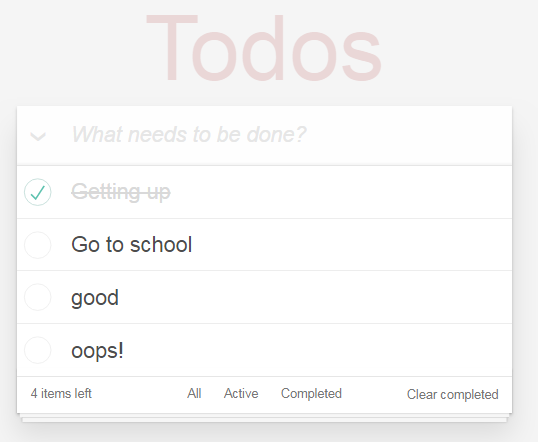
加了样式和不加样式,简直就是天壤之别!!!
Angular待办事项应用4——模拟web服务的更多相关文章
- 利用 Apache Synapse 模拟 Web 服务
Apache Synapse 是一个简单.轻量级的高性能企业服务总线 (ESB),它是在 Apache Software Foundation 的 Apache License Version 2.0 ...
- Angular待办事项应用2
todo组件 接上一篇,在根目录创建todo组件 命令行输入:ng g c todo 得到 文件结构 修改默认路由为todo: 然后打开浏览器:http://localhost:4200/ ,查看,t ...
- Angular待办事项应用3
隔离业务逻辑 接着上一节,业务逻辑应该复古牛仔单独的service中,我们在todo文件夹中建立TodoService ng g s todo/todo 引入UUID包 todo中id要唯一,一个是采 ...
- 超级好用的前端开发测试Chrome插件-基于REST的Web服务客户端
基于REST的Web服务客户端是一款功能强大的谷歌浏览器插件,使用基于REST的Web服务客户端(模拟REST客户端)可以让用户使用谷歌浏览器模拟REST请求来测试REST风格. 基于REST的Web ...
- Linux实战教学笔记38:企业级Nginx Web服务优化实战(下)
四,Nginx站点目录及文件URL访问控制 4.1 根据扩展名限制程序和文件访问 Web2.0时代,绝大多数网站都是以用户为中心多的,例如:bbs,blog,sns产品,这几个产品都有一个共同特点,就 ...
- 玩转单元测试之WireMock -- Web服务模拟器
玩转单元测试之WireMock -- Web服务模拟器 WireMock 是一个灵活的库用于 Web 服务测试,和其他测试工具不同的是,WireMock 创建一个实际的 HTTP服务器来运行你的 We ...
- 记一次Web服务的性能调优
前言 一个项目在经历开发.测试.上线后,当时的用户规模还比较小,所以刚刚上线的项目一般会表现稳定.但是随着时间的推移,用户数量的增加,qps的增加等因素会造成项目慢慢表现出网页半天无响应的状况.在之前 ...
- [转]C# WinForm动态调用远程Web服务
本文转自:http://blog.csdn.net/muyangjun/article/details/7930871 1.添加服务引用 2.在弹出的添加服务引用对话框地址栏中输入WebService ...
- 从开发的角度比较 ASP.NET Web 服务与 WCF
Windows Communication Foundation (WCF) 具有一个 ASP.NET 兼容模式选项,用户使用此选项可以对 WCF 应用程序进行编程和配置,使其像 ASP.NET We ...
随机推荐
- FFmpeg命令详解
命令格式 功能 FFmpeg命令是在ffmpeg.exe可执行文件环境下执行,ffmpeg.exe用于音视频的转码,加水印,去水印,视频剪切,提取音频,提取视频,码率控制等等功能. 最简单的命令 ff ...
- 附加属性来控制控件中,要扩展模块的visibility
可解决: 文本框控件中的按钮,DataGridColumnHeader中加入Filter控件... cs文件中的 附加属性 + 样式文件中的 template+控件 -> visibility ...
- 数据库如何从SQL server转换到SQLite
我之前用的是SQL server数据库,但是客户那里觉得安装这个大的数据库比较卡,说是导致蓝屏了,硬往SQL server上赖,没有办法客户是上帝么,给他换个小点的数据库吧!考虑Access,不行这个 ...
- error while loading shared libraries: libudev.so.0 的问题
在linux下运行koala的时候遇到了问题: 应该是缺少文件libudev.so.0 在/lib和/lib64目录下也都没有这个文件.然后网上找解决方案,在/lib/x86_64-linux-gnu ...
- CSS2.1SPEC:视觉格式化模型之width属性详解(上)
在介绍了包含块之后,CSS2.1标准中介绍了width属性和height属性,这两个属性在我们的页面布局中也发挥着重要的作用.在盒模型中,width和height包围了一个框的内容区域(content ...
- Kotlin 基本语法
常量 val a: Int = 5 变量 var a: Int = 5 Any:匹配任何类型 ?:nullable,比如 a?.toString,如果 a 为 null 不会出错. 函数基本结构 fu ...
- openstack 虚机迁移 Unacceptable CPU info: CPU doesn't have compatibility
问题: Unacceptable CPU info: CPU doesn't have compatibility 解决: vim /usr/lib/python2.7/site-packages/n ...
- BS4爬取物价局房产备案价以及dataframe的操作来获取房价的信息分析
因为最近要买房子,然后对房市做了一些调研,发现套路极多.卖房子的顾问目前基本都是一派胡言能忽悠就忽悠,所以基本他们的话是不能信的.一个楼盘一次开盘基本上都是200-300套房子,数据量虽然不大,但是其 ...
- 分布式ehcache缓存
今天在这里了记录一下学习ehcache分布式集群的过程. ehcache的三种最为常用集群方式,分别是 RMI.JGroups 以及 EhCache Server . 这里主要讲一下rmi方式. 1. ...
- SpringBoot入门之事件监听
spring boot在启动过程中增加事件监听机制,为用户功能拓展提供极大的便利,sptingboot支持的事件类型有以下五种: ApplicationStartingEvent Applicatio ...