
info.plist
更新了Xcode8 以及 iOS10,App访问用户的相机、相册、麦克风、通讯录的权限都需要重新进行相关的配置,不然在Xcode8中打开编译的话会直接crash。
需要在info.plist中添加App需要的一些设备权限。
相机NSCameraUsageDescription

相册NSPhotoLibraryUsageDescription

通讯录NSContactsUsageDescription

始终访问位置NSLocationAlwaysUsageDescription

位置NSLocationUsageDescription

在使用期间访问位置NSLocationWhenInUseUsageDescription

麦克风NSMicrophoneUsageDescription

访问蓝牙NSBluetoothPeripheralUsageDescription

访问日历NSCalendarsUsageDescription

访问媒体资料库NSAppleMusicUsageDescription

访问健康分享NSHealthShareUsageDescription

访问健康更新NSHealthUpdateUsageDescription

访问运动与健身NSMotionUsageDescription

访问提醒事项NSRemindersUsageDescription
提别提醒: 从2017年1月1日起,强制使用https,所有新提交的 app 默认不允许使用NSAllowsArbitraryLoads来绕过ATS的限制 安全传输不再支持SSLv3, 建议尽快停用SHA1和3DES算法.
下面贴出来错误:
Q1: iOS10相册相机闪退问题:
iOS10系统下调用系统相册、相机功能,遇到闪退的情况,日志描述如下:
This app has crashed because it attempted to access privacy-sensitive data without a usage description.The app's Info.plist must contain an NSPhotoLibraryUsageDescription key with a string value explaining to the user how the app uses this data.
解决方法:在info.plist文件下添加
相机权限
<key>NSCameraUsageDescription<key>

<string>cameraDesciption<string>
相册权限
<key>NSPhotoLibraryUsageDescription<key>

<string>photoLibraryDesciption<string>
Q2: iOS 10 因苹果健康导致闪退
如果在app中调用了苹果健康,iOS10中会出现闪退。控制台报出的原因是:Terminating app due to uncaught exception 'NSInvalidArgumentException', reason: 'NSHealthUpdateUsageDescription must be set in the app's Info.plist in order to request write authorization.'
这是因为我们要在info.plist文件中声明苹果健康的使用权限,所以在info.plist中添加以下key就可以:
请求写入
<key>NSHealthUpdateUsageDescription<key>

<string>some string value stating the reason<string>
请求读取
<key>NSHealthShareUsageDescription<key>

<string>some string value stating the reasonPaste_Image.png<string>
Q3: Xcode 打印的那些杂乱无章的bug
更新Xcode8之后,新建立工程,都会打印一堆莫名其妙看不懂的Log.比如如这些
subsystem: com.apple.UIKit, category: HIDEventFiltered, enable_level:0, persist_level:0, default_ttl:0, info_ttl:0, debug_ttl:0, generate_symptoms:0, enable_oversize:1,
屏蔽的方法如下:
Xcode8里边 Edit Scheme->Run-> Arguments, 在Environment Variables里边添加
OS_ACTIVITY_MODE = Disable 就行,截图如下:(真的没有iPhone4了)
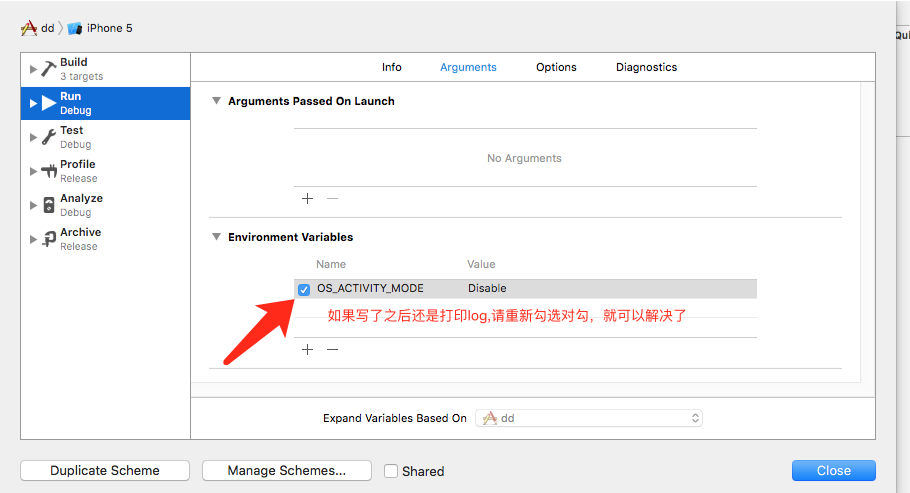
弄完之后就可以像之前那样 正常打印了.
info.plist的更多相关文章
- plist文件、NSUserDefault 对文件进行存储的类、json格式解析
========================== 文件操作 ========================== Δ一 .plist文件 .plist文件是一个属性字典数组的一个文件: .plis ...
- Your app declares support for audio in the UIBackgroundModes key in your Info.plist 错误
提交AppStore时候被拒绝 拒绝原因:Your app declares support for audio in the UIBackgroundModes key in your Info.p ...
- ios开发之Info.plist文件相关配置
前言:在iOS开发中有些情况下需要对Info.plist文件进行配置,以下介绍几种相关配置.以后遇到需要配置的再更新... 开发环境:swift3.0.1,Xcode8.1 一,项目中需要使用第三方字 ...
- Excel文件转plist文件出现的文件编码问题
今天在测试时遇到了需要将大量整理好的Excel数据转换为plist文件的情况.百度了一下教程,发现虽然别人也遇到过类似的情况,但是有些讲的还是不够细致.所以做如下整理. 百度到的内容中有使用Mes ...
- 将plist文件读取成为数组
NSString *plistPath = [[NSBundle mainBundle] pathForResource:@"city" ofType:@"plist&q ...
- IOS学习笔记之获取Plist文件读取数据
@property(nonatomic,strong) NSArray *pic; //创建数组属性 @property(nonatomic,assign) int index; //创建索引属性 @ ...
- plist的读取和写入
// 从plist中读取数组数据 let arrPath = Bundle.main.path(forResource: "ArrayPList", ofType: "p ...
- App Transport Security has blocked a cleartext HTTP (http://) resource load since it is insecure. Temporary exceptions can be configured via your app's Info.plist file
ios进行http请求,会出现这个问题: App Transport Security has blocked a cleartext HTTP (http://) resource load sin ...
- iOS plist文件创建
iOS中plist的创建,数据写入与读取功能创建一个test.plist文件,textInput作为输入,displayLabel作为显示,有一个按钮来触发保持程序triggerStorage: -( ...
- 加载plist文件数据的方法
这个pilist文件最外面的是一个数组,数组中每一个item是一个字典,我们的目的就是为了取到每一个item字典中的内容数据 下面看代码举例 //加载数组 - (void)handleData { / ...
随机推荐
- 传智播客PHP面试题宝典开放下载
上下卷面试题更新完毕,一部让菜鸟4k+入职的 面试题宝典 http://php.itcast.cn/news/20130806/11490333788.shtml php视频教程 下载 http:// ...
- poj 1028 Web Navigation(模拟)
题目链接:http://poj.org/problem? id=1028 Description Standard web browsers contain features to move back ...
- java、js中实现无限层级的树形结构(类似递归)
js中: var zNodes=[ {id:0,pId:-1,name:"Aaaa"}, {id:1,pId:0,name:"A"}, {id:11,pId:1 ...
- dom4j怎么获得指定名称的节点信息
<?xml version="1.0" encoding="utf-8" ?> <MgUtil> <db_config> & ...
- Ladda 应用提交表单的时候显示loading载入中 包含不同位置,不同效果
Ladda 应用提交表单的时候显示loading载入中 包含不同位置,不同效果 不同大小.位置,效果,进度条等 演示 XML/HTML Code <article class="exa ...
- Git remotes/origin/pr/* 分支清理
代码在gitHub上托管,每次git pull完后,用git branch -a都可以看到一堆remotes/origin/pr/*分支: 可以通过两种方式去除: 1,修改git的config文件找到 ...
- std::tr1::function
转自:https://www.cnblogs.com/qlee/archive/2011/07/04/2097594.html 在C++的TR1中(Technology Report)中包含一个fun ...
- JSTORM使用笔记
安装部署 zeromq 简单快速的传输层框架,安装如下: wget http://download.zeromq.org/zeromq-2.1.7.tar.gztar zxf zeromq-2.1.7 ...
- Zabbix named 监控
Named 监控 配置 named.conf ,在options 配置节增加如下配置(同时检查/var/named 文件夹权限),然后重启named服务. tatistics-file "/ ...
- JS/JQuery获取当前元素的上一个/下一个兄弟级元素等元素的方法
$(function(){ //遍历获取的input元素对象数组,绑定click事件 var len = $("input[type='file']").length; ; i & ...