
Django_rest_framework_组件(authentication、permission、throttle)
认证组件
说明
from rest_framework.authentication import BaseAuthentication

class TestAuthentication(BaseAuthentication):

    def authenticate(self, request):

        """

        用户认证,如果验证成功后返回元组: (用户,用户Token)

        :param request:

        :return:

                return1:(user,token)表示验证通过并设置用户名和Token;

                return2:AuthenticationFailed异常

                return3:None,表示跳过该验证;

                如果跳过了所有认证,默认用户和Token和使用配置文件进行设置

                self._authenticator = None

                if api_settings.UNAUTHENTICATED_USER:

                    self.user = api_settings.UNAUTHENTICATED_USER() # 默认值为:匿名用户

                else:

                    self.user = None

                if api_settings.UNAUTHENTICATED_TOKEN:

                    self.auth = api_settings.UNAUTHENTICATED_TOKEN()# 默认值为:None

                else:

                    self.auth = None

        """

        ....return ('登录用户', '用户token')

    def authenticate_header(self, request):

        """

        Return a string to be used as the value of the `WWW-Authenticate`

        header in a `401 Unauthenticated` response, or `None` if the

        authentication scheme should return `403 Permission Denied` responses.

        """

        pass
局部认证
在需要认证的视图类里加上authentication_classes = [认证组件1类名,认证组件2类名....]
示例如下:
seralizers.py
|
1
2
3
4
5
6
7
|
from rest_framework import serializersfrom app01 import modelsclass PublishSerializers(serializers.ModelSerializer): class Meta: model = models.Publish fields = '__all__' |
auth.py
|
1
2
3
4
5
6
7
8
9
10
11
12
13
14
15
16
17
|
from rest_framework.authentication import BaseAuthenticationfrom rest_framework import exceptionsfrom app01 import modelsclass TokenAuth(BaseAuthentication): def authenticate(self,request): '''函数名必须叫authenticate''' # 验证条件根据需求设置(此示例为需要有token值) token = request.GET.get('token') token_obj = models.Token.objects.filter(token=token).first() if not token_obj: # 如果验证失败,需要跑出AuthenticationFailed错误 raise exceptions.AuthenticationFailed("验证失败!") else: user = token_obj.user # 如果验证成功,需要返回一个元组,分别是用户以及验证类的实例对象,然后内部会赋值给request.user和request.auth return user.username,token_obj |
from rest_framework.authentication import BaseAuthentication

from rest_framework.exceptions import AuthenticationFailed

from app01 import models

class BlackNameAuth(BaseAuthentication):

    '''黑名单认证'''

    def authenticate(self, request):

        BLACK_NAME_LIST = ['小花', '小翠']

        # 通过从url获取user_id的方式模拟用户登录

        user_id = request.GET.get('uid')

        user = models.UserInfo.objects.filter(pk=user_id).first()

        if not user or user.username in BLACK_NAME_LIST:

            raise AuthenticationFailed('您没有登录或者被关小黑屋啦')

        else:

            return user.username,user_id
auth2
views.py
|
1
2
3
4
5
6
7
8
9
10
|
from rest_framework import viewsetsfrom app01.auth import TokenAuthclass PublishViewSet(viewsets.ModelViewSet): # 在这里配置authentication_classes # 注意,值为一个列表,可以放多个认证组件类名 authentication_classes = [TokenAuth] queryset = models.Publish.objects.all() serializer_class = serializer.PublishSerializers |
全局认证
在setting.py里配置如下:
|
1
2
3
|
REST_FRAMEWORK = { "DEFAULT_AUTHENTICATION_CLASSES": ["app01.auth.TokenAuth",]} |
这样配置之后,每个视图类都要经过认证成功之后才能执行下一步,
如果有某些方法不需要认证,如login函数,则需要在login函数中单独加入一个配置属性:
|
1
|
authentication_classes = [] #自己的类里有的话就调用此类的配置,为空既什么都不做 |
权限组件
说明
class TestPermission(BasePermission):

    message = "权限验证失败"

    def has_permission(self, request, view):

        """

        判断是否有权限访问当前请求

        Return `True` if permission is granted, `False` otherwise.

        :param request:

        :param view:

        :return: True有权限;False无权限

        """

        if request.user == "管理员":

            return True

    # GenericAPIView中get_object时调用

    def has_object_permission(self, request, view, obj):

        """

        视图继承GenericAPIView,并在其中使用get_object时获取对象时,触发单独对象权限验证

        Return `True` if permission is granted, `False` otherwise.

        :param request:

        :param view:

        :param obj:

        :return: True有权限;False无权限

        """

        if request.user == "管理员":

            return True
局部权限
permission.py
|
1
2
3
4
5
6
7
8
9
10
11
12
13
|
from app01 import modelsclass VipPermission(): def has_permission(self,request,view): # 经过认证组件之后将用户名赋值给了request.user # 这里可以直接取到 username = request.user user = models.User.objects.filter(username=username).first() # 如果用户的vip值为1,即为True,则通过认证,否则return False if user.vip: return True else: return False |
views.py
|
1
2
3
4
5
6
7
8
9
|
from rest_framework import viewsetsfrom app01.auth import TokenAuthfrom app01.permission import VipPermissionclass PublishViewSet(viewsets.ModelViewSet): authentication_classes = [TokenAuth] permission_classes = [VipPermission] queryset = models.Publish.objects.all() serializer_class = serializer.PublishSerializers |
这个时候如果登录用户是vip,则会继续执行下一步,如果是普通用户,则会返回错误信息,如下:
|
1
|
{"detail":"You do not have permission to perform this action."} |
如果需要自定义错误信息,只需要在类里定义一个message属性即可,如下:
|
1
|
message="只有超级用户才能访问" |
全局权限
|
1
2
3
4
5
6
|
REST_FRAMEWORK = { # 认证组件 "DEFAULT_AUTHENTICATION_CLASSES": ["app01.auth.TokenAuth",], # 权限组件 "DEFAULT_PERMISSION_CLASSES": ["app01.permission.VipPermission",],} |
throttle(访问频率)组件
局部视图throttle
在app01.service.throttles.py中:
|
1
2
3
4
5
6
7
8
9
10
11
12
13
14
15
16
17
18
19
20
21
22
23
24
25
26
27
28
29
30
31
32
33
34
|
from rest_framework.throttling import BaseThrottleVISIT_RECORD={}class VisitThrottle(BaseThrottle): def __init__(self): self.history=None def allow_request(self,request,view): remote_addr = request.META.get('REMOTE_ADDR') print(remote_addr) import time ctime=time.time() if remote_addr not in VISIT_RECORD: VISIT_RECORD[remote_addr]=[ctime,] return True history=VISIT_RECORD.get(remote_addr) self.history=history while history and history[-1]<ctime-60: history.pop() if len(history)<3: history.insert(0,ctime) return True else: return False def wait(self): import time ctime=time.time() return 60-(ctime-self.history[-1]) |
在views.py中:
|
1
2
3
4
5
6
|
from app01.service.throttles import *class BookViewSet(generics.ListCreateAPIView): throttle_classes = [VisitThrottle,] queryset = Book.objects.all() serializer_class = BookSerializers |
全局视图throttle
|
1
2
3
4
5
|
REST_FRAMEWORK={ "DEFAULT_AUTHENTICATION_CLASSES":["app01.service.auth.Authentication",], "DEFAULT_PERMISSION_CLASSES":["app01.service.permissions.SVIPPermission",], "DEFAULT_THROTTLE_CLASSES":["app01.service.throttles.VisitThrottle",]} |
内置throttle类
在app01.service.throttles.py修改为:
|
1
2
3
4
5
6
|
class VisitThrottle(SimpleRateThrottle): scope="visit_rate" def get_cache_key(self, request, view): return self.get_ident(request) |
settings.py设置:
|
1
2
3
4
5
6
7
8
|
REST_FRAMEWORK={ "DEFAULT_AUTHENTICATION_CLASSES":["app01.service.auth.Authentication",], "DEFAULT_PERMISSION_CLASSES":["app01.service.permissions.SVIPPermission",], "DEFAULT_THROTTLE_CLASSES":["app01.service.throttles.VisitThrottle",], "DEFAULT_THROTTLE_RATES":{ "visit_rate":"5/m", # 1分钟5次,同理,5/s,5/h,5/d,表示秒/时/日 }} |
views.py上可重写throttled方法
#首页支持匿名访问,

#无需要登录就可以访问

class IndexView(APIView):

    authentication_classes = [MyAuthentcate,]   #认证判断他是不是匿名用户

    permission_classes = []   #一般主页就不需要权限验证了

    throttle_classes = [AnonThrottle,UserThrottle,]  #对匿名用户和普通用户的访问限制

    def get(self,request):

        # self.dispatch

        return Response('访问首页')

    def throttled(self, request, wait):

        '''可定制方法设置中文错误'''

        # raise exceptions.Throttled(wait)

        class MyThrottle(exceptions.Throttled):

            default_detail = '请求被限制'

            extra_detail_singular = 'Expected available in {wait} second.'

            extra_detail_plural = 'Expected available in {wait} seconds.'

            default_code = '还需要再等{wait}秒'

        raise MyThrottle(wait)

#需登录就可以访问

class ManageView(APIView):

    authentication_classes = [MyAuthentcate, ]  # 认证判断他是不是匿名用户

    permission_classes = [MyPermission,]  # 一般主页就不需要权限验证了

    throttle_classes = [AnonThrottle, UserThrottle, ]  # 对匿名用户和普通用户的访问限制

    def get(self, request):

        # self.dispatch

        return Response('管理人员访问页面')

    def throttled(self, request, wait):

        '''可定制方法设置中文错误'''

        # raise exceptions.Throttled(wait)

        class MyThrottle(exceptions.Throttled):

            default_detail = '请求被限制'

            extra_detail_singular = 'Expected available in {wait} second.'

            extra_detail_plural = 'Expected available in {wait} seconds.'

            default_code = '还需要再等{wait}秒'

        raise MyThrottle(wait)
如果有某些方法不需要频次,如xxx函数,则需要在xxx函数中单独加入一个配置属性:
|
1
|
throttle_classes = [] |
示例
认证
from django.contrib import admin

from django.urls import path,re_path,include

urlpatterns = [

    re_path("testrestfulframework/",include("testrestfulframework.urls")),

]

#################  testrestfulframework.urls ###############

from django.urls import path,re_path,include

from testrestfulframework import views

urlpatterns = [

    re_path(r"login/$",views.LoginViewSet.as_view()),

    re_path(r"books/$",views.BookViewSet.as_view()),

    re_path(r"books/(?P<pk>\d+)$",views.BookDetailViewSet.as_view()),

]
urls.py
from django.db import models

class Book(models.Model):

    title=models.CharField(max_length=32)

    price=models.IntegerField()

    pub_date=models.DateField()

    publish=models.ForeignKey("Publish",on_delete=models.CASCADE)

    authors=models.ManyToManyField("Author")

    def __str__(self):

        return self.title

class Publish(models.Model):

    name=models.CharField(max_length=32)

    email=models.EmailField()

    def __str__(self):

        return self.name

class Author(models.Model):

    name=models.CharField(max_length=32)

    age=models.IntegerField()

    def __str__(self):

        return self.name

class User(models.Model):

    username = models.CharField(max_length=16)

    password = models.CharField(max_length=64)

class Token(models.Model):

    token = models.CharField(max_length=128)

    user = models.ForeignKey(to=User,on_delete=models.CASCADE)
models.py
# -*- coding:utf-8 -*-

from rest_framework.authentication import BaseAuthentication

from rest_framework import exceptions

from testrestfulframework import models

class TokenAuth(BaseAuthentication):

    def authenticate(self, request):

        '''函数名必须叫authenticate'''

        # 验证条件根据需求设置(此示例为需要有token值)

        token = request.GET.get('token')

        print(request.data)

        print(request.GET)

        token_obj = models.Token.objects.filter(token=token).first()

        if not token_obj:

            # 如果验证失败,需要跑出AuthenticationFailed错误

            raise exceptions.AuthenticationFailed("验证失败!")

        else:

            user = token_obj.user

            # 如果验证成功,需要返回一个元组,分别是用户以及验证类的实例对象,然后内部会赋值给request.user和request.auth

            return user.username, token_obj
service/auth.py
# -*- coding:utf-8 -*-

import hashlib, time

def get_random_str(user):

    ctime = str(time.time())

    md5 = hashlib.md5(bytes(user, encoding="utf8"))

    md5.update(bytes(ctime, encoding="utf8"))

    return md5.hexdigest()
service/random_token.py
# -*- coding:utf-8 -*-

from rest_framework import serializers

from testrestfulframework import models

class BookSerializers(serializers.ModelSerializer):

    # publish = serializers.HyperlinkedIdentityField(

    #     view_name='publish_detail',

    #     lookup_field="publish_id",

    #     lookup_url_kwarg="pk")

    class Meta:

        model = models.Book

        fields = "__all__"

        # depth=1

class PublshSerializers(serializers.ModelSerializer):

    class Meta:

        model = models.Publish

        fields = "__all__"

        # depth = 1

class AuthorSerializers(serializers.ModelSerializer):

    class Meta:

        model = models.Author

        fields = "__all__"

        # depth = 1
serializers.py
<!DOCTYPE html>

<html lang="en">

<head>

    <meta charset="UTF-8">

    <title>Title</title>

</head>

<body>

<form action="/testrestfulframework/login/" method="POST">

    {% csrf_token %}

    <div>用户名:<input type="text" name="username"></div>

    <div>密码:<input type="password" name="password"></div>

    <input type="submit" value="登录">

</form>

</body>

</html>
login.html
认证1 局部认证
from django.shortcuts import HttpResponse

from rest_framework import mixins

from rest_framework import generics

from testrestfulframework import models

from testrestfulframework import serializers

from testrestfulframework.service.auth import TokenAuth

from testrestfulframework.service import random_token

from rest_framework.views import APIView

from django.http import JsonResponse

from django.shortcuts import render

class LoginViewSet(APIView):

    # authentication_classes = [TokenAuth, ]

    def get(self,request):

        return render(request,"login.html")

    def post(self, request, *args, **kwargs):

        res = {"code": 1000, "msg": None}

        try:

            username = request._request.POST.get("username")

            password = request._request.POST.get("password")

            user_obj = models.User.objects.filter(username=username, password=password).first()

            print(username, password, user_obj)

            if not user_obj:

                res["code"] = 1001

                res["msg"] = "用户名或者密码错误"

            else:

                token = random_token.get_random_str(username)

                models.Token.objects.update_or_create(user=user_obj, defaults={"token": token})

                res["token"] = token

        except Exception as e:

            res["code"] = 1002

            res["msg"] = e

        import json

        print(res)

        # return HttpResponse(json.dumps(res))

        return JsonResponse(res, json_dumps_params={"ensure_ascii": False})

class BookViewSet(generics.ListCreateAPIView):

    authentication_classes = [TokenAuth,]

    queryset = models.Book.objects.all()

    serializer_class = serializers.BookSerializers

class BookDetailViewSet(generics.RetrieveUpdateDestroyAPIView):

    queryset = models.Book.objects.all()

    serializer_class = serializers.BookSerializers
views.py
第一步:登录

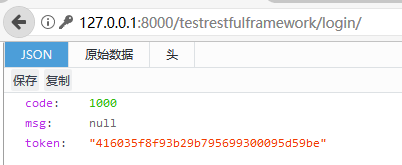
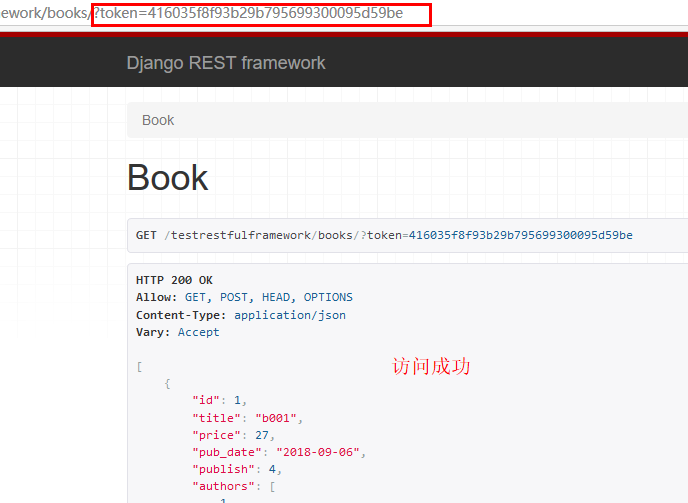
第二步,手动提取token,并以get方式访问目标内容。
注意:这里是手动,实际上完全可以在views.py通过url处理redirect到目标url,此处不做这操作。
不带token
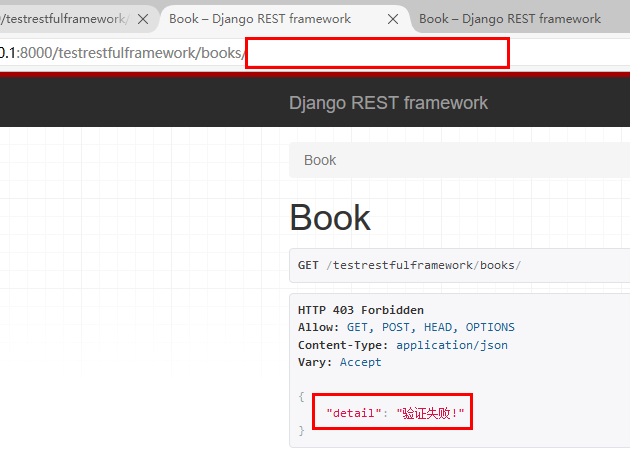
带token
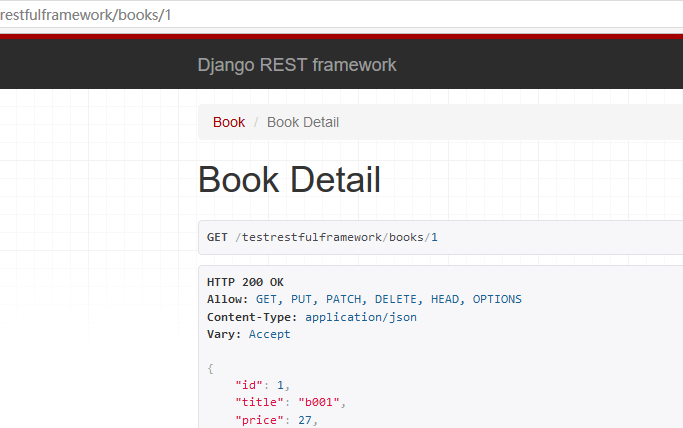
不做验证的url可直接访问
认证2 全局认证
REST_FRAMEWORK = {

    "DEFAULT_AUTHENTICATION_CLASSES": ["testrestfulframework.service.auth.TokenAuth",]

}
settings.py
from django.shortcuts import HttpResponse

from rest_framework import mixins

from rest_framework import generics

from testrestfulframework import models

from testrestfulframework import serializers

from testrestfulframework.service.auth import TokenAuth

from testrestfulframework.service import random_token

from rest_framework.views import APIView

from django.http import JsonResponse

from django.shortcuts import render

class LoginViewSet(APIView):

    # authentication_classes = [TokenAuth, ]

    def get(self,request):

        return render(request,"login.html")

    def post(self, request, *args, **kwargs):

        res = {"code": 1000, "msg": None}

        try:

            username = request._request.POST.get("username")

            password = request._request.POST.get("password")

            user_obj = models.User.objects.filter(username=username, password=password).first()

            print(username, password, user_obj)

            if not user_obj:

                res["code"] = 1001

                res["msg"] = "用户名或者密码错误"

            else:

                token = random_token.get_random_str(username)

                models.Token.objects.update_or_create(user=user_obj, defaults={"token": token})

                res["token"] = token

        except Exception as e:

            res["code"] = 1002

            res["msg"] = e

        import json

        print(res)

        # return HttpResponse(json.dumps(res))

        return JsonResponse(res, json_dumps_params={"ensure_ascii": False})

class BookViewSet(generics.ListCreateAPIView):

    # authentication_classes = [TokenAuth,]

    queryset = models.Book.objects.all()

    serializer_class = serializers.BookSerializers

class BookDetailViewSet(generics.RetrieveUpdateDestroyAPIView):

    authentication_classes = []

    queryset = models.Book.objects.all()

    serializer_class = serializers.BookSerializers
views.py
验证结果同上,略。
权限
url.py、serializers.py、models.py均与上例一致。
from rest_framework.permissions import BasePermission

class SVIPPermission(BasePermission):

    message = '没有访问权限,请充值超级会员'

    def has_permission(self, request,view):

        # auth认证里面找到user对象的type字段值

        role = request.auth.user.role

        if role == 3:

            return True

        else:

            return False

    def has_object_permission(self, request,view,obj):

        # 如果是单个单个条目的detail,需要has_object_permission,此处,obj是该条目

        # 可做进一步处理

        print(obj)  # b001

        print(type(obj))  # <class 'testrestfulframework.models.Book'>

        return True
service/permission.py
权限1 局部权限
from django.shortcuts import HttpResponse

from rest_framework import mixins

from rest_framework import generics

from testrestfulframework import models

from testrestfulframework import serializers

from testrestfulframework.service.auth import TokenAuth

from testrestfulframework.service.permissions import SVIPPermission

from testrestfulframework.service import random_token

from rest_framework.views import APIView

from django.http import JsonResponse

from django.shortcuts import render

class LoginViewSet(APIView):

    # authentication_classes = [TokenAuth, ]

    def get(self,request):

        return render(request,"login.html")

    def post(self, request, *args, **kwargs):

        res = {"code": 1000, "msg": None}

        try:

            username = request._request.POST.get("username")

            password = request._request.POST.get("password")

            user_obj = models.User.objects.filter(username=username, password=password).first()

            print(username, password, user_obj)

            if not user_obj:

                res["code"] = 1001

                res["msg"] = "用户名或者密码错误"

            else:

                token = random_token.get_random_str(username)

                models.Token.objects.update_or_create(user=user_obj, defaults={"token": token})

                res["token"] = token

                res["user"] = user_obj.username

        except Exception as e:

            res["code"] = 1002

            res["msg"] = e

        import json

        # return HttpResponse(json.dumps(res))

        return JsonResponse(res, json_dumps_params={"ensure_ascii": False})

class BookViewSet(generics.ListCreateAPIView):

    authentication_classes = (TokenAuth,)

    permission_classes = (SVIPPermission,)

    queryset = models.Book.objects.all()

    serializer_class = serializers.BookSerializers

class BookDetailViewSet(generics.RetrieveUpdateDestroyAPIView):

    authentication_classes = (TokenAuth,)

    permission_classes = (SVIPPermission,)

    queryset = models.Book.objects.all()

    serializer_class = serializers.BookSerializers
views.py

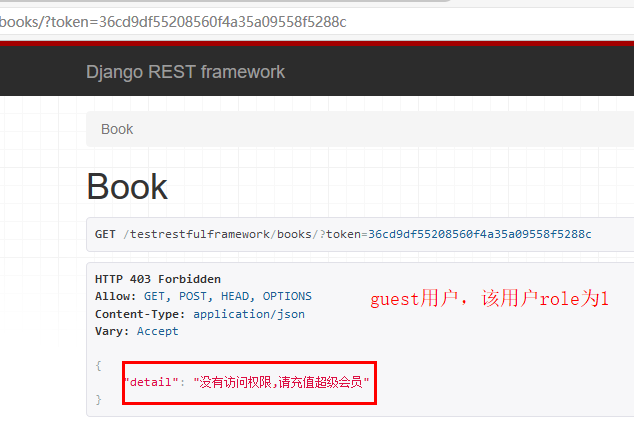
权限2 全局权限
REST_FRAMEWORK = {

    # "DEFAULT_AUTHENTICATION_CLASSES": ("testrestfulframework.service.auth.TokenAuth",),

    'DEFAULT_PERMISSION_CLASSES': ('testrestfulframework.service.permissions.SVIPPermission',)

}
settings.py
from django.shortcuts import HttpResponse

from rest_framework import mixins

from rest_framework import generics

from testrestfulframework import models

from testrestfulframework import serializers

from testrestfulframework.service.auth import TokenAuth

from testrestfulframework.service.permissions import SVIPPermission

from testrestfulframework.service import random_token

from rest_framework.views import APIView

from django.http import JsonResponse

from django.shortcuts import render

class LoginViewSet(APIView):

    # authentication_classes = [TokenAuth, ]

    def get(self,request):

        return render(request,"login.html")

    def post(self, request, *args, **kwargs):

        res = {"code": 1000, "msg": None}

        try:

            username = request._request.POST.get("username")

            password = request._request.POST.get("password")

            user_obj = models.User.objects.filter(username=username, password=password).first()

            print(username, password, user_obj)

            if not user_obj:

                res["code"] = 1001

                res["msg"] = "用户名或者密码错误"

            else:

                token = random_token.get_random_str(username)

                models.Token.objects.update_or_create(user=user_obj, defaults={"token": token})

                res["token"] = token

                res["user"] = user_obj.username

        except Exception as e:

            res["code"] = 1002

            res["msg"] = e

        import json

        # return HttpResponse(json.dumps(res))

        return JsonResponse(res, json_dumps_params={"ensure_ascii": False})

class BookViewSet(generics.ListCreateAPIView):

    authentication_classes = (TokenAuth,)

    # permission_classes = (SVIPPermission,)

    queryset = models.Book.objects.all()

    serializer_class = serializers.BookSerializers

class BookDetailViewSet(generics.RetrieveUpdateDestroyAPIView):

    authentication_classes = (TokenAuth,)

    # permission_classes = (SVIPPermission,)

    queryset = models.Book.objects.all()

    serializer_class = serializers.BookSerializers
views.py
结果同上,略。
频率
频率1 局部频率
# -*- coding:utf-8 -*-

from rest_framework.throttling import BaseThrottle

VISIT_RECORD = {}

class VisitThrottle(BaseThrottle):

    def __init__(self):

        self.history = None

    def allow_request(self, request, view):

        remote_addr = request.META.get('REMOTE_ADDR')

        print(remote_addr)

        import time

        ctime = time.time()

        if remote_addr not in VISIT_RECORD:

            VISIT_RECORD[remote_addr] = [ctime, ]  # 这里只针对源ip做限制,还可以通过源ip和目标url进行限制,根据自己的设计进行限制。

            return True

        history = VISIT_RECORD.get(remote_addr)

        self.history = history

        while history and history[-1] < ctime - 60:  # 一分钟以上的访问,可以从history去除,为history腾出空间

            history.pop()

        if len(history) < 3:  # history空间为3,

            history.insert(0, ctime)

            return True

        else:

            return False

    def wait(self):

        """

        会返回一个这样的信息:{"detail":"Request was throttled. Expected available in xxx(这里是60的倒计时) seconds."}

        """

        import time

        ctime = time.time()

        return 60 - (ctime - self.history[-1])
service/throttle.py
from django.shortcuts import HttpResponse

from rest_framework import mixins

from rest_framework import generics

from testrestfulframework import models

from testrestfulframework import serializers

from testrestfulframework.service.auth import TokenAuth

from testrestfulframework.service.permissions import SVIPPermission

from testrestfulframework.service.throttle import VisitThrottle

from testrestfulframework.service import random_token

from rest_framework.views import APIView

from django.http import JsonResponse

from django.shortcuts import render

class LoginViewSet(APIView):

    # authentication_classes = [TokenAuth, ]

    def get(self,request):

        return render(request,"login.html")

    def post(self, request, *args, **kwargs):

        res = {"code": 1000, "msg": None}

        try:

            username = request._request.POST.get("username")

            password = request._request.POST.get("password")

            user_obj = models.User.objects.filter(username=username, password=password).first()

            print(username, password, user_obj)

            if not user_obj:

                res["code"] = 1001

                res["msg"] = "用户名或者密码错误"

            else:

                token = random_token.get_random_str(username)

                models.Token.objects.update_or_create(user=user_obj, defaults={"token": token})

                res["token"] = token

                res["user"] = user_obj.username

        except Exception as e:

            res["code"] = 1002

            res["msg"] = e

        import json

        # return HttpResponse(json.dumps(res))

        return JsonResponse(res, json_dumps_params={"ensure_ascii": False})

class BookViewSet(generics.ListCreateAPIView):

    # authentication_classes = (TokenAuth,)

    # permission_classes = (SVIPPermission,)

    throttle_classes = [VisitThrottle]

    queryset = models.Book.objects.all()

    serializer_class = serializers.BookSerializers

class BookDetailViewSet(generics.RetrieveUpdateDestroyAPIView):

    # authentication_classes = (TokenAuth,)

    # permission_classes = (SVIPPermission,)

    throttle_classes = [VisitThrottle]

    queryset = models.Book.objects.all()

    serializer_class = serializers.BookSerializers
views.py
import requests

import gevent

from gevent import monkey;monkey.patch_all()

url = "http://127.0.0.1:8000/testrestfulframework/books/"

url = "http://127.0.0.1:8000/testrestfulframework/books/2"

def func(url):

    res = requests.request(method="GET",url=url)

    print(res.text)

    return res.text

gevent.joinall([gevent.spawn(func,url=url) for i in range(10)])
客户端
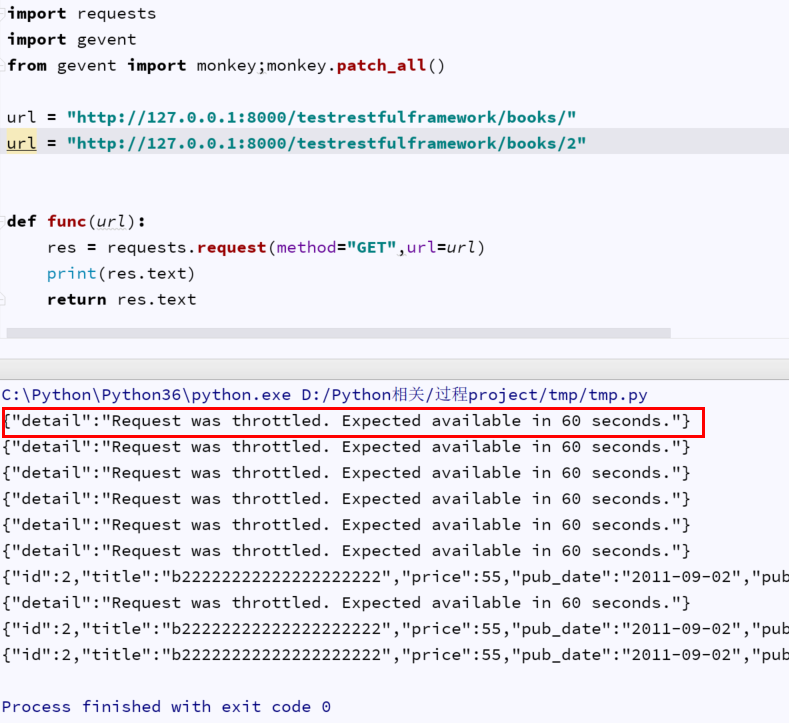
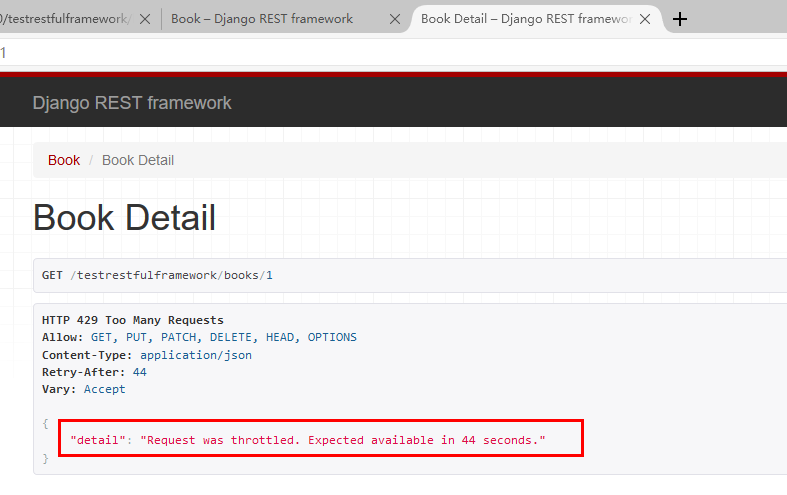
频率2 全局频率
REST_FRAMEWORK = {

    # "DEFAULT_AUTHENTICATION_CLASSES": ("testrestfulframework.service.auth.TokenAuth",),

    # 'DEFAULT_PERMISSION_CLASSES': ('testrestfulframework.service.permissions.SVIPPermission',),

    "DEFAULT_THROTTLE_CLASSES":("testrestfulframework.service.throttle.VisitThrottle",)

}
settings
from django.shortcuts import HttpResponse

from rest_framework import mixins

from rest_framework import generics

from testrestfulframework import models

from testrestfulframework import serializers

from testrestfulframework.service.auth import TokenAuth

from testrestfulframework.service.permissions import SVIPPermission

from testrestfulframework.service.throttle import VisitThrottle

from testrestfulframework.service import random_token

from rest_framework.views import APIView

from django.http import JsonResponse

from django.shortcuts import render

class LoginViewSet(APIView):

    # authentication_classes = [TokenAuth, ]

    def get(self,request):

        return render(request,"login.html")

    def post(self, request, *args, **kwargs):

        res = {"code": 1000, "msg": None}

        try:

            username = request._request.POST.get("username")

            password = request._request.POST.get("password")

            user_obj = models.User.objects.filter(username=username, password=password).first()

            print(username, password, user_obj)

            if not user_obj:

                res["code"] = 1001

                res["msg"] = "用户名或者密码错误"

            else:

                token = random_token.get_random_str(username)

                models.Token.objects.update_or_create(user=user_obj, defaults={"token": token})

                res["token"] = token

                res["user"] = user_obj.username

        except Exception as e:

            res["code"] = 1002

            res["msg"] = e

        import json

        # return HttpResponse(json.dumps(res))

        return JsonResponse(res, json_dumps_params={"ensure_ascii": False})

class BookViewSet(generics.ListCreateAPIView):

    # authentication_classes = (TokenAuth,)

    # permission_classes = (SVIPPermission,)

    # throttle_classes = [VisitThrottle]

    queryset = models.Book.objects.all()

    serializer_class = serializers.BookSerializers

class BookDetailViewSet(generics.RetrieveUpdateDestroyAPIView):

    # authentication_classes = (TokenAuth,)

    # permission_classes = (SVIPPermission,)

    throttle_classes = []

    queryset = models.Book.objects.all()

    serializer_class = serializers.BookSerializers
views.py

设置了throttle_classes = []的view

频率3 内置throttle类
views.py同上
REST_FRAMEWORK = {

    # "DEFAULT_AUTHENTICATION_CLASSES": ("testrestfulframework.service.auth.TokenAuth",),

    # 'DEFAULT_PERMISSION_CLASSES': ('testrestfulframework.service.permissions.SVIPPermission',),

    "DEFAULT_THROTTLE_CLASSES":("testrestfulframework.service.throttle.VisitThrottle",),

    "DEFAULT_THROTTLE_RATES": {

        "visit_rate": "5/m",  # 1分钟5次,同理,5/s,5/h,5/d,表示秒/时/日

    }

}
settings.py
from rest_framework.throttling import BaseThrottle,SimpleRateThrottle

class VisitThrottle(SimpleRateThrottle):

    scope = "visit_rate"

    def get_cache_key(self, request, view):

        return self.get_ident(request)
service/throttle.py

参考or转发
https://www.cnblogs.com/fu-yong/p/9052065.html
https://www.cnblogs.com/fu-yong/p/9063223.html
https://www.cnblogs.com/kermitjam/p/9416097.html
Django_rest_framework_组件(authentication、permission、throttle)的更多相关文章
- rest-framework频率组件
throttle(访问频率)组件 1.局部视图throttle from rest_framework.throttling import BaseThrottle VISIT_RECORD={} c ...
- Android的四大组件及应用安装安全问题(4)
Android的四大组件及组件间通信 如果想对四大组件有深入的了解,那永远不要停留在一些条条干干的SDK API的认识,需要了解他的通讯,他的复用,他的边界问题,这样才会对四大组件有透明的认识. 四大 ...
- [android] AndroidManifest.xml - 【 manifest -> permission】
在 API Level 1 时被引入 语法: <permission android:description="string resource" android:icon= ...
- 二十二、android中application标签说明
<application> <applicationandroid:allowClearUserData=["true" | "false"] ...
- Spring Security(16)——基于表达式的权限控制
目录 1.1 通过表达式控制URL权限 1.2 通过表达式控制方法权限 1.2.1 使用@PreAuthorize和@PostAuthorize进行访问控制 1.2.2 ...
- 基于微服务API级权限的技术架构
一般而言,企业内部一套成熟的权限系统,都是基于角色(Role)的 访问控制方法(RBAC – Role Based Access Control),即权限 (Permission)与角色相关联,用户( ...
- 微信小程序 app.json文件配置
https://developers.weixin.qq.com/miniprogram/dev/index.html 起步 https://developers.weixin.qq.com/min ...
- 【Android】application标签说明
<application> <application android:allowClearUserData=["true" | "false" ...
- Android 之 AndroidManifest.xml 详解(一)
当Android启动一个应用程序组件之前,它必须知道哪些个组件是存在的,所以开发人员在开发过程中,必须将应用程序中出现的组件一一在AndroidManifest.xml文件中" 声明 &qu ...
随机推荐
- JFinal 部署在 Tomcat 下推荐方法(转载)
经常有人在群里问 tomcat 下项目部署的问题,现写个简单的博文,希望能帮助到有需要的人. 首先明确一下 JFinal 项目是标准的 java web 项目,其部署方式与普通 java web 项目 ...
- [转]浮动窗体中的OpenGL多视图的实现
由于在工作中需要结合浮动窗体实现OpenGL的多视图,用于得到三维实体的三视图观察效果,通过参考其它资料,设计了一个程序框架,在此基础之上大家可以根据自己的需要进行扩充,实现需要的功能. 程序实现效果 ...
- asp.net core合并压缩资源文件(转载)
在asp.net core中使用BuildBundlerMinifier合并压缩资源文件 在asp.net mvc中可以使用Bundle来压缩合并css,js 不知道的见:http://www.cnb ...
- 追溯了解Ubuntu(壹)
1.关于Ubuntu 安装完成后界面展示 Ubuntu 是一个南非的民族观念,着眼于人们之间的忠诚和联系.该词来自于祖鲁语和科萨语.Ubuntu(发音"oo-BOON-too"-- ...
- centos下安装myrocksdb
承接上一篇,https://www.cnblogs.com/lunyu/p/10190364.html .编译安装myrocks的整个过程,特别是第2步和第7步,让人冗长难耐.因此编译安装成功后省去这 ...
- mac下安装phalcon
PHP版本:7.1.16 1. 安装 brew tap tigerstrikemedia/homebrew-phalconphp brew install php71-phalcon 2.配置php. ...
- PHP SHA1withRSA加密生成签名及验签
最近公司对接XX第三方支付平台的代付业务,由于对方公司只有JAVA的demo,所以只能根据文档自己整合PHP的签名加密,网上找过几个方法,踩到各种各样的坑,还好最后算是搞定了,话不多说,代码分享出来. ...
- redis未授权访问批量验证脚本编写[python]
漏洞简介 简单来说,redis是一个数据库.在默认的配置下,redis绑定在0.0.0.0:6379,也就是说,如果服务器有公网ip,可以通过访问其公网ip的6379端口来操作redis.最为致命的是 ...
- Json转Scala对象一个问题
今天与第三方对接一个接口,由于我们是用Scala语言,对方的返回体Json需要转换为一个对象,对象里面包含一个数组也可以说是集合,于是乎就用List接收,看似没问题,编译也没报错,自测调用的时候就报了 ...
- C++实现tar包解析
tar(tape archive)是Unix和类Unix系统上文件打包工具,可以将多个文件合并为一个文件,使用tar工具打出来的包称为tar包.一般打包后的文件名后缀为".tar" ...