
WhatsApp & Tasker for Android – Read & Write messages
WhatsApp & Tasker for Android – Read & Write messages
The requirement for the automation is that, if I send a WhatsApp ‘wru’ message to the phone,
it should respond back giving the location and battery level of my phone.
It could be useful, if you like to locate your misplaced phone or automatically reply to your partner/friend,
honestly, I don’t know what you will use it - through this post, I am just introducing automating WhatsApp using Tasker.
Before we begin, the following script only works when your phone is rooted as
we will be accessing the WhatsApp database and type some special characters like ‘:’.
Let’s follow the code line by line:
Profile:

        Location request from XYZ. ()

// Name of your profile.

Event:

        Notification [ Owner Application:WhatsApp Title:* ]

// When a new notification comes from WhatsApp, this event is fired.

// Read the end note, if you face problems with Chrome app after enabling Tasker accessibility.

Enter:

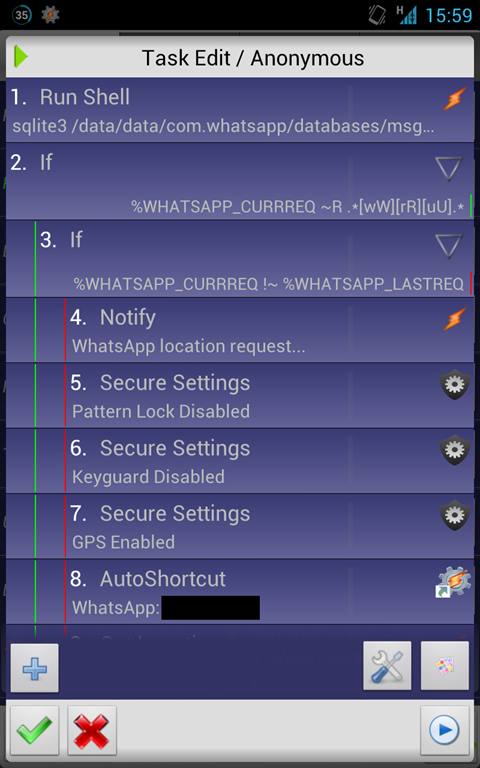
        A1: Run Shell [ Command:sqlite3 /data/data/com.whatsapp/databases/msgstore.db

                        "SELECT _id, data FROM messages WHERE key_from_me='0' AND key_remote_jid LIKE '%XXXXXXXXXXX%' ORDER BY _id DESC LIMIT 1;"

                        Timeout (Seconds):

                        Use Root:On

                        Store Result In:%WHATSAPP_CURRREQ ]

// We will access the WhatsApp database and check if the message comes from designated phone number or not. We mustn’t reply to every message.

// Replace XXXXXXXXXXX with the phone number of your message sender.

// I made a timeout for 10 seconds, if in case WhatsApp is busy accessing the database.

// Store the read Id and the last message on to the variable %WHATSAPP_CURRREQ

        A2: If [ %WHATSAPP_CURRREQ ~R .*[wW][rR][uU].* ]

// Check if the pattern of the message is correct and we are all set to send the location.

                A3: If [ %WHATSAPP_CURRREQ !~ %WHATSAPP_LASTREQ ]

// Verify that the message is different from the last request. Remember every message has a unique Id.

                        A4: Notify [ Title:WhatsApp location request... Text:Sending location

                                to Kavita Gupta... Icon:<icon> Number: Permanent:On Priority: ]

// Just a notification that the location message is being prepared.

// Make a note it is a permanent notification, we will clear it later.

                        A5: Secure Settings [ Configuration:Pattern Lock Disabled

                                Package:com.intangibleobject.securesettings.plugin Name:Secure Settings ]

// I am disabling the pattern lock, that I use using the plugin Secure Settings.

// You can download the plugin from here: https://play.google.com/store/apps/details?id=com.intangibleobject.securesettings.plugin&hl=en

                        A6: Secure Settings [ Configuration:Keyguard Disabled Package:com.intangibleobject.securesettings.plugin Name:Secure Settings ]

// Disable the keygaurd, it is useful, when your phone is on lock and you want to automate everything, even the typing.

                        A7: Secure Settings [ Configuration:GPS Enabled Package:com.intangibleobject.securesettings.plugin Name:Secure Settings ]

// Pretty clear, turn on the GPS and get location at A8

                        A8: AutoShortcut [ Configuration:WhatsApp: Some One Package:com.joaomgcd.autoshortcut Name:AutoShortcut ]

// I am using AutoShortcut plugin (https://play.google.com/store/apps/details?id=com.joaomgcd.autoshortcut) to start WhatsApp with the indented recipient.

// Replace Some One, actually choose it from the plugin, the right recipient.

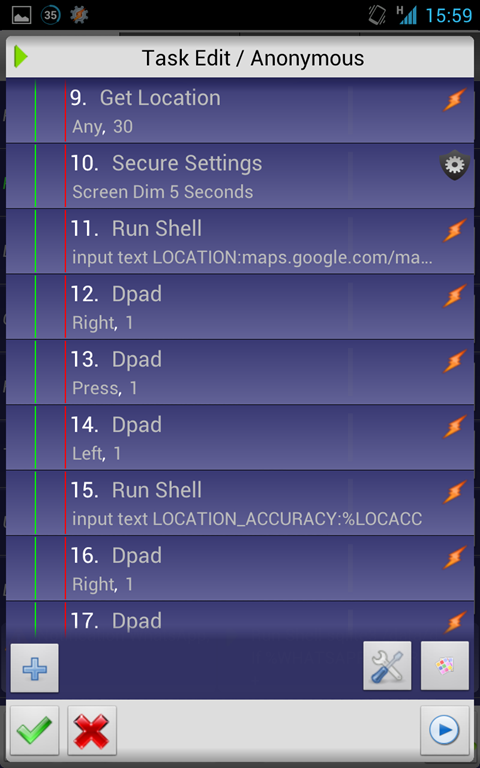
                        A9: Get Location [ Source:Any Timeout (Seconds): Continue Task Immediately:Off Keep Tracking:Off ]

// I am getting the location, timeout is 30 seconds, adjust it accordingly.

                        A10: Secure Settings [ Configuration:Screen Dim  Seconds Package:com.intangibleobject.securesettings.plugin Name:Secure Settings ]

// Now, this extension of the plugin Secure Settings, wakes your device so that you can type out the string on the WhatsApp app.

                        A11: Run Shell [ Command:input text LOCATION:maps.google.com/maps?q=%LOC Timeout (Seconds): Use Root:On Store Result In: ]

// Now, I am using the shell script to type the text to the window, because the ‘:’ while not be typed from the Type task in Tasker.

// And also, this is way faster, but remember you need root for this, not for the other way of typing.

                        A12: Dpad [ Button:Right Repeat Times: ] // Focus the Send button

                        A13: Dpad [ Button:Press Repeat Times: ] // And press it.

                        A14: Dpad [ Button:Left Repeat Times: ] // Get back to the typing box.

                        A15: Run Shell [ Command:input text LOCATION_ACCURACY:%LOCACC Timeout (Seconds): Use Root:On Store Result In: ]

                        A16: Dpad [ Button:Right Repeat Times: ]

                        A17: Dpad [ Button:Press Repeat Times: ]

                        A18: Dpad [ Button:Left Repeat Times: ]

                        A19: Run Shell [ Command:input text BATTERY_LEVEL:%BATT% Timeout (Seconds): Use Root:On Store Result In: ]

// I am adding Battery level in my case as well.

                        A20: Dpad [ Button:Right Repeat Times: ]

                        A21: Dpad [ Button:Press Repeat Times: ]

                        A22: Variable Set [ Name:%WHATSAPP_LASTREQ To:%WHATSAPP_CURRREQ Do Maths:Off Append:Off ]

// And now, we say, request is done.

                        A23: Button [ Button:Back ]

// I am exiting the WhatsApp nicely and not killing it. If you are the murderer kind, kill it, just know, you don’t have any place in the heaven.

                        A24: Button [ Button:Back ]

                        A25: Notify Cancel [ Title: Warn Not Exist:Off ]

// Remove the permanent notification.

                        A26: Notify [ Title:WhatsApp location request Text:Location sent successfully. Icon:<icon> Number: Permanent:Off Priority: ]

// Make a temporary notification, and say, location is sent.

                        A27: Secure Settings [ Configuration:GPS Disabled Package:com.intangibleobject.securesettings.plugin Name:Secure Settings ]

// Disable all the horrible things we turned on earlier.

                        A28: Secure Settings [ Configuration:Pattern Lock Enabled

                                Package:com.intangibleobject.securesettings.plugin Name:Secure Settings ]

                        A29: Secure Settings [ Configuration:Keyguard Enabled

                                Package:com.intangibleobject.securesettings.plugin Name:Secure Settings ]

                A30: End If

        A31: End If


<TaskerData sr="" dvi="1" tv="1.3.2u1">

    <Profile sr="prof12" ve="2">

        <cdate>1352377806966</cdate>

        <clp>true</clp>

        <edate>1352473212546</edate>

        <id>12</id>

        <mid0>13</mid0>

        <nme>Location request from Some One.</nme>

        <Event sr="con0" ve="2">

            <code>461</code>

            <App sr="arg0">

                <appClass>com.whatsapp.Main</appClass>

                <appPkg>com.whatsapp</appPkg>

                <label>WhatsApp</label>

            </App>

            <Str sr="arg1" ve="3"/>

        </Event>

    </Profile>

    <Task sr="task13">

        <cdate>1352377810717</cdate>

        <edate>1352473212546</edate>

        <id>13</id>

        <pri>10</pri>

        <Action sr="act0" ve="3">

            <code>123</code>

            <Str sr="arg0" ve="3">sqlite3 /data/data/com.whatsapp/databases/msgstore.db "SELECT _id, data FROM messages WHERE key_from_me='0' AND key_remote_jid LIKE '%PHONE_NUMBER%' ORDER BY _id DESC LIMIT 1;"</Str>

            <Int sr="arg1" val="10"/>

            <Int sr="arg2" val="1"/>

            <Str sr="arg3" ve="3">%WHATSAPP_CURRREQ</Str>

        </Action>

        <Action sr="act1" ve="3">

            <code>37</code>

            <lhs>%WHATSAPP_CURRREQ</lhs>

            <op>11</op>

            <rhs>.*[wW][rR][uU].*</rhs>

        </Action>

        <Action sr="act10" ve="3">

            <code>123</code>

            <Str sr="arg0" ve="3">input text LOCATION:maps.google.com/maps?q=%LOC</Str>

            <Int sr="arg1" val="0"/>

            <Int sr="arg2" val="1"/>

            <Str sr="arg3" ve="3"/>

        </Action>

        <Action sr="act11" ve="3">

            <code>701</code>

            <Int sr="arg0" val="3"/>

            <Int sr="arg1" val="1"/>

        </Action>

        <Action sr="act12" ve="3">

            <code>701</code>

            <Int sr="arg0" val="4"/>

            <Int sr="arg1" val="1"/>

        </Action>

        <Action sr="act13" ve="3">

            <code>701</code>

            <Int sr="arg0" val="2"/>

            <Int sr="arg1" val="1"/>

        </Action>

        <Action sr="act14" ve="3">

            <code>123</code>

            <Str sr="arg0" ve="3">input text LOCATION_ACCURACY:%LOCACC</Str>

            <Int sr="arg1" val="0"/>

            <Int sr="arg2" val="1"/>

            <Str sr="arg3" ve="3"/>

        </Action>

        <Action sr="act15" ve="3">

            <code>701</code>

            <Int sr="arg0" val="3"/>

            <Int sr="arg1" val="1"/>

        </Action>

        <Action sr="act16" ve="3">

            <code>701</code>

            <Int sr="arg0" val="4"/>

            <Int sr="arg1" val="1"/>

        </Action>

        <Action sr="act17" ve="3">

            <code>701</code>

            <Int sr="arg0" val="2"/>

            <Int sr="arg1" val="1"/>

        </Action>

        <Action sr="act18" ve="3">

            <code>123</code>

            <Str sr="arg0" ve="3">input text BATTERY_LEVEL:%BATT%</Str>

            <Int sr="arg1" val="0"/>

            <Int sr="arg2" val="1"/>

            <Str sr="arg3" ve="3"/>

        </Action>

        <Action sr="act19" ve="3">

            <code>701</code>

            <Int sr="arg0" val="3"/>

            <Int sr="arg1" val="1"/>

        </Action>

        <Action sr="act2" ve="3">

            <code>37</code>

            <lhs>%WHATSAPP_CURRREQ</lhs>

            <op>2</op>

            <rhs>%WHATSAPP_LASTREQ</rhs>

        </Action>

        <Action sr="act20" ve="3">

            <code>701</code>

            <Int sr="arg0" val="4"/>

            <Int sr="arg1" val="1"/>

        </Action>

        <Action sr="act21" ve="3">

            <code>547</code>

            <Str sr="arg0" ve="3">%WHATSAPP_LASTREQ</Str>

            <Str sr="arg1" ve="3">%WHATSAPP_CURRREQ</Str>

            <Int sr="arg2" val="0"/>

            <Int sr="arg3" val="0"/>

        </Action>

        <Action sr="act22" ve="3">

            <code>703</code>

            <Int sr="arg0" val="0"/>

        </Action>

        <Action sr="act23" ve="3">

            <code>703</code>

            <Int sr="arg0" val="0"/>

        </Action>

        <Action sr="act24" ve="3">

            <code>779</code>

            <Str sr="arg0" ve="3"/>

            <Int sr="arg1" val="0"/>

        </Action>

        <Action sr="act25" ve="3">

            <code>523</code>

            <Str sr="arg0" ve="3">WhatsApp location request</Str>

            <Str sr="arg1" ve="3">Location sent successfully.</Str>

            <Img sr="arg2" ve="2">

                <icn>17301571</icn>

            </Img>

            <Int sr="arg3" val="0"/>

            <Int sr="arg4" val="0"/>

            <Int sr="arg5" val="3"/>

        </Action>

        <Action sr="act26" ve="3">

            <code>11820</code>

            <Bundle sr="arg0">

                <Vals sr="val">

                    <com.intangibleobject.securesettings.plugin.extra.BLURB>GPS Disabled</com.intangibleobject.securesettings.plugin.extra.BLURB>

                    <com.intangibleobject.securesettings.plugin.extra.BLURB-type>java.lang.String</com.intangibleobject.securesettings.plugin.extra.BLURB-type>

                    <com.intangibleobject.securesettings.plugin.extra.ENABLED>false</com.intangibleobject.securesettings.plugin.extra.ENABLED>

                    <com.intangibleobject.securesettings.plugin.extra.ENABLED-type>java.lang.Boolean</com.intangibleobject.securesettings.plugin.extra.ENABLED-type>

                    <com.intangibleobject.securesettings.plugin.extra.SETTING>gps</com.intangibleobject.securesettings.plugin.extra.SETTING>

                    <com.intangibleobject.securesettings.plugin.extra.SETTING-type>java.lang.String</com.intangibleobject.securesettings.plugin.extra.SETTING-type>

                    <com.twofortyfouram.locale.intent.extra.BLURB>GPS Disabled</com.twofortyfouram.locale.intent.extra.BLURB>

                    <com.twofortyfouram.locale.intent.extra.BLURB-type>java.lang.String</com.twofortyfouram.locale.intent.extra.BLURB-type>

                    <net.dinglisch.android.tasker.subbundled>true</net.dinglisch.android.tasker.subbundled>

                    <net.dinglisch.android.tasker.subbundled-type>java.lang.Boolean</net.dinglisch.android.tasker.subbundled-type>

                </Vals>

            </Bundle>

            <Str sr="arg1" ve="3">com.intangibleobject.securesettings.plugin</Str>

            <Str sr="arg2" ve="3">Secure Settings</Str>

        </Action>

        <Action sr="act27" ve="3">

            <code>11820</code>

            <Bundle sr="arg0">

                <Vals sr="val">

                    <com.intangibleobject.securesettings.plugin.extra.BLURB>Pattern Lock Enabled</com.intangibleobject.securesettings.plugin.extra.BLURB>

                    <com.intangibleobject.securesettings.plugin.extra.BLURB-type>java.lang.String</com.intangibleobject.securesettings.plugin.extra.BLURB-type>

                    <com.intangibleobject.securesettings.plugin.extra.ENABLED>true</com.intangibleobject.securesettings.plugin.extra.ENABLED>

                    <com.intangibleobject.securesettings.plugin.extra.ENABLED-type>java.lang.Boolean</com.intangibleobject.securesettings.plugin.extra.ENABLED-type>

                    <com.intangibleobject.securesettings.plugin.extra.SETTING>lock_pattern_autolock</com.intangibleobject.securesettings.plugin.extra.SETTING>

                    <com.intangibleobject.securesettings.plugin.extra.SETTING-type>java.lang.String</com.intangibleobject.securesettings.plugin.extra.SETTING-type>

                    <com.twofortyfouram.locale.intent.extra.BLURB>Pattern Lock Enabled</com.twofortyfouram.locale.intent.extra.BLURB>

                    <com.twofortyfouram.locale.intent.extra.BLURB-type>java.lang.String</com.twofortyfouram.locale.intent.extra.BLURB-type>

                    <net.dinglisch.android.tasker.subbundled>true</net.dinglisch.android.tasker.subbundled>

                    <net.dinglisch.android.tasker.subbundled-type>java.lang.Boolean</net.dinglisch.android.tasker.subbundled-type>

                </Vals>

            </Bundle>

            <Str sr="arg1" ve="3">com.intangibleobject.securesettings.plugin</Str>

            <Str sr="arg2" ve="3">Secure Settings</Str>

        </Action>

        <Action sr="act28" ve="3">

            <code>11820</code>

            <Bundle sr="arg0">

                <Vals sr="val">

                    <com.intangibleobject.securesettings.plugin.extra.BLURB>Keyguard Enabled</com.intangibleobject.securesettings.plugin.extra.BLURB>

                    <com.intangibleobject.securesettings.plugin.extra.BLURB-type>java.lang.String</com.intangibleobject.securesettings.plugin.extra.BLURB-type>

                    <com.intangibleobject.securesettings.plugin.extra.ENABLED>true</com.intangibleobject.securesettings.plugin.extra.ENABLED>

                    <com.intangibleobject.securesettings.plugin.extra.ENABLED-type>java.lang.Boolean</com.intangibleobject.securesettings.plugin.extra.ENABLED-type>

                    <com.intangibleobject.securesettings.plugin.extra.SETTING>keyguard</com.intangibleobject.securesettings.plugin.extra.SETTING>

                    <com.intangibleobject.securesettings.plugin.extra.SETTING-type>java.lang.String</com.intangibleobject.securesettings.plugin.extra.SETTING-type>

                    <com.twofortyfouram.locale.intent.extra.BLURB>Keyguard Enabled</com.twofortyfouram.locale.intent.extra.BLURB>

                    <com.twofortyfouram.locale.intent.extra.BLURB-type>java.lang.String</com.twofortyfouram.locale.intent.extra.BLURB-type>

                    <net.dinglisch.android.tasker.subbundled>true</net.dinglisch.android.tasker.subbundled>

                    <net.dinglisch.android.tasker.subbundled-type>java.lang.Boolean</net.dinglisch.android.tasker.subbundled-type>

                </Vals>

            </Bundle>

            <Str sr="arg1" ve="3">com.intangibleobject.securesettings.plugin</Str>

            <Str sr="arg2" ve="3">Secure Settings</Str>

        </Action>

        <Action sr="act29" ve="3">

            <code>38</code>

        </Action>

        <Action sr="act3" ve="3">

            <code>523</code>

            <Str sr="arg0" ve="3">WhatsApp location request...</Str>

            <Str sr="arg1" ve="3">Sending location to Some One...</Str>

            <Img sr="arg2" ve="2">

                <icn>17301571</icn>

            </Img>

            <Int sr="arg3" val="0"/>

            <Int sr="arg4" val="1"/>

            <Int sr="arg5" val="3"/>

        </Action>

        <Action sr="act30" ve="3">

            <code>38</code>

        </Action>

        <Action sr="act4" ve="3">

            <code>11820</code>

            <Bundle sr="arg0">

                <Vals sr="val">

                    <com.intangibleobject.securesettings.plugin.extra.BLURB>Pattern Lock Disabled</com.intangibleobject.securesettings.plugin.extra.BLURB>

                    <com.intangibleobject.securesettings.plugin.extra.BLURB-type>java.lang.String</com.intangibleobject.securesettings.plugin.extra.BLURB-type>

                    <com.intangibleobject.securesettings.plugin.extra.ENABLED>false</com.intangibleobject.securesettings.plugin.extra.ENABLED>

                    <com.intangibleobject.securesettings.plugin.extra.ENABLED-type>java.lang.Boolean</com.intangibleobject.securesettings.plugin.extra.ENABLED-type>

                    <com.intangibleobject.securesettings.plugin.extra.SETTING>lock_pattern_autolock</com.intangibleobject.securesettings.plugin.extra.SETTING>

                    <com.intangibleobject.securesettings.plugin.extra.SETTING-type>java.lang.String</com.intangibleobject.securesettings.plugin.extra.SETTING-type>

                    <com.twofortyfouram.locale.intent.extra.BLURB>Pattern Lock Disabled</com.twofortyfouram.locale.intent.extra.BLURB>

                    <com.twofortyfouram.locale.intent.extra.BLURB-type>java.lang.String</com.twofortyfouram.locale.intent.extra.BLURB-type>

                    <net.dinglisch.android.tasker.subbundled>true</net.dinglisch.android.tasker.subbundled>

                    <net.dinglisch.android.tasker.subbundled-type>java.lang.Boolean</net.dinglisch.android.tasker.subbundled-type>

                </Vals>

            </Bundle>

            <Str sr="arg1" ve="3">com.intangibleobject.securesettings.plugin</Str>

            <Str sr="arg2" ve="3">Secure Settings</Str>

        </Action>

        <Action sr="act5" ve="3">

            <code>11820</code>

            <Bundle sr="arg0">

                <Vals sr="val">

                    <com.intangibleobject.securesettings.plugin.extra.BLURB>Keyguard Disabled</com.intangibleobject.securesettings.plugin.extra.BLURB>

                    <com.intangibleobject.securesettings.plugin.extra.BLURB-type>java.lang.String</com.intangibleobject.securesettings.plugin.extra.BLURB-type>

                    <com.intangibleobject.securesettings.plugin.extra.ENABLED>false</com.intangibleobject.securesettings.plugin.extra.ENABLED>

                    <com.intangibleobject.securesettings.plugin.extra.ENABLED-type>java.lang.Boolean</com.intangibleobject.securesettings.plugin.extra.ENABLED-type>

                    <com.intangibleobject.securesettings.plugin.extra.SETTING>keyguard</com.intangibleobject.securesettings.plugin.extra.SETTING>

                    <com.intangibleobject.securesettings.plugin.extra.SETTING-type>java.lang.String</com.intangibleobject.securesettings.plugin.extra.SETTING-type>

                    <com.twofortyfouram.locale.intent.extra.BLURB>Keyguard Disabled</com.twofortyfouram.locale.intent.extra.BLURB>

                    <com.twofortyfouram.locale.intent.extra.BLURB-type>java.lang.String</com.twofortyfouram.locale.intent.extra.BLURB-type>

                    <net.dinglisch.android.tasker.subbundled>true</net.dinglisch.android.tasker.subbundled>

                    <net.dinglisch.android.tasker.subbundled-type>java.lang.Boolean</net.dinglisch.android.tasker.subbundled-type>

                </Vals>

            </Bundle>

            <Str sr="arg1" ve="3">com.intangibleobject.securesettings.plugin</Str>

            <Str sr="arg2" ve="3">Secure Settings</Str>

        </Action>

        <Action sr="act6" ve="3">

            <code>11820</code>

            <Bundle sr="arg0">

                <Vals sr="val">

                    <com.intangibleobject.securesettings.plugin.extra.BLURB>GPS Enabled</com.intangibleobject.securesettings.plugin.extra.BLURB>

                    <com.intangibleobject.securesettings.plugin.extra.BLURB-type>java.lang.String</com.intangibleobject.securesettings.plugin.extra.BLURB-type>

                    <com.intangibleobject.securesettings.plugin.extra.ENABLED>true</com.intangibleobject.securesettings.plugin.extra.ENABLED>

                    <com.intangibleobject.securesettings.plugin.extra.ENABLED-type>java.lang.Boolean</com.intangibleobject.securesettings.plugin.extra.ENABLED-type>

                    <com.intangibleobject.securesettings.plugin.extra.SETTING>gps</com.intangibleobject.securesettings.plugin.extra.SETTING>

                    <com.intangibleobject.securesettings.plugin.extra.SETTING-type>java.lang.String</com.intangibleobject.securesettings.plugin.extra.SETTING-type>

                    <com.twofortyfouram.locale.intent.extra.BLURB>GPS Enabled</com.twofortyfouram.locale.intent.extra.BLURB>

                    <com.twofortyfouram.locale.intent.extra.BLURB-type>java.lang.String</com.twofortyfouram.locale.intent.extra.BLURB-type>

                    <net.dinglisch.android.tasker.subbundled>true</net.dinglisch.android.tasker.subbundled>

                    <net.dinglisch.android.tasker.subbundled-type>java.lang.Boolean</net.dinglisch.android.tasker.subbundled-type>

                </Vals>

            </Bundle>

            <Str sr="arg1" ve="3">com.intangibleobject.securesettings.plugin</Str>

            <Str sr="arg2" ve="3">Secure Settings</Str>

        </Action>

        <Action sr="act7" ve="3">

            <code>8263</code>

            <Bundle sr="arg0">

                <Vals sr="val">

                    <com.twofortyfouram.locale.intent.extra.BLURB>WhatsApp: Some One</com.twofortyfouram.locale.intent.extra.BLURB>

                    <com.twofortyfouram.locale.intent.extra.BLURB-type>java.lang.String</com.twofortyfouram.locale.intent.extra.BLURB-type>

                    <intent>#Intent;launchFlags=0x14000000;component=com.whatsapp/.Conversation;S.jid=491111111111%40s.whatsapp.net;S.displayname=Some%20One;end</intent>

                    <intent-type>java.lang.String</intent-type>

                    <net.dinglisch.android.tasker.subbundled>true</net.dinglisch.android.tasker.subbundled>

                    <net.dinglisch.android.tasker.subbundled-type>java.lang.Boolean</net.dinglisch.android.tasker.subbundled-type>

                </Vals>

            </Bundle>

            <Str sr="arg1" ve="3">com.joaomgcd.autoshortcut</Str>

            <Str sr="arg2" ve="3">AutoShortcut</Str>

        </Action>

        <Action sr="act8" ve="3">

            <code>902</code>

            <Int sr="arg0" val="2"/>

            <Int sr="arg1" val="30"/>

            <Int sr="arg2" val="0"/>

            <Int sr="arg3" val="0"/>

        </Action>

        <Action sr="act9" ve="3">

            <code>11820</code>

            <Bundle sr="arg0">

                <Vals sr="val">

                    <com.intangibleobject.securesettings.plugin.extra.BLURB>Screen Dim

5 Seconds</com.intangibleobject.securesettings.plugin.extra.BLURB>

                    <com.intangibleobject.securesettings.plugin.extra.BLURB-type>java.lang.String</com.intangibleobject.securesettings.plugin.extra.BLURB-type>

                    <com.intangibleobject.securesettings.plugin.extra.SETTING>wake_device</com.intangibleobject.securesettings.plugin.extra.SETTING>

                    <com.intangibleobject.securesettings.plugin.extra.SETTING-type>java.lang.String</com.intangibleobject.securesettings.plugin.extra.SETTING-type>

                    <com.intangibleobject.securesettings.plugin.extra.WAKE_LOCK_DURATION>5000</com.intangibleobject.securesettings.plugin.extra.WAKE_LOCK_DURATION>

                    <com.intangibleobject.securesettings.plugin.extra.WAKE_LOCK_DURATION-type>java.lang.Long</com.intangibleobject.securesettings.plugin.extra.WAKE_LOCK_DURATION-type>

                    <com.intangibleobject.securesettings.plugin.extra.WAKE_LOCK_TYPE>dim</com.intangibleobject.securesettings.plugin.extra.WAKE_LOCK_TYPE>

                    <com.intangibleobject.securesettings.plugin.extra.WAKE_LOCK_TYPE-type>java.lang.String</com.intangibleobject.securesettings.plugin.extra.WAKE_LOCK_TYPE-type>

                    <com.twofortyfouram.locale.intent.extra.BLURB>Screen Dim

5 Seconds</com.twofortyfouram.locale.intent.extra.BLURB>

                    <com.twofortyfouram.locale.intent.extra.BLURB-type>java.lang.String</com.twofortyfouram.locale.intent.extra.BLURB-type>

                    <net.dinglisch.android.tasker.subbundled>true</net.dinglisch.android.tasker.subbundled>

                    <net.dinglisch.android.tasker.subbundled-type>java.lang.Boolean</net.dinglisch.android.tasker.subbundled-type>

                </Vals>

            </Bundle>

            <Str sr="arg1" ve="3">com.intangibleobject.securesettings.plugin</Str>

            <Str sr="arg2" ve="3">Secure Settings</Str>

        </Action>

    </Task>

</TaskerData>
Download this Task from here: http://db.tt/9vRmbhyb
That’s it in the above small example – you can read/write messages from/to WhatsApp app. I am using n7000-cm9.1-cwr6. Oh yea, and if you are having the Talkback auto enabled for Chrome browser, you need to turn Off the Web scripts to run.
Tasker is amazing, I have automated a lot of tasks using this tool. I will share a few none generic ones with you in my coming post here.
WhatsApp & Tasker for Android – Read & Write messages的更多相关文章
- How to read out WhatsApp messages with Tasker and react on their content in real time
http://technologyworkroom.blogspot.sg/2013/05/tasker-how-to-read-out-whatsapp.html Tasker can read o ...
- Send a WhatsApp Message programatically -- Tasker WhatsTasker
Here is My code snippet: Uri mUri = Uri.parse("smsto:+9876543210"); Intent mIntent = new I ...
- Solution for sending Whatsapp via sqlite "INSERT INTO"
I use something similar but thought I'd mention this 'bug' that can happen:when you INSERT '%wa_mess ...
- Ultimate Guide to WhatsApp for Business 2019
By Iaroslav Kudritskiy (Source: https://rocketbots.io/blog/the-ultimate-guide-to-whatsapp-business-a ...
- Content portal for Pocketables Tasker articles
http://www.pocketables.com/2013/03/overview-of-pocketables-tasker-articles.html I write a lot about ...
- Qt for Android 启动短暂的黑屏或白屏问题如何解决?
解决方法一: 使用透明主题 点击项目 -> 在 构建设置 里面找到 Build Android APK 栏目,点击 create templates 创建一个 AndroidManifest.x ...
- 所有selenium相关的库
通过爬虫 获取 官方文档库 如果想获取 相应的库 修改对应配置即可 代码如下 from urllib.parse import urljoin import requests from lxml im ...
- Dig out WeChat deleted chat messages on Android Phone
As we know that WeChat will wipe deleted chat messages. That's why forensic guys could not dig out ...
- Android Tasker应用之自动查询并显示话费流量套餐信息
Android Tasker应用之自动查询并显示话费流量套餐信息 虽然Android平台有非常多的流量监控软件,但最准确的流量数据还是掌握在运营商手里.有些朋友可能像我一样时不时地发短信查询流量信息, ...
随机推荐
- 在VS中让一个JS文件智能提示另一个JS文件中的成员2--具体引用
我们知道,在html中,利用<script language="javascript" type="text/javascript" src=" ...
- gitlab备份与还原
1.备份 登录原服务器,执行命令: gitlab-rake gitlab:backup:create 备份后文件在如下目录,下载该文件 /var/opt/gitlab/backups 2.还原 先安装 ...
- python进阶学习之高阶函数
高阶函数就是把函数当做参数传递的一种函数, 例如: 执行结果: 1.map()函数 map()接收一个函数 f 和一个list, 并通过把函数 f 依次作用在 list 的每个元素上,得到一个新的 l ...
- Description Resource Path Location Type The superclass "javax.servlet.http.HttpServlet" was not foun
一段时间没亲自建新项目玩乐,今天建立了一Maven project的时候发现了以下异常,Description Resource Path Location Type The superclass & ...
- [java笔记]动态数组
private int count;//计数器 private int ary[] = new int [3]; if(count >= ary.length){ //数组动态扩展 int ne ...
- Mybatis入门及Dao开发方式
本节内容: Mybatis介绍 使用jdbc编程问题总结 Mybatis架构 Mybatis入门程序 Dao的开发方式 SqlMapConfig.xml文件说明 一.Mybatis介绍 MyBatis ...
- Pytest里,mark装饰器的使用,双引号,没引号,这种差别很重要
按最新版的pytest测试框架. 如果只是单一的mark,不要加任何引号. 如果是要作and ,not之类的先把,一定要是双引号! 这个要记清楚,好像和以前版本的书上介绍的不一样,切记! import ...
- Ubuntu18.04 n卡配置
一.背景 最近安装了ubutnu18.04后,安装系统后重启卡住,强制关机重启后,又在开机界面紫屏卡住,上网搜索后发现是n卡的驱动问题,使用以下方法安装驱动后成功解决该问题. 二.解决方法 1.进入恢 ...
- 前端-JS-BOM和DOM
前戏 到目前为止,我们已经学过了JavaScript的一些简单的语法.但是这些简单的语法,并没有和浏览器有任何交互. 也就是我们还不能制作一些我们经常看到的网页的一些交互,我们需要继续学习BOM和DO ...
- nginx启动 [emerg] 12180#12948: invalid number of arguments in "root" directive in D:
注意空格和中文符号 修改了就可以了. 还要注意最后需要加分号; https://blog.csdn.net/rodulf/article/details/53557278