
windows下redis安装及应用
一、下载安装Redis(windows版本)
1、下载地址:https://github.com/MicrosoftArchive/redis/releases
2、安装:
1)打开运行窗口,输出cmd,进入DOS命令窗口。然后打开至redis目录,执行redis-service redis.windows.conf命令(下图为安装成功)。
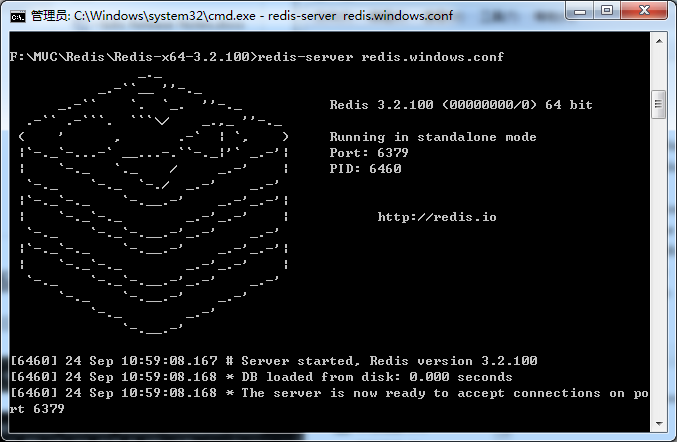
2)这个窗口要保持开启关闭时redis服务会自动关闭,所以需要把redis添加到windows服务(可以保存成两个bat批处理文件)。
安装命令:redis-server.exe --service-install redis.windows.conf --loglevel verbose
卸载命令:redis-server --service-uninstall
二、.net环境应用,以ServiceStack.Redis类库为例(功能:删除商品下Key值为xxxxx的缓存)。
1、定义redis单独配置文件。
1)web.config


2)redis.config
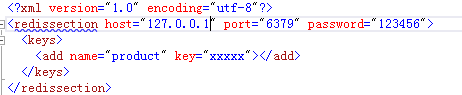
2、定义RedisSection类,redis相关属性等。
namespace Demo.Util

{

    public class RedisSection : ConfigurationSection

    {

        private static RedisSection _instance;

        public static RedisSection Instatce

        {

            get

            {

                _instance = ConfigurationManager.GetSection("redissection") as RedisSection;

                return _instance;

            }

        }

        /// <summary>

        /// 服务器

        /// </summary>

        [ConfigurationProperty("host", IsRequired = true)]

        public string Host

        {

            get { return this["host"].ToString(); }

        }

        /// <summary>

        /// 端口号

        /// </summary>

        [ConfigurationProperty("port", IsRequired = true)]

        public string Port

        {

            get { return this["port"].ToString(); }

        }

        /// <summary>

        /// 密码

        /// </summary>

        [ConfigurationProperty("password", IsRequired = false)]

        public string Password

        {

            get { return this["password"].ToString(); }

        }

        /// <summary>

        /// 过期时间 单位:小时

        /// </summary>

        [ConfigurationProperty("expireTime", IsRequired = false)]

        public int ExpireTime

        {

            get { return int.Parse(this["expireTime"].ToString()); }

        }

        /// <summary>

        /// 最大写链接数

        /// </summary>

        [ConfigurationProperty("MaxWritePoolSize", IsRequired = false, DefaultValue = )]

        public int MaxWritePoolSize

        {

            get

            {

                int maxWritePoolSize = (int)base["MaxWritePoolSize"];

                return maxWritePoolSize >  ? maxWritePoolSize : ;

            }

            set

            {

                base["MaxWritePoolSize"] = value;

            }

        }

        /// <summary>

        /// 最大读链接数

        /// </summary>

        [ConfigurationProperty("MaxReadPoolSize", IsRequired = false, DefaultValue = )]

        public int MaxReadPoolSize

        {

            get

            {

                int maxReadPoolSize = (int)base["MaxReadPoolSize"];

                return maxReadPoolSize >  ? maxReadPoolSize : ;

            }

            set

            {

                base["MaxReadPoolSize"] = value;

            }

        }

        /// <summary>

        /// 自动重启

        /// </summary>

        [ConfigurationProperty("AutoStart", IsRequired = false, DefaultValue = true)]

        public bool AutoStart

        {

            get

            {

                return (bool)base["AutoStart"];

            }

            set

            {

                base["AutoStart"] = value;

            }

        }

        [ConfigurationProperty("keys", IsDefaultCollection = true)]

        public KeyCollection Keys

        {

            get { return this["keys"] as KeyCollection; }

        }

    }

    public class KeyCollection : ConfigurationElementCollection

    {

        protected override ConfigurationElement CreateNewElement()

        {

            return new KeyElement();

        }

        protected override object GetElementKey(ConfigurationElement element)

        {

            return ((KeyElement)element).Name;

        }

        public KeyElement this[int index]

        {

            get

            {

                return this.BaseGet(index) as KeyElement;

            }

        }

        new public KeyElement this[string Name]

        {

            get

            {

                return (KeyElement)BaseGet(Name);

            }

        }

        new public int Count

        {

            get { return base.Count; }

        }

    }

    public class KeyElement : ConfigurationElement

    {

        [ConfigurationProperty("name", IsRequired = false)]

        public string Name

        {

            get { return this["name"].ToString(); }

        }

        [ConfigurationProperty("key", IsRequired = true)]

        public string Key

        {

            get { return this["key"].ToString(); }

        }

    }

}
3、定义RedisHelper类,redis相关操作。
public class RedisHelper

    {

        private static string password = string.IsNullOrEmpty(RedisSection.Instatce.Password) ? "" : RedisSection.Instatce.Password + "@";

        //Redis服务器和端口号(密码@127.0.0.1:6379)

        private static string RedisPath = string.Format("{0}:{1}", password + RedisSection.Instatce.Host, RedisSection.Instatce.Port);

        //过期时间(小时)

        //private static int ExpireTime = RedisSection.Instatce.ExpireTime;

        private static PooledRedisClientManager prcm = CreateManager(new string[] { RedisPath }, new string[] { RedisPath });

        /// <summary>

        /// 缓存池

        /// </summary>

        /// <param name="readWriteHosts">“写”链接池链接数</param>

        /// <param name="readOnlyHosts">“读”链接池链接数</param>

        /// <returns></returns>

        private static PooledRedisClientManager CreateManager(string[] readWriteHosts, string[] readOnlyHosts)

        {

            // 支持读写分离,均衡负载

            return new PooledRedisClientManager(readWriteHosts, readOnlyHosts, new RedisClientManagerConfig

            {

                MaxWritePoolSize = RedisSection.Instatce.MaxWritePoolSize,

                MaxReadPoolSize = RedisSection.Instatce.MaxReadPoolSize,

                AutoStart = RedisSection.Instatce.AutoStart

            });

        }

        public static void Remove(string key)

        {

            using (var redis = prcm.GetClient())

            {

                redis.Remove(key);

            }

        }

        public static void RemoveAll(IEnumerable<string> keys)

        {

            using (var redis = prcm.GetClient())

            {

                redis.RemoveAll(keys);

            }

        }

    }
4、使用
var key = RedisSection.Instatce.Keys["product"].Key;

Util.Redis.RedisHelper.Remove(key);
windows下redis安装及应用的更多相关文章
- windows下Redis安装及利用java操作Redis
一.windows下Redis安装 1.Redis下载 下载地址:https://github.com/MicrosoftArchive/redis 打开下载地址后,选择版本 然后选择压缩包 下载 R ...
- windows下redis安装和配置
windows下redis安装和配置 redis介绍 Redis是一个开源,高级的键值存储和一个适用的解决方案,用于构建高性能,可扩展的Web应用程序. Redis有三个主要特点,使它优越于其它键值数 ...
- Windows下Redis安装配置和使用注意事项
Windows下Redis安装配置和使用注意事项 一:下载 下载地址: https://github.com/microsoftarchive/redis/releases 文件介绍: 本文以3.2. ...
- Windows下Redis安装+可视化工具Redis Desktop Manager使用
Redis是有名的NoSql数据库,一般Linux都会默认支持.但在Windows环境中,可能需要手动安装设置才能有效使用.这里就简单介绍一下Windows下Redis服务的安装方法,希望能够帮到你. ...
- windows下redis安装
最近因公司项目原因,去了趟昆明出差,其中第一次接触安装redis,配置sentinel,学习到不少,但也都是皮毛而已,本随笔记下所学知识. 1.首先介绍下redis,来源自百度百科 redis是一个k ...
- windows下redis安装及配置
1.简介: redis是一个高性能的key-value数据库:redis能读的速度为11万次/秒,写的速度是8.1万次/秒 redis支持丰富的数据类型:String, List, Hash(map) ...
- Windows下Redis安装及使用
1.下载安装Redis(安装直接下一步就行,此步骤省略) Redis-x64-3.2.100.exe 2.Redis使用 安装目录如下: ①cmd启动redis: ②将redis安装为服务 此时如果安 ...
- 1.windows下Redis安装
参考文档:https://www.cnblogs.com/Leo_wl/p/6392196.html?utm_source=itdadao&utm_medium=referral Redis数 ...
- Windows下Redis安装过程
1.去github下载Redis-x64-2.8.2402.zip压缩包 2.将压缩包解压到你要安装的目录下 3.将redis设置为开机自启动服务 redis-server --service-ins ...
随机推荐
- [leetcode]199. Binary Tree Right Side View二叉树右视图
Given a binary tree, imagine yourself standing on the right side of it, return the values of the nod ...
- Java SE-基本数据类型对应包装类
包装类 Java是面向对象的编程语言,包装类的出现更好的体现这一思想. 其次,包装类作为类是有属性有方法的,功能比基本数据类型要强大. [八种基本数据类型的包装类] byte ——Byte short ...
- 17-js 提交表单以及判空
js
- 类实现Parcelable接口在Intent中传递
类实现了Parcelable接口就可以在Intent中传递 只要在类的定义中实现Parcelable接口 代码 package entity; import android.os.Parcel; ...
- 《计算机网络》谢希仁(第7版) 第四章 c语言http://c.biancheng.net/cpp/html/3137.html
第四章 网络层 电信网使用面向连接的通信方式,使电信网络能够向用户提供可靠传输的服务. 互联网设计思路:网络层向上只提供简单灵活的.无连接的.尽最大努力交付的数据报(分组)服务. 网络层不提供可靠传输 ...
- makefile all
all:udps udpc udps:udpserv.c gcc -Wall -o udps udpserv.cudpc:udpclient.c gcc -Wall -o udpc udp ...
- DB2 like两个表的字段或like一个变量
DB2中的like的使用是有限制的,它后面不能跟一个变量或者是字段,因此,在存储过程或SQL语句中就不能like一个变量或一个字段. 比如有两个表A(a,b,c,d),B(a,b,c,d). 普遍的用 ...
- 20155317 王新玮 2016-2017-2 《Java程序设计》第9周学习总结
20155317 王新玮 2016-2017-2 <Java程序设计>第9周学习总结 教材学习内容总结 数据库本身是个独立运行的应用程序 撰写应用程序是利用通信协议对数据库进行指令交换,以 ...
- Find the squareroot
https://github.com/Premiumlab/Python-for-Algorithms--Data-Structures--and-Interviews/blob/master/Moc ...
- js动态添加删除行,兼容ie和火狐
<!DOCTYPE html PUBLIC "-//W3C//DTD XHTML 1.0 Transitional//EN" "http://www.w3.org/ ...