
06慕课网《进击Node.js基础(一)》作用域和上下文
作用域
function(){}大括号中的内容是一个作用域;
function 和 var 的声明会被提到作用域的最上面
function f(){

    a = 2;

    var b = g();  //此处可以访问到g()函数

    a=3;

    return b;

    function g(){  //函数的声明会被提前到作用域顶部

        return a;

    }

    a=1;

}

var result = f();

console.log(f());  //

console.log(a)    //3  a未被声明,那么就会在全局作用域被声明;

            //  如果a被在f()中声明,那么全局作用域则访问不到

            //  如果a在全局和局部作用域都被声明:那么两个a互相不干扰
调用函数访问变量的能力
//全局变量

var globalVariable = 'This is global variable'

//全局函数

function globalFunction(){

    //局部变量

    var localVariable =  'This is local variable'

    console.log('visit gloabl/local variable')

    console.log(globalVariable)

    console.log(localVariable)

    globalVariable = 'this is change variable'

    console.log(globalVariable)

    //局部函数

    function loaclFunction(){

        //局部变量

        var innerLocalVariable = 'this is inner local variable'

        console.log('visit gloabl/local/innerLocal variable')

        console.log(globalVariable)

        console.log(localVariable)

        console.log(innerLocalVariable)

    }

    //作用域内可访问局部函数

    loaclFunction()

}

//在全局不能访问局部变量和函数

globalFunction()
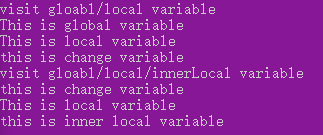
上下文
和this关键字有关,是调用当前可执行代码的对象的引用
this指向函数拥有者,只能在函数中使用
this指向构造函数
var pet = {

    words:'..',

    speak:function(){

        console.log(this.words)

        console.log(this==pet)

    }

}

pet.speak()

this指向全局对象
function pet(words){

    this.words = words

    console.log(this.words)

    console.log(this==global)

}

//this指向了全局global对象

pet('..')

this指向实例对象
function Pet(words){

    this.words = words

    this.speak = function(){

        console.log(this.words)

        console.log(this)

    }

}

var cat = new Pet('Miao')

cat.speak();

使用call和apply改变上下文引用对象
this指向引用方法的对象
var pet = {

    words:'..',

    speak:function(say){

        console.log(say + ' ' + this.words)

    }

}

pet.speak('haha')

使用call-apply
var pet = {

    words:'..',

    speak:function(say,free){

        console.log(say + ' ' + free+ ' '+ this.words)

    }

}

var dog={

    words:'wawa'

}

pet.speak.call(dog,'haha','lala')

pet.speak.apply(dog,['haha','lala'])

使用call和apply方便实现继承
function Pet(words){

    this.words = words

    this.speak = function(){

        console.log(this.words)

    }

}

//Dog继承Pet,拥有了Pet的speak方法

function Dog(words){

    Pet.call(this,words)

}

var dog = new Dog('wawa')

dog.speak()

06慕课网《进击Node.js基础(一)》作用域和上下文的更多相关文章
- 03慕课网《进击Node.js基础(一)》API-URL网址解析
url url.parse(url,query,host);解析域名 url必须,地址字符串 query可选 host 可选:在不清楚协议时正确解析 querystring 字符串和对象之间互相解析 ...
- 01慕课网《进击Node.js基础(一)》Node.js安装,创建例子
版本:偶数位为稳定版本,基数为非稳定版本 - 0.6.x - 0.7.x - 0.8.x -0.9.x -0.10.x -0.11.x 概念:Node.js采用谷歌浏览器的V8引擎,用C ...
- 10慕课网《进击Node.js基础(一)》初识promise
首先用最简单的方式实现一个动画效果 <!doctype> <html> <head> <title>Promise animation</titl ...
- 07慕课网《进击Node.js基础(一)》HTTP小爬虫
获取HTML页面 var http = require('http') var url='http://www.imooc.com/learn/348' http.get(url,function(r ...
- 进击Node.js基础(二)
一.一个牛逼闪闪的知识点Promise npm install bluebird 二.Promise实例 ball.html <!doctype> <!DOCTYPE html> ...
- 02慕课网《进击Node.js基础(一)》——CommonJs标准
是一套规范管理模块 每个js 为一个模块,多个模块作为一个包 node.js和Couchdb是对其的实现: 不同于jQuery 模块:定义.标识.引用(地址/模块名称) 模块类型: 核心模块http ...
- 进击Node.js基础(一)
一.前言 1:Node.js本质上是用chrome浏览器 v8引擎 使用c++编写的JS运行环境 2:相比于JS没有浏览器安全级的限制,额外提供了一些系统级的API:文件读写,进程管理,网络通信等. ...
- 04慕课网《进击Node.js基础(一)》HTTP讲解
HTTP:通信协议 流程概述: http客户端发起请求,创建端口默认8080 http服务器在端口监听客户端请求 http服务器向客户端返回状态和内容 稍微详细解析: 1.域名解析:浏览器搜素自身的D ...
- 11慕课网《进击Node.js基础(一)》Buffer和Stream
Buffer 用来保存原始数据 (logo.png) 以下代码读取logo.png为buffer类型 然后将buffer转化为string,新建png 可以将字符串配置: data:image/png ...
随机推荐
- openstack placement 组件作用理解
例如,一个资源提供者可以是一个计算节点,共享存储池,或一个IP分配池.placement服务跟踪每个供应商的库存和使用情况.例如,在一个计算节点创建一个实例的可消费资源如计算节点的资源提供者的CPU和 ...
- Red Hat Linux 挂载外部资源
在我们安装的Red Hat Linux 中.当中一半机器为最主要的server配置,没有桌面环境.在从U盘上复制文件的时候可就犯难了.在网上查了查才知道.要訪问U盘就必须先将它们挂载到Linux系统的 ...
- Mybatis的使用与流程解析
1. 什么是MyBatis MyBatis的前身是Apache的一个开源项目ibatis,后来迁移到Google code就改名为MyBatis. 官方解释: MyBatis是一款优秀的持久层框架,它 ...
- docker的简单使用----适用于新手
Docker 1.简介 Docker是一个开源的应用容器引擎 将软件编译成一个镜像:然后在镜像里各种软件做好配置,将镜像发布出去,其他的使用这就可以直接使用这个镜像.运行中的这个镜像叫做容器,容器启动 ...
- go Context的使用
控制并发有两种经典的方式,一种是WaitGroup,另外一种就是Context WaitGroup的使用 WaitGroup可以用来控制多个goroutine同时完成 func main() { va ...
- 20155325 Exp1 PC平台逆向破解(5)M
Exp1 PC平台逆向破解(5)M 阶段性截图 基础知识 掌握NOP, JNE, JE, JMP, CMP汇编指令的机器码 汇编指令 作用 机器码 NOP "空指令".执行到NOP ...
- UOJ UR#9 App管理器
题目传送门 题目大意大概就是给你一个混合图(既有有向边又有无向边),对于每条无向边,u-v,问删去u->v,或删去v->u那条可以使新图强连通.(保证数据有解). 这道题前几个数据点送分. ...
- Catalan&Stirling数
Catalan&Stirling数 Tags:数学 作业部落 评论地址 Catalan数 \(1,1,2,5,14,42,132,429,1430,4862,16796,58786...\) ...
- SpringCloud-微服务网关ZUUL(六)
前言:前面说过,由于微服务过多,可能某一个小业务就需要调各种微服务的接口,不可避免的就会需要负载均衡和反向代理了,以确保ui不直接与所有的微服务接口接触,所以我们需要使用一个组件来做分发,跨域等各种请 ...
- 开发中常遇到的linux系统配置操作整理
一直以来,工作中使用xshell连接linux虚拟机.常常需要在虚拟机中搭建一个新的Linux系统,为了满足操作需要,必不可少的是一系列配置.之前对这些指令都是记录在云笔记,但是零零散散,每次用时,都 ...