
web项目整合Shiro框架
1、修改pom.xml文件
  <dependency>

      <groupId>org.apache.shiro</groupId>

      <artifactId>shiro-core</artifactId>

      <version>1.3.2</version>

    </dependency>

    <dependency>

      <groupId>org.apache.shiro</groupId>

      <artifactId>shiro-web</artifactId>

      <version>1.3.2</version>

    </dependency>
2、在web中使用shiro时必须配置监听器,web.xml
参考地址:http://shiro.apache.org/webapp-tutorial.html
  <listener>

        <listener-class>org.apache.shiro.web.env.EnvironmentLoaderListener</listener-class>

    </listener>
3、在整个web开发中,用户的登录检测一定要有过滤器
  <filter>

        <filter-name>ShiroFilter</filter-name>

        <filter-class>org.apache.shiro.web.servlet.ShiroFilter</filter-class>

        <!-- 指定配置文件的路径 -->

        <init-param>

            <param-name>configpath</param-name>

            <param-value>classpath:shiro.ini</param-value>

        </init-param>

    </filter>

    <filter-mapping>

        <filter-name>ShiroFilter</filter-name>

        <url-pattern>/*</url-pattern>

        <dispatcher>REQUEST</dispatcher>

        <dispatcher>FORWARD</dispatcher>

        <dispatcher>INCLUDE</dispatcher>

        <dispatcher>ERROR</dispatcher>

    </filter-mapping>
此时web程序就与shiro集成好了
4、创建shiro.ini文件
[main]
#如果现在认证失败,应该跳转到loginUrl配置的路径
authc.loginUrl=/login.jsp

#需要配置上当角色认证失败后的跳转页面
roles.unauthorizedUrl=/role.jsp

#需要配置上当权限认证失败后的跳转页面
perms.unauthorizedUrl=/role.jsp

#定义本次要基于JDBC实现的Realm的认证的配置类
jdbcRealm=com.wyl.realm.MyRealm

#配置安全管理器所使用的Realm
securityManager.realms=$jdbcRealm

#配置所有需要进行路径检测的页面
[urls]
#登录的页面不需要检测
/shiroLogin=anon

#指定的页面需要检测,需要先进行身份认证,然后进行角色处理
#此时角色的关系是或的关系
/pages/welcom.jsp=authc,roles[member],roles[dept]
#登录之后对指定的权限处理
/pages/welcom.jsp=authc,perms[member:add],perms[dept:add]
5、创建MyRealm类,完成用户验证
package com.wyl.realm;

import org.apache.shiro.authc.AuthenticationException;

import org.apache.shiro.authc.AuthenticationInfo;

import org.apache.shiro.authc.AuthenticationToken;

import org.apache.shiro.authc.SimpleAuthenticationInfo;

import org.apache.shiro.authc.UnknownAccountException;

import org.apache.shiro.authz.AuthorizationInfo;

import org.apache.shiro.authz.SimpleAuthorizationInfo;

import org.apache.shiro.realm.AuthorizingRealm;

import org.apache.shiro.subject.PrincipalCollection;

import com.wyl.entity.Member;

import com.wyl.service.MemberLoginService;

/**

 * 自定义用户认证

 * @author wyl

 */

public class MyRealm extends AuthorizingRealm{

    @Override

    protected AuthenticationInfo doGetAuthenticationInfo(AuthenticationToken token) throws AuthenticationException {

        System.out.println("1、**************用户登录验证:doGetAuthenticationInfo***************");

        // 1、登录认证的方法需要先执行,用来判断登录的用户信息是否合法

        String username = (String) token.getPrincipal();//取得用户名

        MemberLoginService service = new MemberLoginService();

        //通过用户名获得用户的完整信息

        Member vo = service.get(username);//取得用户信息

        service.close();

        if(vo == null){

            throw new UnknownAccountException("该用户名不存在!!!");

        }else{ //进行密码验证处理

            String password = new String((char[]) token.getCredentials());//取得登录密码

            //将数据库密码与登录密码比较

            if(!password.equals(vo.getPassword())){

                throw new AuthenticationException("密码错误!!!");

            }else{

                AuthenticationInfo auth = new SimpleAuthenticationInfo(username, password, "memberRealm");

                return auth;

            }

        }

    }

    @Override

    protected AuthorizationInfo doGetAuthorizationInfo(PrincipalCollection principals) {

        // TODO Auto-generated method stub

        System.out.println("2、**************用户角色与权限:doGetAuthorizationInfo***************");

        // 1、登录认证的方法需要先执行,用来判断登录的用户信息是否合法

        String username = (String) principals.getPrimaryPrincipal();//取得用户名

        SimpleAuthorizationInfo auth = new SimpleAuthorizationInfo();//定义授权信息的返回数据

        MemberLoginService service = new MemberLoginService();

        auth.setRoles(service.listRolesByMember(username)); //设置角色信息

        auth.setStringPermissions(service.listJurisdictionsByMember(username)); //设置权限信息

        service.close();

        return auth;

    }

}
6、创建LoginServlet类
package com.wyl.servlet;

import java.io.IOException;

import javax.servlet.ServletException;

import javax.servlet.annotation.WebServlet;

import javax.servlet.http.HttpServlet;

import javax.servlet.http.HttpServletRequest;

import javax.servlet.http.HttpServletResponse;

import org.apache.shiro.SecurityUtils;

import org.apache.shiro.authc.UsernamePasswordToken;

import org.apache.shiro.subject.Subject;

@WebServlet("/shiroLogin")

public class LoginServlet extends HttpServlet {

    @Override

    protected void doPost(HttpServletRequest req, HttpServletResponse resp) throws ServletException, IOException {

        // TODO Auto-generated method stub

        String mid = req.getParameter("mid");

        String password = req.getParameter("password");

        //获取进行用户名和密码验证的接口对象

        Subject subject = SecurityUtils.getSubject();

        //实现身份认证信息保存

        UsernamePasswordToken token = new UsernamePasswordToken(mid,password);

        subject.login(token);

        req.setAttribute("mid", mid);

        req.getRequestDispatcher("/pages/welcom.jsp").forward(req, resp);;

    }

    @Override

    protected void doGet(HttpServletRequest req, HttpServletResponse resp) throws ServletException, IOException {

        // TODO Auto-generated method stub

        this.doPost(req, resp);

    }

}
7、在根目录下创建login.jsp文件
<%@ page language="java" contentType="text/html; charset=utf-8"

    pageEncoding="utf-8"%>

<!DOCTYPE html PUBLIC "-//W3C//DTD HTML 4.01 Transitional//EN" "http://www.w3.org/TR/html4/loose.dtd">

<%

    String path = request.getContextPath();

    String basePath = request.getScheme()+"://"

            +request.getServerName()+":"

            +request.getServerPort()+path+"/";

%>

<html>

<head>

<base href="<%=basePath%>">

<meta http-equiv="Content-Type" content="text/html; charset=utf-8">

<title>shiro登录</title>

</head>

<body>

    <form action="shiroLogin" method="post">

    用户名:<input type="text" name="mid" id="mid">

    密码:<input type="password" name="password" id="password">

    <input type="submit" value="登录">

    <input type="reset" value="重置">

    </form>

</body>

</html>
8、创建/pages/welcom.jsp文件
<%@ page language="java" contentType="text/html; charset=utf-8"

    pageEncoding="utf-8"%>

<!DOCTYPE html PUBLIC "-//W3C//DTD HTML 4.01 Transitional//EN" "http://www.w3.org/TR/html4/loose.dtd">

<html>

<head>

<meta http-equiv="Content-Type" content="text/html; charset=utf-8">

<title>Insert title here</title>

</head>

<body>

    <h1>welcom</h1>

</body>

</html>
9、结果显示
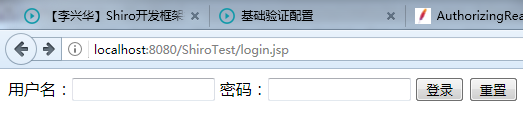
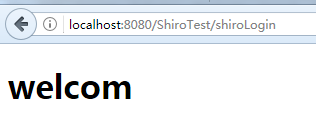
web项目整合Shiro框架的更多相关文章
- 【SSM】Eclipse使用Maven创建Web项目+整合SSM框架
自己接触ssm框架有一段时间了,从最早的接触新版ITOO项目的(SSM/H+Dobbu zk),再到自己近期来学习到的<淘淘商城>一个ssm框架的电商项目.用过,但是还真的没有自己搭建过, ...
- Eclipse使用Maven创建Web项目+整合SSM框架
一.准备环境: maven:apache-maven-3.2.3 jdk:jdk1.8.0_25 tomcat:tomcat-9.0 二.配置Maven.jdk 1.Window——>Prefe ...
- (转) shiro权限框架详解06-shiro与web项目整合(上)
http://blog.csdn.net/facekbook/article/details/54947730 shiro和web项目整合,实现类似真实项目的应用 本文中使用的项目架构是springM ...
- (转)shiro权限框架详解06-shiro与web项目整合(下)
http://blog.csdn.net/facekbook/article/details/54962975 shiro和web项目整合,实现类似真实项目的应用 web项目中认证 web项目中授权 ...
- spring整合shiro框架
上一篇文章已经对shiro框架做了一定的介绍,这篇文章讲述使用spring整合shiro框架,实现用户认证已经权限控制 1.搭建环境 这里不在赘述spring环境的搭建,可以简单的搭建一个ssm框架, ...
- Maven项目整合SSH框架
---------------------siwuxie095 Maven 项目整合 SSH 框架 创建 ...
- Maven项目整合Struts2框架
-------------------------siwuxie095 Maven 项目整合 Struts2 框架 1. ...
- (十二)整合 Shiro 框架,实现用户权限管理
整合 Shiro 框架,实现用户权限管理 1.Shiro简介 1.1 基础概念 1.2 核心角色 1.3 核心理念 2.SpringBoot整合Shiro 2.1 核心依赖 2.2 Shiro核心配置 ...
- Spring与Web项目整合的原理
引言: 在刚开始我们接触IOC时,我们加载并启用SpringIOC是通过如下代码手动加载 applicationContext.xml 文件,new出context对象,完成Bean的创建和属性的注入 ...
随机推荐
- U盘安装CentOS7笔记
准备工具: 8G左右U盘; 最新版UltraISO; CentOS7光盘镜像; CentOS7的镜像文件可以在网易的开源镜像站或者阿里云的开源镜像站下载,地址分别是:http://mirrors.16 ...
- CS224n(一)
个人博客地址: https://yifdu.github.io/2018/10/30/CS224n%E7%AC%94%E8%AE%B0%EF%BC%88%E4%B8%80%EF%BC%89/#more
- 一步一步学EF系列【5、升级篇 实体与数据库的映射】live writer真坑,第4次补发
前言 之前的几篇文章,被推荐到首页后,又被博客园下了,原因内容太少,那我要写多点呢,还是就按照这种频率进行写呢?本身我的意图这个系列就是想已最简单最容易理解的方式进行,每篇内容也不要太多,这样初学者容 ...
- JForum的运行环境
JForum的运行环境: 开始本文之前,我们确认一下JForum的运行环境. - Java动态运行环境(JRE) - 支持J2EE Servlet标准的任何一款Web服务器:Tomcat,JBoss, ...
- JPush相关概念
JPush相关概念 连接极光服务器前提 在连接极光服务器之前需要先将APP进行注册,连接Server时需要用到下发的两个字段:AppKey:应用唯一标识.Master Secret:服务器秘钥,用于服 ...
- Java HashMap详细介绍和使用示例
①对HashMap的整体认识 HashMap是一个散列表,它存储的内容是键值对(key-value)映射. HashMap继承于AbstractMap,实现了Map.Cloneable.java.io ...
- Django 部署(Apache下)
前言: 因为需要在服务器下运行python脚本,所以需要搭建Django服务器.所以将自己的学习过程也记录下来,方便日后查阅. 本文环境如下: Ubuntu 16.04 python2.7 Apac ...
- SpringBoot入门学习(三)
基于第二讲,这一讲我们主要讲解包含以下内容 springBoot添加对freemarker的支持 使用@RestController处理ajax请求 使用@PathVariable注解获取url参数 ...
- 在vue项目中使用codemirror插件实现代码编辑器功能(代码高亮显示及自动提示
在vue项目中使用codemirror插件实现代码编辑器功能(代码高亮显示及自动提示) 1.使用npm安装依赖 npm install --save codemirror; 2.在页面中放入如下代码 ...
- ROS学习
随着机器人领域的快速发展和复杂化,代码的复用性和模块化的需求原来越强烈,而已有的开源机器人系统又不能很好的适应需求.2010年Willow Garage公司发布了开源机器人操作系统ROS(robot ...