
springMVC注解的参数传递
1、web.xml
 <?xml version="1.0" encoding="UTF-8"?>

 <web-app xmlns:xsi="http://www.w3.org/2001/XMLSchema-instance" xmlns="http://java.sun.com/xml/ns/javaee" xsi:schemaLocation="http://java.sun.com/xml/ns/javaee http://java.sun.com/xml/ns/javaee/web-app_2_5.xsd" id="WebApp_ID" version="2.5">

   <display-name>springmvc1</display-name>

   <filter>

     <filter-name>characterEncoding</filter-name>

     <filter-class>org.springframework.web.filter.CharacterEncodingFilter</filter-class>

     <init-param>

       <param-name>encoding</param-name>

       <param-value>UTF-8</param-value>

     </init-param>

   </filter>

   <filter-mapping>

     <filter-name>characterEncoding</filter-name>

     <url-pattern>/*</url-pattern>

   </filter-mapping>

   <servlet>

     <servlet-name>springmvc</servlet-name>

     <servlet-class>org.springframework.web.servlet.DispatcherServlet</servlet-class>

     <init-param>

       <param-name>contextConfigLocation</param-name>

       <param-value>classpath:springmvc.xml</param-value>

     </init-param>

   </servlet>

   <servlet-mapping>

     <servlet-name>springmvc</servlet-name>

     <url-pattern>*.do</url-pattern>

   </servlet-mapping>

   <welcome-file-list>

     <welcome-file>index.html</welcome-file>

     <welcome-file>index.htm</welcome-file>

     <welcome-file>index.jsp</welcome-file>

     <welcome-file>default.html</welcome-file>

     <welcome-file>default.htm</welcome-file>

     <welcome-file>default.jsp</welcome-file>

   </welcome-file-list>

 </web-app>
2、springmvc.xml
 <?xml version="1.0" encoding="UTF-8"?>

 <beans xmlns="http://www.springframework.org/schema/beans"

     xmlns:mvc="http://www.springframework.org/schema/mvc"

     xmlns:aop="http://www.springframework.org/schema/aop"

     xmlns:tx="http://www.springframework.org/schema/tx"

     xmlns:context="http://www.springframework.org/schema/context"

     xmlns:xsi="http://www.w3.org/2001/XMLSchema-instance"

     xsi:schemaLocation="http://www.springframework.org/schema/beans

                         http://www.springframework.org/schema/beans/spring-beans-3.2.xsd

                         http://www.springframework.org/schema/mvc

                         http://www.springframework.org/schema/mvc/spring-mvc-3.2.xsd

                         http://www.springframework.org/schema/context

                         http://www.springframework.org/schema/context/spring-context-3.2.xsd

                         http://www.springframework.org/schema/aop

                         http://www.springframework.org/schema/aop/spring-aop-3.2.xsd

                         http://www.springframework.org/schema/tx

                         http://www.springframework.org/schema/tx/spring-tx-3.2.xsd">

         <!-- 把Controller交给spring管理 -->

         <context:component-scan base-package="com.xiaostudy"/>

         <!-- 配置注解处理器映射器 功能:寻找执行类Controller -->

         <bean class="org.springframework.web.servlet.mvc.method.annotation.RequestMappingHandlerMapping"/>

         <!-- 配置注解处理器适配器 功能:调用controller方法,执行controller -->

         <bean class="org.springframework.web.servlet.mvc.method.annotation.RequestMappingHandlerAdapter"/>

         <!-- 配置sprigmvc视图解析器:解析逻辑试图

              后台返回逻辑试图:index

             视图解析器解析出真正物理视图:前缀+逻辑试图+后缀====/WEB-INF/index.jsp -->

         <bean class="org.springframework.web.servlet.view.InternalResourceViewResolver">

             <property name="prefix" value="/WEB-INF/"/>

             <property name="suffix" value=".jsp"/>

         </bean>

 </beans>
3、domain类
 package com.xiaostudy.domain;

 public class User {

     private int id;

     private String username;

     private String password;

     private int age;

     public int getId() {

         return id;

     }

     public void setId(int id) {

         this.id = id;

     }

     public String getUsername() {

         return username;

     }

     public void setUsername(String username) {

         this.username = username;

     }

     public String getPassword() {

         return password;

     }

     public void setPassword(String password) {

         this.password = password;

     }

     public int getAge() {

         return age;

     }

     public void setAge(int age) {

         this.age = age;

     }

     @Override

     public String toString() {

         return "User [id=" + id + ", username=" + username + ", password=" + password + ", age=" + age + "]";

     }

 }
4、封装domain类
 package com.xiaostudy.controller;

 import com.xiaostudy.domain.User;

 public class CustomUser {

     private User user;

     public User getUser() {

         return user;

     }

     public void setUser(User user) {

         this.user = user;

     }

     @Override

     public String toString() {

         return "CustomUser [user=" + user + "]";

     }

 }
5、注解类
 package com.xiaostudy.controller;

 import org.springframework.stereotype.Controller;

 import org.springframework.web.bind.annotation.RequestMapping;

 import org.springframework.web.bind.annotation.RequestMethod;

 import com.xiaostudy.domain.User;

 @Controller//<bean class="com.xiaostudy.controller.MyController"/>

 @RequestMapping(value="/myController")//访问该类的方法时,前面多这样一个路径

 public class MyController {

 //    @RequestMapping("hello")//http://localhost:8080/demo2/hello.do

 //    @RequestMapping("/hello")//http://localhost:8080/demo2/hello.do

 //    @RequestMapping(value="/hello.do")//http://localhost:8080/demo2/hello.do

 //    @RequestMapping(value="/hello.do",method=RequestMethod.GET)//http://localhost:8080/demo2/hello.do

 //    @RequestMapping(value="/hello.do",method= {RequestMethod.GET,RequestMethod.POST})//http://localhost:8080/demo2/hello.do

     public String print() {

         return "index";

     }

     @RequestMapping("hi")//http://localhost:8080/demo2/myController/hi.do

     public String hello() {

         return "index";

     }

     @RequestMapping("requestint")//http://localhost:8080/demo2/myController/requestint.do

     public String requestint(int id) {

         System.out.println(id);

         return "index";

     }

     @RequestMapping("requestint2")//http://localhost:8080/demo2/myController/requestint2.do

     public String requestint2(int id, int i) {

         System.out.println(id + "   " + i);

         return "index";

     }

     @RequestMapping("requestint3")//http://localhost:8080/demo2/myController/requestint3.do

     public String requestint3(User user) {

         System.out.println(user);

         return "index";

     }

     @RequestMapping("requestint4")//http://localhost:8080/demo2/myController/requestint4.do

     public String requestint4(CustomUser customUser) {

         System.out.println(customUser);

         return "index";

     }

     @RequestMapping("xiaostudy")//http://localhost:8080/demo2/myController/hi.do

     public String add() {

         return "xiaostudy";

     }

 }
6、填写表单数据的xiaostudy.jsp
 <%@ page language="java" contentType="text/html; charset=UTF-8" pageEncoding="UTF-8"%>

 <!DOCTYPE html PUBLIC "-//W3C//DTD HTML 4.01 Transitional//EN"

             "http://www.w3.org/TR/html4/loose.dtd">

 <html>

 <head>

     <meta http-equiv="Content-Type" content="text/html; charset=UTF-8">

     <title>springMVC_demo</title>

 </head>

 <body>

     <form action="${pageContext.request.contextPath }/myController/requestint.do">

         <fieldset>

             <legend>单独一个参数</legend>

             <input type="text" name="id" id="id"/>

             <input type="submit" value="提交">

         </fieldset>

     </form>

     <form action="${pageContext.request.contextPath }/myController/requestint2.do">

         <fieldset>

             <legend>两个参数</legend>

             <input type="text" name="i" id="i"/>

             <input type="text" name="id" id="id"/>

             <input type="submit" value="提交">

         </fieldset>

     </form>

     <form action="${pageContext.request.contextPath }/myController/requestint3.do">

         <fieldset>

             <legend>参数为一个对象</legend>

             <input type="text" name="id" id="id"/>

             <input type="text" name="username" id="username"/>

             <input type="password" name="password" id="password"/>

             <input type="text" name="age" id="age"/>

             <input type="submit" value="提交">

         </fieldset>

     </form>

     <form action="${pageContext.request.contextPath }/myController/requestint4.do">

         <fieldset>

             <legend>参数为一个封装对象</legend>

             <input type="text" name="user.id" id="id"/>

             <input type="text" name="user.username" id="username"/>

             <input type="password" name="user.password" id="password"/>

             <input type="text" name="user.age" id="age"/>

             <input type="submit" value="提交">

         </fieldset>

     </form>

 </body>

 </html>
7、跳转的index.jsp
 <%@ page language="java" contentType="text/html; charset=UTF-8" pageEncoding="UTF-8"%>

 <!DOCTYPE html PUBLIC "-//W3C//DTD HTML 4.01 Transitional//EN"

             "http://www.w3.org/TR/html4/loose.dtd">

 <html>

 <head>

     <meta http-equiv="Content-Type" content="text/html; charset=UTF-8">

     <title>springMVC_demo</title>

 </head>

 <body>

     xiaostudy

 </body>

 </html>
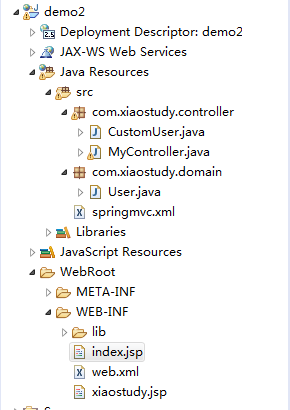
项目文件结构
springMVC注解的参数传递的更多相关文章
- springmvc注解和参数传递
一.SpringMVC注解入门 1. 创建web项目2. 在springmvc的配置文件中指定注解驱动,配置扫描器 <!-- mvc的注解驱动 --> <mvc:annotation ...
- springmvc入门基础之注解和参数传递
一.SpringMVC注解入门 1. 创建web项目2. 在springmvc的配置文件中指定注解驱动,配置扫描器 <!-- mvc的注解驱动 --> <mvc:annotation ...
- springMVC 注解版
http://blog.csdn.net/liuxiit/article/details/5756115 http://blog.csdn.net/hantiannan/article/categor ...
- springMVC注解初步
一.(补充)视图解析器---XmlViewResolver 作用:分离配置信息. 在视图解析器---BeanNameViewResolver的基础之上进行扩充,新建一个myView.xml分离信息 在 ...
- SpringMVC注解开发初步
一.(补充)视图解析器---XmlViewResolver 作用:分离配置信息. 在视图解析器---BeanNameViewResolver的基础之上进行扩充,新建一个myView.xml分离信息 在 ...
- SpringMVC注解汇总(二)-请求映射规则
接上一节SpringMVC注解汇总-定义 讲到Httpy请求信息 URL路径映射 1)普通URL路径映射 @RequestMapping(value={"/test1", &quo ...
- springMVC注解启用及优化
使用注解的原因 最方便的还是启用注解 注解方便,而且项目中很流行. 配置文件尽量减少,主要使用注解方式. Springmvc的注解是在2.5版本后有了注解,如何开启注解配置文件 Web.xml文件中不 ...
- 6.SpringMVC注解启用
SpringMVC注解可以帮助我们快速地注入 属性和参数 提高开发效率. 由于 有相当一部分人讨厌xml配置方式 注解可以覆盖 xml则不能 使用注解比xml规范化,因为很多注解都是java的规范的范 ...
- springMVC(注解版笔记)
springMVC(注解版) 较之于非注解版本,发生一下变化: 1.配置文件需要配置的标签有: <!-- 包的扫描,此包下面的所有包都启用注解 --> <context:compon ...
随机推荐
- crontab下设置ntpdate的问题
1.在crontab里设置了ntpdate 同步时间,一段时间发现没有起作用 原来的写法是 20 00 × × × ntpdate cn.pool.ntp.org 单独拿出来执行也是没问题的,最近好好 ...
- 剑指Offer——数组中只出现一次的数字
题目描述: 一个整型数组里除了两个数字之外,其他的数字都出现了两次.请写程序找出这两个只出现一次的数字. 分析: 数组中一共有偶数个数.两个数字只出现过一次. 相同数异或在一起等于0,那么将所有数异或 ...
- Period---hdu1358(循环节 kmp)
题目链接:http://acm.hdu.edu.cn/showproblem.php?pid=1358 题意 :求给你个串,前i位子串由某个字符串重复k次得到,求所有的i和k(k>1); 例如: ...
- 禁止Centos系统You have new mail in /var/spool/mail/root提示
禁止Centos系统You have new mail in /var/spool/mail/root提示 https://blog.csdn.net/oyym_mv/article/details/ ...
- python学习笔记(二十三)私有方法和私有属性
在Class内部,可以有属性和方法,而外部代码可以通过直接调用实例变量的方法来操作数据,这样,就隐藏了内部的复杂逻辑. 但是,从前面Person类的定义来看,外部代码还是可以自由地修改一个实例的nam ...
- TensorFlow学习笔记(三)-- feed_dict 使用
个人理解:就是TF的一种输入语法. 跟C语言的scanf(),C++的 cin>> 意思差不多,只是长相奇怪了点而已. 做完下面几个例子,基本也就适应了. 首先占位符申请空间:使用的时候, ...
- #运算符、不同的指针类型、数组和指针、指针运算、堆、栈、静态区、只读区、下标VS指针
#运算符:用于在预编译期将宏参数转换为字符串 #define CONVERS(x) #x //注:没用双引号包括. 不同类型的指针占用的内存空间大小相同. 局部变量 定义: a[5]; 打印a[ ...
- 数据结构-平衡二叉树 旋转过程平衡因子分析 c和java代码实现对比
平衡二叉搜索树(Self-balancing binary search tree)又被称为AVL树(有别于AVL算法),且具有以下性质:它是一 棵空树或它的左右两个子树的高度差的绝对值不超过1,并且 ...
- 【JXL】导出Excel
基本设置 // File file = new File("d:\\writetest.xlsx");// WritableWorkbook wwb = Workbook.crea ...
- 2016-2017 ACM-ICPC Southwestern European Regional Programming Contest (SWERC 2016) B - Bribing Eve
地址:http://codeforces.com/gym/101174/attachments 题目:pdf,略 思路: 把每个人的(x1,x2)抽象成点(xi,yi). 当1号比i号排名高时有==& ...