
Spring学习(三)——集成 Velocity
上篇文章http://www.cnblogs.com/wenjingu/p/3822989.html我们使用Gradle构建了一个简单的Spring MVC Web应用程序,
本篇将在上篇的基础上将jsp页面改为velocity模板,并集成到Spring MVC框架中。使用Velocity开发视图的好处是在团队开发中,将
java代码从web页面中分离出来,使得页面开发人员和业务逻辑开发人员的工作解耦,更有利于团队分工合作和web站点的长期维护。
1、修改gradle文件,增加依赖包,代码如下:
apply plugin: 'idea'

apply plugin: 'java'

repositories {

    mavenCentral()

    maven { url "http://repo.spring.io/release" }

}

dependencies {

    compile(

            "org.springframework:spring-context:4.0.5.RELEASE",

            "org.springframework:spring-web:4.0.5.RELEASE",

            "org.springframework:spring-webmvc:4.0.5.RELEASE",

            "org.springframework:spring-context-support:4.0.5.RELEASE",

            "org.apache.velocity:velocity:1.7",

            "org.apache.velocity:velocity-tools:2.0",

            "org.anarres.gradle:gradle-velocity-plugin:1.0.0"

    )

    testCompile("org.springframework:spring-test:4.0.5.RELEASE")

    runtime("jstl:jstl:1.2")

}

task copyJars(type: Copy) {

    from configurations.runtime

    into 'lib' // 目标位置

}
运行命令:gradle copyJars。
2、修改spring-web-servlet.xml配置文件,完整代码如下:
<?xml version="1.0" encoding="UTF-8"?>

<beans xmlns="http://www.springframework.org/schema/beans"

       xmlns:xsi="http://www.w3.org/2001/XMLSchema-instance"

       xmlns:context="http://www.springframework.org/schema/context"

       xsi:schemaLocation="http://www.springframework.org/schema/beans

       http://www.springframework.org/schema/beans/spring-beans-4.0.xsd

       http://www.springframework.org/schema/context

       http://www.springframework.org/schema/context/spring-context-4.0.xsd">

    <context:component-scan base-package="controller"/>

    <bean id="velocityConfig" class="org.springframework.web.servlet.view.velocity.VelocityConfigurer">

        <property name="resourceLoaderPath" value="/WEB-INF/vm"/>

        <property name= "velocityProperties">

            <props>

                <prop key= "input.encoding">utf-8</prop>

                <prop key= "output.encoding">utf-8</prop>

            </props>

        </property>

    </bean>

    <bean id="viewResolver" class="org.springframework.web.servlet.view.velocity.VelocityViewResolver">

        <!--<property name="prefix" value="/WEB-INF/vm/"/>-->

        <property name="suffix" value=".vm"/>

        <property name="contentType" value="text/html;charset=utf-8"></property> <!-- 设置编码格式 -->

    </bean>

    <!-- 扫描web包,应用Spring的注解 -->

    <!--<context:component-scan base-package="controller"/>-->

    <!--<bean id="viewResolver" class="org.springframework.web.servlet.view.InternalResourceViewResolver">-->

    <!--<property name="prefix" value="/WEB-INF/view/"/>-->

    <!--<property name="suffix" value=".jsp"/>-->

    <!--</bean>-->

</beans>
LoginController代码不变。
并在WEB-INF目录下新建目录vm,将所有的Velocity文件放在该目录下。
3、新建login.vm文件,代码如下:
<html>

<head>

    <title>登录VelocityDemo</title>

</head>

<body>

<form action="/loginCheck.html" method="post">

    用户名:

    <input type="text" name="userName">

    <br>

    密 码:

    <input type="password" name="password">

    <br>

    <input type="submit" value="登录"/>

</form>

    #foreach ($error in $errors)

    <br>$error

    #end

</body>

</html>
上述页面的中文显示有乱码。
4、velocity中文乱码解决方案
在spring-web-servlet.xml配置文件中的添加如下代码:
<property name= "velocityProperties">

           <props>

               <prop key= "input.encoding">utf-8</prop>

               <prop key= "output.encoding">utf-8</prop>

           </props>

 </property>

 <property name="contentType" value="text/html;charset=utf-8"></property> <!-- 设置编码格式 -->
5、测试结果
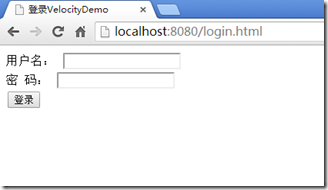
Demo源码下载:VelocityDemo2.0.zip ,lib中的jar包上传时删除了,运行前请先运行命令:gradle copyJars下载jar包。
Spring学习(三)——集成 Velocity的更多相关文章
- Spring学习(三)--高级装配
一.Spring profile 在开发软件的时候,有一个很大的挑战就是将应用程序从一个环境迁 移到另外一个环境.开发阶段中,某些环境相关做法可能并不适合迁 移到生产环境中,甚至即便迁移过去也无法正常 ...
- spring学习(三) ———— spring事务操作
前面一篇博文讲解了什么是AOP.学会了写AOP的实现,但是并没有实际运用起来,这一篇博文就算是对AOP技术应用的进阶把,重点是事务的处理. --wh 一.jdbcTemplate 什么是JdbcTem ...
- Spring学习三
Spring注解来注入bean 在classpath中扫描组件 组件扫描,即componetscanning 利用注解来扫描的组件有 @Component :基本注解,表示一个受Spring管理的 ...
- spring boot(三) 集成mybatis
前言 还记得之前我们写接口也是基于SpringMVC+MyBatis环境下,项目入手就需要N个配置文件,N个步骤才能实现,不但繁琐,而且时间长了xml配置文件太多,难以维护.现在基于spring bo ...
- spring学习 三 框架的搭建
1 导入jar包 spring启来最少要5个包,四个核心包和一个依赖的日志包 2 创建配置文件 在dynamic web project下的src目录下,创建一个spring的xml配置文件,名称可以 ...
- Spring学习(三)-----Spring自动装配Beans
在Spring框架,可以用 auto-wiring 功能会自动装配Bean.要启用它,只需要在 <bean>定义“autowire”属性. <bean id="custom ...
- Spring学习三----------注入方式
© 版权声明:本文为博主原创文章,转载请注明出处 Spring注入方式 本篇博客只讲最常用的两种注入方式:设值注入和构造器注入.代码为完整代码,复制即可使用. 1.目录结构 2.pom.xml < ...
- Spring学习(三)
DI (Dependency Injection) 1.依赖注入,组件之间的依赖关系由容器在运行期间决定.Ioc容器注入应用程序某个对象,它所需要的外部资源(包括对象,资源,常量数据). birthd ...
- spring学习三:Spring Bean 生命周期
Bean 的生命周期 理解 Spring bean 的生命周期很容易.当一个 bean 被实例化时,它可能需要执行一些初始化使它转换成可用状态.同样,当 bean 不再需要,并且从容器中移除时,可能需 ...
- spring学习三:Spring的Aop、代理
ref:https://mp.weixin.qq.com/s/J77asUvw8FcnF-6YlX6AAw AOP相关术语: Joinpoint(连接点):类里面可以被增强的方法,这些方法称为连 ...
随机推荐
- Spring实战之处理自动装配的歧义性
仅有一个bean匹配所需的结果时,自动装配才是有效的.如果不仅有一个bean能够匹配结果的话,这种歧义性会阻碍Spring自动装配属性.构造器参数或方法参数.为了阐述自动装配的歧义性,假设我们使用@A ...
- vue图片、背景图片路径问题
vue图片.背景图片路径问题 vue中引入图片经常会出现路径问题,在此记录一下: 1.组件中 <img> 引用图片 <img src="../assets/img/logo ...
- 「小程序JAVA实战」小程序导航组件(26)
转自:https://idig8.com/2018/08/19/xiaochengxujavashizhanxiaochengxudaohangzujian26/ 来说下 ,小程序的导航组件.源码:h ...
- Bresenham画线算法
[Bresenham画线算法] Bresenham是一种光栅化算法.不仅可以用于画线,也可以用用画圆及其它曲线. 通过lower与upper的差,可以知道哪一个点更接近线段: 参考:<计算机图形 ...
- gvim
[gvim] 1.gvim的配置文件在安装目录下,文件名为_vimrc. 2.通过以下命令选择配色方案:
- listener does not currently know of SID given in connect descriptor
一次连接数据库怎么也连接不上,查了多方面资料,终于找到答案,总结 首先应该保证数据库的服务启动 在myeclipse的数据库视图中点 右键->new 弹出database driver的窗口, ...
- VUE+WebPack游戏设计:'乘法防线'游戏设计
- 快速上手Runtime(一)之消息机制
Runtime简介 Runtime简称运行时.OC就是运行时机制,也就是在运行时候的一些机制,其中最主要的是消息机制. 对于C语言,函数的调用在编译的时候会决定调用哪个函数. 对于OC的函数,属于动态 ...
- Opencv Harris角点检测
#include <iostream>#include <opencv2/opencv.hpp> using namespace std;using namespace cv; ...
- 297. Serialize and Deserialize Binary Tree二叉树的序列化和反序列化(就用Q)
[抄题]: Serialization is the process of converting a data structure or object into a sequence of bits ...