
maven项目创6 表现层整合
springmvc.xm创建l 和 web.xml配置 ,报错先不管
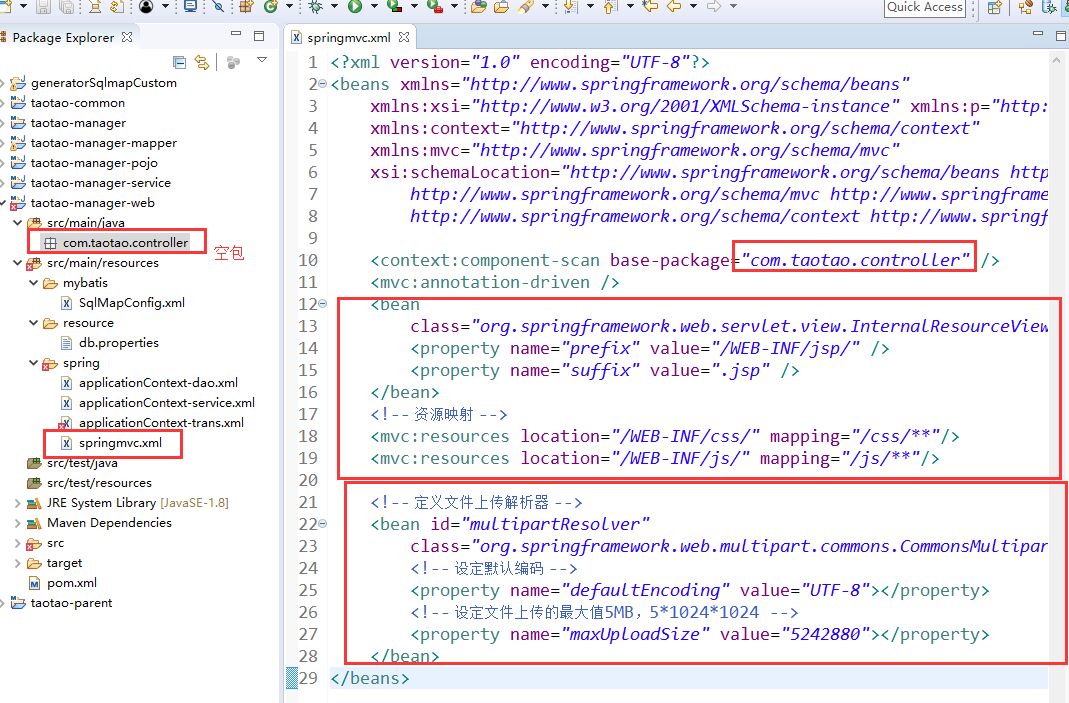
springmvc.xml
com.taotao.controller 空包
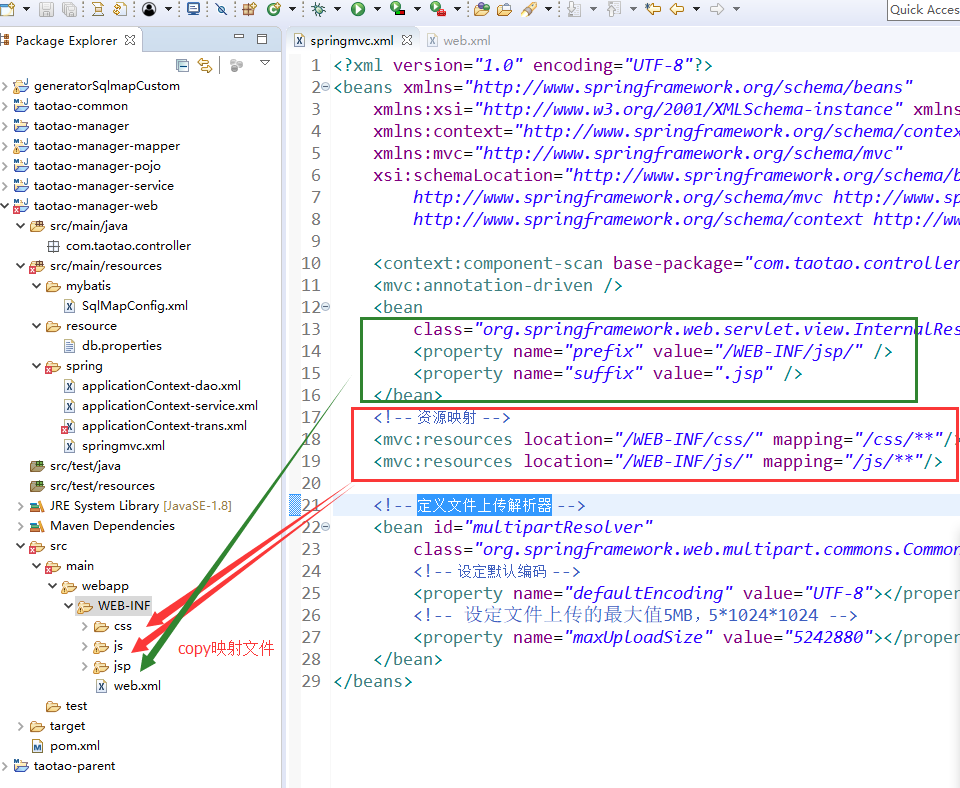
其中 资源映射 是等 web.xml 配置好了再添加的,见尾图
定义文件上传解析器 看应用而配置,不一定要有
<?xml version="1.0" encoding="UTF-8"?>

<beans xmlns="http://www.springframework.org/schema/beans"

    xmlns:xsi="http://www.w3.org/2001/XMLSchema-instance" xmlns:p="http://www.springframework.org/schema/p"

    xmlns:context="http://www.springframework.org/schema/context"

    xmlns:mvc="http://www.springframework.org/schema/mvc"

    xsi:schemaLocation="http://www.springframework.org/schema/beans http://www.springframework.org/schema/beans/spring-beans.xsd

        http://www.springframework.org/schema/mvc http://www.springframework.org/schema/mvc/spring-mvc-4.0.xsd

        http://www.springframework.org/schema/context http://www.springframework.org/schema/context/spring-context.xsd">

    <context:component-scan base-package="com.taotao.controller" />

    <mvc:annotation-driven />

    <bean

        class="org.springframework.web.servlet.view.InternalResourceViewResolver">

        <property name="prefix" value="/WEB-INF/jsp/" />

        <property name="suffix" value=".jsp" />

    </bean>

    <!-- 资源映射 -->

    <mvc:resources location="/WEB-INF/css/" mapping="/css/**"/>

    <mvc:resources location="/WEB-INF/js/" mapping="/js/**"/>

    <!-- 定义文件上传解析器 -->

    <bean id="multipartResolver"

        class="org.springframework.web.multipart.commons.CommonsMultipartResolver">

        <!-- 设定默认编码 -->

        <property name="defaultEncoding" value="UTF-8"></property>

        <!-- 设定文件上传的最大值5MB,5*1024*1024 -->

        <property name="maxUploadSize" value="5242880"></property>

    </bean>

</beans>
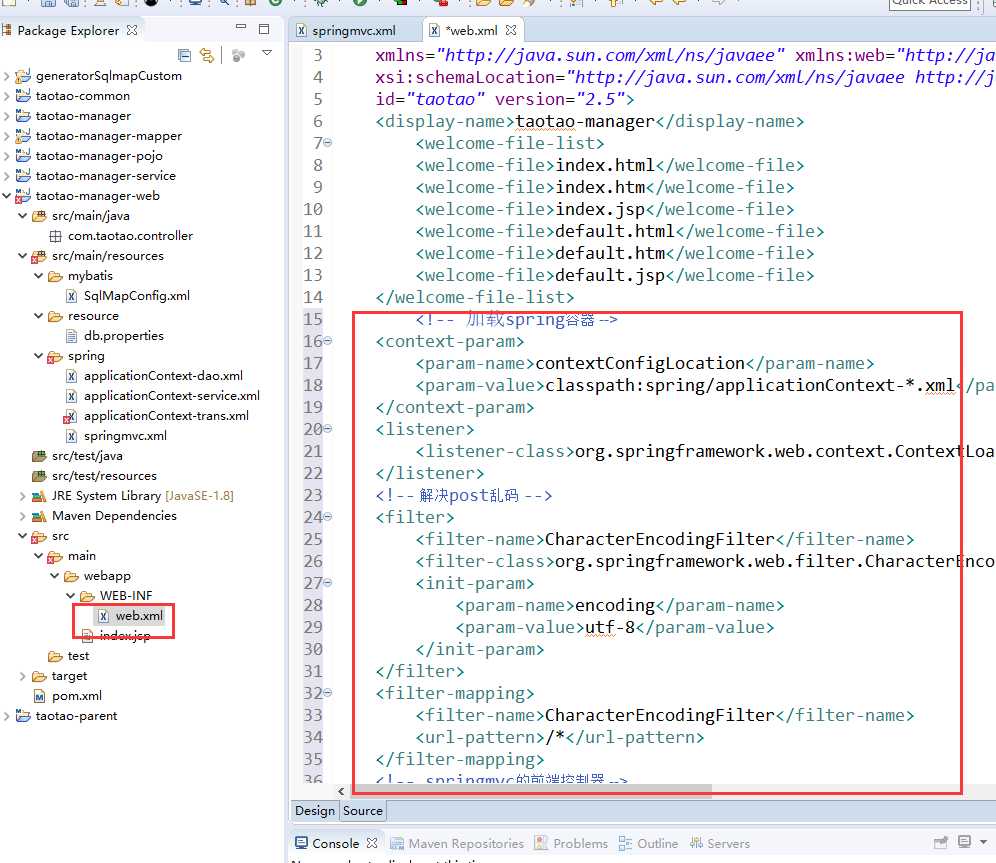
web.xml 配置
<!-- 加载spring容器 -->

    <context-param>

        <param-name>contextConfigLocation</param-name>

        <param-value>classpath:spring/applicationContext-*.xml</param-value>

    </context-param>

    <listener>

        <listener-class>org.springframework.web.context.ContextLoaderListener</listener-class>

    </listener>

    <!-- 解决post乱码 -->

    <filter>

        <filter-name>CharacterEncodingFilter</filter-name>

        <filter-class>org.springframework.web.filter.CharacterEncodingFilter</filter-class>

        <init-param>

            <param-name>encoding</param-name>

            <param-value>utf-8</param-value>

        </init-param>

    </filter>

    <filter-mapping>

        <filter-name>CharacterEncodingFilter</filter-name>

        <url-pattern>/*</url-pattern>

    </filter-mapping>

    <!-- springmvc的前端控制器 -->

    <servlet>

        <servlet-name>taotao-manager</servlet-name>

        <servlet-class>org.springframework.web.servlet.DispatcherServlet</servlet-class>

        <!-- contextConfigLocation不是必须的, 如果不配置contextConfigLocation, springmvc的配置文件默认在:WEB-INF/servlet的name+"-servlet.xml" -->

        <init-param>

            <param-name>contextConfigLocation</param-name>

            <param-value>classpath:spring/springmvc.xml</param-value>

        </init-param>

        <load-on-startup>1</load-on-startup>

    </servlet>

    <servlet-mapping>

        <servlet-name>taotao-manager</servlet-name>
<!-- 拦截所有请求 -->
        <url-pattern>/</url-pattern>

    </servlet-mapping>

会拦截所有请求包括静态资源,需要在springmvc.xml中添加静态资源映射
maven项目创6 表现层整合的更多相关文章
- maven项目创建4 dao层整合
项目配置文件要放在打包成war包的web项目中 创建文件步骤 1 SqlMapConfig.xml <?xml version="1.0" encoding=" ...
- maven项目创建5 service层整合
创建service相关文件 创建applicationContext-service.xml文件 <?xml version="1.0" encoding="UTF ...
- (转)淘淘商城系列——SSM框架整合之表现层整合
http://blog.csdn.net/yerenyuan_pku/article/details/72721120 上文我们一起学习了Service层的整合,本文将教大家如何整合表现层. 我们在t ...
- maven项目创7 配置分页插件
页面编写顺序 首先确定是否拥有想要的pojo(对象实体类)———>dao层mybatis配置——>service层的接口及实现类——>controller(web下) 分页插件作 ...
- maven项目快速搭建SSM框架(一)创建maven项目,SSM框架整合,Spring+Springmvc+Mybatis
首先了解服务器开发的三层架构,分配相应的任务,这样就能明确目标,根据相应的需求去编写相应的操作. 服务器开发,大致分为三层,分别是: 表现层 业务层 持久层 我们用到的框架分别是Spring+Spri ...
- ssm框架整合+maven项目创建
在引入外部maven插件后就可以创建一个maven项目了,这篇文章主要介绍ssm框架的整合和如何创建一个maven项目 1.在开发工具的项目空白区单击右键,依次选择New.Other,会出现如下界面, ...
- eclipse 创建maven 项目 动态web工程完整示例 maven 整合springmvc整合mybatis
接上一篇: eclipse 创建maven 项目 动态web工程完整示例 eclipse maven工程自动添加依赖设置 maven工程可以在线搜索依赖的jar包,还是非常方便的 但是有的时候可能还需 ...
- Maven项目中Spring整合Mybatis
Maven项目中Spring整合Mybatis 添加jar包依赖 spring需要的jar包依赖 <dependency> <groupId>org.springframewo ...
- maven项目ssh框架的整合
1.环境 eclipse版本:Eclipse Mars2 4.5jdk版本:1.8maven版本:apache-maven 3.3.9zhnegs这是主要的开发工具版本,ssh的各种jar包版本就不列 ...
随机推荐
- AIX弱口令解密
1.看下我们的AIX弱口令如果是图中的这种那么我们就可以通过以下脚本来完成转换 2.打开kali给脚本丢进去自动生成下图这种格式,转换完成后保存通过john --w来跑. 脚本文件:保存为.bash ...
- 最短meeting路线(树的直径)--牛客第四场(meeting)
题意: 给你一棵树,树上有些点是有人的,问你选一个点,最短的(最远的那个人的距离)是多少. 思路: 其实就是树的直径,两遍dfs,dfs第二遍的时候遇到人就更新直径就行了,ans是/2,奇数的话+1. ...
- mongodb 数据操作(2)
查询 db.student.find({}) 查询db.student.find({name:"李强1"}) 查询 条件查询 db.student.find({sex:&quo ...
- 使用request+bs4爬取所有股票信息
爬取前戏 我们要知道利用selenium是非常无敌的,自我认为什么反爬不反爬都不在话下,但是今天我们为什么要用request+bs4爬取所有股票信息呢?因为他比较原始,因此今天的数据,爬取起来也是比较 ...
- 使用 vscode将本地项目上传到github、从github克隆项目以及删除github上的某个文件夹
安装Git后,可以看到windows环境下有两个命令输入窗口Git CMD 和Git Bash Git GUI是可视化图形界面 Git中的Bash是基于CMD的,在CMD的基础上增添一些新的命令与功能 ...
- server001
- java中内部类
package com.xt.instanceoftest; import com.xt.instanceoftest.Body.Heart; public class StaticInnerClas ...
- hadoop离线数据存储和挖掘架构
前序: 当你把你知道的东西,写下来,让人看明白是一种境界:当你能把自己写下来的东西给人讲明白,又是另一种境界.在这个过程中,我们都需要历练. 基于hadoop集群下海量离线数据存储和挖掘分析架构: 架 ...
- 本人亲测-inno setup打包EXE(较完整实例)
; Script generated by the Inno Setup Script Wizard.; SEE THE DOCUMENTATION FOR DETAILS ON CREATING I ...
- js的作用主要这么几个
js的作用主要有这么几个表单验证:网页上,用户输入的信息需要进行验证,在客户端验证,可以减少对服务器端的压力.所以,你应该把握正则表达式方面的知识.网页特效:页面上很多特效是非常好的,能产生很好的用户 ...