
用 Flask 来写个轻博客 (14) — M(V)C_实现项目首页的模板
Blog 项目源码:https://github.com/JmilkFan/JmilkFan-s-Blog
目录
前文列表
用 Flask 来写个轻博客 (1) — 创建项目
用 Flask 来写个轻博客 (2) — Hello World!
用 Flask 来写个轻博客 (3) — (M)VC_连接 MySQL 和 SQLAlchemy
用 Flask 来写个轻博客 (4) — (M)VC_创建数据模型和表
用 Flask 来写个轻博客 (5) — (M)VC_SQLAlchemy 的 CRUD 详解
用 Flask 来写个轻博客 (6) — (M)VC_models 的关系(one to many)
用 Flask 来写个轻博客 (7) — (M)VC_models 的关系(many to many)
用 Flask 来写个轻博客 (8) — (M)VC_Alembic 管理数据库结构的升级和降级
用 Flask 来写个轻博客 (9) — M(V)C_Jinja 语法基础快速概览
用 Flask 来写个轻博客 (10) — M(V)C_Jinja 常用过滤器与 Flask 特殊变量及方法
用 Flask 来写个轻博客 (11) — M(V)C_创建视图函数
用 Flask 来写个轻博客 (12) — M(V)C_编写和继承 Jinja 模板
用 Flask 来写个轻博客 (13) — M(V)C_WTForms 服务端表单检验
实现所需要的视图函数
- 在开始实现首页模板之前, 我们为了调试和显示的方便, 首先伪造一些假数据:
- fake_data.py
import random

import datetime

from uuid import uuid4

from models import db, User, Tag, Post

user = User(id=str(uuid4()), username='jmilkfan', password='fanguiju')

db.session.add(user)

db.session.commit()

user = db.session.query(User).first()

tag_one = Tag(id=str(uuid4()), name='Python')

tag_two = Tag(id=str(uuid4()), name='Flask')

tag_three = Tag(id=str(uuid4()), name='SQLALchemy')

tag_four = Tag(id=str(uuid4()), name='JMilkFan')

tag_list = [tag_one, tag_two, tag_three, tag_four]

s = "EXAMPLE TEXT"

for i in xrange(100):

    new_post = Post(id=str(uuid4()), title="Post" + str(i))

    new_post.user = user

    new_post.publish_date = datetime.datetime.now()

    new_post.text = s

    new_post.tags = random.sample(tag_list, random.randint(1, 3))

    db.session.add(new_post)

db.session.commit()
直接在 manager shell 中导入就能够执行该脚本文件:
>>> import fake_datahome.html 的视图函数之前博文中就已经记录过了,现在再将必须的视图函数代码贴出。
- views.py
from flask import render_template

from sqlalchemy import func

from main import app

from models import db, User, Post, Tag, Comment, posts_tags

def sidebar_data():

    """Set the sidebar function."""

    # Get post of recent

    recent = db.session.query(Post).order_by(

            Post.publish_date.desc()

        ).limit(5).all()

    # Get the tags and sort by count of posts.

    top_tags = db.session.query(

            Tag, func.count(posts_tags.c.post_id).label('total')

        ).join(

            posts_tags

        ).group_by(Tag).order_by('total DESC').limit(5).all()

    return recent, top_tags

@app.route('/')

@app.route('/<int:page>')

def home(page=1):

    """View function for home page"""

    posts = Post.query.order_by(

        Post.publish_date.desc()

    ).paginate(page, 10)

    recent, top_tags = sidebar_data()

    return render_template('home.html',

                           posts=posts,

                           recent=recent,

                           top_tags=top_tags)

@app.route('/post/<string:post_id>')

def post(post_id):

    """View function for post page"""

    post = Post.query.get_or_404(post_id)

    tags = post.tags

    comments = post.comments.order_by(Comment.date.desc()).all()

    recent, top_tags = sidebar_data()

    return render_template('post.html',

                           post=post,

                           tags=tags,

                           comments=comments,

                           recent=recent,

                           top_tags=top_tags)

@app.route('/tag/<string:tag_name>')

def tag(tag_name):

    """View function for tag page"""

    # Tag.qurey() 对象才有 first_or_404(),而 db.session.query(Model) 是没有的

    tag = Tag.query.filter_by(name=tag_name).first_or_404()

    posts = tag.posts.order_by(Post.publish_date.desc()).all()

    recent, top_tags = sidebar_data()

    return render_template('tag.html',

                           tag=tag,

                           posts=posts,

                           recent=recent,

                           top_tags=top_tags)
实现 home.html 模板
- templates/home.html
<!-- Replace the TITLE of template base.html -->

{% extends "base.html"%}

{% block title %}JmilkFan's Blog{% endblock %}

<!-- Replace the BODY of template base.html -->

{% block body %}

<!-- The data object from view function: `home()` -->

<div class="row">

  <div class="col-lg-9">

    <!-- Get Pagination object-->

    {% for post in posts.items %}

    <div class="row">

      <div class="col-lg-12">

        <h1>{{ post.title }}</h1>

      </div>

    </div>

    <div class="row">

      <div class="col-lg-12">

        {{ post.text | truncate(255) | safe }}

        <!-- Set the link for read more -->

        <a href="{{

          url_for('post', post_id=post.id)

          }}">Read More</a>

      </div>

    </div>

    {% endfor %}

  </div>

  <div class="col-lg-3">

    <div class="row">

      <h5>Recent Posts</h5>

      <ul>

        {% for post in recent %}

        <!-- Set the link for recent posts. -->

        <li><a href="{{

          url_for('post', post_id=post.id)

          }}">{{ post.title }}</a></li>

        {% endfor %}

      </ul>

    </div>

    <div class="row">

      <h5>Popular Tags</h5>

      <ul>

        {% for tag in top_tags %}

        <li><a href="{{

          url_for('tag', tag_name=tag[0].name)

          }}">{{ tag[0].name }}</a></li>

        {% endfor %}

      </ul>

    </div>

  </div>

  <!-- Call the Macro: `render_pagination` from base.html -->

  {{ render_pagination(posts, 'home') }}

</div>

{% endblock %}
代码分析
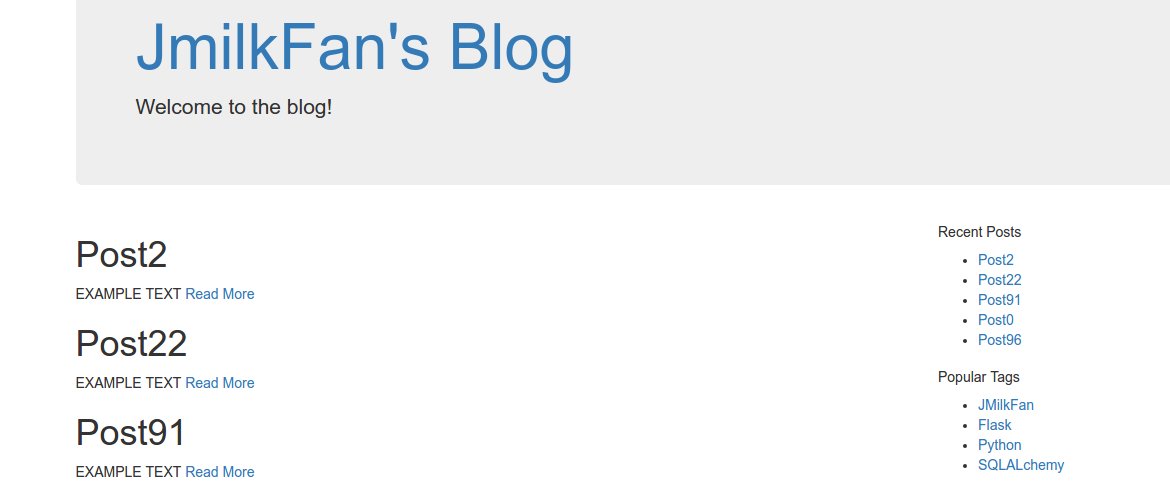
需求:我们希望当访问到域名 http://<ipaddress>:5000/,即访问博客的 / 时,能够正文处显示文章列表,右上侧边栏显示最新的 5 篇博文,右下侧边拦显示 关联博文数最多的 5 个标签,并且希望每一个页面的右侧边栏都是一致的。
按照这个需求,首先我们需要定义一个路由函数(在这里同时也是视图函数)
home()来跳转到首页,并且首页中具有分页的功能,所以会定义两个app.oute()装饰器。同时因为我们需要在右侧边栏显示最新的 5 篇博文和博文关联数最多的 5 个标签,所以需要提供
recent/recent数据对象,并且这些对象是高重用的,所以将其抽象成一个函数。我们还希望能够通过右侧边拦提供的链接跳转到具体的 post 或 tag 中,这就需要得到 posts/tags 表中的数据对象,所以会使用到视图函数
post()/tag()。
实现效果
- 再结合在前面博文中实现的分页链接宏

用 Flask 来写个轻博客 (14) — M(V)C_实现项目首页的模板的更多相关文章
- 用 Flask 来写个轻博客 (12) — M(V)C_编写和继承 Jinja 模板
Blog 项目源码:https://github.com/JmilkFan/JmilkFan-s-Blog 目录 目录 前文列表 扩展阅读 使用 Bootstrap 编写 Jinja 模板文件 继承一 ...
- 用 Flask 来写个轻博客 (15) — M(V)C_实现博文页面评论表单
目录 目录 前文列表 实现 post 视图函数 在 posthtml 中添加表单 效果 前文列表 用 Flask 来写个轻博客 (1) - 创建项目 用 Flask 来写个轻博客 (2) - Hell ...
- 用 Flask 来写个轻博客 (11) — M(V)C_创建视图函数
目录 目录 前文列表 视图函数 在 viewspy 文件中定义视图函数 定义右侧边栏的视图函数 为每一张数据表定义视图函数 前文列表 用 Flask 来写个轻博客 (1) - 创建项目 用 Flask ...
- 用 Flask 来写个轻博客 (13) — M(V)C_WTForms 服务端表单检验
目录 目录 前文列表 WTForms WTF 的基础使用 常用的字段类型 fieldsDateField fieldsIntegerField fieldsFloatField fieldsStrin ...
- 用 Flask 来写个轻博客 (10) — M(V)C_Jinja 常用过滤器与 Flask 特殊变量及方法
Blog 项目源码:https://github.com/JmilkFan/JmilkFan-s-Blog 目录 目录 前文列表 Jinja 中常用的过滤器 default float int len ...
- 用 Flask 来写个轻博客 (9) — M(V)C_Jinja 语法基础快速概览
#目录 前文列表 扩展阅读 Jinja 变量名 注释 控制语句 if 语句 循环 过滤器 无参数调用 带参数调用 宏 定义宏 调用宏 结果 兼容 JavaScript 前文列表 用 Flask 来写个 ...
- 用 Flask 来写个轻博客
用 Flask 来写个轻博客 用 Flask 来写个轻博客 (1) — 创建项目 用 Flask 来写个轻博客 (2) — Hello World! 用 Flask 来写个轻博客 (3) — (M)V ...
- 用 Flask 来写个轻博客 (37) — 在 Github 上为第一阶段的版本打 Tag
Blog 项目源码:https://github.com/JmilkFan/JmilkFan-s-Blog 目录 目录 前文列表 第一阶段结语 打 Tag 前文列表 用 Flask 来写个轻博客 (1 ...
- 用 Flask 来写个轻博客 (36) — 使用 Flask-RESTful 来构建 RESTful API 之五
目录 目录 前文列表 PUT 请求 DELETE 请求 测试 对一条已经存在的 posts 记录进行 update 操作 删除一条记录 前文列表 用 Flask 来写个轻博客 (1) - 创建项目 用 ...
随机推荐
- ReplicatorLayer 复制图层
使用文档介绍: #import <QuartzCore/CALayer.h> NS_ASSUME_NONNULL_BEGIN CA_CLASS_AVAILABLE (10.6, 3.0, ...
- git 忽略提交及已push过得文件忽略提交
在使用Git的过程中,我们喜欢有的文件比如日志,临时文件,编译的中间文件等不要提交到代码仓库,这时就要设置相应的忽略规则,来忽略这些文件的提交 Git 忽略文件提交的方法 这种方式通过在项目的某个文件 ...
- PAT 2019-3 7-1 Sexy Primes
Description: Sexy primes are pairs of primes of the form (p, p+6), so-named since "sex" is ...
- 2019牛客国庆集训派对day1(A, B E F K)
链接:https://ac.nowcoder.com/acm/contest/1099#question A:可知符合条件的图中间肯定存在一个由1构成的矩形,找到由1构成矩形的边界,判断出现的1的数量 ...
- 方法Join()
等待线程结束:jion() 谦让: yeild() 睡眠: sleep() jion和sleep和yeild之间有什么区别呢? 首先介绍一下jion(): 如果想让主线程等待子线程执行完毕之后再继续运 ...
- 转 LoadRunner错误处理函数
在脚本的Run-time Settings中,可以设置在脚本运行过程中发生错误的处理方式.进入到Run-time Settings中,切换到Miscellaneous标签页,可以看到Error Han ...
- IPython notebook在浏览器中显示不正常的问题及解决方法
使用过Python的童鞋们应该知道IPython是一个比python自带的交互式界面更加友好的交互界面,IPython提供了自动补齐什么的,其实我还没开始用所以这里也不扯淡了,大家自己去网上查,IPy ...
- 配置静态IP时候route没有设置的GATEWAY问题
今天在想把虚拟机里RHEL6.5设置成静态IP来着 在 /etc/sysconfig/betwork-scripts/ifcfg-eth0 文件中将"GATEWAY"拼写成了&qu ...
- console.log的另一种用法
// console.log用法 var foo, bar; console.log(`foo's type: ${foo}`, `bar's type: ${bar}`); 输出:
- windows下如何使用Git上传代码
首先,在使用Git的同时,我们需要拥有码云账号,在官网注册即可(官网:https://gitee.com/). 注册结束后创建一个代码仓库,最好和要上传的文件夹名字一样: 1.首先在电脑上安装wind ...