
UIautomatorviewer连接设备报错Unexpected error while obtaining UI hierarchy
先来看下现象哈,点击sdk/tools下uiautomatorviever.bat,点击连接设备的图标,本以为就这么简单,那你就错了:
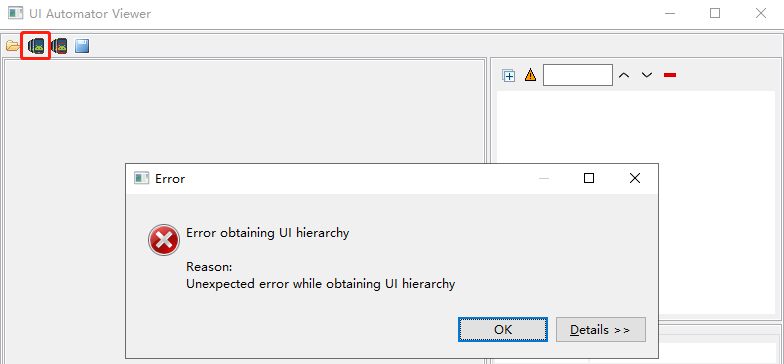
是不是看到这个瞬间心情就不好了,那么我们该怎么解决这个问题呢,归根结底还是要把界面元素属性找出来呀。。
耐心往下看,吧啦吧啦。。奉上解决方案:
1.在电脑随便某个盘创建两个文本文件
xx.uix,xx.png

2.执行以下命令(-s 设备名称)
adb -s XEGNW18828001115 shell uiautomator dump /sdcard/app.uix
adb -s XEGNW18828001115 pull /sdcard/app.uix D:/app.uix

adb -s XEGNW18828001115 shell screencap -p /sdcard/app.png
adb -s XEGNW18828001115 pull /sdcard/app.png D:/app.png

3.导入从设备上获取的截图和资源文件
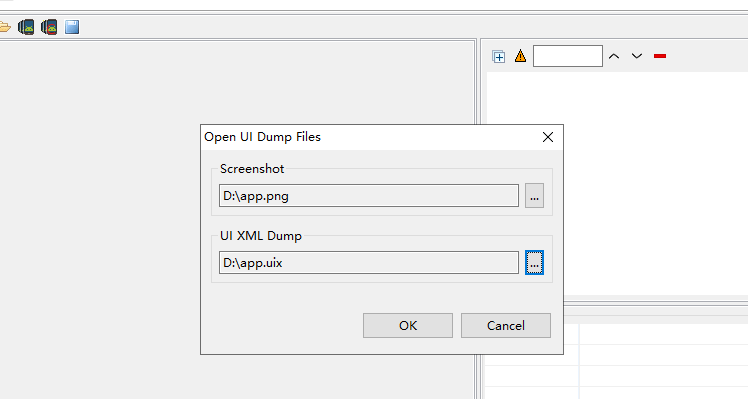
4.见证奇迹的时刻来了
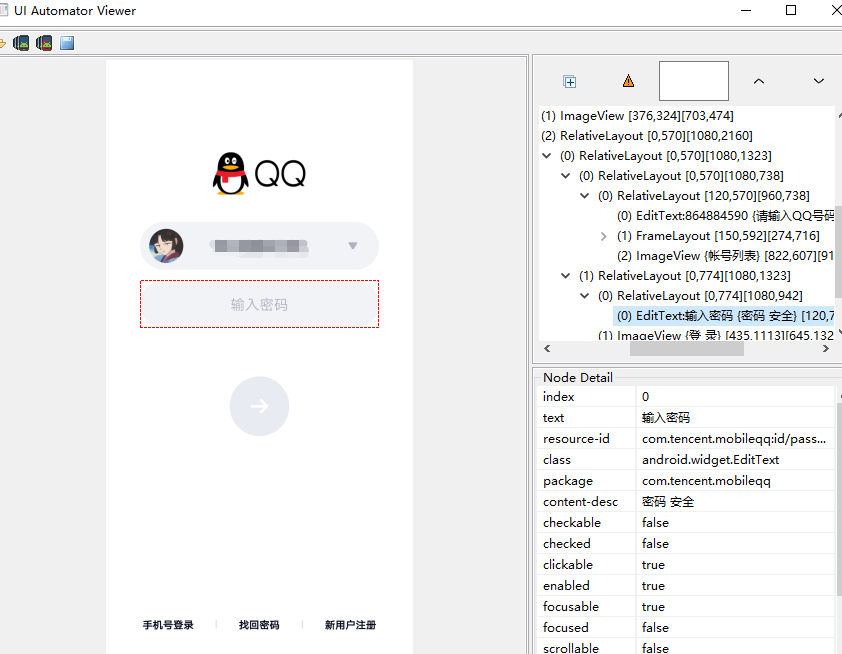
做一棵小草,谁也撼动不了………
UIautomatorviewer连接设备报错Unexpected error while obtaining UI hierarchy的更多相关文章
- android-tools下的uiautomatorviewer截图,提示“Unexpected error while obtaining UI hierarchy”
使用原来工具下的uiautomatorviewer对android 5.1.0的手机,进行截图,是正常的,切换到android10截图,就报错"Unexpected error while ...
- 【Mac+Android+uiautomatorviewer】之报错:Unexpected error while obtaining UI hierarchy java.lang.reflect.InvocationTargetException
安卓8.0以后uiautomatorviewer会报错,解决办法如下: 参考:<android 8.0 以后 uiautomator 无法直接使用的问题> 步骤一: 先执行命令:(注意:想 ...
- 【Uiautomatorviewer】报错:Unexpected error while obtaining UI hierarchy java.lang.reflect.InvocationT...
android 9.0系统不能用uiautomator识别 解决方法:android 8.0 以后 uiautomator 无法直接使用的问题https://www.cnblogs.com/copyw ...
- Android8 以上使用 UIautomator Viewer提示Unexpected error while obtaining UI hierarchy报错(方法二)
一:最常见的一个问题就是:Android8及以上的系统无法获取到页面,提示报下面的错误 二:解决办法 1.下载新的tools,在下面链接里找到SDK tools下载 http://www.androi ...
- uiautomator:Error while obtaining UI hierarchy XML file: com.android.ddmlib.SyncException: Remote object doesn't exist!
尝试用android sdk的uiautomatorviewer抓元素的时候报错:Error while obtaining UI hierarchy XML file: com.android.dd ...
- error while obtaining ui hierarchy xml file...用 uiautomatorviewer 获取安卓手机软件页面时报错
Error while obtaining UI hierarchy XML file: com.android.ddmlib.SyncException: Remote object doesn't ...
- uiautomatorviewer 报错 Error while obtaining UI hierarchy XML file: com.android.ddmlib.SyncException: Remote object doesn't exist!
在进行自动化时经常需要使用到 uiautomatorviewer获取控件的各个属性,然后在脚本中通过各个控件的属性来操作. 如果使用的是uiautomator2的话,一般都是使用weditor这个来查 ...
- 【Android】【问题解决记录】Error obtaining UI hierarchy :Error while obtaining UI hierarchy XML file: com.android.ddmlib.SyncException: Remote object doesn't exist!
在使用uiautomatorviewer时遇到两类Error obtaining UI hierarchy报错,分别是: Error while obtaining UI hierarchy XML ...
- Error while obtaining UI hierarchy XML file: com.android.ddmlib.SyncException: Remote object doesn't
在使用真机定位页面元素时启动uiautomatorviewer.bat ,报错Error while obtaining UI hierarchy XML file: com.android.ddml ...
随机推荐
- asp.core 同时兼容JWT身份验证和Cookies 身份验证两种模式
在实际使用中,可能会遇到,aspi接口验证和view页面的登录验证情况.asp.core 同样支持两种兼容. 首先在startup.cs 启用身份验证. var secrityKey = new Sy ...
- Struts2跟SpringMVC的区别
1. 拦截机制不同 Struts2是类级别的拦截,每次请求就会创建一个Action,和Spring整合时Struts2的ActionBean注入作用域是原型模式prototype,然后通过setter ...
- Ubuntu20.04 安装MongoDB及其基本使用
MongoDB 官方文档 本博客旨在自我学习使用,如有任何疑问请及时联系博主 基本介绍 MongoDB 是由C++语言编写并基于分布式文件存储的开源数据库. MongoDB 是一款介于关系数据库和非关 ...
- 第2章 selenium开发环境的搭建
前端技术: html:网页的基础,一种标记语言,显示数据: JS:前端脚本语言,解释型语言,在页面中添加交互行为 xml:扩展标记语言,用来传输和存储数据 css:层叠样式表,用来表现HTML或XML ...
- 使用VMware安装win10虚拟机
(1)打开VMware: (2)打开左上角的文件,点击新建虚拟机: (3)选择典型,下一步: (4)选择稍后安装操作系统,下一步: (5)选择win10×64,下一步: (6)可随意修改虚拟机名称,位 ...
- 面向对象—多态、鸭子类型(Day21)
编程原则java具有自己的编程原则和设计模式,不能多继承.python的编程原则:1.开放封闭原则:开放是对扩展是开放的,封闭是对修改是封闭的(已经写完的代码程序是不能修改的).2.依赖倒置原则:高层 ...
- Redis 中常见的集群部署方案
Redis 的高可用集群 前言 几种常用的集群方案 主从集群模式 全量同步 增量同步 哨兵机制 什么是哨兵机制 如何保证选主的准确性 如何选主 选举主节点的规则 哨兵进行主节点切换 切片集群 Redi ...
- Latex公式导出word,Latex转换MathML使用POI导出公式可编辑的Word文件
背景 之前在 使用spire.doc导出支持编辑Latex公式的标准格式word 博客中写过,使用spire.doc来生成word,不得不说spire.doc的api操作起来还是比较方便,但是使用的过 ...
- libc++abi.dylib: terminating with uncaught exception of type NSException
这是微信sdk注册时候报的错误 解决方法 选择Build Setting,在"Other Linker Flags"中加入"-Objc -all_load"
- nginx拒绝国外IP访问
nginx拒绝国外IP访问方法很多,比如iptables,geoip模块,域名解析等等.这些方法不会相互冲突,可以结合起来一起使用. 今天来教大家利用两个小方法解决 域名解析禁止掉海外IP访问网站. ...