
KingbaseES V8R6集群同步模式synchronous参数配置详解
如下图所示:

集群数据同步原理说明:
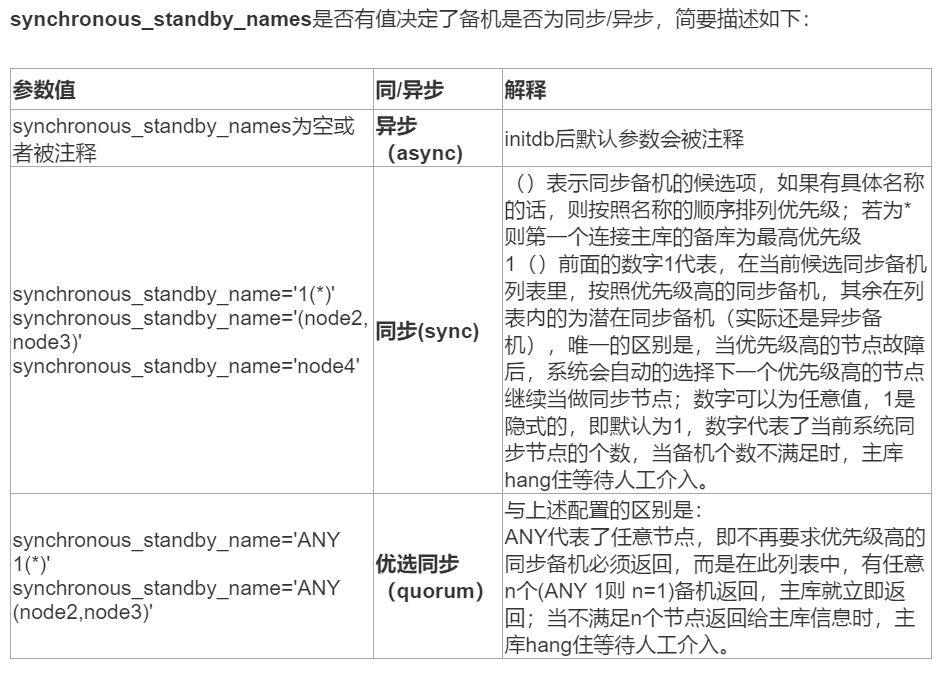
synchronous参数配置测试:
集群节点信息:
ID | Name    | Role    | Status    | Upstream | repmgrd | PID   | Paused? | Upstream last seen

----+---------+---------+-----------+----------+---------+-------+---------+--------------------

 1  | node101 | standby |   running | node102  | running | 7345  | no      | 1 second(s) ago

 2  | node102 | primary | * running |          | running | 13934 | no      | n/a
数据库版本:
test=# select version();

                                                       version

----------------------------------------------------------------------------------------------------------------------

 KingbaseES V008R006C005B0041 on x86_64-pc-linux-gnu, compiled by gcc (GCC) 4.1.2 20080704 (Red Hat 4.1.2-46), 64-bit

(1 row)
一、配置synchronous='sync'
1、配置synchronous参数
[kingbase@node102 bin]$ cat ../etc/repmgr.conf |grep sync

#synchronous='quorum'

synchronous='sync'
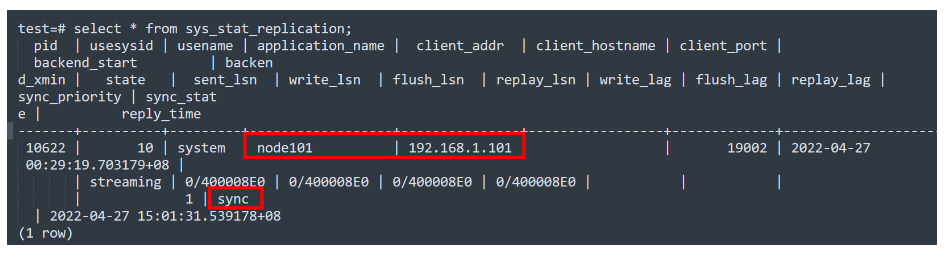
2、查看流复制同步状态
test=# select * from sys_stat_replication;

  pid  | usesysid | usename | application_name |  client_addr  | client_hostname | client_port |         backend_start         | backend_xmin |   state   |  sent_lsn  | write_lsn  | flush_lsn  | replay_lsn | write_lag | flush_lag | replay_lag | sync_priority | sync_state |          reply_time

-------+----------+---------+------------------+---------------+-----------------+-------------+-------------------------------+-------

 10622 |       10 | system  | node101          | 192.168.1.101 |                 |       19002 | 2022-04-27 00:29:19.703179+08 |       | streaming | 0/400008E0 | 0/400008E0 | 0/400008E0 | 0/400008E0 |           |           |            |             1 | sync  | 2022-04-27 15:01:31.539178+08

(1 row)
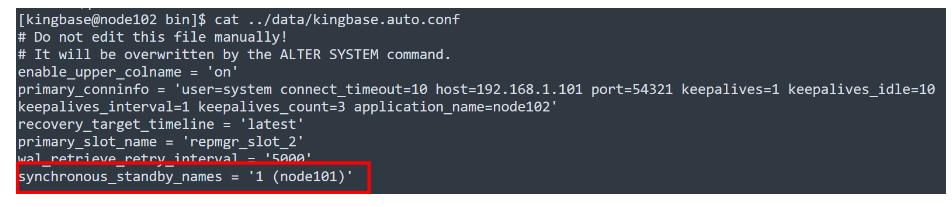
3、查看kingbase.auto.conf配置
[kingbase@node102 bin]$ cat ../data/kingbase.auto.conf

# Do not edit this file manually!

# It will be overwritten by the ALTER SYSTEM command.

enable_upper_colname = 'on'

primary_conninfo = 'user=system connect_timeout=10 host=192.168.1.101 port=54321 keepalives=1 keepalives_idle=10 keepalives_interval=1 keepalives_count=3 application_name=node102'

recovery_target_timeline = 'latest'

primary_slot_name = 'repmgr_slot_2'

wal_retrieve_retry_interval = '5000'

synchronous_standby_names = '1 (node101)'
二、配置synchronous='quorum'(默认)
1、配置synchronous参数
[kingbase@node102 bin]$ cat ../etc/repmgr.conf |grep sync

synchronous='quorum'

#synchronous='sync'

#synchronous='async'
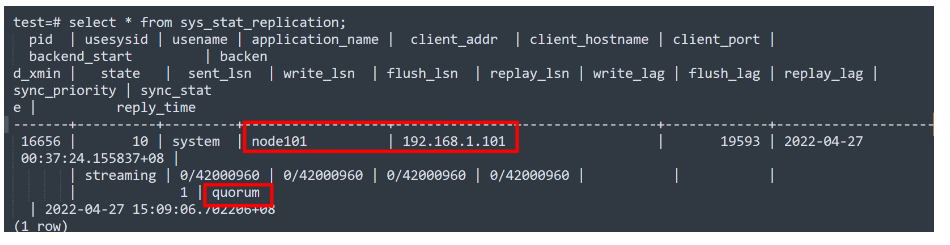
2、查看流复制同步状态
test=# select * from sys_stat_replication;

  pid  | usesysid | usename | application_name |  client_addr  | client_hostname | client_port |         backend_start         | backend_xmin |   state   |  sent_lsn  | write_lsn  | flush_lsn  | replay_lsn | write_lag | flush_lag | replay_lag | sync_priority | sync_state |          reply_time

-------+----------+---------+------------------+---------------+-----------------+-------------+-------------------------------+--------------+-----------+------------+------------+------------+------------+-----------+-----------+------------+---------------+------------+-------------------------------

 16656 |       10 | system  | node101          | 192.168.1.101 |                 |       19593 | 2022-04-27 00:37:24.155837+08 |       | streaming | 0/42000960 | 0/42000960 | 0/42000960 | 0/42000960 |           |           |            |             1 | quorum  | 2022-04-27 15:09:06.702206+08

(1 row)
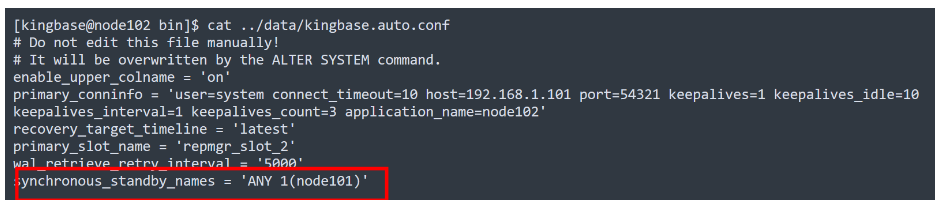
3、查看kingbase.auto.conf配置
[kingbase@node102 bin]$ cat ../data/kingbase.auto.conf

# Do not edit this file manually!

# It will be overwritten by the ALTER SYSTEM command.

enable_upper_colname = 'on'

primary_conninfo = 'user=system connect_timeout=10 host=192.168.1.101 port=54321 keepalives=1 keepalives_idle=10 keepalives_interval=1 keepalives_count=3 application_name=node102'

recovery_target_timeline = 'latest'

primary_slot_name = 'repmgr_slot_2'

wal_retrieve_retry_interval = '5000'

synchronous_standby_names = 'ANY 1(node101)'
三、配置synchronous='async'(默认)
1、配置synchronous参数
[kingbase@node102 bin]$ cat ../etc/repmgr.conf |grep sync

#synchronous='quorum'

#synchronous='sync'

synchronous='async'
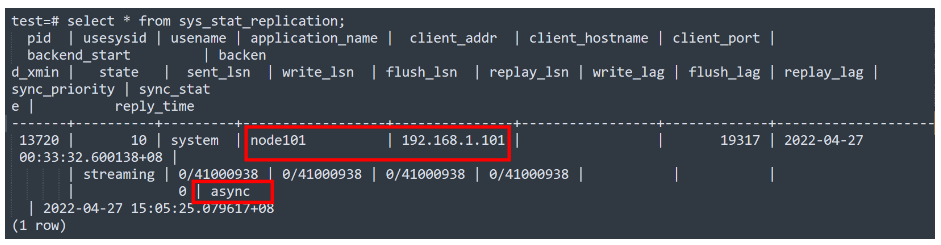
2、查看流复制同步状态
test=# select * from sys_stat_replication;

  pid  | usesysid | usename | application_name |  client_addr  | client_hostname | client_port |         backend_start         | backend_xmin |   state   |  sent_lsn  | write_lsn  | flush_lsn  | replay_lsn | write_lag | flush_lag | replay_lag | sync_priority | sync_state |          reply_time

-------+----------+---------+------------------+---------------+-----------------+-------------+-------------------------------+--------------+-----------+------------+------------+------------+------------+-----------+-----------+------------+---------------+------------+-------------------------------

 13720 |       10 | system  | node101          | 192.168.1.101 |                 |       19317 | 2022-04-27 00:33:32.600138+08 |       | streaming | 0/41000938 | 0/41000938 | 0/41000938 | 0/41000938 |           |           |            |             0 | async  | 2022-04-27 15:05:25.079617+08

(1 row)
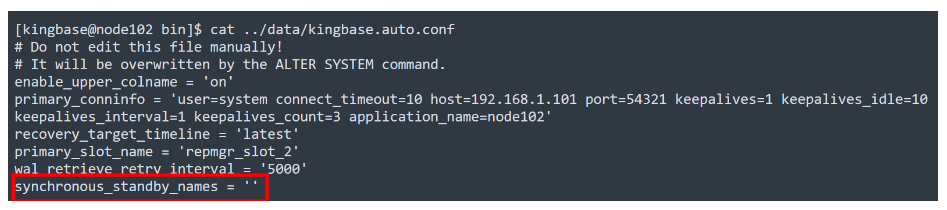
3、查看kingbase.auto.conf配置
[kingbase@node102 bin]$ cat ../data/kingbase.auto.conf

# Do not edit this file manually!

# It will be overwritten by the ALTER SYSTEM command.

enable_upper_colname = 'on'

primary_conninfo = 'user=system connect_timeout=10 host=192.168.1.101 port=54321 keepalives=1 keepalives_idle=10 keepalives_interval=1 keepalives_count=3 application_name=node102'

recovery_target_timeline = 'latest'

primary_slot_name = 'repmgr_slot_2'

wal_retrieve_retry_interval = '5000'

synchronous_standby_names = ''
KingbaseES V8R6集群同步模式synchronous参数配置详解的更多相关文章
- Vmware在NAT模式下网络配置详解
Vmware在NAT模式下网络配置详解 Linux中的网络配置对于接触Linux不久的小白菜来说,还是小有难度的,可能是不熟悉这种与windows系列迥然不同的命令行操作,也可能是由于对Linux的结 ...
- druid 参数配置详解
druid 参数配置详解 */--> druid 参数配置详解 Table of Contents 1. 初始化连接 2. 参数配置及说明 3. 注意事项 3.1. 底层连接 3.2. 空闲检查 ...
- logback 常用参数配置详解
logback 常用配置详解(二) <appender> <appender>: <appender>是<configuration>的子节点,是负责写 ...
- Nginx.conf参数配置详解
Nginx的配置文件nginx.conf配置详解如下: user nginx nginx; #Nginx用户及组:用户 组.window下不指定 worker_processes 8; #工作进程:数 ...
- Spark 性能相关参数配置详解-任务调度篇
随着Spark的逐渐成熟完善, 越来越多的可配置参数被添加到Spark中来, 本文试图通过阐述这其中部分参数的工作原理和配置思路, 和大家一起探讨一下如何根据实际场合对Spark进行配置优化. 由于篇 ...
- 深入剖析Redis系列: Redis集群模式搭建与原理详解
前言 在 Redis 3.0 之前,使用 哨兵(sentinel)机制来监控各个节点之间的状态.Redis Cluster 是 Redis 的 分布式解决方案,在 3.0 版本正式推出,有效地解决了 ...
- HDFS之三:hdfs参数配置详解
1.hdfs-site.xml 参数配置 – dfs.name.dir – NameNode 元数据存放位置 – 默认值:使用core-site.xml中的hadoop.tmp.dir/dfs/nam ...
- xheditor的参数配置详解
2.2. 初始化参数列表 2.3. API函数接口列表 2.4. 上传程序开发规范 2.5. 插件开发指南 2.6. 皮肤设计指南 2.2. 初始化参数列表 初始化参数示例代码: $('#elm1') ...
- datatables参数配置详解
//@translator codepiano //@blog codepiano //@email codepiano.li@gmail.com //尝试着翻译了一下,难免有错误的地方,欢迎发邮件告 ...
随机推荐
- ElasticSearch7.3学习(三十二)----logstash三大插件(input、filter、output)及其综合示例
1. Logstash输入插件 1.1 input介绍 logstash支持很多数据源,比如说file,http,jdbc,s3等等 图片上面只是一少部分.详情见网址:https://www.elas ...
- SpringBoot项目启动org.springframework.context.ApplicationContextException: Failed to start bean 'documentationPluginsBootstrapper'; nested exception is java.lang.NullPointerException解决方法
将Pom文件中的SpringBoot版本调低即可. 我的是调成了2.5.6
- Future源码一观-JUC系列
背景介绍 在程序中,主线程启动一个子线程进行异步计算,主线程是不阻塞继续执行的,这点看起来是非常自然的,都已经选择启动子线程去异步执行了,主线程如果是阻塞的话,那还不如主线程自己去执行不就好了.那会不 ...
- leetcode教程系列——Binary Tree
tree是一种常用的数据结构用来模拟真实物理世界里树的层级结构.每个tree有一个根(root)节点和指向其他节点的叶子(leaf)节点.从graph的角度看,tree也可以看作是有N个节点和N-1个 ...
- JAVA编程练习01作业
1.已知y与x的关系:,要求:从键盘上输入一个x的值,输出其对应的y的值. 2. 输入一个圆半径(r),计算并输出圆的面积和周长. 3.输入一个三位正整数n,输出其个位.十位和百位上的数字. 4.根据 ...
- 千位分隔符在web开发中的作用
有千位分隔符会被认为是数字,否则在移动端会被直接识别成手机号 在开发实战中主流实现方式是添加meta标签 <meta name="format-detection" cont ...
- CenetOS 7设置IP
使用ip addr查看网卡名称,如:eth0 vim /etc/sysconfig/network-scripts/ifcfg-eth0,编辑网卡名对应的配置文件: BOOTPROTO=dhcp ON ...
- APISpace 月出月落和月相API接口 免费好用
月出和月落的位置,正如地球围绕太阳变化时产生的日出和日落一样,但是也和月相有关.一天中月亮升起的时间取决于它的月相.当你记得月相取决于太阳,月亮和地球的相对位置应该是明显的.月相是指从地球上看月球直 ...
- Solution -「构造」专练
记录全思路过程和正解分析.全思路过程很 navie,不过很下饭不是嘛.会持续更新的(应该). 「CF1521E」Nastia and a Beautiful Matrix Thought. 要把所有数 ...
- Hadoop - MapReduce 过程
Hadoop - MapReduce 一.MapReduce设计理念 map--->映射 reduce--->归纳 mapreduce必须构建在hdfs之上的一种大数据离线计算框架 在线: ...