
HDFS连接JAVA,HDFS常用API
先在pom.xml中导入依赖包
<dependencies>

        <!-- https://mvnrepository.com/artifact/org.apache.hadoop/hadoop-hdfs -->

        <dependency>

            <groupId>org.apache.hadoop</groupId>

            <artifactId>hadoop-hdfs</artifactId>

            <version>2.7.6</version>

        </dependency>

        <!-- https://mvnrepository.com/artifact/org.apache.hadoop/hadoop-common -->

        <dependency>

            <groupId>org.apache.hadoop</groupId>

            <artifactId>hadoop-common</artifactId>

            <version>2.7.6</version>

        </dependency>

        <!-- https://mvnrepository.com/artifact/org.apache.hadoop/hadoop-client -->

        <dependency>

            <groupId>org.apache.hadoop</groupId>

            <artifactId>hadoop-client</artifactId>

            <version>2.7.6</version>

        </dependency>

        <!-- https://mvnrepository.com/artifact/junit/junit -->

        <dependency>

            <groupId>junit</groupId>

            <artifactId>junit</artifactId>

            <version>4.3</version>

        </dependency>

    </dependencies>
hdfs连接Java
1.先获取配置文件(hdfs-site.xml)
Configuration cg = new Configuration();  导入的是import org.apache.hadoop.conf.Configuration;
cg.set("dfs.replication","1");   1是备份数量
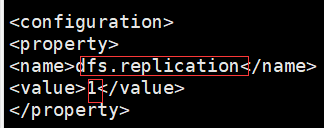
2.获取连接地址(core-site.xml)
URI uri = new URI("hdfs://master:9000");
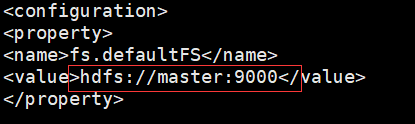
3.创建(获取)hdfs文件管理系统的对象,同过对象操作hdfs
FileSystem fs = FileSystem.get(uri, cg);
常用HDFSAPi:
import org.apache.hadoop.conf.Configuration;

import org.apache.hadoop.fs.*;

import org.junit.Before;

import org.junit.Test;

import java.io.*;

import java.net.URI;

public class HdfsApi {

    FileSystem fs;

    @Before

    public void main() throws Exception {

        Configuration cg = new Configuration();

        cg.set("dfs.replication", "1");

        URI uri = new URI("hdfs://master:9000");

        fs = FileSystem.get(uri, cg);

    }

    @Test

    public void mk() throws IOException {

        boolean mk = fs.mkdirs(new Path("/test"));

    }

    @Test

    public void del() throws IOException {

        //false表示不迭代删除也可以不加,true可以进行多目录迭代删除

        boolean del = fs.delete(new Path("/test"),false);

        System.out.println(del);

    }

    @Test

    public void listStatus() throws IOException {  //对比图在下

        //查看目录下文件列表

        FileStatus[] fileStatuses = fs.listStatus(new Path("/data/data"));

        System.out.println(fileStatuses);  //[Lorg.apache.hadoop.fs.FileStatus;@106cc338

        System.out.println("-------------------------------");

        for (FileStatus fileStatus : fileStatuses) {

            System.out.println(fileStatus.getLen());  //文件大小 以B字节为单位

            System.out.println(fileStatus.getReplication()); //副本个数

            System.out.println(fileStatus.getPermission());  //读写状态

            System.out.println(fileStatus.getBlockSize());  //固定的一个block大小128MB

            System.out.println(fileStatus.getAccessTime());   //创建文件时的时间戳

            System.out.println(fileStatus.getPath());   //文件路径

            System.out.println("-----------------");

        }

/*输出结果

log4j:WARN No appenders could be found for logger (org.apache.hadoop.util.Shell).

log4j:WARN Please initialize the log4j system properly.

log4j:WARN See http://logging.apache.org/log4j/1.2/faq.html#noconfig for more info.

[Lorg.apache.hadoop.fs.FileStatus;@106cc338

-------------------------------

180

1

rw-r--r--

134217728

1631969331482

hdfs://master:9000/data/data/cource.txt

-----------------

138540

1

rw-r--r--

134217728

1631963067585

hdfs://master:9000/data/data/score.txt

-----------------

41998

1

rw-r--r--

134217728

1631963067890

hdfs://master:9000/data/data/students.txt

-----------------

*/

    }

    @Test

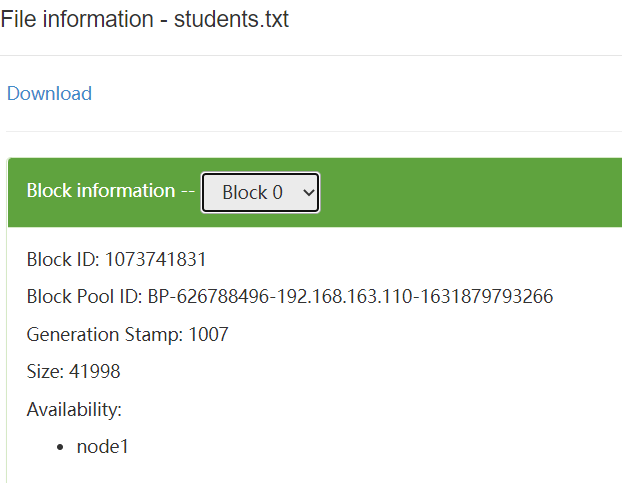
    public void listBlockLocation() throws IOException {  //对比图在下

        BlockLocation[] fbl =

                fs.getFileBlockLocations(

                        new Path("/data/data/students.txt"),0,1000000000);

        for (BlockLocation bl : fbl) {

            String[] hosts = bl.getHosts();

            for (String host : hosts) {

                System.out.println(host);

            }   //node1  表示文件存在node1,因为文件小于一个block,所以这里只存在一个节点

            System.out.println(bl.getLength());  //41998  size大小

            String[] names = bl.getNames();

            for (String name : names) {

                System.out.println(name);

            } //192.168.163.120:50010   node1的地址

            System.out.println(bl.getOffset());  //0  偏移量

            String[] topologyPaths = bl.getTopologyPaths();

            for (String topologyPath : topologyPaths) {

                System.out.println(topologyPath);

            } //   /default-rack/192.168.163.120:50010

        }

    }

    @Test

    public void open() throws IOException {

        FSDataInputStream open = fs.open(new Path("/data/data/students.txt"));

        BufferedReader br = new BufferedReader(new InputStreamReader(open));  //因为文件中有中文,所以将字节流转为字符流来读取

        String len;

        while ((len=br.readLine())!=null){

            System.out.println(len);

        }

        br.close();

    }

    @Test

    public void create() throws IOException {

        FSDataOutputStream fos = fs.create(new Path("/data/data/test.txt"));

        BufferedWriter bw = new BufferedWriter(new OutputStreamWriter(fos));

        bw.write("你好");

        bw.write("世界");

        bw.newLine();

        bw.write("我和我的祖国");

        bw.flush();

        bw.close();

    }

}

HDFS连接JAVA,HDFS常用API的更多相关文章
- Java 之常用API(一)
常用API 1 API概述 2 Scanner类与String类 3 StringBuilder类 NO.one API概述 1.1 API概述 API(Application Programm ...
- Java之常用API
API概述 什么是API API (Application Programming Interface) :应用程序编程接口 java中的API 指的就是 JDK 中提供的各种功能的 Java类,这些 ...
- Java 基础 常用API (System类,Math类,Arrays, BigInteger,)
基本类型包装类 基本类型包装类概述 在实际程序使用中,程序界面上用户输入的数据都是以字符串类型进行存储的.而程序开发中,我们需要把字符串数据,根据需求转换成指定的基本数据类型,如年龄需要转换成int类 ...
- Java 基础 常用API (Object类,String类,StringBuffer类)
Java API Java 的API(API: Application(应用) Programming(程序) Interface(接口)) Java API就是JDK中提供给我们使用的类,这些类将底 ...
- Java 之常用API(二)
Object类 & System类 日期相关类 包装类 & 正则表达式 Object类 & System类 1.1 Object类 1.1.1 概述 Object类是Java语 ...
- java selenium常用API(WebElement、iFrame、select、alert、浏览器窗口、事件、js) 一
WebElement相关方法 1.点击操作 WebElement button = driver.findElement(By.id("login")); button.clic ...
- java自学-常用api
API(Application Programming Interface),应用程序编程接口.Java API是JDK中提供给我们使用的类的说明文档.即jdk包里边写好的类,这些类将底层的代码实现封 ...
- Java的常用API
Object类 1.toString方法在我们直接使用输出语句输出对象的时候,其实通过该对象调用了其toString()方法. 2.equals方法方法摘要:类默认继承了Object类,所以可以使用O ...
- Java的常用API之System类简介
Syetem类 java.lang.System类中提供了大量的静态方法,可以获取与系统相关的信息或系统级操作,在System类的API文档中,常用的方法有: public static long c ...
随机推荐
- 微前端框架 之 qiankun 从入门到源码分析
封面 简介 从 single-spa 的缺陷讲起 -> qiankun 是如何从框架层面解决 single-spa 存在的问题 -> qiankun 源码解读,带你全方位刨析 qianku ...
- Codeforces Round #741 (Div. 2)
全部题目跳转链接 A - The Miracle and the Sleeper 题意 给定\([l, r]\) 求出在这个区间内的两个数字a和b的取模的最大值 (\(a \ge b\)) 分析 上届 ...
- SlidingMenu addIgnoreView() 无效的bug解决方法
## 感谢大佬:https://blog.csdn.net/fuchaosz/article/details/51513288 1 简介 最近在做侧滑的时候用到了SlidingMenu,在MainAc ...
- 随机数类 Random
import java.util.Random; /* 随机数类 Random 需求: 编写一个函数随机产生四位的验证码. */ public class Demo5 { public static ...
- UITableView的全部属性、方法以及代理方法执行顺序,看过之后肯定有收获---董鑫
UITableView-------表视图--继承UIScrollView并遵守NSCoding协议 属性 frame-------------设置控件的位置和大小 backgroundColor-- ...
- SSH 远程访问及控制 ( 早上好,我是派大星,上帝派来爱你的那颗星)
远程访问及控制 1.SSH远程管理,TCP Wrappers访问控制 2.配置密钥对验证 1.SSH远程管理,TCP访问控制 SSH是一种安全通道协议,主要用来实现字符界面的远程登录.远程复制等功能: ...
- python篇第3天【编码规范】
第二天加班去了! 语法约定: 多行语句 Python语句中一般以新行作为为语句的结束符. 但是我们可以使用斜杠( \)将一行的语句分为多行显示,如下所示: total = item_one + \ i ...
- 34、python并发编程之多进程(操作篇)
目录: 一 multiprocessing模块介绍 二 Process类的介绍 三 Process类的使用 四 守护进程 五 进程同步(锁) 六 队列(推荐使用) 七 管道 八 共享数据 九 信号量( ...
- Solution -「CF 1025D」Recovering BST
\(\mathcal{Description}\) Link. 给定序列 \(\{a_n\}\),问是否存在一棵二叉搜索树,使得其中序遍历为 \(\{a_n\}\),且相邻接的两点不互素. ...
- Solution -「ARC 110E」Shorten ABC
\(\mathcal{Description}\) Link. 给定长度为 \(n\),包含 A, B, C 三种字符的字符串 \(S\),定义一次操作为将其中相邻两个不相同的字符替换为字符集 ...