
Android的ProgressBar以及自定义进度条
1.xml文件 activity_main.xml
<LinearLayout xmlns:android="http://schemas.android.com/apk/res/android"

    xmlns:tools="http://schemas.android.com/tools"

    android:layout_width="match_parent"

    android:layout_height="match_parent"

    android:orientation="vertical" >

    <ProgressBar

        android:id="@+id/progressBar01"

        android:layout_width="wrap_content"

        android:layout_height="wrap_content" />

    <ProgressBar

        android:id="@+id/progressBar02"

        style="?android:attr/progressBarStyleLarge"

        android:layout_width="wrap_content"

        android:layout_height="wrap_content" />

    <ProgressBar

        android:id="@+id/progressBar03"

        style="?android:attr/progressBarStyleSmall"

        android:layout_width="wrap_content"

        android:layout_height="wrap_content" />

    <ProgressBar

        android:id="@+id/progressBar04"

        style="?android:attr/progressBarStyleHorizontal"

        android:layout_width="match_parent"

        android:layout_height="wrap_content"

        android:max="100"

        android:progress="20"

        android:secondaryProgress="60" />

    <Button

        android:id="@+id/increment"

        android:layout_width="wrap_content"

        android:layout_height="wrap_content"

        android:text="@string/increment" />

    <Button

        android:id="@+id/decrement"

        android:layout_width="wrap_content"

        android:layout_height="wrap_content"

        android:text="@string/decrement" />

    <Button

        android:id="@+id/showDialog"

        android:layout_width="wrap_content"

        android:layout_height="wrap_content"

        android:onClick="showDialog"

        android:text="@string/showDialog" />

    <ProgressBar

        android:id="@+id/progressBar05"

        android:layout_width="match_parent"

        android:layout_height="wrap_content"

        android:indeterminateDrawable="@drawable/pb_custom" />

</LinearLayout>
2.string.xml
<?xml version="1.0" encoding="utf-8"?>

<resources>

    <string name="app_name">Android_019</string>

    <string name="action_settings">Settings</string>

    <string name="hello_world">Hello world!</string>

    <string name="increment">增加</string>

    <string name="decrement">减少</string>

    <string name="showDialog">显示进度条对话框</string>

</resources>
3.MainActivity.java
package com.example.android_019;

import android.os.Bundle;

import android.app.Activity;

import android.app.ProgressDialog;

import android.view.Menu;

import android.view.View;

import android.view.View.OnClickListener;

import android.view.Window;

import android.widget.Button;

import android.widget.ProgressBar;

/**

 * 进度条的实现方法

 * @author hbj403

 */

public class MainActivity extends Activity implements OnClickListener{

	private Button btnIncrement,btnDecrement;

	private ProgressBar pb01;

	@Override

	protected void onCreate(Bundle savedInstanceState) {

		super.onCreate(savedInstanceState);

		//设置标题栏进度条 注意 一定要在setContentView方法之前定义

		requestWindowFeature(Window.FEATURE_INDETERMINATE_PROGRESS);

		setContentView(R.layout.activity_main);

		//设置标题栏为启动接可见

		setProgressBarIndeterminateVisibility(true);

		btnIncrement=(Button) findViewById(R.id.increment);

		btnIncrement.setOnClickListener(this);

		btnDecrement=(Button) findViewById(R.id.decrement);

		btnDecrement.setOnClickListener(this);

		pb01=(ProgressBar) findViewById(R.id.progressBar04);

	}

	@Override

	public boolean onCreateOptionsMenu(Menu menu) {

		getMenuInflater().inflate(R.menu.main, menu);

		return true;

	}

	@Override

	public void onClick(View v) {

		switch (v.getId()) {

		case R.id.increment:

			pb01.incrementProgressBy(10);

			pb01.setSecondaryProgress(40);

			break;

		case R.id.decrement:

			pb01.incrementProgressBy(-10);

			pb01.setSecondaryProgress(-40);

			break;

		default:

			break;

		}

	}

	//显示对话框进度条

	public void showDialog(View view){

		//ProgressDialog.show(this, "标题", "文件正在下载中...", true, true); 直接设置对话框的属性

		ProgressDialog pd=new ProgressDialog(this);

		pd.setIcon(R.drawable.ic_launcher);

		pd.setTitle("下载对话框");

		pd.setMessage("文件正在下载中...");

		pd.setMax(100);

		//设置对对话框的样式

		pd.setProgressStyle(ProgressDialog.STYLE_HORIZONTAL);

		pd.show();

	}

}
4.图片Z1
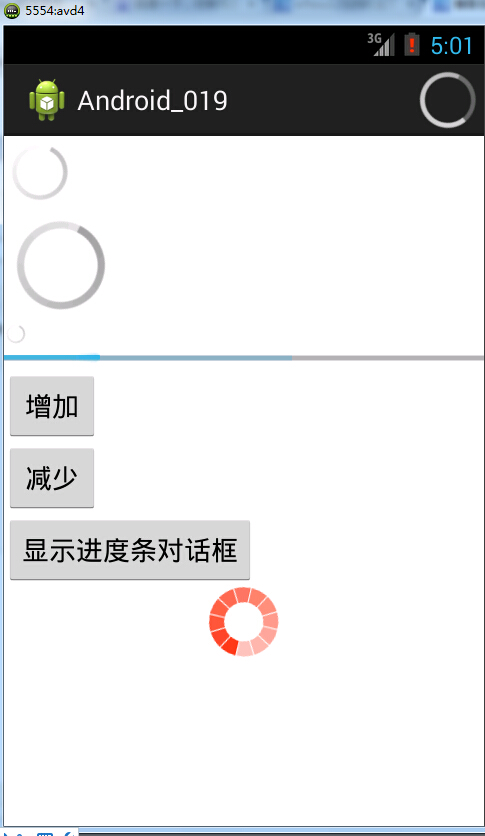
5.显示效果
Android的ProgressBar以及自定义进度条的更多相关文章
- android 自定义进度条颜色
android 自定义进度条颜色 先看图 基于产品经理各种自定义需求,经过查阅了解,下面是自己对Android自定义进度条的学习过程! 这个没法了只能看源码了,还好下载了源码, sources\b ...
- Android自定义进度条颜色
这个没法了只能看源码了,还好下载了源码, sources\base\core\res\res\ 下应有尽有,修改进度条颜色只能找progress ,因为是改变样式,首先找styles.xml ? 1 ...
- C# 根据BackgroundWoker异步模型和ProgressBar控件,自定义进度条控件
前言 程序开发过程中,难免会有的业务逻辑,或者算法之类产生让人能够感知的耗时操作,例如循环中对复杂逻辑处理;获取数据库百万乃至千万级数据;http请求的时候等...... 用户在使用UI操作并不知道程 ...
- android113 自定义进度条
MainActivity: package com.itheima.monitor; import android.os.Bundle; import android.app.Activity; im ...
- 自定义进度条PictureProgressBar——从开发到开源发布全过程
自定义进度条PictureProgressBar——从开发到开源发布全过程 出处: 炎之铠邮箱:yanzhikai_yjk@qq.com 本文原创,转载请注明本出处! 本项目JCenter地址:htt ...
- Android之ProgressBar读取文件进度解析
ProgressBar进度条, 分为旋转进度条和水平进度条,进度条的样式根据需要自定义,之前一直不明白进度条如何在实际项目中使用,网上演示进度条的案例大多都是通过Button点 击增加.减少进度值,使 ...
- Qt之模型/视图(自定义进度条)
简述 在之前的章节中分享过关于QHeaderView表头排序.添加复选框等内容,相信大家模型/视图.自定义风格有了一定的了解,下面我们来分享一个更常用的内容-自定义进度条. 实现方式: 从QAbstr ...
- Android再学习-20141018-布局-进度条
20141018-Android再学习 对齐至控件的基准线 为了保证印刷字母的整齐而划定的线(四线三格的第三条线). android:layout_alignBaseline 与父控件的四个边缘对齐( ...
- BitBlt()函数实现带数字百分比进度条控件、静态文本(STATIC)控件实现的位图进度条、自定义进度条控件实现七彩虹颜色带数字百分比
Windows API BitBlt()函数实现带数字百分比进度条控件. 有两个例子:一用定时器实现,二用多线程实现. 带有详细注解. 此例是本人原创,绝对是网上稀缺资源(本源码用Windows AP ...
随机推荐
- Android调用相册截取图片遇到的问题
1.在Android中可以使用如下的方式来调用相册,选择图片进行裁剪使用,昨天在开发的时候遇到一个问题 private void cropBigImageUri(Uri uri, int output ...
- iOS 生成本地验证码
在应用程序注册.登陆或者有关支付确认的界面,经常会用到验证码,验证码有的是通过手机发送获取的,有的是在本地点击获取的,通过手机发送获取的动态验证码可以使用第三方类库实现,本地点击获取的是在本地自己绘制 ...
- SharePoint 2010 获取列表全部定义方法
http://spf06/_vti_bin/owssvr.dll?Cmd=ExportList&List=%7B220128F0-6084-45B3-9942-C29B3AF6663C%7D ...
- C#中参数传递【转】
转自[Learning hard] 建议参考 『第十一回:参数之惑---传递的艺术(上)』 一.引言 对于一些初学者(包括工作几年的人在内)来说,有时候对于方法之间的参数传递的问题感觉比较困惑的,因为 ...
- Jersey(1.19.1) - Security
Security information is available by obtaining the SecurityContext using @Context, which is essentia ...
- Jersey(1.19.1) - Client API, Uniform Interface Constraint
The Jersey client API is a high-level Java based API for interoperating with RESTful Web services. I ...
- mvc中的webapi
MVC中 webapi的使用 和 在其他网站中如何来调用(MVC) 1.webapi的路由规则注册在App_Start\WebApiConfig.cs文件中 2.webapi控制器继承父类 apiCo ...
- SQL语句:SQLwhile(0=0)与while @@fetch_status=0.
第一句是SQL循环用的,这个条件下,会读取所有的记录,因为会一直循环; 第二句是游标里的,@@fetch_status=0 等于0时,说明游标是成功的.
- Struts升级到2.3.15.1抵抗漏洞
后知后觉,今天才开始修复Struts2的漏洞 详细情形可以参考: http://struts.apache.org/release/2.3.x/docs/security-bulletins.html ...
- Android EditText不弹出输入法焦点问题的总结
转自:http://mobile.51cto.com/aprogram-403138.htm 看一个manifest中Activity的配置,如果这个页面有EditText,并且我们想要进入这个页面的 ...