
redis 在windows 上的安装与使用
1.redis-windows
最近在做一个抢拍模块,由于过于平凡的insert与update I/O受不了,故只好把东西放内存里,等拍卖结束了,在写入磁盘.
至于为什么要用window呢? 因为服务器上的就是window的,没的选.
一打开官网就看到一些不怎么开心的东西.
Win64 Unofficial The Redis project does not directly support Windows, however the Microsoft Open Tech group develops and maintains an Windows port targeting Win64. Clone Other downloads are available on GitHub, Historical downloads are available on Google Code.
Scripts and other automatic downloads can easily access the tarball of the latest Redis stable version athttp://download.redis.io/redis-stable.tar.gz. The source code of the latest stable release is always browsable here, use the file src/version.h in order to extract the version in an automatic way.
但我去下载下来之后发现跟它本身那个没啥区别,该咋样,还咋样, 而且让我恶心的是它的描述文件让我很蛋疼,:
Where to find complete Redis documentation?

-------------------------------------------

This README is just a fast "quick start" document. You can find more detailed

documentation at http://redis.io

Building Redis

--------------

Redis can be compiled and used on Linux, OSX, OpenBSD, NetBSD, FreeBSD.

We support big endian and little endian architectures.

It may compile on Solaris derived systems (for instance SmartOS) but our

support for this platform is "best effort" and Redis is not guaranteed to

work as well as in Linux, OSX, and *BSD there.

It is as simple as:

% make

You can run a  bit Redis binary using:

% make 32bit

After building Redis is a good idea to test it, using:

% make test

Fixing problems building  bit binaries

...
算了,反正官方也说了它是非官方,不影响我使用就是了,我们也不该那么吊!
下载完后, 我们照着它的文档做:
How to build Redis using Visual Studio
You can use the free Visual Studio Express 2013 for Windows Desktop edition available athttp://www.microsoft.com/en-us/download/details.aspx?id=40787.
Open the solution file msvs\redisserver.sln in Visual Studio 2013, select a build configuration (Debug or Release) and target (Win32 or x64) then build.
This should create the following executables in the msvs\$(Target)\$(Configuration) folder:
- redis-server.exe
- redis-benchmark.exe
- redis-cli.exe
- redis-check-dump.exe
- redis-check-aof.exe
编译我选择 release-64bit 的版本,如下:
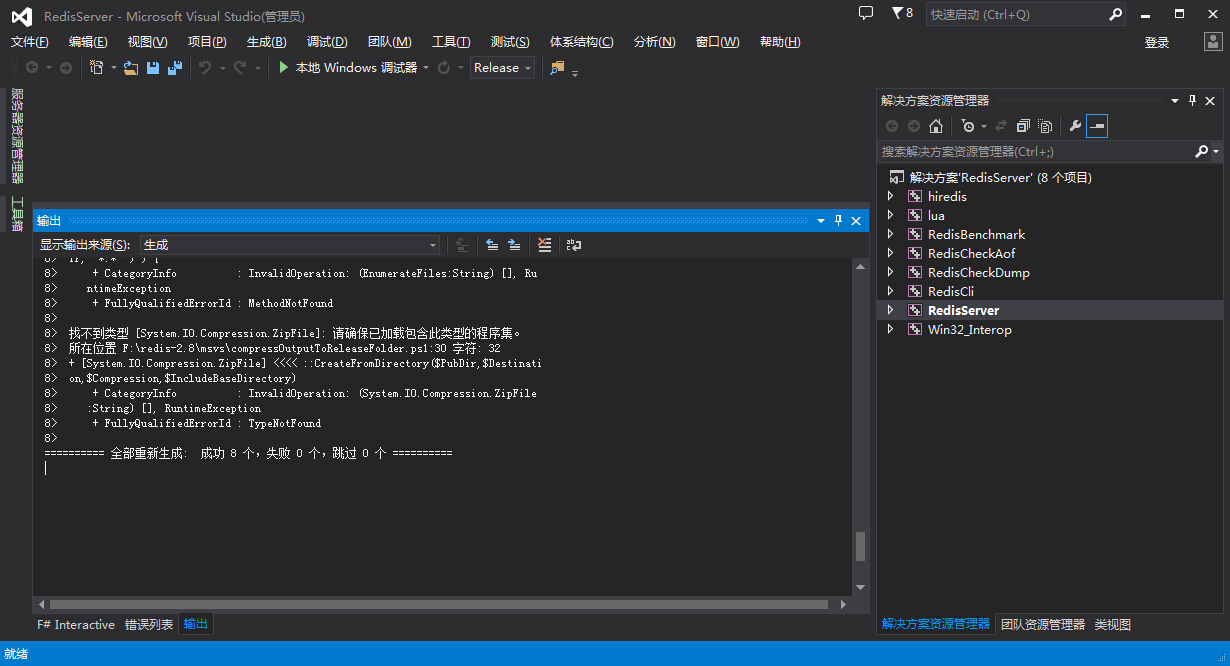
找到他的输出目录一般是在 msvs\x64\Release 目录下, 把其他一下非exe 的文件全干掉, 剩下如下几个:

然后我们把我们下载下来的那个压缩包中的redis.conf 拿出来,放在我们生产的目录中,用命令打开:
F:\redis-2.8>redis-server.exe  redis.conf

[]  Sep ::31.549 #

The Windows version of Redis allocates a large memory mapped file for sharing

the heap with the forked process used in persistence operations. This file

will be created in the current working directory or the directory specified by

the 'heapdir' directive in the .conf file. Windows is reporting that there is

insufficient disk space available for this file (Windows error 0x70).

You may fix this problem by either reducing the size of the Redis heap with

the --maxheap flag, or by moving the heap file to a local drive with sufficient

space.

Please see the documentation included with the binary distributions for more

details on the --maxheap and --heapdir flags.

Redis can not continue. Exiting.
根据提示,是 maxheap 标识有问题, 这个是因为位置文件中少了个配置:
我们在 redis.conf 头部加入一行
maxheap
如:
# Redis configuration file example

# Note on units: when memory size is needed, it is possible to specify

# it in the usual form of 1k 5GB 4M and so forth:

#

# 1k =>  bytes

# 1kb =>  bytes

# 1m =>  bytes

# 1mb => * bytes

# 1g =>  bytes

# 1gb => ** bytes

#

# units are case insensitive so 1GB 1Gb 1gB are all the same.

################################## INCLUDES ###################################

# Include one or more other config files here.  This is useful if you

# have a standard template that goes to all Redis server but also need

# to customize a few per-server settings.  Include files can include

# other files, so use this wisely.

#

# Notice option "include" won't be rewritten by command "CONFIG REWRITE"

# from admin or Redis Sentinel. Since Redis always uses the last processed

# line as value of a configuration directive, you'd better put includes

# at the beginning of this file to avoid overwriting config change at runtime.

#

# If instead you are interested in using includes to override configuration

# options, it is better to use include as the last line.

#

# include /path/to/local.conf

# include /path/to/other.conf

################################ GENERAL  #####################################

maxheap

# By default Redis does not run as a daemon. Use 'yes' if you need it.

# Note that Redis will write a pid file in /var/run/redis.pid when daemonized.

daemonize no

...
然后再次启动:
 F:\redis-2.8>redis-server.exe  redis.conf

                _._

           _.-``__ ''-._

      _.-``    `.  `_.  ''-._           Redis 2.8. (/)  bit

  .-`` .-```.  ```\/    _.,_ ''-._

 (    '      ,       .-`  | `,    )     Running in stand alone mode

 |`-._`-...-` __...-.``-._|'` _.-'|     Port:

 |    `-._   `._    /     _.-'    |     PID: 9316

  `-._    `-._  `-./  _.-'    _.-'

 |`-._`-._    `-.__.-'    _.-'_.-'|

 |    `-._`-._        _.-'_.-'    |           http://redis.io

  `-._    `-._`-.__.-'_.-'    _.-'

 |`-._`-._    `-.__.-'    _.-'_.-'|

 |    `-._`-._        _.-'_.-'    |

  `-._    `-._`-.__.-'_.-'    _.-'

      `-._    `-.__.-'    _.-'

          `-._        _.-'

              `-.__.-'

[]  Sep ::27.776 # Server started, Redis version 2.8.

[]  Sep ::27.776 * The server is now ready to accept connections on po

rt
双击打开 redis-cli.exe , 如果不报错,则连接上了本地服务器,然后测试,比如 set命令,get命令:
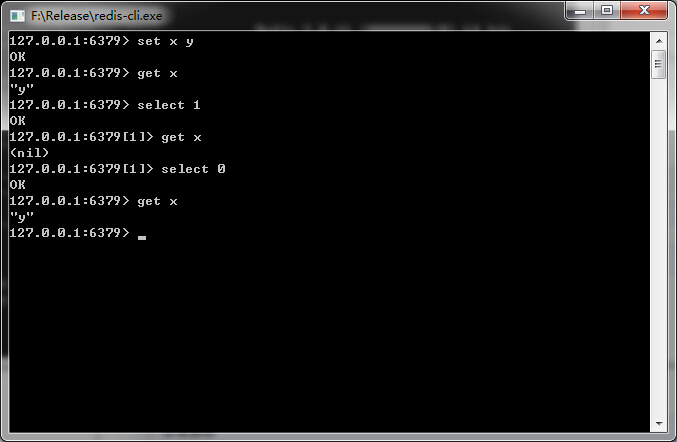
很明显, 哥成功了, 也祝大家好运
注意:
1. 这个版本是Win64的,所以32位windows就不要折腾了。
2. 我的操作系统是Windows 7 64位旗舰版,运行内存16GB,用户 是Administrator ,如果你不是,可能需要设置下 redis-server.exe 和redis-cli.exe 的属性中的兼容性权限(以管理员身份运行) .
3. 什么360啊,UAC啊,防火墙啊,该关的请关闭。。。
如果你懒得亲自动手,可以点这里 : 点击下载
redis 在windows 上的安装与使用的更多相关文章
- redis在windows上的安装
1.下载地址:https://github.com/MSOpenTech/redis 主要支持win64的,有个msi文件可以直接安装,安装后redis会变成一个服务,对于windows来说这种最方便 ...
- redis 在windows 上面的安装和使用,集群搭建
redis作为nosql数据库,将数据存储到内存中(缓存),具有非常高的性能.下面讲解一下redis的安装及java api的使用. 1:redis 安装 windows 上面直接下载msi文件,安装 ...
- 大数据高性能数据库Redis在Windows上的使用教程
Redis学习笔记----Redis在windows上的安装配置和使用 Redis简介 redis是一个key-value存储系统.和Memcached类似,它支持存储的value类型相对更多,包括s ...
- Redis for Windows(C#缓存)安装和使用
Redis for Windows(C#缓存)安装和使用 前言 前段时间写过两篇简单的有关Memcached缓存的相关文章,当然了只是入门的如何使用而已.最近这两天又发现了Redis这个神奇的东西,之 ...
- jinkins在windows上的安装 配置C#编译
首先jinkins在windows上的安装就不说,安装只需要下载相应安装包就可以了,后有些时候经常需要修改端口号.修改如下: 然后重启jenkins服务 首次运行界面 个人建议插件按需安装. 建立一个 ...
- (转)windows上virtualenv 安装及使用
[注意]要在某个含有空格的目录下面创建virtualenv环境,就要安装 win32api . 原文地址:http://blog.csdn.net/liuchunming033/article/det ...
- git在windows上的安装和简单使用
git在windows上的安装和简单使用. 参考: https://git-scm.com/book/zh/v1/Git-%E5%9F%BA%E7%A1%80-%E8%BF%9C%E7%A8%8B%E ...
- Windows上PostgreSQL安装配置教程
Windows上PostgreSQL安装配置教程 这篇文章主要为大家详细介绍了Windows上PostgreSQL安装配置教程,具有一定的参考价值,感兴趣的小伙伴们可以参考一下 PostgreSQL的 ...
- redis 在 windows 中的安装
redis 在 windows 中的安装 redis 官方并没有提供 redis 的 windows 版本.但是微软提供了 redis 的 windows 版本.有2.8和3.0版本.3.0版本支持集 ...
随机推荐
- jQuery性能优化(转)
摘要:jQuery是我们经常使用的强大的JS类库,因此它的性能优化十分重要,下面就重几点来说明 原文作者:szyuxueliang 原文地址:http://www.cnblogs.com/yxl ...
- Android中用PULL解析XML
解析XML的方式有DOM,SAX,PULL,那为什么要在Android中使用PULL解析呢?首先来说一下PULL解析的优点,然后再说一下其他两种解析方式的缺点,答案就清晰可见啦. DOM不适合文档较大 ...
- DOS批处理命令-几个固定名称的变量
批处理中有一些变量的变量名称是固定的,具有特定的意义,接下来,我们来看看这些有特定意义的变量到底有什么意义. 1.%CD% 当前路径的路径名[盘符 + 路径] - 現在のディレクトリ文字列に ...
- PYTHON:HTTP头设置工具(以附件名为例)
import oss2 # 用户授权 auth = oss2.Auth('accessId', 'accessKey')# oss bucket bucket = oss2.Bucket(auth, ...
- php对UTF8字体串进行单字分割返回数组
在网上查了很多字符串分割方法,都无法正确对UTF8字符串进行正确分割返回单个字符的数组.经过对FTU8编码的分析写出了下面的方法对UTF8进行分割.本人测试可用.本方法只支持UTF8编码的,其它编码转 ...
- UEditor的使用方法
文本编辑器程序员都会用到,今天无意中发现UEditor是个好东西,特奉献给大家,并提供下载. 这个编辑器的亮点是可以显示当前输入多少字符,还可以输入多少字符. 新创建的MVC项目,在layout页面里 ...
- [SWF]在线预览文档下载
写本文的缘由:领导有些项目文档需要审阅,网站上的文档只能在线预览,没有提供下载.开始用截屏的方式,可想而知这将会是多大的重复性劳动.所以研究了一下,发现可以曲线救国,所以在这里分享一下. 问题描述:这 ...
- java集合 collection-list-ArrayList 将自定义对象作为元素存到ArrayList集合中,并去除重复元素。
import java.util.*; /* 将自定义对象作为元素存到ArrayList集合中,并去除重复元素. 比如:存人对象.同姓名同年龄,视为同一个人.为重复元素. 思路: 1,对人描述,将数据 ...
- PERL 脚本
PERL: Practical Extraction and Report Language 参考文档 1.Perl 5 version 24.0 documentation
- [GeekBand] 探讨C++新标准之新语法——C++ 11~14
一. 可变参数模板(Variadic Templates) 在C++11中,出现了参数数目可变的模板,这部分在之前C++高级编程的时候就有学习到. 其实,在C中就有类似的设定.最常用的printf() ...