
ios 画圆环进度条
#import <UIKit/UIKit.h>

@interface SNCircleProgressView : UIView

/**

 *  进度值0-1.0之间

 */

@property (nonatomic,assign)CGFloat progressValue;

/**

 *  边宽

 */

@property(nonatomic,assign) CGFloat progressStrokeWidth;

/**

 *  进度条颜色

 */

@property(nonatomic,strong)UIColor *progressColor;

/**

 *  进度条轨道颜色

 */

@property(nonatomic,strong)UIColor *progressTrackColor;

@end

#import "SNCircleProgressView.h"

@interface SNCircleProgressView ()

{

    CAShapeLayer *backGroundLayer; //背景图层

    CAShapeLayer *frontFillLayer;      //用来填充的图层

    UIBezierPath *backGroundBezierPath; //背景贝赛尔曲线

    UIBezierPath *frontFillBezierPath;  //用来填充的贝赛尔曲线

}

@end

@implementation SNCircleProgressView

@synthesize progressColor = _progressColor;

@synthesize progressTrackColor = _progressTrackColor;

@synthesize progressValue = _progressValue;

@synthesize progressStrokeWidth = _progressStrokeWidth;

- (instancetype)initWithCoder:(NSCoder *)aDecoder

{

    if (self = [super initWithCoder:aDecoder]) {

        [self setUp];

    }

    return self;

}

- (instancetype)initWithFrame:(CGRect)frame

{

    if (self = [super initWithFrame:frame])

    {

        [self setUp];

    }

    return self;

}

/**

 *  初始化创建图层

 */

- (void)setUp

{

    //创建背景图层

    backGroundLayer = [CAShapeLayer layer];

    backGroundLayer.fillColor = nil;

    backGroundLayer.frame = self.bounds;

    //创建填充图层

    frontFillLayer = [CAShapeLayer layer];

    frontFillLayer.fillColor = nil;

    frontFillLayer.frame = self.bounds;

    [self.layer addSublayer:backGroundLayer];

    [self.layer addSublayer:frontFillLayer];

}

- (void)setProgressColor:(UIColor *)progressColor

{

    _progressColor = progressColor;

    frontFillLayer.strokeColor = progressColor.CGColor;

}

- (UIColor *)progressColor

{

    return _progressColor;

}

- (void)setProgressTrackColor:(UIColor *)progressTrackColor

{

    _progressTrackColor = progressTrackColor;

    backGroundLayer.strokeColor = progressTrackColor.CGColor;

    backGroundBezierPath = [UIBezierPath bezierPathWithArcCenter:self.center radius:(CGRectGetWidth(self.bounds)-self.progressStrokeWidth)/.f startAngle: endAngle:M_PI*

                                                       clockwise:YES];

    backGroundLayer.path = backGroundBezierPath.CGPath;

}

- (UIColor *)progressTrackColor

{

    return _progressTrackColor;

}

- (void)setProgressValue:(CGFloat)progressValue

{

    _progressValue = progressValue;

    frontFillBezierPath = [UIBezierPath bezierPathWithArcCenter:self.center radius:(CGRectGetWidth(self.bounds)-self.progressStrokeWidth)/.f startAngle:-M_PI_4 endAngle:(*M_PI)*progressValue-M_PI_4 clockwise:YES];

    frontFillLayer.path = frontFillBezierPath.CGPath;

}

- (CGFloat)progressValue

{

    return _progressValue;

}

- (void)setProgressStrokeWidth:(CGFloat)progressStrokeWidth

{

    _progressStrokeWidth = progressStrokeWidth;

    frontFillLayer.lineWidth = progressStrokeWidth;

    backGroundLayer.lineWidth = progressStrokeWidth;

}

- (CGFloat)progressStrokeWidth

{

    return _progressStrokeWidth;

}

@end
#import "ViewController.h"

#import "SNCircleProgressView.h"

@interface ViewController ()

{

  SNCircleProgressView *progressView;

}

@end

@implementation ViewController

- (void)viewDidLoad {

    [super viewDidLoad];

    progressView = [[SNCircleProgressView alloc]initWithFrame:CGRectMake(,, , )];

    progressView.progressColor = [UIColor redColor];

    progressView.progressStrokeWidth = .f;

    progressView.progressTrackColor = [UIColor whiteColor];

    [self.view addSubview:progressView];

    [NSTimer scheduledTimerWithTimeInterval:.f target:self selector:@selector(changeProgressValue) userInfo:nil repeats:YES];

}

- (void)changeProgressValue

{

    progressView.progressValue += 0.1;

    if (progressView.progressValue>=.f) {

        progressView.progressValue = 0.1f;

    }

}

- (void)didReceiveMemoryWarning {

    [super didReceiveMemoryWarning];

    // Dispose of any resources that can be recreated.

}

@end
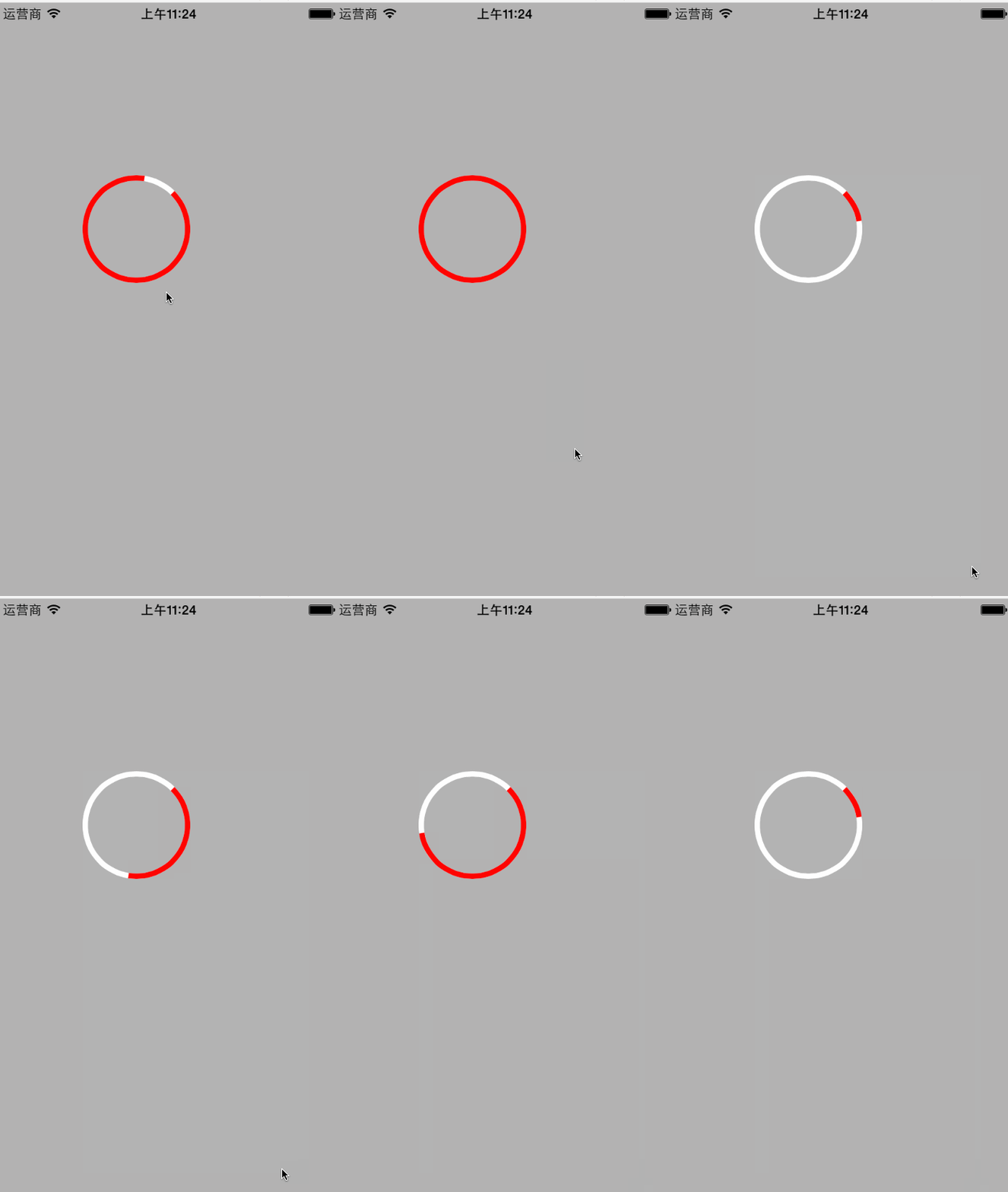
ios 画圆环进度条的更多相关文章
- 用Raphael在网页中画圆环进度条
原文 :http://boytnt.blog.51cto.com/966121/1074215 条状的进度条我们见得太多了,实现起来比较简单,它总是长方形的,在方形的区域里摆 放就不太好看了.随着cs ...
- H5 可堆叠的圆环进度条,支持任意数量子进度条
by Conmajia SN: S22-W1M 由来 看到一篇帖子<vue实用组件--圆环百分比进度条>,让我想起了很多年前我在WinForm下仿制过的Chrome进度条. ▲ 原版进度条 ...
- iOS圆弧渐变进度条的实现
由于项目需要一个环形渐变进度条显示课程,这方便网上的确有很多相关资料但是,都是比较零散的而且,大多数只是放一堆代码就算完了.这里我想详细写一篇我自己实现这个进度条的过程. 实现一个圆弧进度条主要分为三 ...
- CSS3实现圆环进度条
摘要:圆环进度条被应用于各个场景,比如我们可以用来表示加载进度等.通常我们可以用 css3 的动画去实现. 详解 css3 实现圆环进度条 简单的画一个圆环,我们都知道如何使用 css 画一个圆环.( ...
- iOS学习-圆形进度条
效果: #import <UIKit/UIKit.h> @interface HsProfitRatePieWidgets : UIView { UILabel *_textLabel; ...
- 两种CSS3圆环进度条详解
晚上睡觉之前,我抽了1个多小时,研究了一下圆环进度条,结合从网上查阅的资料,我终于掌握了两种圆环的生成方法. 这次的效果就是单纯的CSS3效果,也没有写具体的JS,等以后有时间在好好整理一下吧~. 第 ...
- canvas绘制百分比圆环进度条
开发项目,PM会跟踪项目进度:完成某个事情,也可以设置一个完成的进度. 这里用canvas绘制一个简单百分比圆环进度条. 看下效果: 1. 动画方式 2. 静默方式 // 贴上代码,仅供参考 ...
- Xamarin iOS教程之进度条和滚动视图
Xamarin iOS教程之进度条和滚动视图 Xamarin iOS 进度条 进度条可以看到每一项任务现在的状态.例如在下载的应用程序中有进度条,用户可以很方便的看到当前程序下载了多少,还剩下多少.Q ...
- Vue/React圆环进度条
数据展示,一直是各行各业乐此不疲的需求,具体到前端开发行业,则是各种各种图表数据展示,各种表格数据展示,烦不胜烦(繁不胜繁)! 前几天刚做了折线图.柱状图.饼状图之类的图表数据展示效果,今天又碰到了类 ...
随机推荐
- LightOJ 1370 - Bi-shoe and Phi-shoe (欧拉函数思想)
http://lightoj.com/volume_showproblem.php?problem=1370 Bi-shoe and Phi-shoe Time Limit:2000MS Me ...
- McAfee Host Intrusion Prevention
McAfee Host Intrusion Prevention是一款集防火墙功能和HIPS于一身的主动防御和防火墙软件,将其与 McAfee VirusScan Enterprise 8.5/8.7 ...
- String.Format格式说明(转)
C#格式化数值结果表 字符 说明 示例 输出 C 货币 string.Format("{0:C3}", 2) $2.000 D 十进制 string.Format("{0 ...
- Linux syslog 学习
最经有在看lighttpd facgi相关的东西.在lighttpd官网上看到如下sample code. #include <stdlib.h> #include <string. ...
- oracle 学习笔记--用户管理
oracle 用户管理 创建用户(需要具有dba权限的用户) create user 用户名 identified by 密码 defaule tablespace users //默认表空间 ...
- android 自定义adapter和线程结合 + ListView中按钮滑动后状态丢失解决办法
adapter+线程 1.很多时候自定义adapter的数据都是来源于服务器的,所以在获取服务器的时候就需要异步获取,这里就需要开线程了(线程池)去获取服务器的数据了.但这样有的时候adapter的中 ...
- (剑指Offer)面试题36:数组中的逆序对
题目: 在数组中的两个数字,如果前面一个数字大于后面的数字,则这两个数字组成一个逆序对.输入一个数组,求出这个数组中的逆序对的总数. 思路: 1.顺序扫描 顺序扫描整个数组,每扫描到一个数字,就将该数 ...
- DLL文件无法删除怎么解决
dll文件你听说过吗?那怎样把那些删不掉的东西删掉呢?请看.... 老听网友说某某文件删不掉啊.之类的.而且有很多都是dll文件.删除的时候总是提示,"正在使用"或者是" ...
- 【M35】让自己习惯于标准C++语言
1.最近一些年C++语言增加的特性有: a.RTTI,namespace,bool,关键字mutable和explicit,enums,以及const static int可以直接初始化. b.扩充了 ...
- Codeforces Round #215 (Div. 1) B. Sereja ans Anagrams 匹配
B. Sereja ans Anagrams Time Limit: 20 Sec Memory Limit: 256 MB 题目连接 http://codeforces.com/problemset ...