
PhpStorm, XDebug, and DBGp Proxy
phpstorm 利用 xdebug、dbgp-proxy配置远程调试
1.单客户机远程调试
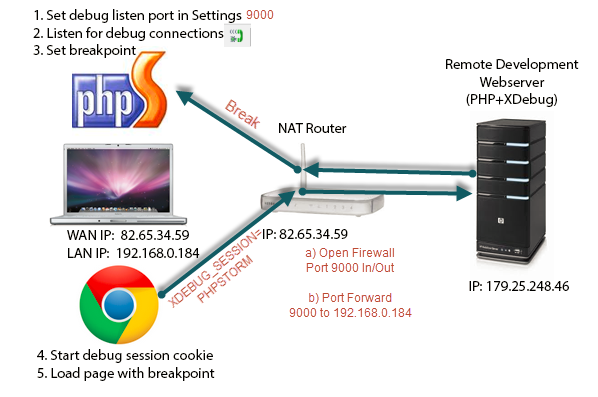
a.安装xdebug库文件(windows:php_xdebug.dll;linux:php_xdebug.so)
b.修改php.ini(php源码运行环境)
        ;xdebug库文件

        zend_extension = "d:/wamp/bin/php/php5.3.10/zend_ext/php_xdebug.dll"

        ;开启远程调试

        xdebug.remote_enable = On

        ;客户机ip

        xdebug.remote_host=localhost

        ;客户机xdebug监听端口

        xdebug.remote_port=9000

        xdebug.remote_handler=dbgp

        ;idekey

        xdebug.idekey=PhpStorm

        xdebug.profiler_enable = off

        xdebug.profiler_enable_trigger = off

        xdebug.profiler_output_name = cachegrind.out.%t.%p

        xdebug.profiler_output_dir = "d:/wamp/tmp"
c.客户机(IDE运行环境)
I.配置php程序远程服务,phpstorm:File>Settings>Languages & Frameworks>PHP>Servers
apache服务:其中"use path mappings"用于将本地代码与远程服务主机代码映射,然后跟踪
II.配置xdebug,phpstorm:File>Settings>Languages & Frameworks>PHP>Debug
Debug port:默认9000,与"xdebug.remote_port"一致
III.单击“edit configurations”,选择服务器
IIII.在phpStorm里打开监听,就是一个电话一样的按钮
V.打开debug,就是那个像甲壳虫的小按钮(此操作会打开一个链接然后将连接后的参数XDEBUG_SESSION_START注入到cookie:XDEBUG_SESSION,该值唯一
标示一个ide)
2.多客户机远程调试

a.在远程服务主机上,安装Komodo Remote Debugging(http://code.activestate.com/komodo/remotedebugging/)
输入pydbgpproxy.exe --help,
控制台输出:
-i hostname:port listener port for IDE processes(defaults to '127.0.0.1:9001')
-d hostname:port listener port for debug processes(defaults to '127.0.0.1:9000')
启动pydbgpproxy.exe -i 0.0.0.0:9001 -d 9000
控制台输出:
INFO: dbgp.proxy: starting proxy listeners. appid: 10814
INFO: dbgp.proxy: dbgp listener on 127.0.0.1:9000
INFO: dbgp.proxy: IDE listener on 0.0.0.0:9001
则成功启动
dbgp proxy server监听9000与远程主机服务通信,监听9001与IDE(phpstorm)通信
b.安装xdebug库文件(windows:php_xdebug.dll;linux:php_xdebug.so)
c.修改php.ini(php源码运行环境)
        ;xdebug库文件

        zend_extension = "d:/wamp/bin/php/php5.3.10/zend_ext/php_xdebug.dll"

        ;开启远程调试

        xdebug.remote_enable = On

        ;DBGP PROXY SERVER所在主机ip

        xdebug.remote_host=localhost

        ;DBGP PROXY SERVER监听端口

        xdebug.remote_port=9000

        ;代理

        xdebug.remote_handler=dbgp

        ;此种模式下该项不在起作用,可以取消

        ;xdebug.idekey=PhpStorm

        xdebug.profiler_enable = off

        xdebug.profiler_enable_trigger = off

        xdebug.profiler_output_name = cachegrind.out.%t.%p

        xdebug.profiler_output_dir = "d:/wamp/tmp"
c.客户机(IDE运行环境)
I.配置php程序远程服务,phpstorm:File>Settings>Languages & Frameworks>PHP>Servers
apache服务:其中"use path mappings"用于将本地代码与远程服务主机代码映射,然后跟踪
II.配置xdebug,phpstorm:File>Settings>Languages & Frameworks>PHP>Debug
Debug port:xdebug的监听端口xx(其中xx根据自己选择),listening for connections from 'xdebug'
DBGP Proxy:
IDE Key(IDE的唯一key,一定不要与其他客户机的key相同,否则不能注册)
Host(DBGP Proxy server 的主机ip)
Port(DBGP Proxy server与IDE通信的监听端口,与-i 0.0.0.0:9001里设置一致)
III.将IDE的配置注入到DBGP Proxy server
单击工具栏"Tools",选择"Register IDE"进行注册(若果没有配置IDE,可以选择"configurations"进行配置,然后注册)
IIII.单击"edit configurations",选择服务器
V.在phpStorm里打开监听,就是一个电话一样的按钮
VI.打开debug,就是那个像甲壳虫的小按钮(此操作会打开一个链接然后将连接后的参数XDEBUG_SESSION_START注入到cookie:XDEBUG_SESSION,该值唯一
标示一个ide),将XDEBUG_SESSION_START参数值修改为IDE Key
参见:http://matthardy.net/blog/configuring-phpstorm-xdebug-dbgp-proxy-settings-remote-debugging-multiple-users/
http://wenku.baidu.com/link?url=ppL0e290lQSjle8jkI3Apaqvi5yYkv_kuSxl6SYnvwZFWPVMemRl8NrLO_QKmm6Kunn1JBmMmBLs5I4IL5yW5ixI2KQ0mFmcr1hL9uyIgq3
Komodo Remote Debugging
PhpStorm, XDebug, and DBGp Proxy的更多相关文章
- phpstorm xdebug
xdebug安装 https://xdebug.org/wizard.php http://blog.csdn.net/zhyh1986/article/details/45172685 http:/ ...
- PhpStorm/Xdebug安装使用
安装环境:XAMPP;phpStorm版本10; windows 7 64bit. XAMPP.phpStorm 都直接安装在了D盘根目录,9999m目录建在D:\xampp\htocts下,即目录工 ...
- php+phpStorm+xdebug配置方法
1.下载xdebug文件 http://xdebug.org/wizard.php 将phpinfo()的源代码复制到文本框中,xdebug会提示如何配置和下载哪个版本的xdebug. 全部下载地址: ...
- XAMPP PHPSTORM XDEBUG 配合使用
1.xdebug 配置 安装完xampp 进入 php.ini [XDebug]zend_extension = "C:\xampp\php\ext\php_xdebug.dll" ...
- PHPStorm+XDebug进行调试图文教程以及解析wamp的php.ini设置不生效的原因
这篇文章主要为大家详细介绍了PHPStorm+XDebug进行调试图文教程,内容很丰富,具有一定的参考价值,感兴趣的小伙伴们可以参考一下 笔者的开发环境如下:Windows8.1+Apache+P ...
- XAMPP环境下用phpStorm+XDebug进行断点调试的配置
具体过程: 服务器端(本地调试的情况下就是在本机)安装好XAMPP,停止apache服务(注意,如果直接退出XAMPP,是不会停止apache的) 在安装目录下找到php.ini,类似于D:\xamp ...
- phpStorm+XDebug+chrome 配置
运行环境: phpStorm 10.0.1 PHP 5.6.24 VC11 x86 Thread Safe Xdebug 2.4.1(PHP 5.6 VC11 TS (32 bit) 1. PHP安装 ...
- PhpStorm+xdebug+postman调试
PhpStorm+xdebug+postman调试 写PHP时,一直用postman做测试,最近发现在测试过程中可以用xdebug来断点调试,比原来手动打exit或者die来断点效率高多了. 下面记录 ...
- macOS 下 PHPStorm + Xdebug 调试 Docker 环境中的代码
0x00 描述 宿主机是 mac mini,构建的项目在 docker 中,所以需要在 PHPStorm 上配置 Xdebug 进行远程代码调试. 0x01 环境 宿主机:macOS High Sie ...
随机推荐
- Android主题theme和风格style总结
用到了Android的主题和风格,感觉很多地方需要总结和记录下来.其实主题和风格是有很大的作用的,特别是界面要求比较高的客户端. Style:是一个包含一种或者多种格式化属性的集合,我们可以将其用为一 ...
- 《C++ primer》--第7章
删除指针后,该指针就变成了悬垂指针.悬垂指针指向曾经存放对象的内存,但该对象已经不再存在了. 习题7.8 举一个例子说明什么时候应该将形参定义为引用类型.再举一个例子说明什么时候不应该将形参定义为引用 ...
- 【PHP】Windows环境Hello World
转自:http://www.cnblogs.com/wangkangluo1/archive/2011/07/19/2110943.html 一 下载 XAMPP下载地址: https://sourc ...
- 《Python 学习手册4th》 第十五章 文档
''' 时间: 9月5日 - 9月30日 要求: 1. 书本内容总结归纳,整理在博客园笔记上传 2. 完成所有课后习题 注:“#” 后加的是备注内容 (每天看42页内容,可以保证月底看完此书) “重点 ...
- bug报告-常用词汇中英对照表
- 《零成本实现Web自动化测试--基于Selenium》第三章 Selenium-IDE
1.简介 Selenium-IDE(集成开发环境)是一种开发selenium测试案例的工具.是一种易用的Firefox插件.你可以通过文字菜单,在当前页面上选择一个UI元素,接着挑选与UI元素相关的s ...
- C语言char[]和char*比较
先看看一个例子: #include <iostream> using namespace std; main() { char *c1 = "abc"; char c2 ...
- Apache Rewrite常用设置说明
例子: RewriteEngine on 打开引擎 RewriteRule test.html /test.php [L] RewriteRule test.html?$ /tianqi.php?s1 ...
- Codeforces Round #364 (Div.2) C:They Are Everywhere(双指针/尺取法)
题目链接: http://codeforces.com/contest/701/problem/C 题意: 给出一个长度为n的字符串,要我们找出最小的子字符串包含所有的不同字符. 分析: 1.尺取法, ...
- homework-02 "最大子数组之和"的问题进阶
代码编写 这次的作业瞬间难了好多,无论是问题本身的难度或者是单元测试这一原来没接触过的概念或者是命令行参数的处理这些琐碎的问题,都使得这次作业的完成说不上轻松. 最大子数组之和垂直水平相连的拓展问题解 ...