
git 提交远程
一、从远程克隆项目,修改后提交
1、先切换要放项目的本地目录
C:\Users\chendd>cd E:\web

C:\Users\chendd>e:
2、根据服务器的git地址克隆到本地,并查看状态
E:\web>git clone https://github.com/findbugGroup/findbug-v0..git

Cloning into 'findbug-v0.1'...

remote: Counting objects: , done.

remote: Compressing objects: % (/), done.

remote: Total  (delta ), reused  (delta )

Receiving objects: % (/), 3.29 MiB | 190.00 KiB/s, done.

Resolving deltas: % (/), done.

Checking connectivity... done.

E:\web>git status

fatal: Not a git repository (or any of the parent directories): .git

E:\web>cd findbug-v0.

E:\web\findbug-v0.>git status

On branch master

Your branch is up-to-date with 'origin/master'.

Changes not staged for commit:

  (use "git add <file>..." to update what will be committed)

  (use "git checkout -- <file>..." to discard changes in working directory)

        modified:   README.md

no changes added to commit (use "git add" and/or "git commit -a")
3、修改下项目,提交到本地暂存(可能要输入用户名,密码。也可以提前配置)
E:\web\findbug-v0.>git commit -a -m "test"

*** Please tell me who you are.

Run

  git config --global user.email "you@example.com"

  git config --global user.name "Your Name"

to set your account's default identity.

Omit --global to set the identity only in this repository.

fatal: unable to auto-detect email address (got 'chendd@chendd-PC.(none)')

E:\web\findbug-v0.>git config --global user.email "mail4chedd@qq.com"

E:\web\findbug-v0.>git config --global user.name "chendd"

E:\web\findbug-v0.>git commit -a -m "test"

[master 32a7c94] test

  file changed,  insertion(+)
4、提交到远程服务器上去
E:\web\findbug-v0.>git push origin master

Username for 'https://github.com': chendd

Password for 'https://chendd@github.com':

Counting objects: , done.

Delta compression using up to  threads.

Compressing objects: % (/), done.

Writing objects: % (/),  bytes |  bytes/s, done.

Total  (delta ), reused  (delta )

To https://github.com/findbugGroup/findbug-v0..git

   6fd4585..32a7c94  master -> master
二、将本地项目提交到远程服务器
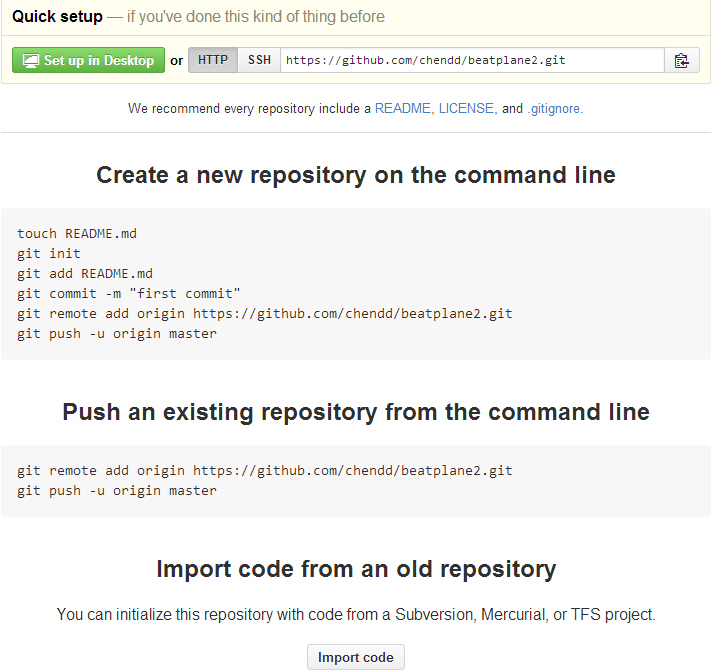
1、先在远程网站上 new 个新的repository,复制git地址
然后按照 网站上说的 终端上运行命令(这里我是后来再新建的,故git名加个2,区分)
E:\web\findbug-v0.>cd ..

E:\web>mkdir beatplane

E:\web>cd beatplane

E:\web\beatplane>git init

Initialized empty Git repository in E:/web/beatplane/.git/

E:\web\beatplane>touch README.md

E:\web\beatplane>git add README.md

E:\web\beatplane>git add .

E:\web\beatplane>git commit -m "first commit"

[master (root-commit) 7c19145] first commit

  files changed,  insertions(+),  deletions(-)

 create mode  README.md

 create mode  "\346\226\260\345\273\272\346\226\207\346\234\254\346\226\20

\\\ ().txt"

 create mode  "\346\226\260\345\273\272\346\226\207\346\234\254\346\226\20

\\\.txt"

E:\web\beatplane>git remote add origin https://github.com/chendd/BeatPlane.git

E:\web\beatplane>git push -u origin master

Username for 'https://github.com': chendd

Password for 'https://chendd@github.com':

Counting objects: , done.

Delta compression using up to  threads.

Compressing objects: % (/), done.

Writing objects: % (/),  bytes |  bytes/s, done.

Total  (delta ), reused  (delta )

To https://github.com/chendd/BeatPlane.git

 * [new branch]      master -> master

Branch master set up to track remote branch master from origin.
提交刷新网页,大功告成

git 提交远程的更多相关文章
- git提交远程仓库命令
在已有的git库中搭建新库,并且将本地的git仓库,上传到远程服务器的git库中,从而开始一个新的项目 首先,在本地新建文件夹abc,进入到abc里面,然后git init.这样就在本地初始化了一个g ...
- 使用git提交远程仓库
git pull 更新 git add 文件名 将文件添加到暂存区 git commit -m ‘注释’ 提交 git push origin master 提交到远程仓库
- git提交远程报错[rejected] master -> master (fetch first)
1 先下载git for windows 然后一直点下一步安装. 2 安装之后,选择git gui.生成ssh 链接 git 公钥. 用命令也可以: $ ssh-keygen -t rsa -C &q ...
- eclipse使用git提交本地项目,提交至远程github上
准备工作: 目的:eclipse使用git提交本地项目,提交至远程github上 eclipse版本:eclipse4.5 64位 jdk版本:jdk-1.7 64位 项目类型:maven web项 ...
- git学习四:eclipse使用git提交项目
支持原创:http://blog.csdn.net/u014079773/article/details/51595127 准备工作: 目的:eclipse使用git提交本地项目,提交至远程githu ...
- eclipse使用git提交项目
eclipse使用git提交项目有2种方式:一种是git命令窗口,另一种是eclipse自带git插件(跟svn插件一样使用) 一.使用git命令窗口提交项目 1.首先官网下载git并安装,然后配置用 ...
- 不用copy代码--eclipse使用git提交项目-转
原文地址:http://blog.csdn.net/u014079773/article/details/51595127 准备工作: 目的:eclipse使用git提交本地项目,提交至远程githu ...
- eclipse使用git提交代码
准备工作: 目的:eclipse使用git提交本地项目,提交至远程github上 eclipse版本:eclipse4.5 64位 jdk版本:jdk-1.7 64位 项目类型:maven web项 ...
- git提交项目到已存在的远程分支
今天想提交项目到github的远程分支上,那个远程分支是之前就创建好的,而我的本地关联分支还没创建. 之前从未用github提交到远程分支过,弄了半个钟,看了几篇博文,终于折腾出来.现在把步骤整理 ...
随机推荐
- CodeForces 558E(计数排序+线段树优化)
题意:一个长度为n的字符串(只包含26个小字母)有q次操作 对于每次操作 给一个区间 和k k为1把该区间的字符不降序排序 k为0把该区间的字符不升序排序 求q次操作后所得字符串 思路: 该题数据规模 ...
- Tableau学习笔记之四
创建基本变量图表: 1.可以创建表格,条形图,饼图,直方图,线图,堆积条形图,箱线图等. 2.根据自己选择的变量和维度的数量,Tableau中的“智能显示”会相应的提醒,可以绘制哪些图形,可以绘制的一 ...
- 我喜欢的乐队-Euphoria
来自日本的后摇乐团,001年冬天由森川裕之.佐藤昭太.木下阳辅三人于东京组建,2003年签约日本独立厂牌123Record,并发行首张EP细碟<Floral Dew>.包括EP.Singl ...
- PHP图像操作:3D图、缩放、旋转、裁剪、添加水印(三)
来源:http://www.ido321.com/887.html 5.PHP对图像的旋转 1: <div> 2: <h4>旋转之前</h4> 3: <img ...
- Android应用性能优化笔记(java代码优化)
Java代码优化 缓存结果: 如果计算代价过高,最好把过去的结果缓存起来. 伪代码如下: result=cache.get(n); //输入参数n作为键 if(result==nul ...
- [HIve - LanguageManual] Join Optimization (不懂)
Join Optimization Join Optimization Improvements to the Hive Optimizer Star Join Optimization Star S ...
- 【Spark学习】Apache Spark配置
Spark版本:1.1.1 本文系从官方文档翻译而来,转载请尊重译者的工作,注明以下链接: http://www.cnblogs.com/zhangningbo/p/4137969.html Spar ...
- mysql的登录密码带特殊符号登录不进去的问题
eg : mysqldump -u root -p)P:9 ${dbname} > $dataPath$filename 当我将数据库的数据每天进行自动导出时,需要带上密码,但 ) 是一个特殊符 ...
- Zookeeper实现分布式选举算法
分布式系统中经常采用Master/Slave架构.(截止到目前为止我还没有碰到过其他架构...)这种架构中如果Master发生故障就会导致整个集群停止服务,为了提高系统的高可用性通常采用选举算法来选出 ...
- Hadoop应用开发实战案例 第1周
本课程的基础课程是,Hadoop数据分析平台课程.相信,能看我本博文的朋友,是有一定的基础了. 只是前个课程是讲解,这个课程是应用. 第一层是:数据源层,代表有生产线上的数据,比如关系型数据库orca ...