
基于注解实现SpringBoot多数据源配置
1.功能介绍
在实际的开发中,同一个项目中使用多个数据源是很常见的场景。最近在学习的过程中使用注解的方式实现了一个Springboot项目多数据源的功能。具体实现方式如下。
2.在application.properties中添加多数据源配置
添加多个数据源和mapper文件路径配置,此配置用于基于java的配置数据源中使用。
#数据库配置

spring.datasource.demo.user.url=jdbc:mysql://xxx.xx.xx.xx:3306/demo-user

spring.datasource.demo.user.username=xxxx

spring.datasource.demo.user.password=xxxx

spring.datasource.demo.user.driver-class-name=com.mysql.jdbc.Driver

spring.datasource.demo.server.url=jdbc:mysql://xxx.xx.xx.xx:3306/springbootdemo

spring.datasource.demo.server.username=xxxx

spring.datasource.demo.server.password=xxxx

spring.datasource.demo.server.driver-class-name=com.mysql.jdbc.Driver

#mapper文件的路径

mybatis.demo.server.mapper-location=classpath*:mapper/demo-server/*.xml

mybatis.demo.user.mapper-location=classpath*:mapper/demo-user/*.xml
3.基于java的方式实现数据库配置
配置类图如下:
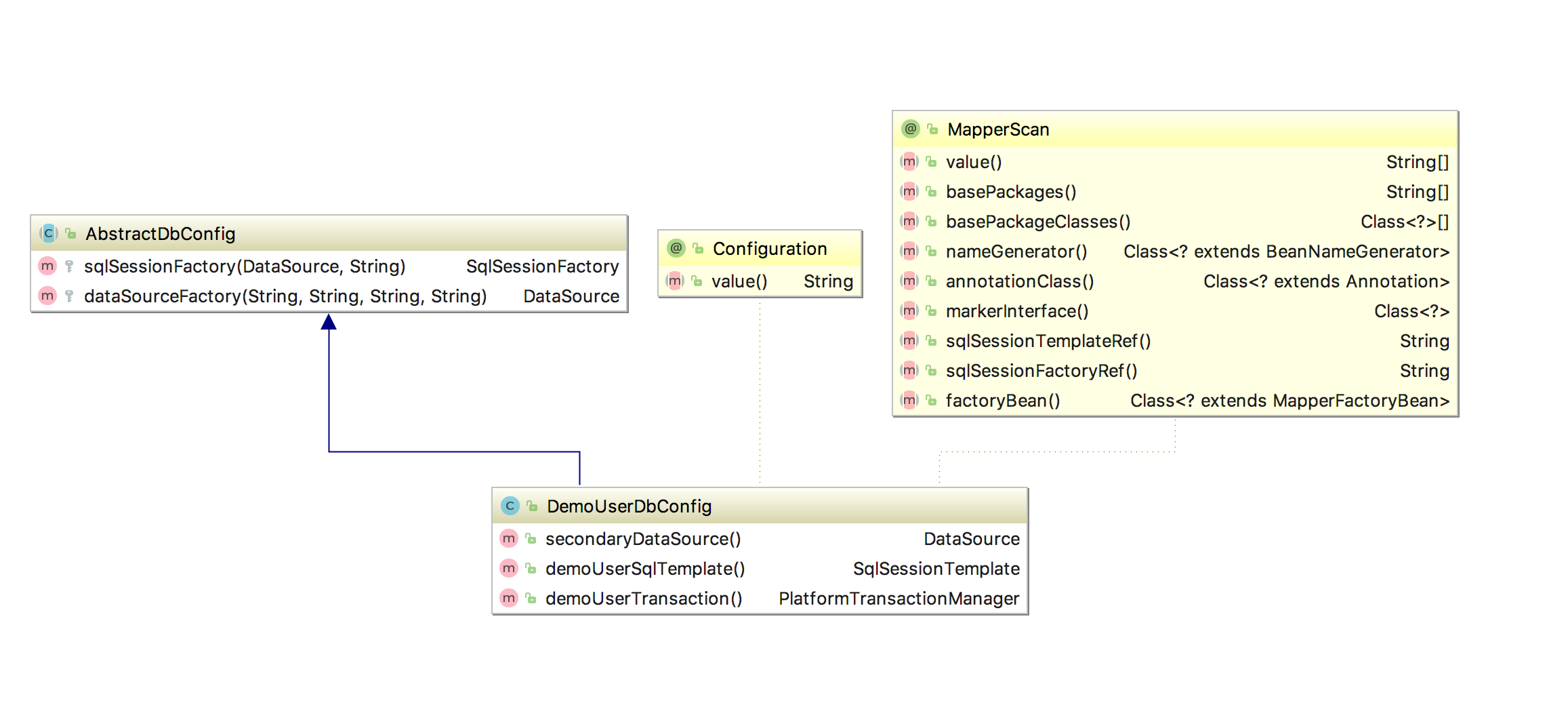
其中DemoUserDbConfig类源代码如下:
其中Configuration注解表识此类为Spring的配置类。
MapperScan注解中的basePackages、annotationClass、sqlSessionTemplateRef用于配置此数据库链接扫描com.example包中所有注解为DemoUserMapper的接口。
@Configuration

@MapperScan(basePackages = {"com.example"},annotationClass = DemoUserMapper.class,

       sqlSessionTemplateRef = "demoUserTemplate")

public class DemoUserDbConfig extends AbstractDbConfig {

    @Value("${spring.datasource.demo.user.url}")

    private String url;

    @Value("${spring.datasource.demo.user.username}")

    private String userName;

    @Value("${spring.datasource.demo.user.password}")

    private String password;

    @Value("${spring.datasource.demo.user.driver-class-name}")

    private String driveClassName;

    @Value(value = "${mybatis.demo.user.mapper-location}")

    private String mapperLocation;

    @Bean(name = "demoUser")

    public DataSource secondaryDataSource() {

        return dataSourceFactory(driveClassName, url, userName, password);

    }

    @Bean(name = "demoUserTemplate")

    public SqlSessionTemplate demoUserSqlTemplate() throws Exception {

        return new SqlSessionTemplate((sqlSessionFactory(secondaryDataSource(), mapperLocation)));

    }

    @Bean

    @Qualifier("demoUserTransaction")

    public PlatformTransactionManager demoUserTransaction() {

        return new DataSourceTransactionManager(secondaryDataSource());

    }

}
其中AbstractDatasource设置了通用的方法,源代码如下:
public abstract class AbstractDbConfig {

    protected SqlSessionFactory sqlSessionFactory(DataSource dataSource, String mapperLocation) throws Exception {

        SqlSessionFactoryBean factoryBean = new SqlSessionFactoryBean();

        factoryBean.setDataSource(dataSource);

        ResourcePatternResolver resourceResolver = new PathMatchingResourcePatternResolver();

        Resource[] resource= resourceResolver.getResources(mapperLocation);

        factoryBean.setMapperLocations(resource);

        return factoryBean.getObject();

    }

    protected DataSource dataSourceFactory(String driveClassName, String url, String userName, String password){

        DruidDataSource datasource = new DruidDataSource();

        datasource.setDriverClassName(driveClassName);

        datasource.setUrl(url);

        datasource.setUsername(userName);

        datasource.setPassword(password);

        datasource.setMaxActive(20);

        datasource.setInitialSize(20);

        return datasource;

    }

}
使用相同的方法定义其他数据源。
4.定义接口和mapper文件
分别定义连接demo-user数据库和springbootdemo数据库的mapper文件。连接demo-user数据库的接口如下,使用DemoUserMapper注解表识。
@DemoUserMapper

public interface UserDao {

    /**

     * 返回所有的dictionary列表

     *

     * @return 所有的dictionary列表

     */

    List<String> list();

}
mapper文件如下:
<!DOCTYPE mapper PUBLIC "-//mybatis.org//DTD Mapper 3.0//EN" "http://mybatis.org/dtd/mybatis-3-mapper.dtd" >

<mapper namespace="com.example.multidatasource.business.user.UserDao">

    <select id="list" resultType="string">

        SELECT `name` FROM `user`

    </select>

</mapper>
定义读取springbootdemo数据库的接口,代码如下。使用DemoServerMapper注解表识
@DemoServerMapper

public interface DictionaryDao {

    /**

     * 返回所有的dictionary列表

     *

     * @return 所有的dictionary列表

     */

    List<Dictionary> list();

    /**

     * 查询此key下的所有子节点

     *

     * @param key 数据字典key

     * @return 返回key所有的子节点列表

     */

    List<Dictionary> listChildrenByKey(String key);

    /**

     * 插入数据到数据库

     *

     * @param dictionary

     */

    void insert(Dictionary dictionary);

}
mapper文件代码如下:
<!DOCTYPE mapper PUBLIC "-//mybatis.org//DTD Mapper 3.0//EN" "http://mybatis.org/dtd/mybatis-3-mapper.dtd" >

<mapper namespace="com.example.multidatasource.business.dictionary.dao.DictionaryDao">

    <resultMap id="DictionaryResultMap" type="com.example.multidatasource.business.dictionary.Dictionary">

        <result property="id" column="id"></result>

        <result property="dictKey" column="dict_key"></result>

        <result property="dictValue" column="dict_value"></result>

        <result property="parentId" column="parent_id"></result>

        <result property="description" column="description"></result>

    </resultMap>

    <select id="list" resultMap="DictionaryResultMap">

        SELECT * FROM `dictionary`

    </select>

    <select id="listChildrenByKey" resultMap="DictionaryResultMap">

        SELECT * FROM dictionary where parent_id= (select id from dictionary where dict_key= #{key})

    </select>

    <delete id="delete" parameterType="int">

        delete from dictionary where id = #{id}

    </delete>

    <insert id="insert" parameterType="com.example.multidatasource.business.dictionary.Dictionary">

        INSERT INTO `dictionary`(`dict_key`,`dict_value`,`parent_id`,`description`)

        VALUES(#{dictKey}, #{dictValue}, #{parentId}, #{description})

    </insert>

</mapper>
5.定义注解
定义DemoUserMapper和DemoServerMapper注解,分别作为使用demo-user和springbootdemo数据库的表识。
定义代码如下:
@Documented

@Retention(RetentionPolicy.RUNTIME)

@Target(ElementType.TYPE)

@Component

@Mapper

public @interface DemoServerMapper {

    /**

     * The value may indicate a suggestion for a logical component name,

     * to be turned into a Spring bean in case of an autodetected component.

     * @return the suggested component name, if any (or empty String otherwise)

     */

    String value() default "";

}

@Documented

@Retention(RetentionPolicy.RUNTIME)

@Target(ElementType.TYPE)

@Component

@Mapper

public @interface DemoUserMapper {

    /**

     * The value may indicate a suggestion for a logical component name,

     * to be turned into a Spring bean in case of an autodetected component.

     * @return the suggested component name, if any (or empty String otherwise)

     */

    String value() default "";

}
6.使用单元测试验证配置
编写单元测试代码如下:
@RunWith(SpringRunner.class)

@SpringBootTest

public class MultiDatasourceApplicationTests {

    @Autowired

    private DictionaryDao dictionaryDao;

    @Autowired

    private UserDao userDao;

    @Test

    public void contextLoads() {

        System.out.println(dictionaryDao.list());

        System.out.println("===================");

        System.out.println(userDao.list());

    }

}
基于注解实现SpringBoot多数据源配置的更多相关文章
- 基于注解的Spring多数据源配置和使用(非事务)
原文:基于注解的Spring多数据源配置和使用 1.创建DynamicDataSource类,继承AbstractRoutingDataSource package com.rps.dataSourc ...
- 基于注解的Spring多数据源配置和使用
前一段时间研究了一下spring多数据源的配置和使用,为了后期从多个数据源拉取数据定时进行数据分析和报表统计做准备.由于之前做过的项目都是单数据源的,没有遇到这种场景,所以也一直没有去了解过如何配置多 ...
- 基于xml的Spring多数据源配置和使用
上一篇讲了<基于注解的Spring多数据源配置和使用>,通过在类或者方法上添加@DataSource注解就可以指定某个数据源.这种方式的优点是控制粒度细,也更灵活. 但是当有些时候项目分模 ...
- 基于注解的springboot+mybatis的多数据源组件的实现
通常业务开发中,我们会使用到多个数据源,比如,部分数据存在mysql实例中,部分数据是在oracle数据库中,那这时候,项目基于springboot和mybatis,其实只需要配置两个数据源即可,只需 ...
- Springboot 多数据源配置,结合tk-mybatis
一.前言 作为一个资深的CRUD工程师,我们在实际使用springboot开发项目的时候,难免会遇到同时使用多个数据库的情况,比如前脚刚查询mysql,后脚就要查询sqlserver. 这时,我们很直 ...
- 基于注解的Spring AOP的配置和使用
摘要: 基于注解的Spring AOP的配置和使用 AOP是OOP的延续,是Aspect Oriented Programming的缩写,意思是面向切面编程.可以通过预编译方式和运行期动态代理实现在不 ...
- spring基于通用Dao的多数据源配置详解【ds1】
spring基于通用Dao的多数据源配置详解 有时候在一个项目中会连接多个数据库,需要在spring中配置多个数据源,最近就遇到了这个问题,由于我的项目之前是基于通用Dao的,配置的时候问题不断,这种 ...
- mybatis基于注解形式的多数据源
最近在做一个系统管理项目,需要使用到多数据源,尝试了注解形式和xml形式的多数据源配置,以下是基于注解形式的Mybatis多数据源配置. 1.application.yml 配置文件 database ...
- Spring-Boot 多数据源配置+动态数据源切换+多数据源事物配置实现主从数据库存储分离
一.基础介绍 多数据源字面意思,比如说二个数据库,甚至不同类型的数据库.在用SpringBoot开发项目时,随着业务量的扩大,我们通常会进行数据库拆分或是引入其他数据库,从而我们需要配置多个数据源. ...
随机推荐
- ActiveMQ与RocketMQ对比
ActiveMQ RabbitMQ RocketMq ZeroMQ 关注度 高 高 中 中 成熟度 成熟 成熟 比较成熟 不成熟 所属社区/公司 Apache MozillaPublic ...
- 单线程异步回调机制的缺陷与node的解决方案
一.node单线程异步的缺陷: 单线程异步的优点自然不必多说,node之所以能够如此快的兴起,其单线程异步回调机制相比于传统同步执行编程语言的优势便是原因之一.然而,开发一个node程序,其缺陷也是不 ...
- JQ中的问题
$(function(){$(document).bind("click", function (e) {$(e.target).closest("p").cs ...
- LPCTSTR和CString的关系
类型理解 LPCTSTR类型: L表示long指针 这是为了兼容Windows 3.1等16位操作系统遗留下来的,在win32中以及其他的32位操作系统中, long指针和near指针及far修饰符都 ...
- 系统妈Win10系统64位和32位快速专业版
win10系统64位快速专业安装版 V2016年 系统妈:http://www.xitongma.com/ Ghost Win10 64位正式装机专业版2016 微软向Windows用户推送了win1 ...
- codevs 1313 质因数分解
时间限制: 1 s 空间限制: 128000 KB 题目等级 : 青铜 Bronze 题目描述 Description 已知正整数 n是两个不同的质数的乘积,试求出较大的那个质数 . 输入描述 I ...
- 推荐一个免费的生成词云(word cloud)的在线工具
"词云"这个概念由美国西北大学新闻学副教授.新媒体专业主任里奇·戈登(Rich Gordon)提出. "词云"就是对网络文本中出现频率较高的"关键词& ...
- shell批量转换iOS和Android图标
icon_ios.sh #!/bin/sh convert icon-1024.png -resize 180x180 icon-180@3x.png convert icon-1024.png -r ...
- 设置windows status bar隐藏
info.plist View controller-based status bar appearance 为 NO CGContextSaveGState: invalid context 0x0 ...
- 将回车键转换为Tab键
实现效果: 知识运用: KeyEventArgs类的KeyValue属性 public int KeyValue {get;} //获取KeyDown或KeyUp事件的键盘值 SendKeys类的Se ...